How Can I Reset My Maintenance Required Light Toyota
Resetting the Toyota maintenance required light is a simple process every owner should know. This guide shows you exactly how can I reset my maintenance required light Toyota with easy step-by-step instructions for Camry, Corolla, RAV4, and more. Follow our tips to keep your Toyota running smoothly and stay on top of your maintenance schedule.
You are driving your Toyota down a familiar road when you glance at the dashboard. There it is. The maintenance required light is glowing softly on your instrument cluster. It is not the check engine light, and your car feels perfectly fine. So why is it on? And more importantly, how do you make it go away?
If you have been typing “how can I reset my maintenance required light Toyota” into a search engine, you are not alone. Thousands of Toyota owners face this same question every month. The good news is that resetting this light is usually a very simple process. You do not need to visit a mechanic or spend a single dollar. In most cases, you can handle it yourself in just a few minutes from the comfort of your driver’s seat.
The Toyota maintenance required light is a helpful feature designed to keep your vehicle in top shape. It reminds you when it is time for scheduled service such as an oil change, tire rotation, or fluid check. Once you complete the service, the light needs to be manually cleared. Many owners find this step confusing, but it is actually quite straightforward. This guide will walk you through the entire process with clear, easy-to-follow instructions. We will cover the most popular Toyota models, explain why the light comes on, and share practical tips to help you avoid common mistakes. Let us get started.
Key Takeaways
- The maintenance required light is a scheduled service reminder, not a warning of mechanical failure. It simply tells you when your Toyota is due for routine maintenance like an oil change or tire rotation.
- Resetting the light is a quick DIY task that takes just a few minutes. You do not need special tools or a trip to the dealer in most cases.
- The reset process varies slightly by Toyota model and year. Older models use a manual button method, while newer models may use the steering wheel controls or infotainment screen.
- Always complete your scheduled maintenance before resetting the light. Resetting without servicing will only delay the reminder and put your vehicle at risk.
- If the light keeps returning after a reset, there may be an underlying issue that needs professional diagnosis by a certified Toyota technician.
- Regular maintenance extends your Toyota’s lifespan and prevents costly repairs. Staying on top of your service schedule is one of the best investments you can make.
📑 Table of Contents
What Does the Toyota Maintenance Required Light Mean?
The maintenance required light on your Toyota dashboard is not something to panic about. It is a scheduled maintenance reminder, not an emergency warning. Unlike the check engine light, which signals a potential problem with your vehicle’s engine or emissions system, the maintenance light is simply a calendar alert. It tells you that your Toyota is due for routine service based on mileage or time intervals.
How the Maintenance Indicator System Works
Toyota vehicles come equipped with an intelligent maintenance reminder system. This system tracks your mileage and calculates when the next service is due. When you reach the preset interval, the light activates on your dashboard. Most Toyota models use a 5,000-mile or 6-month interval, whichever comes first. Some newer models may use different intervals depending on driving conditions and the specific engine type.
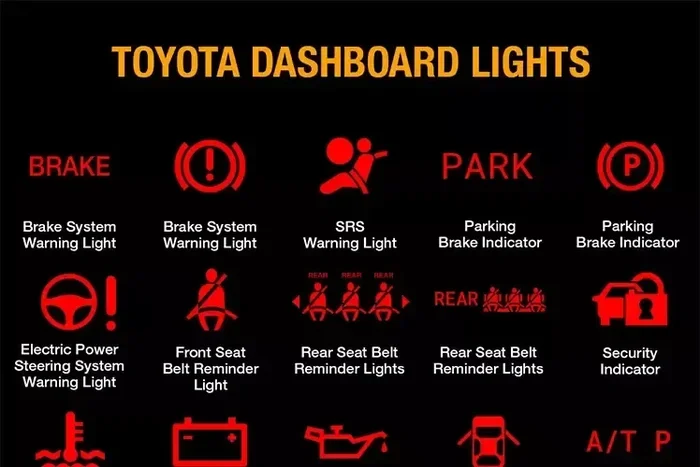
The light typically displays as the words “MAINTENANCE REQUIRED” or a small wrench icon. On some models, it may flash or remain solid. The purpose is simple. It nudges you to visit a service center or perform basic maintenance tasks yourself. Ignoring the light will not damage your vehicle immediately, but it will cause you to miss important service milestones that keep your car running at its best.
Maintenance Required Light vs Check Engine Light
Many drivers confuse the Toyota maintenance required light with the check engine light. These two indicators serve completely different purposes. The check engine light is a serious warning that something is wrong with your vehicle’s operating systems. It often requires immediate diagnostic testing and professional repair.
The maintenance required light is much less urgent. It is simply a reminder to stay current with your Toyota service schedule. However, you should not ignore it for extended periods. Skipping too many service intervals can lead to decreased fuel efficiency, reduced engine performance, and eventually more serious mechanical problems. Think of the maintenance light as a friendly nudge, while the check engine light is a loud alarm.
Common Reasons the Maintenance Light Comes On
Several situations can trigger the maintenance required light on your Toyota dashboard:
- Reaching a mileage interval – This is the most common trigger. Your Toyota’s computer tracks miles and activates the light when you hit the preset service interval.
- Time-based reminders – Some Toyota models also track time. If six months pass since your last service, the light may come on even if you have not driven enough miles to trigger it.
- After an incomplete reset – If the light was not properly cleared after your last service visit, it will remain on and continue to remind you.
- Battery disconnection – Disconnecting your Toyota battery for any reason can sometimes reset the maintenance system and trigger the light as a default.
- Oil life system depletion – In some Toyota models, the oil life monitoring system works alongside the maintenance light. When the oil life reaches zero, the light activates.
How Can I Reset My Maintenance Required Light Toyota?
Now for the main question that brought you here. How can I reset my maintenance required light Toyota? The answer is simpler than you might think. Resetting the maintenance light on most Toyota models involves just a few button presses on your dashboard or steering wheel controls. You do not need any special equipment or expensive dealer visits. Whether you have a sedan, SUV, or truck, the process is designed to be quick and user-friendly.
Before you begin, make sure you have actually completed the scheduled maintenance. Resetting the light without getting your oil changed or performing the required service defeats the purpose of the reminder system. Once your service is done, follow the steps below for your specific Toyota model.
General Reset Method for Most Toyota Models
While the exact steps vary slightly by model and year, the general reset process is similar across most Toyota vehicles. Here is the basic method that works for many Toyota models from various years:
- Turn the ignition to the ON position without starting the engine. Press the start button once or turn the key to the “ON” or “Accessory” position.
- Locate the odometer or trip meter button on your dashboard. This is typically a small button located near the speedometer or on the steering wheel controls.
- Press and hold the button while you turn the ignition off and then back to the ON position.
- Continue holding the button for several seconds until the maintenance light begins to blink or the display changes.
- Release the button once you see the light start to flash or the odometer display resets.
- Turn the ignition off completely and then turn it back on to verify that the maintenance light has been cleared.
This general method works for many Toyota models including the Toyota Camry, Toyota Corolla, and Toyota RAV4. However, some newer models have slightly different procedures that involve navigating through digital menus. We will cover those below.
Resetting the Maintenance Light on Toyota Camry
The Toyota Camry is one of the most popular sedans in America, and resetting its maintenance light is a breeze. For most Camry models, follow these detailed steps:
- Turn the ignition to the OFF position. Make sure the engine is completely stopped.
- Locate the trip meter reset button on the instrument panel, usually on the left side of the dashboard.
- Press and hold the trip meter button firmly.
- While continuing to hold the button, turn the ignition to the ON position.
- Keep holding the button for approximately 10 to 15 seconds.
- The maintenance light should begin to blink or flash on the display.
- Release the button once you see the light blinking.
- Turn the ignition off and then restart the engine to confirm the light has been cleared.
If the Toyota Camry maintenance light does not reset on the first try, do not worry. Repeat the process more slowly and deliberately. Sometimes it takes two or three attempts for the system to register the reset. For Camry models from 2018 and newer with digital displays, you may also be able to use the steering wheel controls to navigate to the maintenance menu and select the reset option directly on screen.
Resetting the Maintenance Light on Toyota Corolla
The Toyota Corolla is another model where the reset process is straightforward and quick. For most Corolla models, here is the step-by-step method:
- Ensure the engine is turned off and the vehicle is stationary.
- Find the trip meter reset button on the dashboard or steering wheel.
- Press and hold the trip meter button.
- Turn the ignition to the ON position while still holding the button.
- Continue holding the button until the odometer display shows “000000” or the maintenance light begins to flash.
- Release the button once you see the display change.
- Turn the ignition off and then back on to verify the reset was successful.
For Toyota Corolla models from 2014 and newer, you may also have the option to use the steering wheel buttons to access the vehicle information menu. Navigate to the maintenance section and select “Reset Maintenance Required.” This digital method is even simpler and takes less than a minute. Always refer to your specific model’s owner’s manual for the most accurate instructions.
Resetting the Maintenance Light on Toyota RAV4
The Toyota RAV4 is a favorite among SUV owners, and resetting its maintenance light follows the same basic principles as the Camry and Corolla:
- Turn the vehicle off completely.
- Press and hold the trip meter button located on the instrument panel.
- While holding the button, turn the ignition to the ON position.
- Wait for the maintenance light to start blinking on the display.
- Release the button once the light begins to flash.
- Turn the ignition off and then restart the engine to confirm the reset.
For Toyota RAV4 models equipped with a touchscreen infotainment system, the process is slightly different. Press the MENU button on the steering wheel, scroll to the “Vehicle Info” section, select “Maintenance,” and choose “Reset Maintenance.” The screen will guide you through the process step by step. This method is especially helpful for owners of 2019 and newer RAV4 models.
Reset Methods by Toyota Model Year
The reset process for your Toyota maintenance required light can vary depending on the year of your vehicle. Understanding these differences helps you find the right method quickly without frustration.
Resetting Older Toyota Models (2010 and Earlier)
For Toyota models from 2010 and earlier, the manual button method is the standard approach. These vehicles do not have advanced infotainment screens or digital maintenance menus. Instead, you rely on the physical buttons located on the dashboard or steering wheel to complete the reset sequence.
The general process involves holding the trip meter or odometer reset button while cycling the ignition between OFF and ON positions. This method has been used by Toyota for decades and remains reliable across older models like the Toyota Camry (2007-2011), Toyota Corolla (2008-2013), and Toyota RAV4 (2006-2012). The key is to hold the button for a full 10 to 15 seconds without letting go too early.
Resetting Newer Toyota Models (2011 and After)
Starting around 2011, Toyota began incorporating more advanced digital displays and touchscreen systems in their vehicles. For these models, the reset process may involve navigating through the vehicle’s information screen:
- Press the MENU button on the steering wheel or use the dashboard control buttons.
- Navigate to the “Vehicle Info” or “Settings” menu on the display.
- Scroll down to find the “Maintenance” or “Service” option.
- Select “Reset Maintenance Required” from the available options.
- Confirm the reset when the system prompts you to do so.
- The maintenance light should turn off immediately on the display.
For Toyota models from 2018 and newer, some vehicles also allow you to reset the maintenance light through the Toyota connected app on your smartphone. This feature is available on models equipped with the Toyota Entune system. Additionally, certain 2020 and newer models support voice commands through the Toyota Audio system. Simply say “Reset maintenance” and the system will walk you through the process.
Comparison Table: Reset Methods by Toyota Model
| Toyota Model | Reset Method | Approximate Time |
|---|---|---|
| Toyota Camry (2007-2017) | Manual button hold on trip meter | 2-3 minutes |
| Toyota Camry (2018+) | Steering wheel menu navigation | 1-2 minutes |
| Toyota Corolla (2009-2013) | Manual button hold on trip meter | 2-3 minutes |
| Toyota Corolla (2014+) | Steering wheel controls or trip meter | 1-2 minutes |
| Toyota RAV4 (2006-2018) | Manual button hold on trip meter | 2-3 minutes |
| Toyota RAV4 (2019+) | Infotainment system menu | 1-2 minutes |
| Toyota Highlander (2008-2019) | Manual button hold on trip meter | 2-3 minutes |
| Toyota Highlander (2020+) | Steering wheel menu navigation | 1-2 minutes |
| Toyota Tacoma (2005-2015) | Manual button hold on trip meter | 2-3 minutes |
| Toyota Tacoma (2016+) | Steering wheel controls or trip meter | 1-2 minutes |
As you can see from the comparison table, the reset method has evolved significantly with newer Toyota models. Older vehicles rely on the physical button method, which is reliable and straightforward. Newer models use digital menus that guide you through the process with on-screen prompts. Both methods are simple and typically take less than three minutes to complete.
Common Mistakes When Resetting the Maintenance Light
Even though resetting the Toyota maintenance required light is a simple process, there are a few common mistakes that Toyota owners make. Being aware of these errors helps you avoid frustration and ensures the reset works correctly the first time.
Mistake 1: Resetting Without Completing the Service
This is by far the most common mistake. Some owners reset the light before actually getting their oil changed or completing the required service. The maintenance required light exists for a reason. If you reset it without performing the actual maintenance, you will lose track of when your next service is due. The light serves as a accountability tool. Complete the service first, then reset the light to acknowledge that the maintenance has been performed.
Mistake 2: Releasing the Button Too Early
Many owners release the trip meter button too soon during the reset sequence. The system needs you to hold the button for a full 10 to 15 seconds for the reset to register. If you let go too early, the light will not reset and you will need to start the process over. Be patient and hold the button steadily until you see the maintenance light begin to blink or the display change.
Mistake 3: Not Consulting the Owner’s Manual
Your Toyota owner’s manual is the most accurate resource for your specific vehicle. It contains the exact reset procedure tailored to your model and year. If the general method described above does not work for your Toyota, consult the manual before assuming something is broken. The manual also includes helpful diagrams and troubleshooting tips that can save you time and effort.
Mistake 4: Ignoring the Light for Extended Periods
Some drivers see the maintenance required light and simply ignore it for months or even years. While your Toyota will continue to run in the short term, skipping scheduled maintenance can lead to serious long-term problems. Oil breaks down over time and loses its lubricating properties. Fluids get low. Filters get clogged. All of these issues can cause expensive damage if not addressed on schedule.
Quick Tips for Maintaining Your Toyota
Resetting the maintenance light is just one piece of the puzzle when it comes to taking care of your Toyota. Here are some practical tips to help you stay on top of your vehicle’s maintenance and keep it running smoothly for years to come:
- Follow the recommended service interval. Toyota typically recommends service every 5,000 miles or 6 months, whichever comes first. Check your owner’s manual for your specific model’s recommendation. Some newer Toyota models with synthetic oil can go up to 10,000 miles between services.
- Keep a detailed maintenance log. Write down every oil change, tire rotation, brake inspection, and service appointment. Include the date, mileage, and type of service performed. This log helps you track your service history and makes it easy to know exactly when the next service is due.
- Use genuine Toyota parts and fluids. Genuine Toyota parts are engineered specifically for your vehicle’s systems. They are tested to meet Toyota’s exact standards for quality and performance. Using genuine parts helps maintain your warranty and ensures your vehicle continues to perform as designed.
- Check your fluids between services. Even when you are not due for a full service, make it a habit to check your oil level, coolant, brake fluid, and windshield washer fluid regularly. Catching low fluid levels early prevents more serious problems from developing.
- Set personal reminders on your phone. Do not rely solely on the maintenance light to remind you. Set a recurring calendar reminder on your phone for your next oil change or service appointment. This gives you a backup reminder and helps you plan ahead.
- Address warning signs immediately. If you notice unusual sounds, vibrations, smells, or changes in how your Toyota drives, do not wait for the next scheduled service. Early detection of problems saves money and prevents minor issues from becoming major repairs.
When Should You See a Professional?
Resetting the Toyota maintenance required light is a DIY task that most owners can handle easily. However, there are situations where professional help is the right choice. Knowing when to seek expert assistance saves you time, money, and potential headaches.
Signs That Something Is Wrong Beyond the Light
The maintenance required light is a routine reminder for scheduled service. But if you notice other symptoms alongside the light, do not ignore them. These signs indicate that your Toyota needs professional attention beyond a simple maintenance reset:
- Unusual noises – Grinding, squealing, clicking, or knocking sounds coming from the engine, brakes, or suspension should be investigated immediately.
- Reduced fuel efficiency – If your gas mileage drops significantly without a clear reason, your vehicle may need professional diagnostics.
- Check engine light is also on – If the maintenance light and the check engine light are both illuminated, get your vehicle diagnosed as soon as possible.
- Poor engine performance – Rough idling, stalling, hesitation when accelerating, or difficulty starting the engine are all signs of potential mechanical issues.
- Fluid leaks – Puddles under your parked vehicle or fluid levels that drop rapidly between services need professional inspection.
- Vibrations or pulling – If your Toyota vibrates unusually or pulls to one side while driving, the tires, alignment, or suspension may need attention.
In these situations, the maintenance required light may simply be a coincidence with a more serious underlying issue. Do not assume the light is the only problem. Have a qualified technician inspect your vehicle to rule out any hidden concerns.
Expert Insights on Toyota Maintenance
If you are unsure about any aspect of your Toyota’s maintenance, do not hesitate to visit a certified Toyota service center. The technicians there are trained specifically for Toyota vehicles. They have access to factory diagnostic tools, the latest service bulletins, and genuine Toyota parts. A professional can also help you reset the maintenance light if the DIY method does not work for your specific model. Many Toyota dealerships offer maintenance packages that include the service plus the reset, taking the guesswork out of the process entirely.
Conclusion
Resetting your Toyota maintenance required light does not have to be a complicated or stressful experience. Whether you drive a Camry, Corolla, RAV4, Highlander, or any other Toyota model, the process is simple and can be done at home in just a few minutes. The key is to follow the correct steps for your specific model and year, and always make sure you have completed the scheduled maintenance before clearing the light.
Remember, the Toyota maintenance required light is your vehicle’s way of keeping you on track with routine services. These services protect your investment, improve fuel efficiency, and prevent costly repairs down the road. By staying proactive with your Toyota maintenance schedule, you are investing in the long-term health and reliability of your vehicle.
Now that you know how can I reset my maintenance required light Toyota, you are fully equipped to handle it yourself the next time that light comes on. Keep this guide saved for easy reference, share it with fellow Toyota owners, and drive with confidence knowing that you have the knowledge to keep your vehicle in excellent shape. Your Toyota will thank you with years of reliable, worry-free driving.
Frequently Asked Questions
Can I reset the Toyota maintenance required light myself?
Yes, absolutely. Resetting the maintenance required light on most Toyota models is a simple DIY task that can be done at home with just a few button presses. You do not need any special tools or technical expertise. Just follow the step-by-step instructions for your specific model, and you will have the light cleared in minutes.
What happens if I don’t reset the maintenance required light?
If you do not reset the light after completing your scheduled service, it will continue to stay on and remind you that maintenance is overdue. While it will not cause any damage to your vehicle, it can be distracting and annoying. The light will also not reset itself automatically, so you will need to manually clear it to turn it off.
How often does Toyota require maintenance?
Toyota typically recommends maintenance every 5,000 miles or 6 months, whichever comes first. However, the exact interval can vary depending on your specific model, driving conditions, and the type of oil used. Always refer to your owner’s manual for the recommended maintenance schedule for your particular Toyota vehicle.
Does resetting the maintenance light clear any diagnostic trouble codes?
No, resetting the maintenance required light does not clear any diagnostic trouble codes. The maintenance light is a simple service reminder and is separate from the OBD-II diagnostic system. If you have a check engine light or stored diagnostic codes, those require a different reset process or professional diagnostic equipment to clear.
Why does my maintenance light keep coming back after I reset it?
If the maintenance light keeps returning after a reset, it usually means that the service interval has not been fully completed or the reset was not performed correctly. It could also indicate that there is an underlying issue with the maintenance monitoring system. In such cases, it is best to visit a certified Toyota service center for a professional inspection and proper reset.
Is it safe to drive my Toyota with the maintenance required light on?
Yes, it is generally safe to drive short distances with the maintenance required light on. The light is simply a reminder for upcoming service and does not indicate an immediate mechanical problem. However, you should not ignore it for extended periods, as skipping scheduled maintenance can lead to reduced performance, lower fuel efficiency, and potential long-term damage to your vehicle.