How to Reset the Maint Reqd Light on Your Car Today
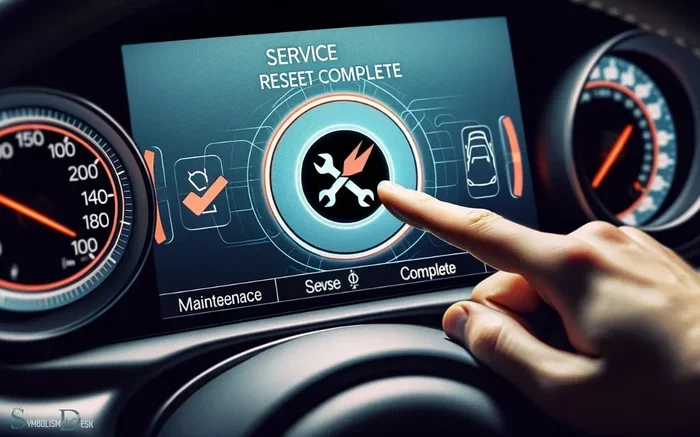
The maint reqd light is a common dashboard symbol that tells drivers it is time for routine car maintenance. Resetting this maintenance required light is a simple process that varies by car brand and model. In this guide, you will learn the exact steps to reset the maint reqd light on Honda, Toyota, and other popular vehicles. We also cover common mistakes to avoid and when to visit a mechanic instead. Follow our tips to keep your car running smoothly and your dashboard clear.
That little light on your dashboard just started blinking, and now you are stuck wondering what it means. If you own a car, chances are you have seen the maint reqd light pop up at the worst possible time. It is frustrating, confusing, and honestly a bit annoying. But here is the good news. Resetting the maintenance required light is one of the easiest car maintenance tasks you can do at home. You do not need a mechanic, fancy tools, or expensive parts. In most cases, it takes less than five minutes.
This guide will walk you through the exact steps to reset the maint reqd light on nearly any vehicle. Whether you drive a Honda, Toyota, Nissan, Ford, or another brand, we have you covered. We will explain what the light means, why it comes on, and how to turn it off for good. Along the way, we will share practical tips, common mistakes to avoid, and expert advice that real car owners swear by. Let us get started and take back control of your dashboard.
Key Takeaways
- Quick Reset Process: Most cars let you reset the maint reqd light in under five minutes using the trip meter or steering wheel buttons.
- Brand-Specific Steps: Honda, Toyota, Nissan, and Ford each have a unique reset procedure you need to follow.
- Change Oil First: Always replace the oil or complete the service before resetting the light to avoid future warnings.
- Avoid Common Mistakes: Holding the wrong button or skipping the oil change are the most frequent errors drivers make.
- Know When to Seek Help: If the light keeps coming back, there may be a deeper issue that needs professional attention.
- Prevent Future Alerts: Following your car’s maintenance schedule helps you avoid the maint reqd light altogether.
📑 Table of Contents
- What Is the Maint Reqd Light?
- Why Does the Maint Reqd Light Come On?
- How to Reset the Maint Reqd Light on Honda Vehicles
- How to Reset the Maint Reqd Light on Toyota Vehicles
- How to Reset the Maint Reqd Light on Other Car Brands
- Common Mistakes When Resetting the Maint Reqd Light
- When to See a Mechanic Instead of Resetting
- Final Thoughts
What Is the Maint Reqd Light?
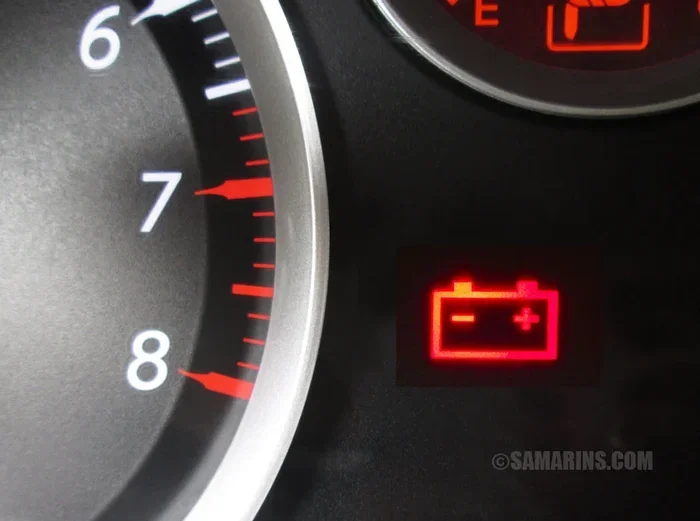
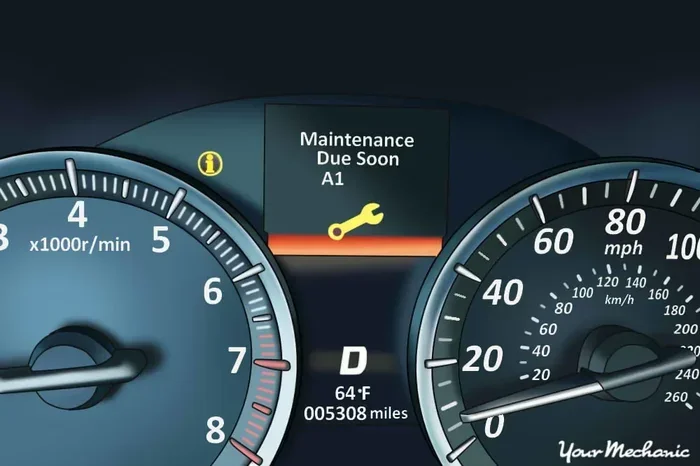
The maint reqd light is a small dashboard symbol that looks like a wrench or a stylized engine icon. It is part of your car’s car maintenance reminder system. When this light turns on, it means your vehicle is due for scheduled service. Most automakers set this light to trigger every 5,000 to 7,500 miles, depending on the model and driving conditions.
The light is not a warning about a broken part. It is simply a friendly nudge from your car to remind you about routine care. Think of it like a calendar alert on your phone. It does not mean something is broken. It just means it is time for an oil change, tire rotation, or other scheduled service interval reset tasks.
Understanding Dashboard Symbols
Modern cars have dozens of dashboard symbols on the instrument cluster. Some are red and urgent, like the check engine light. Others are yellow or amber and less urgent, like the maintenance required light. The key difference is the color and the symbol shape. A red light usually means stop and address the issue immediately. A yellow or orange light often means schedule service soon. The indicator light reset process is different for each type of warning, so it helps to know which light you are dealing with.
If you are ever unsure about a dashboard symbol, check your owner’s manual. Every car manufacturer includes a guide that explains each light and what action to take. Keeping your manual in the glove box is a smart habit every car owner should follow.
The Role of the Maintenance Reminder System
Every modern vehicle has a built-in maintenance schedule tracker. This system monitors your mileage and calculates when the next service is due. When the mileage reaches the preset interval, the service indicator light turns on. This is the oil change reminder working exactly as designed.
The reminder system is based on the oil life system in many newer cars. Instead of tracking only mileage, the oil life system considers driving habits, engine temperature, and trip conditions. It then estimates when the oil needs to be replaced. Once the service is complete, the light needs to be manually turned off. That is where the reset process comes in.
Why Does the Maint Reqd Light Come On?
The most common reason the maint reqd light appears is simply that your car has reached its scheduled service mileage. Automakers program these lights to go off at regular intervals to keep your vehicle running at its best. Missing a service can lead to reduced engine performance, lower fuel efficiency, and even long-term damage.
But there are other reasons this light might show up too. Sometimes a loose gas cap, a minor sensor glitch, or a recent oil change that was not reset can trigger the service due soon message. Understanding the root cause helps you decide whether a quick reset will solve the problem or if you need deeper car maintenance tips and professional help.
Oil Life System and Service Intervals
The oil life system is the brain behind the maintenance reminder. It tracks engine revolutions, temperature changes, and driving patterns. When the system determines the oil is nearing the end of its useful life, it activates the maintenance required light. This is different from older cars that only tracked mileage.
For example, if you drive mostly in short trips around town, the oil life system may trigger the light sooner than the mileage suggests. Short trips do not allow the engine oil to fully heat up and burn off moisture. As a result, the oil degrades faster. The system accounts for this and adjusts the service interval reset timing accordingly. This is actually a smart feature that protects your engine better than a simple mileage counter.
Other Triggers for the Maintenance Light
While the oil change interval is the most common trigger, other factors can activate the dashboard warning light. A low oil level, a faulty oil pressure sensor, or even a recent battery disconnect can cause the light to appear. In some vehicles, the light comes on after a software update at the dealership.
It is also worth noting that some cars trigger the maintenance light when it is time for other services besides an oil change. These can include brake inspections, tire rotations, fluid top-offs, or air filter replacements. The car maintenance reminder system is designed to keep you on top of all routine tasks, not just oil changes.
How to Reset the Maint Reqd Light on Honda Vehicles
Honda vehicles are among the most popular cars on the road, and resetting the maintenance required light on a Honda is straightforward. The process uses the steering wheel controls and the trip meter. Here is the step-by-step maintenance light reset procedure for most Honda models.
Honda Step-by-Step Reset Procedure
Follow these steps to reset the maint reqd light on your Honda:
- Turn the ignition to the ON position without starting the engine. You can do this by pressing the start button without pressing the brake pedal.
- Locate the trip meter reset button on the steering wheel or dashboard. On most Hondas, it is labeled RESET.
- Press and hold the RESET button. Keep holding it for about 10 seconds.
- You should see the maintenance light blink and then turn off. The trip meter display may also reset to zero.
- Release the RESET button and turn the ignition off. Then start the engine to confirm the light is gone.
This method works on most Honda Civic, Accord, CR-V, and Fit models from the past two decades. If the light does not go off, try repeating the process. Sometimes it takes two attempts for the service indicator light to fully reset.
Honda Models That Use the Trip Meter Method
The trip meter method is the standard approach for Honda vehicles. However, some newer Honda models with digital displays may have a slightly different process. On these cars, you navigate through the information display menu to find the maintenance settings. Look for an option labeled Maintenance or Service. From there, you can select Reset and confirm the action.
If you own a Honda with a traditional analog odometer, the trip meter button method described above will work perfectly. For owners of Honda models with a touchscreen infotainment system, check the vehicle settings menu. The reset option is usually buried under Settings, then Vehicle, and then Maintenance. Always refer to your specific owner’s manual for the exact steps for your model year.
How to Reset the Maint Reqd Light on Toyota Vehicles
Toyota uses a slightly different approach compared to Honda. The Toyota maintenance light reset process relies on the odometer button and the trip meter display. Toyota vehicles are known for their reliability, and the reset procedure is just as simple once you know the steps.
Toyota Reset Using the Odometer Button
Here is how to reset the maint reqd light on most Toyota vehicles:
- Turn the ignition to the ON position. Do not start the engine.
- Set the trip meter to the odometer view by pressing the trip button on the dashboard or steering wheel.
- Turn the ignition to the OFF position.
- Press and hold the trip meter reset button.
- While holding the button, turn the ignition back to the ON position.
- Continue holding the button for about 10 to 15 seconds until the maintenance light starts to flash.
- Release the button and turn the ignition off, then back on to verify the light is off.
This service reset procedure works on Toyota Camry, Corolla, RAV4, and most other Toyota models. If the light persists, try holding the button for a few seconds longer. Some older Toyota models may require a slightly different sequence, so always double-check with the owner’s manual if the first attempt does not work.
Toyota Models with the Oil Life System
Many newer Toyota vehicles use the oil life system instead of a simple mileage counter. This system tracks driving conditions and oil quality to determine when service is needed. To reset the maintenance required light on these models, you may need to access the vehicle information display. Use the steering wheel controls to scroll to the Maintenance menu, select Reset, and hold the button until the display shows the reset is complete.
The oil life system is a more advanced version of the traditional maintenance reminder. It takes into account factors like engine temperature, driving speed, and idle time. After completing your oil change, resetting this system ensures the light stays off until the next service interval. This is one of the most useful car maintenance tips for Toyota owners.
How to Reset the Maint Reqd Light on Other Car Brands
Not everyone drives a Honda or Toyota. Fortunately, the reset process is similar across most car brands. The general approach involves using the trip meter, steering wheel buttons, or the information display screen. Here are the methods for some other popular brands.
Nissan and Mazda Reset Methods
For Nissan vehicles, the process is very similar to Toyota. Turn the ignition to ON, press and hold the trip meter reset button, then turn the ignition to OFF and back to ON while holding the button. The maintenance required light should reset after 10 to 15 seconds.
Mazda uses a combination of the trip meter and the information display. On most Mazda models, you press the trip button to access the maintenance menu, scroll to the reset option, and confirm. Newer Mazda vehicles with rotary controllers make this process even easier. Simply turn the controller to the Maintenance option and select Reset.
Ford and Chevrolet Reset Procedures
Ford vehicles often require you to use the steering wheel controls to access the vehicle information display. Navigate to Settings, then Vehicle Maintenance, and select Reset. The service due soon message should clear after confirmation.
Chevrolet vehicles use a similar menu-based approach. Press the Menu button on the steering wheel, scroll to the Vehicle Information section, and find the Maintenance Reset option. On older Chevrolet models without a digital display, you may need to use the trip odometer button method. Hold the trip button while turning the key to the ON position and wait for the light to flash and then turn off.
Common Mistakes When Resetting the Maint Reqd Light
Resetting the maintenance required light is simple, but it is easy to make mistakes along the way. Avoiding these common errors saves time and prevents frustration. Here are the top mistakes drivers make when trying to turn off the maintenance light.
Forgetting to Change the Oil First
The biggest mistake is resetting the light without actually performing the service. Some drivers reset the maint reqd light because the reminder annoys them, without changing the oil or completing the required maintenance. This defeats the entire purpose of the reminder system. Your car needs fresh oil to run properly. Resetting the light without an oil change just means the warning will come back sooner, often within a few hundred miles.
Always complete the service first. Whether it is an oil change, tire rotation, or brake inspection, do the work before you reset the light. This keeps your car healthy and prevents the service indicator light from returning prematurely.
Using the Wrong Reset Method
Every car brand has its own reset procedure. Using the Honda method on a Toyota will not work, and vice versa. The maintenance light reset procedure varies significantly between brands and even between model years within the same brand. Pressing the wrong button or following the wrong sequence can leave the light on or, worse, trigger a different dashboard warning.
Always look up the specific reset method for your car’s make, model, and year. Your owner’s manual is the best resource. If you do not have the manual, search online for your specific vehicle’s reset procedure. Most car forums and manufacturer websites have detailed instructions for free.
When to See a Mechanic Instead of Resetting
Most of the time, resetting the maintenance required light is a simple DIY task. But there are situations where the light signals a problem that goes beyond routine service. Knowing when to handle it yourself and when to visit a professional is an important part of being a smart car owner.
Warning Signs That Point to Bigger Issues
If the maintenance required light comes on alongside other warning lights, pay attention. A red check engine light, an oil pressure warning, or a temperature gauge in the red zone are all signs that something is seriously wrong. These are not lights you should ignore or simply reset. They indicate real mechanical problems that need immediate attention from a qualified mechanic.
Also watch for unusual sounds, smells, or changes in how your car drives. If the engine makes knocking noises, if you smell burning oil, or if the car vibrates while driving, do not just reset the light. These symptoms suggest deeper issues that a simple indicator light reset will not fix. Taking your car to a trusted mechanic in these situations can save you from expensive repairs down the road.
The Importance of Following the Maintenance Schedule
Even if you know how to reset the light, following your car’s maintenance schedule is the most important thing you can do. Regular oil changes, tire rotations, brake inspections, and fluid checks keep your car running safely and efficiently. Skipping these services may seem harmless in the short term, but over time, neglected maintenance leads to bigger problems and higher repair bills.
Set a reminder on your phone or in your calendar for each service interval. This way, the maint reqd light becomes a helpful nudge rather than a source of stress. Keeping up with your car’s maintenance schedule is one of the best car maintenance tips you can follow. It protects your investment and keeps your vehicle reliable for years to come.
Final Thoughts
Resetting the maint reqd light is a quick and easy task that any car owner can do at home. Whether you drive a Honda, Toyota, Nissan, Ford, or any other brand, the process is straightforward once you know the correct steps. The key is to always complete the actual service before resetting the light. This keeps your car in great shape and prevents the warning from coming back too soon.
Use the maintenance light reset procedure outlined in this guide for your specific vehicle. If you run into trouble, consult your owner’s manual or search online for your exact model. And remember, the maintenance required light is there to help you take care of your car. It is not something to fear or ignore. Embrace it as a helpful reminder and stay on top of your vehicle’s service needs. Your car will thank you with better performance, improved fuel economy, and a longer lifespan.
Now that you know exactly how to handle the maintenance required light, you can drive with confidence. The next time that wrench icon appears on your dashboard, you will know exactly what to do. Keep this guide bookmarked for future reference, and share it with fellow car owners who might benefit from a simple reset reminder.
Frequently Asked Questions
Can I drive with the maint reqd light on?
Yes, you can drive with the maintenance required light on, but only for a short distance. The light is a reminder that service is due. It does not mean your car is in immediate danger. However, ignoring it for too long can lead to degraded engine oil and reduced performance. Get your car serviced as soon as possible.
How often does the maint reqd light come on?
Most cars trigger the maintenance required light every 5,000 to 7,500 miles. The exact interval depends on your vehicle’s make, model, and the automaker’s recommended maintenance schedule. Check your owner’s manual to find the specific mileage interval for your car.
Will resetting the maint reqd light clear the oil change reminder?
Yes, resetting the maintenance required light also clears the oil change reminder on most vehicles. The oil life system tracks both the service reminder and the oil change interval together. After you reset the light following an oil change, the reminder will not return until the next service interval is reached.
What if the maint reqd light keeps coming back after resetting?
If the maintenance required light returns shortly after resetting, it usually means the service was not completed or was not reset correctly. Double-check that you finished the required maintenance. Also, make sure you followed the exact service reset procedure for your car brand. If the problem persists, visit a mechanic to check for sensor or system issues.
Do I need special tools to reset the maint reqd light?
No, you do not need any special tools to reset the maint reqd light. All you need is access to the trip meter button or the steering wheel controls on your vehicle. The reset process is built into the car’s system and requires no additional equipment. Just follow the steps for your specific car brand.
Is it safe to reset the maint reqd light yourself?
Yes, it is completely safe to reset the maint reqd light yourself. The process does not affect your car’s computer system or void any warranties. It simply clears the maintenance reminder so the light turns off. Just make sure you have completed the actual service before resetting, as this keeps your car running properly and prevents the light from returning too soon.