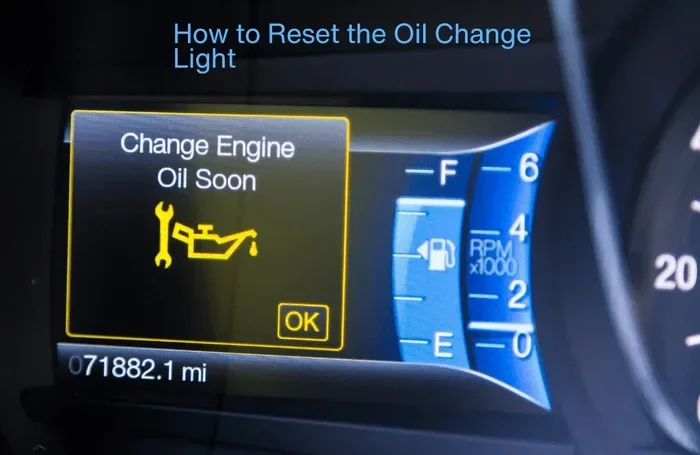
How Do I Reset My Car After an Oil Change Quick Guide
Learn how to reset your car after an oil change with our complete step-by-step guide. We cover the reset procedure for Toyota, Honda, Ford, Chevrolet, and more. Follow these simple steps to clear your oil change reminder and keep your car maintenance on track without any hassle.
So you just got your oil change done and everything is running smoothly. But wait — there is a little light on your dashboard that just will not go away. You know the one. That annoying oil change reminder or maintenance light that keeps staring at you every time you get behind the wheel.
Here is the good news. Resetting your car after an oil change is one of the easiest things you can do as a car owner. You do not need a mechanic. You do not need expensive tools. All you need is a few minutes and the right steps. This guide will walk you through the entire oil change reset process for every major car brand.
Whether you drive a Toyota, Honda, Ford, Chevrolet, or anything in between, you will find exactly what you need below. We will cover the reset procedure, common mistakes to avoid, and quick tips to keep your vehicle maintenance on track. Let us get started.
Key Takeaways
- Resetting is Easy: You can reset your oil change light in just a few minutes without any special tools.
- Brand-Specific Steps: Every car brand has a slightly different reset procedure, so we cover the most popular ones.
- Oil Life Monitor Matters: Understanding your oil life monitor system helps you stay on top of vehicle maintenance.
- Avoid Common Mistakes: Skipping the reset or pressing the wrong button can cause confusion and extra trips to the shop.
- Check Your Manual: Your car owner manual is the best reference for exact reset steps for your specific model.
- See a Pro When Needed: If the light stays on after resetting, a professional mechanic can help diagnose the issue.
📑 Table of Contents
Why You Need to Reset Your Car After an Oil Change
After every oil filter replacement and fresh oil pour, your car’s computer still thinks the old oil is in the engine. The dashboard indicator stays on because the system has not been told the service is complete. This is where the reset comes in.
Think of it like setting a timer. When your mechanic finishes the oil change procedure, the oil change counter inside your car resets to zero. Until you do that manually, the light keeps reminding you that service is overdue. It is not a warning that something is broken. It is just a service interval reset that needs your attention.
What the Dashboard Light Really Means
The oil change light is part of your car’s oil life monitor system. This smart feature tracks your driving habits, engine temperature, and mileage. Based on that data, it estimates when the oil needs changing. Different car brands call this different things.
- Maintenance Required — Toyota and Lexus
- Change Engine Oil — Honda and Acura
- Oil Life System — General Motors (Chevrolet, GMC, Cadillac)
- Service Required — Ford and Lincoln
- Wrench Light — Chrysler and Dodge
No matter what your car calls it, the reset procedure is basically the same idea. You are telling the computer that fresh oil is now in the engine and the countdown can start over.
What Happens If You Skip the Reset
Skipping the reset might seem harmless, but it causes real problems over time. The oil change reminder stays on, which can be distracting. Worse, if you ignore the light long enough, you might start to ignore all dashboard warnings. That is a dangerous habit.
Also, some cars use the oil life percentage to track when the next service is due. If you do not reset it, the percentage stays stuck at zero or a very low number. This can mess up your car maintenance schedule and make it harder to know when your next oil filter replacement is coming up.
How to Reset Your Car After an Oil Change (General Steps)
While every car is a little different, most oil change reset processes follow a similar pattern. Here is what you need to know before you start.
Understanding the Oil Life Monitor System
Your car’s oil life monitor is a small computer program built into the engine control unit. It uses algorithms to track how hard your engine is working. Short trips in cold weather use up oil faster. Long highway drives are easier on the oil. The system adjusts the service interval reset timing based on real driving conditions.
When you turn the ignition to the “on” position (but do not start the engine), you can usually access the oil life monitor through the steering wheel controls or the dashboard buttons. This is where you will perform the mileage reset and clear the oil change counter.
The Basic Reset Process
Here is the general reset procedure that works for most vehicles:
- Turn the ignition key to the “on” position without starting the engine.
- Press the accelerator pedal fully three times within five seconds.
- Wait for the dashboard indicator to flash or change.
- Turn the ignition off and then back on to check if the light is gone.
Some newer cars have a simpler method. You just hold down a specific button on the steering wheel or the instrument panel until the light blinks and then clears. Always refer to your car owner manual for the exact steps for your model.
Expert Insight: The oil life percentage on modern vehicles is more accurate than simple mileage-based systems. If your car shows a percentage, reset it after every oil filter replacement to keep the system calibrated correctly. This small step makes a big difference in long-term vehicle maintenance.
How to Reset by Car Brand
Every car manufacturer has its own reset procedure. Below we break down the steps for the most popular brands on the road today. These steps apply to most models within each brand, but always double-check with your car owner manual if you are unsure.
Toyota Reset Procedure
Toyota vehicles use the Maintenance Required light. Here is how to reset it after an oil change:
- Turn the ignition to the “on” position.
- Press and hold the trip meter reset button on the instrument panel.
- While holding the button, turn the ignition off and then back on.
- Keep holding the button for about 10 seconds until the light turns off.
- Release the button and check the dashboard.
Honda Reset Procedure
Honda uses a change engine oil reminder. The reset procedure is slightly different:
- Press the select/reset knob on the instrument panel.
- Turn the ignition to the “on” position (do not start the engine).
- Hold the knob for about 10 seconds.
- The light should blink and then turn off.
- Turn the ignition off and back on to confirm the reset.
Ford Reset Procedure
Ford vehicles use the service required message on the dashboard. To reset the oil change counter:
- Use the steering wheel arrows to navigate to the “Settings” menu.
- Select “Vehicle Information” or “Maintenance.”
- Find the “Reset Oil Change” or “Oil Life System” option.
- Hold the OK button for several seconds until the reset confirms.
Chevrolet Reset Procedure
Chevrolet uses the Oil Life System. The reset procedure varies slightly by model year:
- Press the service reset button on the steering wheel.
- Scroll to the “Oil Life System” option.
- Hold the reset button until the display shows 100%.
- Turn the ignition off and back on to verify the reset.
Comparison Table: Reset Methods by Brand
| Brand | Light Name | Reset Method | Difficulty |
|---|---|---|---|
| Toyota | Maintenance Required | Trip button + ignition cycle | Easy |
| Honda | Change Engine Oil | Select/reset knob hold | Easy |
| Ford | Service Required | Steering wheel menu | Medium |
| Chevrolet | Oil Life System | Reset button on steering wheel | Easy |
| BMW | Service Interval | iDrive menu + trip button | Medium |
| Mercedes | Service A/B | Steering wheel controls | Medium |
| Nissan | Maintenance Required | Trip button + ignition | Easy |
| Jeep | Wrench Light | Steering wheel menu | Medium |
If your brand is not listed above, the general reset procedure of holding a trip button during an ignition cycle usually works. When in doubt, your car owner manual will have the exact steps.
Common Mistakes When Resetting After an Oil Change
Even though resetting is simple, people make mistakes all the time. Here are the most common errors and how to avoid them.
Mistake 1: Forgetting to Reset the Trip Meter
Some cars require you to reset the trip meter along with the oil change counter. If you only reset one and not the other, the dashboard indicator may not clear properly. Always check both the trip odometer and the service light after completing the reset procedure.
Mistake 2: Turning the Wrong Button
It sounds obvious, but pressing the wrong button is the number one mistake people make. Some cars have a “select” button and a “reset” button right next to each other. Pressing “select” instead of “reset” will just change the display without clearing the light. Take a second to identify the correct button before you start.
Mistake 3: Not Consulting the Car Owner Manual
Your car owner manual is your best friend when it comes to car maintenance. Every model has slight differences in the reset procedure. Skipping the manual can lead to frustration and wasted time. Spend five minutes reading the relevant section before you attempt the reset.
Mistake 4: Starting the Engine During the Reset
Many oil change reset procedures require you to keep the engine off during the process. Starting the engine too early can cancel the reset and send you back to the beginning. Keep the key in the “on” position only, not the “start” position, while performing the reset steps.
Quick Tip: If your oil change light will not turn off after following the steps, try disconnecting the car battery for 15 minutes and reconnecting it. This hard reset clears most dashboard indicators. Just remember that this may also reset your radio presets and clock settings.
Quick Tips to Stay on Top of Your Oil Change Schedule
Resetting the light is just one part of staying on top of vehicle maintenance. Here are some practical tips to make the whole process smoother.
Set Reminders on Your Phone
Use your phone calendar to set a reminder every 3,000 to 5,000 miles (or whatever your manufacturer recommends). When the reminder pops up, you will know it is time for your next oil filter replacement and fresh oil. This simple habit keeps your car maintenance schedule on track without relying solely on the dashboard light.
Use a Maintenance Log
Keep a simple log — either on paper or in a phone app — of every oil change. Record the date, mileage, oil type used, and the name of the shop or mechanic. This makes it easy to track your service interval reset history and proves to any future buyer that you have kept up with car maintenance.
Watch the Oil Life Percentage
If your car displays an oil life percentage, pay attention to it. When it drops below 15%, it is time to schedule your next oil change. Resetting it after the service keeps the percentage accurate and gives you a clear picture of when the next maintenance light reset will be needed.
Keep Your Car Owner Manual in the Glove Box
It sounds old-fashioned, but having your car owner manual physically in the car is incredibly helpful. You can look up the exact reset procedure on the spot without needing to search online. It also contains valuable information about oil type, viscosity, and capacity for your specific engine.
Expert Insight: Many modern cars now have automated oil change reminders built into their infotainment systems. These systems send notifications directly to your phone through the manufacturer’s app. If your car supports this feature, enable it to make vehicle maintenance even easier.
When to See a Professional
Most oil change reset procedures are straightforward and safe to do yourself. However, there are times when professional help is the right call.
Signs Your Reset Did Not Work
If you have followed the reset procedure carefully and the dashboard indicator is still on after 24 hours, something else may be going on. The oil life monitor could be malfunctioning, or there might be a deeper issue with the engine oil pressure system. In these cases, it is best to visit a trusted mechanic.
Other Dashboard Warnings to Watch For
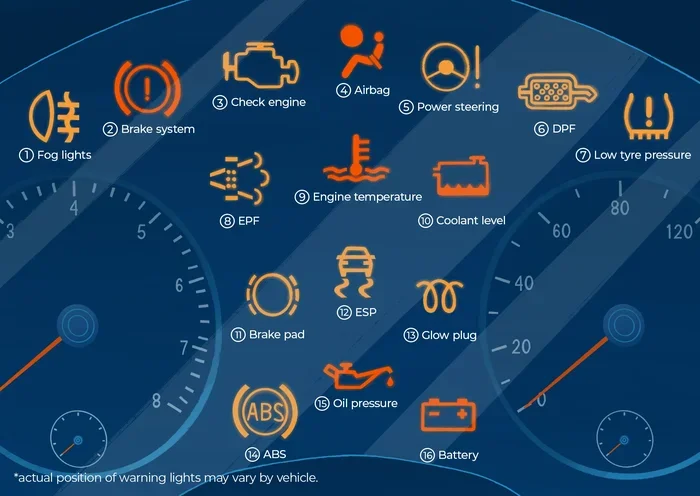
The oil change light is different from the oil pressure warning light. The oil pressure light is usually red and shaped like an oil can. If this light comes on, pull over immediately and check your oil level. Driving with low oil pressure can cause serious engine damage. Do not just reset the light — address the underlying problem first.
Other warning lights that should never be ignored include the check engine light, the battery light, and the temperature warning light. Each of these signals a different issue that requires professional diagnosis. Resetting them without fixing the root cause is not a solution.
Remember, the oil change reset is a simple maintenance task. It is not a fix for engine problems. If your car is showing signs of trouble — strange noises, reduced performance, or fluid leaks — see a professional before anything else.
Conclusion
Resetting your car after an oil change is a quick and easy task that every car owner should know how to do. It takes just a few minutes and keeps your dashboard indicator accurate and your car maintenance schedule on track. Whether you drive a Toyota, Honda, Ford, Chevrolet, or any other brand, the reset procedure is well within your reach.
Use this guide as your go-to reference whenever you need to clear the oil change reminder or reset the oil life monitor. Keep your car owner manual handy for model-specific details, and do not be afraid to ask a mechanic for help if something does not look right.
Staying on top of your vehicle maintenance is one of the best things you can do for your car. A simple oil change reset today can prevent bigger problems tomorrow. So the next time you get your oil changed, take those extra few minutes to reset the system. Your car — and your wallet — will thank you.
Frequently Asked Questions
How often should I reset my car after an oil change?
You should reset the oil change counter every time you get a fresh oil change and oil filter replacement. This keeps your oil life monitor accurate and ensures the service interval reset reflects your actual maintenance schedule.
Can I reset the oil change light myself?
Yes, absolutely. Most oil change reset procedures are simple and do not require any special tools. Just follow the steps in your car owner manual or use the guide above for your specific brand. It usually takes less than five minutes.
What if the oil change light won’t go off after resetting?
Try disconnecting the car battery for 15 minutes and reconnecting it. If the dashboard indicator still stays on, there may be a deeper issue with the oil life monitor system. Visit a professional mechanic to diagnose the problem.
Do I need special tools to reset the oil change counter?
No special tools are needed for most car brands. The reset procedure typically uses buttons already on your steering wheel or instrument panel. Your car owner manual will confirm exactly which buttons to use.
Is it safe to drive with the oil change light on?
It is generally safe for a short period, but you should not ignore it for long. The oil change light is a reminder, not an emergency warning. However, if the oil pressure warning light (a red light) comes on, stop driving immediately and check your oil level.
Will resetting the oil change light void my warranty?
No, resetting the oil change reminder does not void your warranty. The reset procedure is a standard feature built into every modern vehicle. Just make sure you keep records of all oil filter replacement and vehicle maintenance services for warranty claims.