How Can I Factory Reset My Car Easy Steps To Follow
Factory resetting your car is easier than most people think. Whether your infotainment system is acting up or you need to clear error codes, this guide shows you exactly how to reset your car to factory settings in simple steps. You will learn the safest reset procedure for your specific vehicle and avoid costly mistakes.
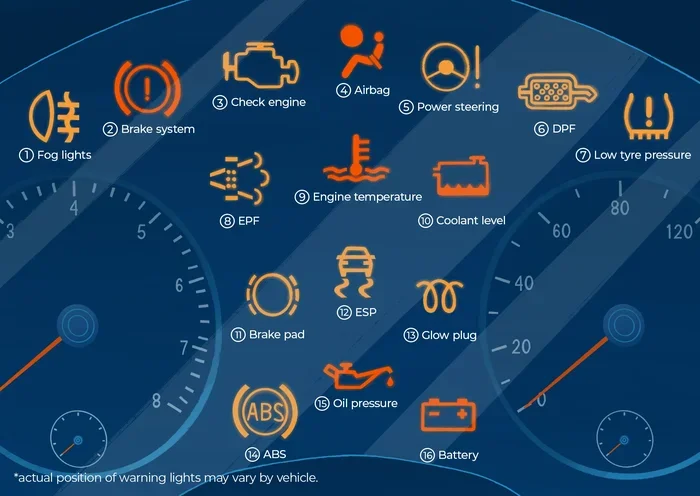
Have you ever sat in your car and thought, “I need to start fresh”? Maybe your infotainment system keeps freezing, or a warning light on your car dashboard just will not go away. Whatever the reason, learning how to factory reset your car can save you time, money, and a lot of frustration.
Many car owners do not realize that a vehicle reset can solve problems that seem serious at first glance. A simple car reset can clear error codes, fix software glitches, and even improve your car performance. The best part? You do not need to be a mechanic to do it.
This guide walks you through every step of the reset procedure in plain, simple language. We will cover why you might need a reset, the different methods you can use, and the mistakes you should avoid. By the end, you will feel confident enough to handle the process yourself.
Key Takeaways
- Factory resetting your car can fix many common electronic and performance issues without a trip to the mechanic.
- Different car systems require different reset methods, from the infotainment screen to the ECU.
- Always back up your data before performing any reset to avoid losing saved settings and preferences.
- Common mistakes like disconnecting the wrong cable can cause more harm than good.
- Some resets are simple and take minutes, while others may need professional help.
- Regular car maintenance includes knowing when and how to reset your vehicle systems.
📑 Table of Contents
What Does Factory Resetting Your Car Mean?
Understanding Factory Settings
When we talk about factory settings, we mean the original software and configuration your car had when it first left the dealership. Every car model comes with default settings for things like radio presets, climate control preferences, and driver assistance features.
Over time, you change these settings. You pair new phones, adjust the seat memory, and install apps on your infotainment system. A factory reset wipes all of those changes away and brings your car back to its original state. Think of it like hitting a restart button on your phone, but for your entire vehicle.
What Happens During a Reset?
During a car system reboot, the onboard computer clears stored data and temporary files. This includes error logs, saved Wi-Fi networks, Bluetooth pairings, and custom settings. Your car electronics return to their default programming.
Do not worry. A proper reset does not damage your car. It does not delete important safety data or harm your engine. It simply refreshes the software and gives your vehicle a clean slate. Some car maintenance experts even recommend periodic resets to keep your car running smoothly.
Why You Might Need to Factory Reset Your Car
Clearing Error Codes and Warning Lights
One of the most common reasons people search for how to reset car computer is a stubborn warning light. You fix the problem, but the light stays on. This happens because the car electronics store fault codes even after the issue is resolved.
A reset car battery procedure or a full system reboot can clear these codes. However, you should always make sure the actual problem is fixed first. Resetting without fixing the root cause will just bring the warning light back.
Fixing Glitches in the Infotainment System
Your car’s infotainment system controls everything from navigation to Bluetooth audio. Sometimes it freezes, crashes, or starts acting strange. A car hard reset can fix these issues quickly. It clears temporary bugs and refreshes the software.
Many modern cars receive car software updates that can sometimes cause conflicts. If you recently updated your system and things feel off, a reset often solves the problem. It is one of the simplest forms of car troubleshooting you can do at home.
Preparing Your Car for Sale or Transfer
Planning to sell your car? A vehicle reset is a smart move. It removes all your personal data, paired devices, and saved preferences. This protects your privacy and gives the new owner a clean start.
If you are buying a used car, a factory reset ensures you are not inheriting someone else’s settings or leftover data. It is a great part of car maintenance when taking ownership of a pre-owned vehicle.
How to Factory Reset Your Car Step by Step
There are several ways to factory reset your car, and the right method depends on your vehicle and what you are trying to fix. Let us look at the three most common approaches.
Method 1: Using the Car’s Built-In Menu
This is the easiest and safest way to perform a reset procedure. Most modern cars have a reset option hidden in their settings menu. Here is how to find it:
- Start your car and let the engine run.
- Go to the settings or system menu on your dashboard screen.
- Look for “System Reset,” “Factory Reset,” or “Restore Defaults.”
- Follow the on-screen prompts to complete the reset.
- Wait for the system to restart. This may take a few minutes.
Always check your car manual for specific instructions. The exact path varies by car model and manufacturer. Some brands put the reset option under “General Settings,” while others hide it in a “Vehicle Health” section.
Method 2: Disconnecting the Battery
Disconnecting your car battery is a classic way to reset the vehicle’s computer. This method works well for clearing error codes and rebooting the entire car electronics system.
- Turn off the engine and remove the keys.
- Open the hood and locate the battery.
- Use a wrench to loosen the negative terminal first.
- Then loosen the positive terminal.
- Wait at least 15 minutes to let the capacitors drain.
- Reconnect the positive terminal first, then the negative.
- Start the car and check if the issue is resolved.
Quick Tip: Always keep your radio presets and Bluetooth pairings backed up before trying this method. You will lose all saved settings when you disconnect the battery.
Method 3: Using a Diagnostic Tool
For a more advanced approach, you can use an OBD2 diagnostic scanner. These tools connect to your car’s onboard computer and allow you to clear codes and reset systems directly.
- Find the OBD2 port under your steering column.
- Plug in the diagnostic tool.
- Turn the ignition to the “on” position (do not start the engine).
- Follow the tool’s menu to access the reset function.
- Select “Clear Codes” or “Reset ECU” as needed.
Diagnostic tools range from basic code readers to advanced scanners. If you do a lot of car troubleshooting, investing in a good scanner is worth it. Many auto parts stores will read codes for free if you do not want to buy a tool.
Comparison of Reset Methods
| Method | Difficulty | Time Required | Best For |
|---|---|---|---|
| Built-In Menu | Easy | 5-10 minutes | Infotainment glitches, general resets |
| Battery Disconnect | Medium | 20-30 minutes | Error codes, ECU reset |
| Diagnostic Tool | Advanced | 10-15 minutes | Precise code clearing, deep resets |
Each method has its place. The built-in menu is great for everyday issues. The battery disconnect works well for deeper resets. And the diagnostic tool gives you the most control over your car electronics.
Resetting Specific Car Systems
Resetting the Infotainment System
The infotainment system is one of the most common reasons people look up how to reset car computer settings. When the screen freezes or apps stop working, a reset often fixes the problem fast.
Start by trying a soft reset first. This means holding the power button on the screen for 10 to 15 seconds. If that does not work, try the factory reset through the settings menu. For stubborn issues, a battery disconnect may be needed.
Expert Insight: Many infotainment problems come from overloaded storage. If you have too many apps or downloaded maps, your system may slow down. Clearing unused data before a reset can help prevent future issues.
Resetting the ECU and Engine Computer
The Engine Control Unit, or ECU, is the brain of your car. It controls fuel injection, ignition timing, and emissions. Sometimes the ECU needs a reset after repairs or part replacements.
To reset the ECU, the battery disconnect method works best. After disconnecting the battery for 15 to 30 minutes, reconnect it and start the car. The ECU will relearn your driving patterns over the next 50 to 100 miles. During this time, you may notice slightly different fuel economy or throttle response.
This is completely normal. Your car is adapting to the fresh factory settings. Give it a few drives to settle back in.
Resetting the Car Battery and Sensors
If you have replaced your battery or worked on any sensors, a reset ensures everything communicates properly. Many car systems need a reboot to recognize new components.
For tire pressure monitoring systems, there is usually a reset button under the steering column or on the dashboard. For oil change reminders, you can often reset these through the instrument cluster menu. Always refer to your car manual for sensor-specific reset instructions.
Common Mistakes to Avoid When Resetting Your Car
Skipping the Owner Manual
Every car model is different, and the owner manual contains the exact reset instructions for your vehicle. Skipping this step can lead to confusion or even accidental data loss. Take five minutes to read the relevant section before you start.
The manual will also tell you if your car has any special precautions. Some vehicles require a specific sequence of button presses. Others may need a professional scan tool for certain resets.
Forgetting to Back Up Settings
This is the number one mistake people make. Before you reset, write down or photograph your important settings. This includes radio presets, Bluetooth pairings, seat positions, and mirror adjustments.
Some car electronics store this data in memory that gets wiped during a reset. If you do not back it up, you will spend time reconfiguring everything from scratch.
Rushing Through the Process
A reset procedure needs time to complete properly. Do not start the engine or turn off the car while the system is rebooting. Interrupting the process can corrupt the software and create bigger problems.
Be patient. Wait for all lights to come back on and for the system to fully initialize. This usually takes 3 to 5 minutes, but some vehicles take longer.
When to Call a Professional
Most factory resets are safe to do at home. But there are times when you should call a professional. If you have tried all the methods above and your car warning lights still do not go away, there may be a deeper hardware issue.
Also, if you are uncomfortable working with your car battery or electrical system, it is perfectly fine to visit a mechanic. A professional has the tools and experience to handle complex ECU reset procedures safely.
Another sign you need expert help is if your car starts behaving strangely after a reset. Unusual noises, persistent error codes, or warning lights that return quickly are not normal. These could indicate a problem that a simple car reset cannot fix.
Remember, a reset car battery or ECU procedure is meant to refresh software, not repair physical damage. If something is broken mechanically, resetting will not solve it.
Conclusion
Learning how to factory reset your car is one of the most useful skills any car owner can have. Whether you are clearing a stubborn warning light, fixing a glitchy infotainment screen, or preparing your vehicle for a new owner, a vehicle reset gives you a fresh start.
The process is simpler than most people think. You can use your car’s built-in menu, disconnect the battery, or use a diagnostic tool. Each method has its strengths, and the right choice depends on your specific situation and car model.
Just remember to back up your settings first, follow the steps carefully, and never rush the process. If something feels wrong, do not hesitate to seek professional help. With the knowledge in this guide, you are now equipped to handle most car reset situations confidently and safely.
Take a few minutes today to understand your vehicle’s reset options. It is a small investment of time that can save you hours of frustration and potentially hundreds of dollars in mechanic bills. Your car will thank you for it.
Frequently Asked Questions
Will factory resetting my car delete all my saved data?
Yes, a factory reset will clear most saved data including radio presets, Bluetooth pairings, Wi-Fi networks, and custom settings. This is why it is important to back up anything you want to keep before starting the reset process.
How long does it take to factory reset a car?
The time varies depending on the method you use. A built-in menu reset usually takes 5 to 10 minutes. A battery disconnect reset takes about 20 to 30 minutes including wait time. Using a diagnostic tool typically takes 10 to 15 minutes.
Is it safe to disconnect my car battery to reset it?
Yes, it is generally safe and is one of the most common reset methods. Just make sure you disconnect the negative terminal first and reconnect it last. Always refer to your car manual for specific safety instructions for your vehicle model.
Will a factory reset fix all car problems?
No, a factory reset fixes software-related issues like error codes, glitches, and settings problems. It will not repair mechanical damage, worn parts, or hardware failures. If your problem is physical, you will need a mechanic.
Do I need any special tools to factory reset my car?
For most resets, you do not need any special tools. A basic OBD2 scanner can be helpful for deeper resets, but many cars allow you to reset through the built-in menu or by disconnecting the battery. Check your car manual to see what is recommended for your specific model.
How often should I factory reset my car?
You do not need to reset your car regularly. A factory reset is only needed when you are experiencing software issues, clearing error codes after repairs, or preparing the car for sale. Routine car maintenance like oil changes and tire rotations is more important for regular upkeep.