Can You Add HomeLink to a Vehicle and How to Install
Can You Add HomeLink to a Vehicle? Yes, absolutely. Whether your car came with factory support or needs an aftermarket module, adding HomeLink is a straightforward process that brings vehicle automation to a whole new level. This guide covers compatibility, costs, and a complete HomeLink installation walkthrough.
Imagine pulling into your driveway and opening your garage door with the press of a button. No fumbling for remotes. No stepping out in the rain. That is the magic of HomeLink. If you have ever wondered whether you can add HomeLink to your vehicle, the short answer is yes. Let us walk through everything you need to know about HomeLink installation and how to get it working in your car.
Can You Add HomeLink to a Vehicle? It depends on a few factors, but the good news is that most vehicles can be upgraded. Whether you drive a new SUV with factory support or an older sedan that needs a little help, there is a path forward. This guide will show you exactly what you need, what it costs, and how to do it yourself.
HomeLink is one of the most convenient vehicle automation features available today. It replaces the need for multiple remotes and gives you a clean, integrated look inside your car. By the end of this article, you will know whether your vehicle qualifies, what equipment you need, and how to complete the entire HomeLink programming process.
Key Takeaways
- HomeLink can be added to most vehicles: Whether you drive a new sedan or an older truck, there is a HomeLink installation option for you.
- Aftermarket modules work great: If your car lacks factory HomeLink, an aftermarket universal remote system is an easy fix.
- Installation is DIY-friendly: Most people can complete the HomeLink programming process in under 30 minutes.
- Costs range from $30 to $300: The price depends on whether you buy a standalone module or a full OEM integration kit.
- Rolling code technology keeps you safe: Modern HomeLink devices use advanced rolling code technology to prevent unauthorized access.
- MyQ smart garage integration adds convenience: Pairing HomeLink with a MyQ smart garage system lets you control your door from anywhere.
- Common issues are easy to fix: Most HomeLink troubleshooting steps take just a few minutes.
📑 Table of Contents
- What Is HomeLink and How Does It Work?
- Can You Add HomeLink to Any Vehicle?
- Step-by-Step HomeLink Installation Guide
- HomeLink Installation Cost Breakdown
- HomeLink vs. Aftermarket Universal Remotes
- Common HomeLink Problems and How to Fix Them
- Final Thoughts: Is Adding HomeLink to Your Vehicle Worth It?
What Is HomeLink and How Does It Work?
HomeLink is a wireless control system built into many vehicles. It lets you operate your garage door opener, gate, or other automated systems directly from your car. Instead of carrying a separate remote, you simply press a button on your console mount and the door opens or closes.
The system works by sending a radio signal to your garage door receiver. Most modern HomeLink devices use rolling code technology, which changes the access code every time you press the button. This makes your home automation setup much more secure than older fixed code transmitter remotes that broadcast the same signal every time.
How the System Communicates with Your Garage
When you press a HomeLink button, the transmitter in your car sends a signal to the receiver on your garage door opener. The receiver then activates the motor and opens or closes the door. The whole process takes less than two seconds.
Here is how the basic setup works:
- You press the HomeLink button inside your vehicle.
- The transmitter sends a coded radio signal to your garage.
- The garage door receiver picks up the signal.
- The opener motor activates and moves the door.
Some HomeLink systems also support power door lock integration. This means you can lock or unlock your car doors at the same time you control your garage. It is a small feature, but it adds real convenience to your daily routine.
Can You Add HomeLink to Any Vehicle?
The answer depends on your vehicle’s age, make, and model. Many newer cars come with factory HomeLink support built right into the rearview mirror or console. But what if your car does not have it? Can you still add HomeLink? Yes, you can.
Vehicles That Support HomeLink from the Factory
Most major automakers offer HomeLink as a standard or optional feature. Here are some common brands and models that include factory HomeLink:
- Ford Explorer, F-150, and most Ford models from 2000 onward
- Chevrolet Silverado, Tahoe, and many GM trucks and SUVs
- Toyota Camry, RAV4, Highlander, and most Toyota models
- Honda Accord, CR-V, and most Honda vehicles
- Jeep Wrangler, Grand Cherokee, and most Jeep models
- Ram trucks and most Dodge models
If your vehicle has a HomeLink button on the overhead console or mirror, you already have the hardware. You just need to program HomeLink to work with your specific garage door opener. The process is simple and takes only a few minutes.
Aftermarket HomeLink Options for Older or Non-Compatible Cars
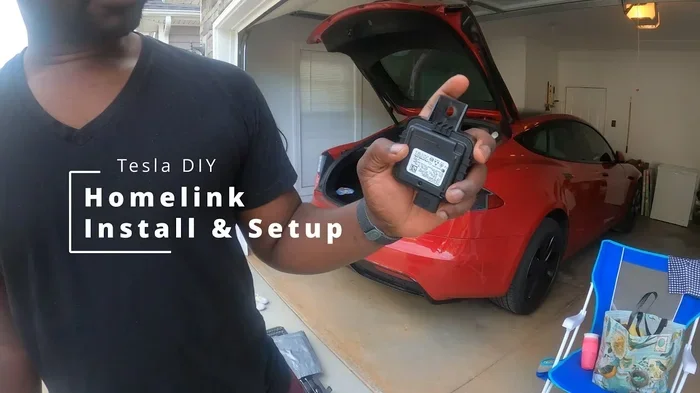
If your car does not have factory HomeLink, you are not out of luck. Several aftermarket HomeLink options can bring this feature to almost any vehicle. These modules plug into your car’s existing wiring or mount discreetly inside the console.
Popular aftermarket HomeLink brands include:
- HomeLink Universal Replacement Module – works with most vehicles
- STEELMATE Car HomeLink Kit – easy plug-and-play setup
- CR-Factory HomeLink Retrofit Module – OEM-quality replacement
Before buying any aftermarket HomeLink device, run a vehicle compatibility check. Most manufacturers offer a lookup tool on their website where you enter your car’s year, make, and model. This ensures you get the right universal remote system for your ride.
Here is a quick comparison of the main options available:
| Option | Best For | Cost Range | Difficulty |
|---|---|---|---|
| Factory HomeLink | Newer vehicles with built-in support | Included with vehicle | Easy – just program |
| Aftermarket Universal Module | Older vehicles or no factory support | $30 – $100 | Moderate – basic wiring |
| OEM Integration Kit | Premium seamless look | $150 – $300 | Easy – plug and play |
| Smart Garage Add-On (MyQ) | Remote access and smart home integration | $100 – $200 | Moderate – app setup |
As you can see, there is an option for every budget and vehicle type. The key is choosing the right HomeLink installation method for your situation.
Step-by-Step HomeLink Installation Guide
Installing HomeLink in your vehicle is easier than most people think. Whether you are working with a factory system or an aftermarket HomeLink module, the basic process is similar. Here is a detailed walkthrough.
What You Will Need Before Starting
Gather these items before you begin your HomeLink installation:
- Your HomeLink device or replacement module
- Your handheld garage door opener remote
- A stepladder or stable platform
- A small flathead screwdriver
- Your vehicle owner’s manual
- A friend to help test the signal
Having everything ready before you start will save you time and frustration. There is nothing worse than getting halfway through a HomeLink programming session and realizing you are missing a tool.
Programming Your HomeLink Device
Follow these steps to program HomeLink in your vehicle:
- Park your car in front of the garage and turn the ignition to the accessory or on position.
- Locate the HomeLink control panel. It is usually on the overhead console, sun visor, or rearview mirror.
- Press and hold the outer two HomeLink buttons until the indicator light turns on. This usually takes about 20 seconds.
- Release the buttons. You are now in HomeLink training mode.
- Hold your handheld garage door opener remote about 1 to 2 inches from the HomeLink control panel.
- Press and hold the button on your handheld remote. The HomeLink indicator light will blink slowly.
- Once the light changes to a fast blink or stays solid, release both buttons.
- Press the programmed HomeLink button inside your car to test it. The garage door should respond.
If your garage door opener uses rolling code technology, you may need to press a “learn” button on the back of the garage door motor unit. Refer to your opener’s manual for specific steps. Some older units use a fixed code transmitter, which is even simpler to pair.
Quick Tip: If the first attempt does not work, do not worry. Repeat the process from step 3. Sometimes it takes a second try for the HomeLink device to sync properly with the garage door receiver.
Common Mistakes to Avoid During Installation
Even simple HomeLink installation can go wrong if you skip steps. Here are the most common mistakes:
- Standing too far away from the garage door motor when programming. Stay within 6 feet for the best signal.
- Forgetting to clear old codes before programming a new HomeLink button. Always start fresh.
- Rushing the process. Hold the buttons for the full time specified. Let the indicator light do its job.
- Using the wrong frequency. Make sure your handheld remote and HomeLink module operate on the same frequency, usually 315 MHz or 390 MHz.
- Ignoring the wiring for aftermarket modules. Always disconnect the car battery before working with electrical connections.
Avoid these pitfalls, and your HomeLink programming will go smoothly. Most people get it right on the first or second try.
Expert Insight: According to automotive technicians, the most common reason for HomeLink programming failure is interference from nearby devices. If you are having trouble, turn off your phone, Wi-Fi router, and any other wireless devices in the garage before attempting to program your HomeLink system.
HomeLink Installation Cost Breakdown
The cost of adding HomeLink to your vehicle varies widely. It depends on whether your car already has the hardware, what type of module you buy, and whether you install it yourself or hire a professional.
Here is a realistic cost breakdown:
- Factory HomeLink – $0 additional cost if your vehicle already has it. You only pay for the HomeLink programming time, which is free if you do it yourself.
- Aftermarket Universal Module – $30 to $100 for the device. Installation is DIY-friendly and takes about 15 to 30 minutes.
- OEM Integration Kit – $150 to $300 for a dealer-installed solution. This gives you the most seamless look and factory-quality performance.
- Professional Installation – $50 to $150 if you pay a shop to handle the HomeLink installation for you.
- MyQ Smart Garage Add-On – $100 to $200 if you want smart home integration and remote access from your phone.
Overall, adding HomeLink is one of the most affordable vehicle automation upgrades you can make. Even the most expensive option costs less than a single trip to the dealer for a service call.
If you are handy with basic tools, the DIY route saves you the most money. A universal garage remote module and 30 minutes of your time is all you need to get started. You will also save on labor costs, which can add up quickly at a repair shop.
HomeLink vs. Aftermarket Universal Remotes
When you are looking for a way to control your garage from your car, you have two main choices: factory or aftermarket HomeLink, or a universal garage remote that sticks to your windshield or dash. Let us compare them side by side.
| Feature | HomeLink System | Universal Garage Remote |
|---|---|---|
| Integration | Built into the car console | Mounted on windshield or dash |
| Appearance | Clean, factory look | Visible device on windshield |
| Security | Rolling code technology | Varies by brand and model |
| Compatibility | Works with most openers | Works with most openers |
| Smart Home Integration | Some models support MyQ | Limited or none |
| Cost | $30 – $300 | $15 – $50 |
| Durability | Built to last the life of the vehicle | May need battery replacement |
| Multi-function | Can control gates, lights, locks | Usually garage door only |
Both options have their place. A universal garage remote is great if you want a quick, cheap fix. But if you want a permanent, integrated solution, HomeLink is the clear winner. It looks better, works more reliably, and offers more features like gate operator compatibility and power door lock integration.
For those who want the best of both worlds, consider pairing HomeLink with a MyQ smart garage system. This gives you in-car control plus smartphone access. You can open your garage from anywhere, check its status, and even let guests in remotely. It is a great example of modern smart home integration that fits right inside your car.
Common HomeLink Problems and How to Fix Them
Even with a proper HomeLink installation, you may run into issues from time to time. Here are the most common problems and how to solve them.
Problem 1: The HomeLink button does not respond.
This is usually a programming issue. Try clearing the HomeLink memory and reprogramming from scratch. To clear the memory, press and hold the two outer HomeLink buttons for 10 seconds until the indicator light blinks rapidly. Then start the programming process again from step one.
Problem 2: The garage door opens but does not close.
This often happens with rolling code technology when the garage door receiver loses sync. Reprogram the HomeLink button using the exact steps in your opener’s manual. Also check that nothing is blocking the safety sensors near the bottom of the garage door track.
Problem 3: Intermittent signal or delayed response.
Weak batteries in your handheld remote can cause this. Replace them with fresh ones. Also, if you have added a HomeLink replacement module, check the wiring connections. Loose wires are a common cause of intermittent HomeLink issues.
Problem 4: HomeLink works but the indicator light stays on.
A solid light after programming usually means the HomeLink device is still in training mode. Press the programmed button once to exit training mode. If the light stays on, try resetting the entire system by disconnecting your car battery for 5 minutes and then reconnecting it.
Quick Tip: Keep a spare handheld remote in your glove box. If your HomeLink system ever needs to be reset or reprogrammed, having a backup remote saves you from being locked out of your garage.
Most HomeLink troubleshooting steps take less than five minutes. The system is designed to be reliable, and with proper HomeLink maintenance, it will serve you well for years.
Common Mistake: Many people try to program HomeLink while standing far away from the garage door motor. This causes signal loss and failed programming sessions. Always park close to the garage and stay within a few feet of the motor unit during the setup process.
Final Thoughts: Is Adding HomeLink to Your Vehicle Worth It?
The answer is a resounding yes. Adding HomeLink to your vehicle transforms a daily chore into a seamless experience. You pull into your driveway, press one button, and the door opens. No extra remotes, no fumbling, no wasted time.
Can You Add HomeLink to a Vehicle? Absolutely. Whether you choose a factory system, an aftermarket HomeLink module, or a full OEM integration kit, the upgrade is affordable, practical, and incredibly convenient. It is one of those small changes that makes a big difference in your daily life.
Take a few minutes today to check your vehicle’s compatibility. If your car does not have factory support, an aftermarket HomeLink module is an easy and inexpensive fix. And if you already have HomeLink, take a moment to make sure it is programmed correctly and functioning at its best.
Your garage is part of your home. Treat it that way with a HomeLink system that works as hard as you do.
Frequently Asked Questions
Can I install HomeLink myself, or do I need a professional?
Most people can install HomeLink themselves without any professional help. The process is straightforward and takes about 15 to 30 minutes. If you are comfortable changing a fuse or replacing a battery, you can handle HomeLink programming. However, if you prefer not to work with your car’s electrical system, a professional can complete the HomeLink installation for a modest fee.
Does HomeLink work with all garage door openers?
HomeLink works with the vast majority of garage door openers on the market. It supports both rolling code technology and fixed-code systems. However, some older or specialty openers may require a HomeLink replacement module or a universal bridge adapter. Always check compatibility before purchasing your HomeLink device.
How long does HomeLink programming take?
The entire HomeLink programming process typically takes between 5 and 15 minutes. If you need to clear old codes or troubleshoot a connection, it may take a little longer. Having your vehicle manual and garage door opener manual handy will speed things up significantly.
Can HomeLink control anything besides a garage door?
Yes! HomeLink is much more than a garage door controller. It can operate gate operators, driveway lights, carports, and even power door lock integration systems. Many homeowners use HomeLink to control multiple automated features around their property, making it a true vehicle automation hub.
What is the difference between HomeLink and MyQ?
HomeLink is the in-car control system that lets you operate your garage with buttons inside your vehicle. MyQ is a smart home platform that connects your garage to your phone. Many modern HomeLink systems support MyQ integration, giving you both in-car control and remote smartphone access. They work together to create a complete smart home integration experience.
How do I know if my vehicle already has HomeLink?
Look for three small buttons on your overhead console, sun visor, or rearview mirror area. If you see a cluster of buttons labeled HomeLink, your vehicle has factory support. You can also check your vehicle owner’s manual or look up your VIN on the manufacturer’s website to confirm car compatibility with HomeLink.