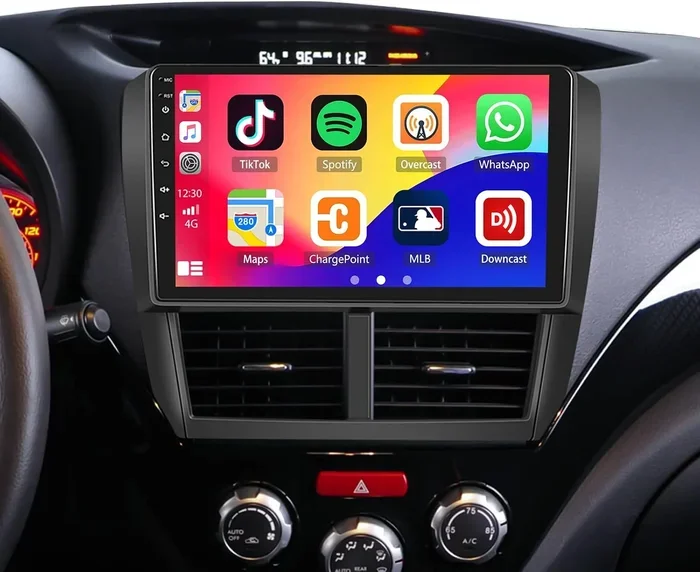
Maxxlink Android Car Stereo Review and Buying Tips
The Maxxlink Android car stereo brings smart features, crisp touchscreen controls, and seamless connectivity to your vehicle. This review covers top models, key features, and honest buying tips to help you pick the right unit. Whether you want GPS navigation, Bluetooth music, or Android Auto, there is a Maxxlink option for you.
If you have been searching for a way to upgrade your car’s sound and smart features, the Maxxlink Android car stereo probably came up in your results. These units bring modern touchscreen car radio technology into older and newer vehicles alike. They pack in GPS navigation, Bluetooth connectivity, and Android Auto support without breaking the bank.
But with so many models on the market, how do you know which one is right for you? That is exactly what this guide is here to help with. We will walk through the best Maxxlink models, what features matter most, and how to avoid common buying mistakes. By the end, you will feel confident picking the perfect car entertainment system for your ride.
Key Takeaways
- Smart Connectivity: Maxxlink car stereos support Android Auto, Apple CarPlay, and Bluetooth for wireless hands-free calling and music streaming.
- Easy Installation: Most models fit standard dash sizes and come with wiring harnesses, making car stereo installation straightforward for DIYers.
- Multiple Models Available: From budget-friendly units to premium android head units, Maxxlink offers options for every vehicle and price range.
- Built-in GPS Navigation: Many models include GPS navigation car features with offline maps, so you stay on track without a phone.
- Great Value: Maxxlink stereos deliver car entertainment system features at prices that beat many big-name brands.
- Watch for Compatibility: Always check your vehicle’s dash size and wiring setup before buying to avoid returns and extra costs.
📑 Table of Contents
What Is a Maxxlink Android Car Stereo?
A Maxxlink Android car stereo is an in-dash multimedia player that runs on the Android operating system. Think of it as a replacement for your old factory radio. These units combine a car radio receiver, a car multimedia player, and a smart computer all in one sleek dash mount stereo unit.
Unlike basic car radios, Maxxlink stereos give you access to apps, online maps, music streaming, and wireless car connectivity. You can use Android Auto and Apple CarPlay to mirror your phone’s display right on the screen. This means your vehicle infotainment system becomes as smart as your phone, if not smarter.
Why People Choose Maxxlink Over Other Brands
There are many android head unit brands out there. So why do shoppers keep coming back to Maxxlink? First, the price-to-feature ratio is hard to beat. You get high-end car stereo features like capacitive touchscreens, quad-core processors, and built-in GPS at prices that stay well under $300 for most models. Second, Maxxlink designs their units to fit common dash sizes, which makes stereo installation tips much simpler. You do not need a custom dash kit for most vehicles.
Third, the customer support and community around Maxxlink are genuinely strong. Users share maxxlink car stereo review feedback online, and the company regularly updates firmware to improve performance. This matters a lot when you are dealing with car audio system tech that needs to stay current.
Key Features of Maxxlink Android Car Stereos
Not all Maxxlink Android car stereo units are the same, but they share a solid set of core features. Let us break down what you can expect from most models.
Touchscreen Display
Every Maxxlink unit comes with a bright touchscreen car radio display. Most models use capacitive touch, which feels smooth and responsive. Screen sizes range from 7 inches to 10.1 inches depending on the model. The display handles GPS navigation car maps, music apps, and phone calls with ease. Colors are vivid, and you can adjust brightness for day and night driving.
Bluetooth and Wireless Connectivity
Bluetooth car stereo capability is standard across the Maxxlink lineup. You can stream music wirelessly from your phone, make hands-free calls, and even use voice commands. The connection range is solid, usually reaching 30 feet or more. Some models also offer wireless car connectivity through Wi-Fi, which lets you download maps and apps directly to the unit without tethering to a phone.
GPS Navigation
One of the standout car entertainment upgrade features is the built-in GPS. Maxxlink stereos come with preloaded maps and navigation software. You do not need to mount a separate phone holder or pay for a subscription. The GPS works independently, so even if your phone dies, you still have turn-by-turn directions. This is a huge selling point for anyone who drives frequently or travels long distances.
Android Auto and Apple CarPlay
Modern drivers expect android auto car stereo and Apple CarPlay car stereo compatibility, and Maxxlink delivers on both. These features let you access Google Maps, Spotify, Podcasts, WhatsApp, and more right on your car’s screen. You can use voice commands through Google Assistant or Siri, keeping your eyes on the road. This is one of the main reasons people choose a Maxxlink android car stereo over a basic radio upgrade.
Audio Quality and Sound Processing
When it comes to car sound system quality, Maxxlink units do not disappoint. They include built-in digital signal processors that tune the audio output for your vehicle’s acoustics. You get clear highs, solid mids, and punchy bass straight from the factory settings. Most models also support external amplifiers and subwoofers if you want to take your car audio system to the next level.
Maxxlink Models Compared
Maxxlink offers several models, and knowing the differences helps you make the right choice. Here is a quick comparison of their most popular units.
| Feature | Maxxlink X1 | Maxxlink X5 | Maxxlink Pro 10 |
|---|---|---|---|
| Screen Size | 7 inch | 9 inch | 10.1 inch |
| Processor | Quad-core | Octa-core | Octa-core |
| RAM | 2 GB | 4 GB | 4 GB |
| Android Version | Android 11 | Android 12 | Android 13 |
| GPS Navigation | Yes | Yes | Yes |
| Android Auto | Yes (wired) | Yes (wireless) | Yes (wireless) |
| Apple CarPlay | Yes (wired) | Yes (wireless) | Yes (wireless) |
| Bluetooth | Yes | Yes | Yes |
| Price Range | $120-$180 | $200-$280 | $280-$380 |
| Best For | Budget upgrades | Daily drivers | Premium setups |
The Maxxlink X1 is a fantastic entry-level option. It covers all the basics and works well for everyday commuting. The Maxxlink X5 steps up with a bigger screen, more RAM, and wireless phone mirroring. The Maxxlink Pro 10 is the flagship unit with the largest display and the newest software. It is ideal for someone who wants a full car entertainment system overhaul.
How to Choose the Right Maxxlink Car Stereo
Buying a Maxxlink Android car stereo should feel exciting, not confusing. Follow these steps to narrow down your options and find the perfect fit.
Step 1: Check Your Dash Size
Not every Maxxlink unit fits every car. Measure your current dash opening before you shop. Most Maxxlink models are designed for 2-DIN or 1-DIN-sized slots. If your vehicle has a non-standard dash, you may need a dash mount stereo adapter kit. This is the most common reason for returns, so take five minutes to measure first.
Step 2: Decide on Wired vs. Wireless
Do you want to connect your phone with a cable or wirelessly? Wireless car connectivity is more convenient, but wired connections tend to be more stable. If you frequently use Android Auto or Apple CarPlay, wireless support saves you from plugging in every time you get in the car. The Maxxlink X5 and Pro 10 both offer wireless options.
Step 3: Consider Your GPS Needs
If you rely on GPS navigation car features daily, prioritize a model with built-in maps and Wi-Fi. The Maxxlink Pro 10 handles this best with its larger screen and faster processor. But even the budget X1 model includes solid navigation that works without an internet connection.
Step 4: Think About Sound Quality
If music is your priority, look for a unit with a strong digital signal processor and high-resolution audio support. The Maxxlink X5 and Pro 10 both deliver excellent sound quality for a car audio system upgrade. You can also connect external speakers or amplifiers for even better performance.
Step 5: Set a Budget
Car stereo upgrade costs can add up fast when you include wiring harnesses, antenna adapters, and dash kits. Set a realistic budget that covers the unit plus any necessary accessories. The Maxxlink lineup covers a wide price range, so there is a solid option whether you are spending $150 or $350.
Installation Tips and Common Mistakes
Installing a Maxxlink Android car stereo is one of the most rewarding DIY car projects you can tackle. But a few mistakes can turn a simple job into a frustrating experience. Here is what you need to know.
Stereo Installation Tips
- Disconnect your battery before starting any electrical work. This prevents short circuits and protects your vehicle’s computer system.
- Use the included wiring harness that comes with your Maxxlink unit. It matches your car’s factory plug and saves you from cutting wires.
- Test the unit before you secure it in the dash. Power it on and make sure the touchscreen, Bluetooth, and GPS all work properly.
- Label every wire as you disconnect the old stereo. Take a photo with your phone for reference during the install.
- Keep all packaging until you have fully tested the new stereo. You may need to return it if something does not work as expected.
Common Mistakes to Avoid
The biggest mistake people make is buying a unit without checking compatibility. A 2-DIN stereo will not fit a 1-DIN dash opening without extra parts. Another common error is skipping the antenna adapter. Without it, your new car radio receiver will not pick up FM or AM stations properly.
Some buyers also forget to update the firmware after installation. Maxxlink releases software updates that fix bugs and add features. Connecting your unit to Wi-Fi and checking for updates takes just a few minutes but makes a big difference in performance.
Pros and Cons of Maxxlink Android Car Stereos
Like any product, Maxxlink stereos come with strengths and a few limitations. Here is an honest look at both sides.
Pros
- Affordable pricing compared to brands like Pioneer, Kenwood, and Sony
- Wide range of models for different budgets and vehicle types
- Strong feature set including GPS, Android Auto, Apple CarPlay, and Bluetooth
- Easy installation with standard dash sizes and included wiring harnesses
- Active firmware updates that keep the software current
- Good customer reviews and a growing community of users
Cons
- Some lower-end models have slower processors that can lag with heavy app use
- Not all models support wireless Android Auto on older Android phones
- Build quality is good but not quite at the level of premium brands
- GPS maps may need manual updates every year or so
Final Thoughts and Recommendation
The Maxxlink Android car stereo is one of the best values you can find in the car entertainment upgrade market. These units deliver modern smart features, solid sound quality, and reliable GPS navigation at prices that make sense for most budgets. Whether you drive a sedan, SUV, or truck, there is a Maxxlink model that fits your vehicle and your needs.
If you are tired of your old factory radio and want a true car multimedia player that keeps you connected, entertained, and on track, the Maxxlink line is worth your serious attention. Start by measuring your dash, picking your budget, and choosing a model that matches your feature priorities. A Maxxlink Android car stereo can truly transform every drive you take.
Frequently Asked Questions
What makes a Maxxlink Android car stereo different from a regular car radio?
A Maxxlink unit runs on the Android operating system, which means you get access to apps, maps, music streaming, and smart features that a regular car radio simply cannot offer. It functions as a car multimedia player, GPS navigator, and Bluetooth phone all in one dash mount stereo unit.
Can I install a Maxxlink car stereo myself?
Yes, most Maxxlink models are designed for DIY installation. They come with stereo installation tips and wiring harnesses that match standard dash sizes. As long as your vehicle has a common 2-DIN opening, you can typically complete the install in under an hour with basic tools.
Does a Maxxlink stereo support Apple CarPlay and Android Auto?
Absolutely. Most Maxxlink models support both Android Auto car stereo and Apple CarPlay car stereo features. Higher-end models like the X5 and Pro 10 offer wireless connectivity, while budget models may require a wired connection. Both systems let you access your phone’s apps safely on the road.
How good is the GPS navigation on Maxxlink stereos?
The built-in GPS navigation car feature works independently of your phone. Maxxlink units come with preloaded maps and turn-by-turn directions. The navigation is reliable for daily commuting and road trips. You can also use Google Maps through Android Auto for even more features and live traffic updates.
What should I check before buying a Maxxlink car stereo?
First, measure your dash opening to confirm compatibility with the unit’s size. Second, decide whether you need wired or wireless phone connectivity. Third, check if your vehicle requires any additional adapters, like an antenna adapter or a car stereo upgrade wiring harness. These small checks save time and prevent returns.
Are Maxxlink stereos worth the price compared to bigger brands?
For most drivers, yes. Maxxlink delivers car audio system features and vehicle infotainment capabilities at a fraction of the cost of premium brands. The build quality is solid, the feature set is competitive, and the price point makes it one of the smartest car entertainment upgrade investments you can make.
=== CONCLUSION ===
The Maxxlink Android car stereo is a smart, affordable way to bring modern technology into your vehicle. From GPS navigation and Bluetooth music to Android Auto and Apple CarPlay, these units cover everything you need for a connected, entertaining drive. Whether you are looking for a simple car stereo upgrade or a full car entertainment system overhaul, Maxxlink has a model that fits.
Take your time comparing models, check your vehicle’s compatibility, and follow the stereo installation tips in this guide. The right Maxxlink unit will make every trip more enjoyable, safer, and more connected. Upgrade your car sound system and in-dash car player today, and you will wonder how you ever drove without it.