How to Make a Wireless Remote Control Car Step by Step
Building a wireless remote control car is easier than you think. This step-by-step guide walks you through everything from choosing parts to testing your finished vehicle. You will learn how to wire a transmitter, connect a receiver, and assemble a fully functional DIY RC car at home.
Have you ever wanted to build your own wireless remote control car from the ground up? Maybe you watched a cool RC vehicle zip across the living room floor and thought, “I could make that.” Well, the good news is you absolutely can. Creating a wireless remote control car at home is a fun and rewarding project that anyone can tackle. You do not need to be an engineer or a tech wizard to get started.
In this guide, we will walk you through every single step of the process. From picking out the right RC car kit to soldering wires and tuning the radio frequency, we have you covered. By the time you finish reading, you will know exactly how to build a wireless remote control car that actually works. Let us dive right in and get your hands dirty.
Key Takeaways
- Choose the right parts: A solid chassis kit, DC motors, a radio transmitter module, and a receiver are the foundation of any wireless remote control car build.
- Follow the wiring carefully: Proper connections between the motor driver, microcontroller, and battery pack make or break your remote control car build.
- Start simple and upgrade later: Beginners should begin with a basic Arduino setup before moving to advanced radio control electronics.
- Safety matters: Always use the correct voltage, avoid short circuits, and work in a clean, well-lit space.
- Testing is essential: Run multiple test rounds to fine-tune steering, speed, and signal range before your final drive.
- Customization is fun: Once your DIY RC car works, you can add lights, sensors, or a better antenna for improved performance.
📑 Table of Contents
- What You Need to Know Before You Start
- Gathering the Right Parts and Tools
- Setting Up the Transmitter and Receiver
- Building the Motor and Drivetrain System
- Wiring Everything Together with Arduino
- Assembling and Testing Your Wireless Remote Control Car
- Upgrading Your Wireless Remote Control Car
- Common Mistakes to Avoid
- Expert Insights and Final Thoughts
What You Need to Know Before You Start
Before you rush out and buy parts, it helps to understand the basics. A wireless remote control car has three main systems working together. First, there is the transmitter. This is the remote control you hold in your hand. Second, there is the receiver inside the car. It picks up signals from the transmitter. Third, there is the motor and drivetrain that actually move the wheels. When all three systems work in harmony, your remote control vehicle comes to life.
The beauty of building a DIY RC car is that you can customize every part. Want faster speed? Swap in a bigger motor. Need better steering? Upgrade the servo. The possibilities are nearly endless. That is what makes this hobby so exciting. You are not just following instructions. You are creating something with your own hands and your own ideas.
Understanding Radio Frequency Basics
Most wireless remote control car projects use radio frequency signals to communicate between the transmitter and receiver. These signals travel through the air at the speed of light. Common frequencies for hobby RC cars are 27 MHz and 49 MHz for basic models. More advanced builds use 2.4 GHz modules, which offer better range and less interference. The radio transmitter sends coded signals, and the receiver module decodes them. This is how your car knows which direction to go when you push a stick on the remote.
Understanding this basic concept will help you troubleshoot later. If your car does not respond, the issue is usually in the signal path. Either the transmitter is not sending properly, or the receiver is not picking up the signal. Once you grasp this flow, fixing problems becomes much easier.
Gathering the Right Parts and Tools
Now let us talk about what you need. Having the right parts before you start is crucial. Nothing kills a project faster than missing a key component halfway through. Here is a clear list of everything you will need for a solid wireless remote control car build.
Essential Components List
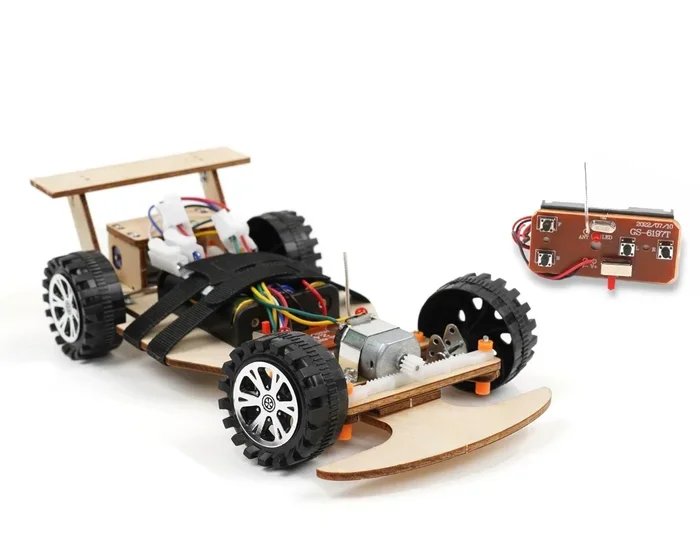
- Car chassis kit: This is the body and frame of your vehicle. You can buy pre-made RC car chassis kits online or from hobby shops. They come in various sizes and styles.
- DC motors: These are the engines that power your wheels. Most basic builds use two DC motors for differential steering.
- Servo motor: The servo handles steering. It connects to the front wheels and turns them left or right when you move the joystick.
- Radio transmitter and receiver pair: These are the communication devices. Make sure they are compatible and operate on the same frequency.
- Motor driver module: This acts as a bridge between your microcontroller and the motors. It handles the power and direction signals.
- Microcontroller: An Arduino Uno or Arduino Nano works perfectly for most remote control car projects. It processes inputs and sends commands to the motors.
- Battery pack: A rechargeable LiPo or AA battery pack powers everything. Choose one that matches your voltage requirements.
- Wires and connectors: You will need plenty of jumper wires, soldering wire, and heat shrink tubing.
- Soldering iron and solder: Clean connections are essential for a reliable wireless remote control car.
- Screwdriver set and pliers: Basic hand tools go a long way in assembly.
Quick Tips for Choosing Parts
When selecting parts for your remote control car build, quality matters more than quantity. Do not just grab the cheapest option. Look for parts with good reviews and reliable specifications. For the transmitter and receiver pair, brands like Flysky, FS-i6, or Sanwa are popular choices among hobbyists. For the motor driver, the L298N or L293D modules are beginner-friendly and widely available. If you are new to Arduino, start with an Arduino Uno. It has the most community support and tutorial resources online.
Also, pay attention to voltage compatibility. If your motor driver needs 5V but your battery outputs 12V, you will fry components. Always double-check the voltage and current ratings before connecting anything. This one simple habit will save you a lot of frustration.
Setting Up the Transmitter and Receiver
The transmitter and receiver pair is the heart of your wireless remote control car. Without a solid wireless connection, nothing else matters. Setting this up correctly from the start will make the rest of the build much smoother.
Installing the Transmitter
Your transmitter is the handheld remote control. Most hobby-grade transmitters come pre-assembled and ready to use. You just need to bind it to the receiver. Binding means pairing the two devices so they communicate on the same frequency and channel. To bind your radio transmitter to the receiver, follow these steps:
- Plug the bind plug into the bind pin on the receiver.
- Power on the receiver using the battery pack.
- Power on the transmitter.
- Wait for the LED on the receiver to stop blinking. This means the binding is complete.
- Remove the bind plug and test the controls.
Once bound, moving the joystick on your transmitter should change the channel values displayed on the receiver. You can check this using a simple Arduino sketch that reads the receiver inputs. This step confirms that your wireless remote control car communication link is working before you move on.
Installing the Receiver in the Car
The receiver sits inside the car and receives signals from the transmitter. Mount it securely using double-sided tape or a small bracket. Keep the antenna extended and away from metal parts, as metal can block radio signals. Solder the receiver output pins to the appropriate channels on your motor driver. Typically, you will connect the steering channel to one input and the throttle channel to another.
A pro tip is to use a separate power supply for the receiver if your motor driver shares power with the motors. Electrical noise from the motors can interfere with the receiver module and cause jittery controls. Adding a capacitor across the receiver power pins can help filter out this noise and keep your remote control vehicle running smoothly.
Building the Motor and Drivetrain System
With the wireless connection sorted, it is time to focus on movement. The drivetrain is what makes your DIY RC car actually go. This part of the build requires patience and attention to detail. One wrong wire, and your car will not move correctly, or worse, it could damage a component.
Connecting the DC Motors
Most basic wireless remote control car builds use two DC motors, one for each rear wheel. This setup is called differential drive. To turn, the car slows down or stops one wheel while the other keeps spinning. Here is how to connect them properly:
- Attach each DC motor to the chassis using the provided brackets and screws.
- Connect the positive wire of each motor to one output terminal on the motor driver.
- Connect the negative wire of each motor to the other output terminal on the motor driver.
- Connect the motor driver input pins to the Arduino. Typically, the left motor connects to pins 5 and 6, and the right motor connects to pins 9 and 10.
- Connect the motor driver power input to the battery pack, matching the voltage rating.
Before you close everything up, do a quick test. Upload a simple sketch to the Arduino that spins both motors forward for two seconds, then stops. If both wheels spin in the same direction at the same speed, your connections are correct. If one wheel spins backward, simply swap the wires for that motor on the motor driver output.
Setting Up the Servo for Steering
The servo motor controls the front wheels and allows your remote control car to turn left and right. Servos have three wires: power, ground, and signal. Connect the power wire to the 5V pin on the Arduino, the ground wire to GND, and the signal wire to a digital pin, usually pin 3 or 10. Mount the servo horn to the steering linkage on the front axle, and make sure the wheels can turn freely without hitting the chassis.
Test the servo by uploading a sketch that moves it to 90 degrees (center), then 0 degrees (full left), then 180 degrees (full right). Adjust the physical linkage if the wheels do not turn far enough in either direction. A well-tuned steering system makes a huge difference in how your wireless remote control car handles on the road or the floor.
Wiring Everything Together with Arduino
This is where your remote control car build really comes together. The Arduino acts as the brain of your vehicle. It reads signals from the receiver and translates them into motor movements. Getting the wiring right is the most important part of the entire process.
Creating the Wiring Diagram
Start by placing the Arduino, motor driver, receiver, and battery pack on the chassis. Arrange them so nothing is cramped or hanging loosely. Here is a simplified wiring overview:
- Receiver to Arduino: Connect the receiver output pins to the Arduino digital input pins. The steering channel goes to one pin, and the throttle channel goes to another.
- Arduino to Motor Driver: Connect the Arduino digital output pins to the motor driver input pins. These control the direction and speed of each motor.
- Motor Driver to Motors: Connect the motor driver output terminals to the DC motors.
- Servo to Arduino: Connect the servo signal wire to a PWM-capable digital pin on the Arduino.
- Power Connections: Connect the battery pack to the motor driver power input. Connect the Arduino power pin to a regulated 5V source, or use the USB connection during testing.
Take your time with this step. Double-check every connection before powering on. A single crossed wire can cause a short circuit. If you are unsure, use a multimeter to test continuity. This small habit will protect your components and keep your wireless remote control car project safe.
Programming the Arduino
Writing the code for your DIY RC car might sound intimidating, but it is simpler than you think. The basic logic is straightforward. The Arduino reads the receiver signal values, maps them to motor speeds, and sends commands to the motor driver and servo. Here is a high-level breakdown of what the code does:
- Read the steering value from the receiver and map it to a servo angle between 0 and 180 degrees.
- Read the throttle value from the receiver and map it to motor speed values between 0 and 255.
- Use the motor driver to set the direction and speed of each wheel based on the throttle input.
- Combine steering and throttle so the car can turn while moving.
There are many free Arduino sketches available online for RC car projects. You can start with a basic sketch and modify it as you learn. The key is to test one function at a time. Get the steering working first, then add the motors. This incremental approach makes debugging much easier.
Assembling and Testing Your Wireless Remote Control Car
Now comes the exciting part. You have all the parts, the wiring is done, and the code is loaded. It is time to put everything together and see your wireless remote control car in action.
Final Assembly Steps
Begin by securing all components to the chassis. Use screws, double-sided tape, or zip ties to keep everything in place. The battery pack should be centered for balanced weight distribution. The Arduino and motor driver can be mounted on top of the chassis using a small piece of perfboard or a mounting bracket. Make sure no wires are hanging where they could get caught in the wheels or tangled in the moving parts.
Attach the wheels to the axles and make sure they spin freely. Check that the front wheels are aligned properly with the servo linkage. A misaligned steering system will cause the car to pull to one side or the other. Adjust the servo horn position until the car drives straight when the joystick is centered.
Testing and Troubleshooting
Before you take your remote control vehicle for a spin, run a series of tests. Start by powering on the car and the transmitter separately. Check that the receiver LED lights up and responds to joystick movements. Then test each function individually:
- Test steering left and right without the motors running.
- Test forward and backward movement with the steering centered.
- Test turning while moving forward.
- Test turning while moving backward.
If something does not work as expected, do not panic. Troubleshooting is a normal part of any electronics project. Common issues include reversed motor directions, unresponsive steering, or intermittent signal loss. For reversed motors, simply swap the wires. For unresponsive steering, check the servo connection and the receiver channel assignment. For signal issues, make sure the antenna is fully extended and positioned away from metal objects.
Once all tests pass, take your wireless remote control car for a test drive. Start in an open indoor space with no obstacles. Gradually increase the speed and test the turning radius. You will likely need to fine-tune the code to get the steering sensitivity and acceleration just right. This process of testing and adjusting is part of the fun.
Upgrading Your Wireless Remote Control Car
Once your basic wireless remote control car is working, you can start thinking about upgrades. This is where the project becomes truly personal. Here are some popular enhancements that can take your build to the next level.
Adding LED Lights
Connecting LED lights to your DIY RC car is a great first upgrade. You can add headlights in the front and taillights in the back. Use a simple transistor circuit or connect them directly to Arduino digital pins through resistors. Program the lights to turn on when the car moves forward and flash when the car turns. This not only looks cool but also helps you see the car in low-light conditions.
Improving Signal Range
If you want your remote control car to go further, consider upgrading the antenna or switching to a higher-gain transmitter. A longer antenna or a directional antenna can significantly boost your signal range. Some hobbyists also use external amplifier modules to extend the range of their radio frequency link. Just be mindful of local regulations regarding radio transmission power.
Adding Sensors and Autonomous Features
For a more advanced challenge, you can add sensors to your wireless remote control car. An ultrasonic sensor can help the car detect obstacles and avoid them automatically. A gyroscope sensor can help with balance if you build a two-wheeled version. These upgrades transform your simple RC car into a smart vehicle that can navigate on its own. The Arduino platform makes adding sensors easy, with libraries and code examples available for nearly every sensor type.
Building a Better Body Shell
The chassis and electronics are the heart of your car, but the body shell is what gives it personality. You can 3D print a custom body, buy a pre-made shell, or even repurpose a plastic container. A well-designed body shell not only looks great but also protects the internal electronics from dust, bumps, and minor crashes. This is a great way to make your remote control vehicle truly one of a kind.
Common Mistakes to Avoid
Even experienced builders make mistakes. Knowing what to watch out for can save you time, money, and frustration. Here are the most common errors people make when building a wireless remote control car and how to avoid them.
- Skipping the planning phase: Rushing into wiring without a plan leads to messy connections and confusion. Always sketch out your wiring diagram first.
- Using mismatched voltage: Connecting a 12V motor to a 5V power supply will result in weak performance. Always match your component voltages.
- Ignoring signal interference: Placing the receiver antenna near the motor or battery can cause signal dropouts. Keep the antenna away from power components.
- Overloading the Arduino: Trying to power high-current devices directly from the Arduino pins will damage it. Always use a motor driver or relay for anything that draws significant current.
- Not testing incrementally: Connecting everything at once and powering up is a recipe for disaster. Test each subsystem separately before combining them.
- Forgetting to secure loose wires: Loose wires can get caught in wheels or short against metal parts. Use zip ties and electrical tape to keep everything neat.
Avoiding these mistakes will make your remote control car build much smoother and more enjoyable. Remember, every mistake is a learning opportunity. Even if something goes wrong, you will understand your build better after you fix it.
Expert Insights and Final Thoughts
Building a wireless remote control car is more than just a fun weekend project. It teaches you real skills in electronics, programming, and mechanical assembly. Many professional engineers and roboticists started their journey with a simple RC car build. The principles you learn here apply to countless other projects, from robotics to home automation.
One thing experienced builders always emphasize is patience. Do not rush the process. Take your time to understand each connection and each line of code. If something does not work, step back and troubleshoot systematically. The satisfaction of watching your own wireless remote control car drive across the floor for the first time is an incredible feeling. It is a moment of pride that comes from knowing you built it yourself.
As you gain confidence, challenge yourself with more complex builds. Try building a four-wheel-drive version, adding a camera for first-person view control, or creating an RC car that can follow a line on the ground. Each new project will build on the skills you developed with this first build. The world of RC hobby projects is vast and welcoming, and you are now part of it.
Start simple, stay curious, and enjoy the process. Your wireless remote control car is waiting to be built. Grab your tools, gather your parts, and bring your creation to life today.
Frequently Asked Questions
What is the easiest way to make a wireless remote control car at home?
The easiest way is to start with a pre-made RC car kit that includes a chassis, motors, and a transmitter-receiver pair. You can then add an Arduino or microcontroller to customize the controls. This approach gives you a working foundation without needing advanced electronics knowledge.
Do I need soldering skills to build a wireless remote control car?
Basic soldering skills are very helpful but not absolutely required. Many components use plug-in connectors or breadboard connections. However, soldering ensures secure and reliable connections, which is especially important for a moving vehicle that will experience vibrations. If you are new to soldering, practice on scrap wires first.
What type of battery is best for a DIY RC car?
A rechargeable LiPo battery is popular for its high energy density and lightweight design. However, AA battery packs or 18650 lithium-ion cells are great alternatives for beginners. The key is to match the battery voltage to your motor and motor driver specifications. Always use a battery with sufficient current capacity to power all components.
How far can a wireless remote control car go?
The range depends on your radio transmitter and receiver module. Basic 27 MHz or 49 MHz modules typically offer 100 to 300 feet of range. Advanced 2.4 GHz systems can reach 1,000 feet or more. Adding a better antenna or using a higher-power transmitter can further extend the range of your remote control vehicle.
Can a child build a wireless remote control car?
Yes, with adult supervision, children as young as 10 can build a simple wireless remote control car. Starter kits with plug-and-play components eliminate the need for soldering and complex wiring. It is a fantastic way to introduce kids to STEM concepts like electronics, programming, and mechanical engineering in a hands-on and fun way.
What should I do if my wireless remote control car does not move?
First, check that the battery is charged and properly connected. Then verify that the transmitter and receiver are bound and communicating. Use a multimeter to test for power at the motor driver and motor connections. If the Arduino is receiving receiver signals but the motors do not respond, the issue is likely in the code or the wiring between the Arduino and the motor driver. Systematically check each connection to find the problem.
=== CONCLUSION ===
Building a wireless remote control car is one of the most satisfying projects you can take on. You learn real skills, create something with your own hands, and end up with a vehicle you can proudly drive around. From choosing the right RC car kit to wiring the motor driver, programming the Arduino, and testing every function, each step brings you closer to a finished remote control vehicle that works exactly the way you want it to.
The process might seem challenging at first, but with patience and careful attention to detail, anyone can do it. Start with the basics, follow the steps in this guide, and do not be afraid to make mistakes. Every error is a chance to learn something new. Once your wireless remote control car is rolling, you will feel a sense of accomplishment that is hard to beat. So gather your parts, fire up your soldering iron, and start building today.