How to Connect a Garage Door Opener Without a Remote
Learning how to connect a garage door opener without a remote is easier than most homeowners think. You can use your wall control panel, a universal remote, or a smart keypad to keep your garage door working smoothly. This guide walks you through every method with clear, step-by-step instructions. Whether you lost your remote or just bought a new opener, you will find practical solutions here.
Have you ever walked out to your car only to realize your garage door remote is missing? It happens to the best of us. Maybe it fell out of your pocket, or maybe the batteries just died at the worst possible moment. Whatever the reason, knowing how to connect a garage door opener without a remote is a skill every homeowner should have.
The good news is that you do not need a remote to operate your garage door opener. There are several straightforward methods you can use right now. From your wall control panel to a universal remote or even a smart keypad, the options are simpler than you might expect. In this guide, we will walk you through each method step by step. You will learn how to get your garage door working again quickly and easily.
We have designed this article to be practical and easy to follow. No confusing jargon here. Just clear instructions, helpful tips, and real-world advice you can use today. Let us dive in and get your garage door connected again.
Key Takeaways
- Wall control panel programming lets you operate your opener directly from inside your garage.
- Universal remotes work with most opener brands and are an affordable replacement option.
- Keypad entry systems offer keyless access and add convenience and security to your home.
- Smart garage opener technology allows app-based and voice-controlled operation.
- Common connection mistakes can usually be fixed with a simple reset or repositioning step.
- Regular maintenance keeps your garage door opener running reliably for years.
- Knowing when to call a professional saves time and prevents costly damage to your system.
📑 Table of Contents
- Understanding Your Garage Door Opener System
- How to Connect a Garage Door Opener Without a Remote Using the Wall Control Panel
- Programming a Universal Remote as an Alternative
- Using a Keypad Entry System for Keyless Access
- Smart Garage Opener Options for Modern Homes
- Troubleshooting Common Connection Issues
- Expert Insights and Maintenance Tips
Understanding Your Garage Door Opener System
Before we jump into the connection methods, it helps to understand how your garage door opener actually works. A basic garage door opener system has a few key parts that work together. The motor unit mounted on your ceiling is the brain of the operation. It receives signals and sends power to move the door up or down. The remote control sends a wireless signal to the motor unit. The wall control panel sits inside your garage and lets you operate the door from inside. And the safety sensors near the bottom of your door track prevent the door from closing on objects or people.
When you lose your remote, you are really just missing one piece of the puzzle. The rest of the system is still fully functional. Understanding this makes the whole process much less stressful. You are not trying to fix something broken. You are simply finding an alternative way to send the signal that tells your opener to work.
Why You Might Lose Your Remote
There are many reasons your remote might not be working or might be missing entirely. Sometimes the batteries simply die, and you cannot find the right replacement right away. Other times, the remote gets lost in the couch cushions or left behind at a friend’s house. In some cases, the remote gets damaged from drops or exposure to moisture. And occasionally, the opener itself needs to be reprogrammed after a power outage or electrical surge.
Whatever the cause, the solution is the same. You need to connect your garage door opener using a method that does not rely on the original remote. This is where the methods in this guide come in handy. Each one gives you a reliable way to control your door without that small handheld device.
How to Connect a Garage Door Opener Without a Remote Using the Wall Control Panel
The wall control panel is the most direct way to operate your garage door opener without a remote. Every garage door opener system comes with one of these panels installed inside your garage. It usually mounts near the door track on the wall at about five feet high. The panel has one or more buttons that send a direct signal to the motor unit.
If your wall panel is already installed and working, you are already halfway there. Simply press the button to open or close your door. But what if the wall panel is not working, or you need to connect a new one? Here is how to handle both situations.
Step-by-Step Wall Panel Programming
Follow these steps to connect or reconnect your wall control panel to the garage door opener:
- Locate the motor unit. This is the box mounted on your ceiling near the garage door. It should have a light on it and a series of buttons or terminals on the back or side.
- Find the learn button. On most openers, this button is located on the back or side of the motor unit. It is often colored — red, orange, green, or purple — and may be hidden behind a light cover or small panel.
- Press and release the learn button. You will usually hear a beep or see a light flash. This tells the opener it is ready to accept a new signal.
- Go to your wall panel. Within about 30 seconds, press and hold the button on your wall control panel for two to three seconds.
- Release the button. The motor unit light should flash, or you will hear a click. This confirms the wall panel is now connected.
- Test the connection. Press the wall panel button. Your garage door should respond by moving up or down.
If your door does not move, do not worry. Simply repeat the steps. Sometimes the timing between pressing the learn button and using the wall panel needs to be a little faster. Try again, and you should be good to go.
Quick Tips for Wall Panel Setup
- Keep your wall panel wiring connections tight. Loose wires are a common cause of connection failures.
- If you have a newer smart opener, the learn button process may also include a smartphone app setup step.
- Make sure your garage door is fully closed before programming. This ensures the safety sensors are not blocking the connection process.
- Label your wall panel wires when you install it. This saves you time if you ever need to troubleshoot later.
Programming a Universal Remote as an Alternative
A universal remote is one of the easiest and most affordable ways to replace a lost or broken garage door remote. These remotes work with most garage door opener brands, including LiftMaster, Chamberlain, Craftsman, and Genie. You can buy a universal remote at most hardware stores for under $30. They are a great backup to keep in your car or give to a family member.
Choosing the Right Universal Remote
Not all universal remotes work with every opener. Before you buy one, check the compatibility list on the packaging. Look for the brand and model number of your garage door opener motor unit. This information is usually printed on a sticker on the motor unit itself. Match it to the remote’s compatibility list to make sure it will work.
Some universal remotes come pre-programmed for certain brands. Others require you to enter a code or follow a programming sequence. The ones that require a code are slightly more work, but they are still very manageable. If you are unsure which remote to buy, a quick call to the manufacturer of your opener can help you find the right match.
Programming Steps for Universal Remotes
Here is how to program a universal remote to connect to your garage door opener:
- Press and hold the learn button on your garage door motor unit until the light blinks.
- Release the learn button. You typically have about 30 seconds to complete the next step.
- On the universal remote, press and hold the button you want to use for your garage door.
- Point the remote at the motor unit and release the button after about three seconds.
- Wait for the motor unit light to flash or hear a click. This confirms the remote has been programmed.
- Test the remote by standing a safe distance away and pressing the button. Your door should respond.
Most universal remotes can store codes for two or three different opener systems. This is handy if you have multiple garage doors or if you want a spare remote for a family member. Just repeat the programming steps for each button on the remote.
Using a Keypad Entry System for Keyless Access
A keypad entry system is a fantastic alternative to a remote. It mounts on the outside of your garage wall near the door. You simply enter a personal identification number, or PIN, to open or close your garage door. This method is especially useful if you frequently let in dog walkers, babysitters, or delivery people. You do not have to hand out physical remotes or worry about them getting lost.
Installing and Setting Up a Keypad
Most keypad systems are designed for easy DIY installation. They typically mount on the exterior wall beside your garage door using screws or adhesive strips. The wiring connects to the motor unit just like a wall control panel does. Here is a general setup process:
- Choose a location on the exterior wall near your garage door. Make sure it is at a comfortable height and protected from direct rain.
- Mount the keypad using the included screws or mounting tape.
- Connect the wires from the keypad to the garage door motor unit. Match the color-coded wires to the same terminals used by your wall control panel.
- Press the learn button on the motor unit until the light blinks.
- Enter your desired PIN on the keypad within the programming window.
- Press the enter or OK button. The motor unit should confirm the connection with a beep or light flash.
- Test the keypad by entering your PIN and pressing enter. The door should respond.
Keypads are a great addition to any garage door system. They add convenience and security without requiring a remote at all. Many modern keypads also include rolling code technology, which changes your access code each time you use it for extra safety.
Benefits of Keypad Entry
- No remote needed. You never have to worry about losing or replacing a handheld remote again.
- Easy to share access. You can give different PINs to different people and change them anytime.
- Weather resistant. Most keypads are built to handle rain, snow, and extreme temperatures.
- Works with smart openers. Many keypads now integrate with smart home systems and apps.
Smart Garage Opener Options for Modern Homes
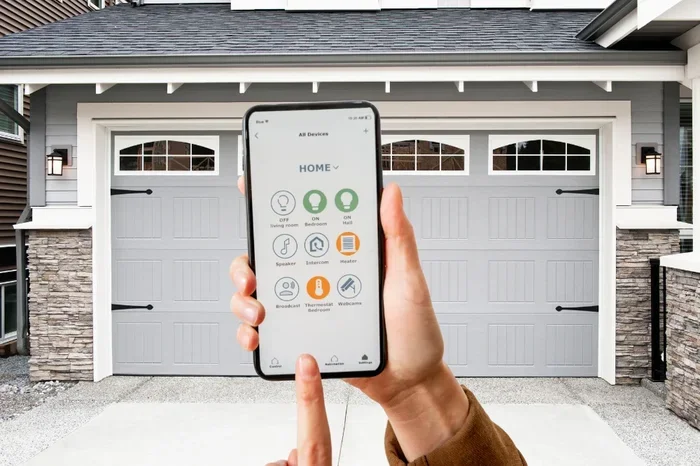
If your garage door opener is relatively new, it may already have smart features built in. Many modern openers come with Wi-Fi connectivity and work with smartphone apps. These smart openers let you control your garage door from anywhere with an internet connection. You can open it for a delivery driver, check if you left it open while at work, or even integrate it with voice assistants like Alexa or Google Home.
Wi-Fi Enabled Openers and Apps
To connect a smart garage door opener without a remote, you typically need to download the manufacturer’s app. Popular brands like Chamberlain myQ, LiftMaster, and Genie all have their own apps. Here is the general process:
- Download the app from the App Store or Google Play Store on your smartphone.
- Create an account with the manufacturer using your email address.
- Follow the in-app instructions to connect your opener to your home Wi-Fi network.
- Press the learn button on your motor unit when prompted by the app.
- Wait for the app to confirm the connection. This usually takes less than a minute.
- Test the app control. Use the app to open or close your garage door from your phone.
Smart openers are incredibly convenient. They give you full control over your garage door without ever needing a physical remote. You can also receive notifications when someone opens or closes the door, which adds an extra layer of home security.
Voice Control Integration
Once your smart opener is connected to the app, you can link it to voice assistants. This means you can say something like, “Hey Google, open the garage door,” and it will happen. It is a hands-free way to operate your door that works beautifully when your hands are full of groceries or other items.
Voice control is just one more way to connect and operate your garage door opener without a traditional remote. It fits right into the modern smart home ecosystem and makes daily life a little more convenient.
Troubleshooting Common Connection Issues
Even when you follow the steps correctly, sometimes things do not go as planned. Your garage door opener might not respond, or the connection might drop unexpectedly. This section covers the most common issues and how to fix them quickly.
When the Opener Won’t Respond
If your garage door opener does not respond after programming, try these troubleshooting steps:
- Check the power source. Make sure the motor unit is plugged in and receiving power. Check your garage circuit breaker too.
- Replace the batteries. If you are using a remote or keypad, dead batteries are the most common culprit.
- Reposition the antenna. The antenna wire on your motor unit should hang down freely. If it is bent or pushed back, it can weaken the signal.
- Reprogram from scratch. Sometimes clearing the existing codes and starting fresh solves the problem. Just press the learn button again and repeat the programming steps.
- Check for interference. Other wireless devices nearby can sometimes cause signal conflicts. Move any nearby routers or electronic devices away from the motor unit.
Common Mistakes to Avoid
Here are some mistakes homeowners often make when connecting a garage door opener without a remote:
- Rushing the learn button timing. You need to press the learn button and then complete the next step within the short window. Take your time.
- Forgetting to close the door first. Some openers will not allow programming if the door is not fully closed. Always start with a closed door.
- Using the wrong wall panel wires. If you are wiring a new panel, double-check that your connections match the wiring diagram in your owner’s manual.
- Ignoring the safety sensors. If your safety sensors are misaligned or blocked, the door will not respond to any signal — remote or otherwise.
- Not updating firmware. Smart openers sometimes need firmware updates to work properly with apps. Check the manufacturer’s website for updates.
Expert Insights and Maintenance Tips
Keeping your garage door opener connected and working well is not just about programming. Regular maintenance plays a big role too. A well-maintained opener lasts longer, runs more quietly, and stays reliable when you need it most.
Keeping Your Opener in Top Shape
Here are some simple maintenance tips every homeowner should follow:
- Lubricate moving parts. Use a silicone-based lubricant on the chain or belt, rollers, and hinges every few months.
- Tighten hardware. Over time, vibration can loosen bolts and brackets on the opener and door track. Check them periodically.
- Test the safety sensors. Every month, place an object in the door’s path and verify that the door reverses when it hits the object.
- Replace batteries in remotes and keypads. Set a reminder to change batteries once a year to avoid unexpected failures.
- Clean the motor unit. Dust and debris can build up on the motor and sensors. A quick wipe-down keeps everything running smoothly.
When to Call a Professional
Most garage door opener connection tasks are simple enough for a homeowner to handle. But there are times when calling a professional makes sense. If you have tried all the steps above and your door still does not respond, there may be a deeper electrical or mechanical issue. Similarly, if you are uncomfortable with wiring or working on a ladder, it is always okay to call in an expert. A professional technician can diagnose and fix the problem safely and quickly.
The bottom line is that knowing how to connect a garage door opener without a remote gives you peace of mind. You are never truly stuck, even when your remote goes missing or stops working. With the methods in this guide, you can confidently take control of your garage door system using alternative approaches that work just as well.
Start with the wall control panel since it is already built into your system. Then consider adding a universal remote, keypad, or smart app as a backup or upgrade. Each option adds convenience and reliability to your daily routine. Keep your opener well-maintained, and it will serve you faithfully for many years to come.
Take a few minutes today to review these methods and make sure you have a backup plan in place. Your future self will thank you the next time your remote disappears or the batteries die at the worst possible moment. Stay prepared, stay connected, and keep your garage door running smoothly no matter what.
Frequently Asked Questions
Can I connect a garage door opener without a remote if I don’t have a wall panel?
Yes, you can. A universal remote or a smart keypad can connect directly to your motor unit without needing the original wall panel. Just use the learn button on your motor unit to program the new device. This works with most garage door opener brands and models.
How do I know which universal remote will work with my opener?
Check the compatibility list on the universal remote packaging. Match it to your opener brand and model number, which is usually found on a sticker on the motor unit. Most universal remotes are clearly labeled for LiftMaster, Chamberlain, Craftsman, and Genie openers.
Is it safe to program a garage door opener myself?
Absolutely. Programming your opener using the wall panel, a universal remote, or a keypad is completely safe and designed for homeowners to do on their own. Just follow the manufacturer’s instructions carefully, and make sure your garage door is fully closed during the process.
Why does my garage door opener keep losing its connection?
This can happen if the learn button programming times out, if the antenna wire is damaged or bent, or if there is interference from nearby wireless devices. Reprogramming the device and checking the antenna wire usually fixes the issue. If the problem persists, the motor unit may need professional inspection.
Can I use my smartphone to control my garage door without a remote?
Yes, if you have a smart garage door opener with Wi-Fi capability. Download the manufacturer’s app, connect it to your home network, and use the learn button to pair the app with your motor unit. This gives you full remote control from anywhere with internet access.
How often should I change the batteries in my garage door remote or keypad?
It is a good practice to replace batteries once a year. If you notice your remote or keypad becoming sluggish or unresponsive, the batteries are likely low. Changing them regularly prevents unexpected failures and keeps your system working reliably.
=== CONCLUSION ===
Knowing how to connect a garage door opener without a remote is one of those practical skills that saves time, money, and frustration. Whether you use the wall control panel already installed in your garage, program a universal remote as a backup, set up a keypad for keyless entry, or take advantage of smart app controls, you have plenty of options. Each method is straightforward and achievable with basic tools and a few minutes of your time.
Remember to keep your opener well-maintained with regular lubrication, hardware checks, and safety sensor tests. And do not hesitate to call a professional if you run into issues you cannot resolve on your own. With the knowledge in this guide, you are fully equipped to keep your garage door system running smoothly — no remote required.