How Do You Turn Off the Maintenance Light After Oil Change
After an oil change, the maintenance required light often stays on and needs a manual reset. This guide shows you how to turn off the maintenance light after oil change using simple button combos, steering wheel controls, or an OBD-II scanner. You’ll learn model-specific steps, avoid common mistakes, and get the light off in minutes.
You just got your oil changed, and you’re feeling great. But then you glance at the dashboard and see that annoying maintenance required light still glowing at you. It’s a moment that catches so many drivers off guard. If you’ve been asking yourself how do you turn off the maintenance light after oil change, you’re in exactly the right place. I’ll walk you through every method, from simple button combos to using a scanner, so you can get that light off and get back on the road with confidence.
The good news is that turning off the maintenance light is usually a quick fix. Most cars let you reset the light in under two minutes. You just need to know the right steps for your vehicle. In this article, I’ll show you the universal method that works for many models. I’ll also cover specific instructions for popular brands like Toyota, Honda, and Ford. Plus, I’ll share tips on using an OBD-II scanner if the button method doesn’t work. By the end, you’ll know exactly how to handle this yourself and save a trip to the dealer.
Key Takeaways
- The maintenance light is a service reminder: It tells you an oil change is due based on driving conditions, not a broken part.
- Most cars reset with a button combo: The trip odometer or steering wheel controls work for Toyota, Honda, Ford, and many others.
- An OBD-II scanner is a universal fix: It works for any vehicle made after 1996 and is perfect for tricky models.
- Model-specific steps vary: Always check your owner’s manual for the exact sequence, especially for luxury brands like BMW and Mercedes.
- Common mistakes keep the light on: Using the wrong ignition position, not holding the button long enough, or skipping the reset entirely are the top culprits.
- Reset only after a real oil change: Never reset the light if the oil wasn’t changed. The system tracks your actual service interval.
📑 Table of Contents
- Why Does the Maintenance Required Light Come On?
- How Do You Turn Off the Maintenance Light After Oil Change? The Simple Guide
- Model-Specific Reset Instructions
- Using an OBD-II Scanner to Turn Off the Maintenance Light
- Common Mistakes That Keep the Maintenance Light On
- What to Do If the Maintenance Light Won’t Turn Off
Why Does the Maintenance Required Light Come On?
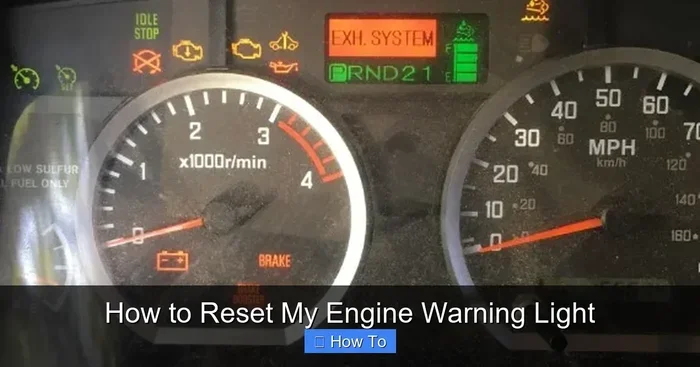
Before we dive into the reset process, it helps to understand what this light actually means. The maintenance required light is part of your car’s oil life monitoring system. It’s not a warning that something is broken. Instead, it’s a friendly reminder that your vehicle is due for an oil change based on driving conditions. The system tracks engine revolutions, temperature, and time since the last service. When it reaches a set interval, it triggers the light.
Many people confuse this light with the check engine light. They are very different. The check engine light signals a serious problem. The maintenance light is just a scheduled service reminder. Some cars also display an oil change indicator or a wrench symbol. The light might say “MAINT” or “SERVICE.” Whatever the label, the reset process is the same once the oil is fresh. The service interval is pre-programmed by the manufacturer, and the system counts down from 100% oil life to zero.
How Do You Turn Off the Maintenance Light After Oil Change? The Simple Guide
Now for the main event. How do you turn off the maintenance light after oil change? The answer depends on your car’s make and model. However, most vehicles share a similar approach using the trip odometer or steering wheel controls. I’ll cover the universal steps first, then dive into specifics.
The Universal Reset Method (Works for Most Cars)
This method works for many Toyota, Honda, and older models. You’ll need to access the trip odometer. Here are the steps:
- Turn the ignition to the “ON” position. Do not start the engine. Just press the start button once or turn the key to “ON.”
- Locate the trip odometer button. It’s usually on the dashboard or steering wheel. Press and hold it.
- While holding the button, turn the ignition off and then back to “ON.” Keep holding the button for about 10 to 15 seconds.
- Watch the display. The maintenance required light should start to flash.
- Release the button. The light should now be off. Turn the ignition off and then on again to confirm.
If the light stays on, don’t worry. I’ll cover model-specific methods next. This universal method is a great starting point for how do you turn off the maintenance light after oil change on many older vehicles.
Using the Steering Wheel Controls (Modern Cars)
Many newer cars use steering wheel buttons or the information display. The process is slightly different but just as simple. For example, in many Ford and Chevrolet models, you press the menu button on the steering wheel. You navigate to the “Vehicle Info” or “Maintenance” menu. Then you select “Reset Service” and hold the button until the light changes. This method is common in vehicles with digital dashboards. The reset maintenance light procedure is often buried in a submenu, so take your time looking through the options.
Quick Tips for a Smooth Reset:
- Make sure the car is stationary and the parking brake is on.
- Check your owner’s manual for the exact button sequence. It’s your best friend.
- Perform the reset right after the oil change. The system needs to know the service was done.
- Use the correct ignition position. “ON” means the electronics are powered, but the engine is off.
- Count slowly when holding the button. Some cars need 15 to 20 seconds for the flash to start.
Model-Specific Reset Instructions
Every car brand has its own quirks. Here’s how to reset the maintenance light for some of the most popular brands. These steps are based on common procedures and may vary slightly by model year.
Toyota and Lexus
Toyota and Lexus use a trip meter reset method. Turn the ignition to “ON.” Press and hold the trip meter reset button (the small button on the instrument cluster). Then turn the ignition to “OFF” and back to “ON” while still holding the button. Hold it for about 10 seconds. The maintenance light reset will flash and then go out. Release the button. This is the most common procedure for Toyota vehicles. For Lexus models, the process is identical because they share the same platform.
Honda and Acura
Honda models often use the steering wheel controls. Turn the ignition to “ON” (not started). Press and hold the “Select” button on the steering wheel until the maintenance light blinks. Then release it. Turn the ignition off and on again. The light should be off. For some older Hondas, you might need to use the trip odometer button instead. The oil life system reset is very similar across Honda models. Acura follows the same pattern, though the menu names might say “Acura” instead of “Honda.”
Ford and Lincoln
Ford vehicles use the information display. Turn the ignition to “ON.” Use the steering wheel arrows to navigate to “Settings” then “Vehicle Health” or “Maintenance.” Select “Reset Maintenance” and hold the OK button. The light will turn off. This method works for most Ford, Lincoln, and Mercury models. The service light reset is straightforward once you find the menu. If you have a Ford with a touchscreen, the path might be “Settings” > “Vehicle” > “Maintenance” > “Reset.”
Other Popular Brands
Chevrolet and GMC models often use the trip odometer method similar to Toyota. Turn the ignition to “ON,” press and hold the trip odometer button, cycle the ignition off and on, and hold until the light flashes. BMW and Mercedes-Benz use the iDrive or COMAND systems. For BMW, press the menu button, go to “Vehicle Info,” then “Service,” and select “Reset.” For Mercedes, use the steering wheel controls to navigate to “Service” > “Reset.” These luxury brands may require a slightly longer hold time.
Comparison Table: Reset Methods by Brand
| Brand | Reset Method | Time Required |
|---|---|---|
| Toyota / Lexus | Trip meter button hold during ignition cycle | 1-2 minutes |
| Honda / Acura | Steering wheel “Select” button or trip odometer | 1-2 minutes |
| Ford / Lincoln | Information display menu navigation | 2-3 minutes |
| Chevrolet / GMC | Trip odometer button or steering wheel menu | 2 minutes |
| BMW | iDrive menu: Vehicle Info > Service > Reset | 3 minutes |
| Mercedes-Benz | Steering wheel controls: Service > Reset | 2 minutes |
This table gives you a quick view of the most common reset maintenance light procedures. Always double-check with your owner’s manual for the exact steps. The vehicle-specific method is the most reliable way to avoid frustration.
Using an OBD-II Scanner to Turn Off the Maintenance Light
If the button method doesn’t work for your car, an OBD-II scanner is your best bet. A scanner is a small diagnostic tool that plugs into your car’s computer. It can read and clear maintenance codes. This method works for almost any vehicle made after 1996.
What Is an OBD-II Scanner?
An OBD-II scanner connects to the diagnostic port under your steering column. It talks to your car’s onboard computer. You can buy a basic scanner for under $30. Some advanced scanners also read live data and check other systems. For resetting the maintenance light, a basic scanner is enough. You don’t need an expensive dealership tool. The scanner reads the diagnostic trouble code related to the maintenance reminder and clears it.
How to Use the Scanner
- Locate the OBD-II port. It’s usually under the dashboard on the driver’s side.
- Plug the scanner into the port. The car’s computer will power on automatically if the ignition is in the “ON” position.
- Turn on the scanner and select “Read Codes” or “Maintenance Reset.”
- Follow the on-screen prompts to clear the maintenance code.
- Once cleared, turn the ignition off and on. The light should be gone.
Using a scanner is a foolproof way to turn off the maintenance light if you’re uncomfortable with button combinations. Many auto parts stores will do this for free if you buy the oil from them. But doing it yourself is quick and easy once you try it. It’s a great diagnostic tool to have in your garage.
Common Mistakes That Keep the Maintenance Light On
Sometimes the light stays on even after you think you’ve reset it. I see this often, and it’s usually a simple fix. Here are the most common mistakes people make when trying to reset their maintenance light.
Skipping the Reset Step Entirely
The most obvious mistake is forgetting to reset the light at all. Many people change the oil and assume the light will turn off by itself. It won’t. The oil life system needs a manual reset to tell it the service was completed. If you don’t reset it, the light will stay on and the oil life percentage won’t update. This is the number one reason the maintenance required light persists after an oil change.
Turning the Ignition in the Wrong Position
You must turn the key or press the start button to the “ON” position, not “START.” “ON” powers the electronics but doesn’t crank the engine. If you accidentally start the engine during the reset, you may need to start over. The sequence must be precise: ON, hold button, OFF, ON, hold, release. This is a common maintenance required light reset pitfall that trips up many DIYers.
Not Holding the Button Long Enough
Timing matters. You need to hold the button for 10 to 15 seconds while cycling the ignition. If you release too early, the system won’t register the reset. Count slowly in your head. Some cars require up to 20 seconds. Be patient and keep holding until you see the light flash.
Ignoring a Real Problem
The maintenance light is a reminder, but sometimes it can indicate a real issue. If the light flashes instead of staying solid, it might signal a fault. If the light comes back immediately after resetting, there could be an underlying problem with the oil pressure sensor or the oil life system. Don’t ignore that. Check your oil level and condition first. A dashboard warning light that won’t stay off is always worth investigating.
Expert Insight: Always check your oil level with the dipstick before resetting the light. If the oil is low, the light might return within a few days. A proper oil change includes checking the level and topping it off if needed. This simple habit prevents the light from coming back and keeps your engine healthy.
What to Do If the Maintenance Light Won’t Turn Off
If you’ve tried the reset steps and the light is still on, don’t panic. There are a few things you can check before visiting a mechanic. Most of the time, it’s a simple fix.
Check the Oil Level and Condition
Open the hood and check the oil dipstick. Is the oil at the full mark? Does it look clean and amber? If the oil is dark and gritty, the change might not have been done correctly. Low oil can also trigger a warning. Top off the oil if needed and try resetting again. This often solves the problem and keeps your oil change indicator happy.
Try a Different Reset Method
Some cars have multiple reset procedures. For example, some Toyota models require you to hold the trip button for 15 seconds, while others need you to press it three times quickly. Check online forums or your owner’s manual for alternative methods. A quick search for your specific model and “maintenance light reset” will give you the exact steps. The button combination can vary even within the same brand across different years.
Use a Different Scanner or Tool
If you used a cheap scanner that couldn’t clear the code, try a different one. Some basic scanners only read codes, they don’t clear maintenance lights. Look for a scanner that specifically says it can reset service intervals. You can also visit an auto parts store like AutoZone or O’Reilly. They often have professional-grade scanners that can clear the light for free. This is a great option if you don’t want to buy a scanner.
Visit a Mechanic or Dealer
Sometimes the issue is deeper. The oil life sensor might be faulty. The dashboard module might need a software update. If none of the above works, a professional mechanic can diagnose the problem. They have the tools and knowledge to fix it quickly. A visit to the dealer might be necessary for some luxury brands, but independent shops can usually handle it too. Don’t let a stubborn light keep you worrying.
Key Takeaway: The maintenance light is a reminder, not a reason to panic. In 95% of cases, a simple reset solves the problem. If not, a quick check of the oil level or a scanner usually does the trick. You now know exactly how do you turn off the maintenance light after oil change, and you’re ready to handle it like a pro.
Resetting the light after your oil change is a small but important step. It keeps your car’s service schedule accurate and gives you peace of mind. Take a moment to do it right after every oil change. Your future self will thank you when the dashboard stays quiet and your engine keeps running smoothly. Remember, the maintenance required light is just a friendly nudge, and you now have the power to dismiss it.
Frequently Asked Questions
Can I drive with the maintenance required light on?
Yes, you can drive safely. The light is just a reminder that an oil change is due. It doesn’t mean your car is broken or in danger. However, you should get the oil changed soon and reset the light to keep your maintenance schedule accurate.
Does resetting the maintenance light change the oil life percentage?
Yes, resetting the light also resets the oil life system back to 100%. The system starts counting down from the beginning based on your driving conditions. This ensures the next oil change reminder comes at the right time.
What if I don’t reset the light after an oil change?
The light will stay on and the oil life percentage won’t update. Over time, the reminder becomes annoying and you might ignore it when a real problem comes up. It’s best to reset it every time you change the oil so the system stays accurate.
Is there a difference between the maintenance required light and the check engine light?
Yes, a big difference. The maintenance light is a scheduled service reminder. The check engine light signals a serious engine or emissions problem. If the check engine light is on, you should have the car inspected right away. The maintenance light is much less urgent.
How often should I reset the maintenance light?
You should reset it every single time you get an oil change or a scheduled service. The light is designed to remind you of the next service interval. Resetting it keeps the system in sync with your actual maintenance schedule.
Can I use a smartphone app to reset the maintenance light?
Some apps can connect to your car’s OBD-II port via a Bluetooth adapter. They can read and clear certain codes, including maintenance reminders. However, not all apps work for all cars, and the process can be more complicated than using a physical scanner. A dedicated OBD-II scanner is usually more reliable.