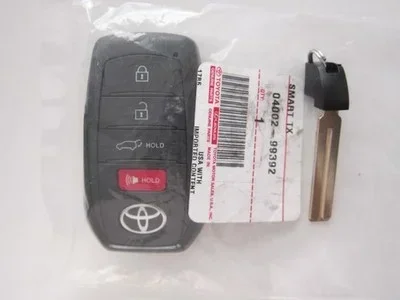
How Do You Reset the Key Fob on a Toyota Highlander
Resetting the key fob on a Toyota Highlander is a simple process that most owners can do at home. Whether your remote lock, push button start, or smart key system stops working, a quick reset often solves the problem. This guide walks you through every method step by step. You will learn how to replace the battery, reprogram the fob, and troubleshoot common issues. By the end, your Toyota Highlander key fob will work like new again.
Have you ever stood by your Toyota Highlander, pressing the remote lock button over and over, hoping it would respond? It is frustrating when your Toyota Highlander key fob suddenly stops working. The good news is that you do not need to panic or rush to the dealer. How Do You Reset the Key Fob on a Toyota Highlander? In most cases, the answer is simpler than you think.
This guide covers everything you need to know about resetting your key fob. We will walk you through each method in plain language. You will also learn how to replace the battery, fix common problems, and prevent issues in the future. Whether you drive a 2010 model or a brand new 2024 Highlander, this article has you covered. Let us get your remote key fob working again.
Key Takeaways
- Easy DIY Reset: Most key fob resets on a Toyota Highlander can be done at home with no special tools.
- Battery Swap Matters: A dead CR2032 battery is the number one cause of key fob problems.
- Multiple Reset Methods: You can reset using the emergency key, the vehicle console, or the fob buttons themselves.
- Smart Key System Basics: Understanding how your Toyota smart key works helps you fix issues faster.
- Know When to Call a Pro: Some situations require a Toyota dealer or a locksmith for proper key fob programming.
- Prevention is Simple: Regular maintenance and proper handling prevent most key fob issues.
- Aftermarket Options Exist: Replacement fobs are available outside the dealer at lower prices.
📑 Table of Contents
- Understanding Your Toyota Highlander Key Fob
- How to Reset the Key Fob on a Toyota Highlander
- Key Fob Battery Replacement Guide
- When to Seek Professional Help
- Preventing Key Fob Problems
- Troubleshooting When the Fob Still Does Not Work
- Key Fob Programming for Additional Remotes
- Key Takeaways
- Frequently Asked Questions
- Conclusion
Understanding Your Toyota Highlander Key Fob
Before you dive into the reset process, it helps to understand what you are working with. The Toyota Highlander uses a smart key system that lets you lock, unlock, and start the vehicle without removing the fob from your pocket. This system is convenient, but it can also confuse owners when things go wrong.
The key fob communicates with the car using a small radio signal. When the signal gets interrupted, the Toyota smart key may not respond. This does not always mean the fob is broken. Often, it just needs a reset or a fresh battery.
How the Smart Key System Works
The smart key system uses a small chip inside the fob. This chip sends a unique code to the car’s immobilizer. If the code matches, the engine starts. If something disrupts this connection, the key fob troubleshooting process begins. Common causes include a dead battery, signal interference, or a need to resync the fob.
Toyota has refined this system over the years. Newer models use encrypted signals that are harder to hack. However, this also means the fob needs proper programming to work correctly. Understanding this basic concept makes the reset process much easier to follow.
Common Key Fob Issues
Before you try resetting, let us look at the most common problems. Identifying the issue saves you time and effort.
- Remote lock and unlock fail: The buttons do nothing when pressed.
- Push button start does not respond: The engine will not start even with the fob inside the car.
- Intermittent signal loss: The fob works sometimes but not others.
- Warning light on the dashboard: A key icon or message appears on the display.
- Short range: The fob only works when you are very close to the vehicle.
- Buttons feel sticky or unresponsive: Physical wear makes the fob hard to use.
If any of these sound familiar, you are in the right place. The next sections show you exactly how to fix them.
How to Reset the Key Fob on a Toyota Highlander
How Do You Reset the Key Fob on a Toyota Highlander? There are three main methods. Each one works for different situations. Let us go through them one by one.
Method One: Reset Using the Emergency Key
Every Toyota Highlander comes with a hidden emergency key inside the fob. This metal key is your backup when the remote stops working. You can use it to access the vehicle and begin the reset process.
First, locate the small release button on the side of the fob. Press it, and the metal key slides out. Use this key to open the driver’s door manually. Once inside, sit in the driver’s seat and insert the key into the ignition.
Turn the ignition to the “On” position without starting the engine. Wait about 10 seconds. Then, turn it back to “Off.” Press the lock button on the fob while the key is in the “On” position. This simple action often resets the connection between the fob and the car.
Step out of the vehicle and close all doors. Press the lock button on the fob from outside. If the doors lock and you hear the confirmation beep, the reset worked. Try starting the engine with the push button start to confirm everything is back to normal.
Method Two: Reset Through the Vehicle Console
Some Toyota Highlander models allow you to reset the key fob through the vehicle’s information display. This method works well when the fob has lost its programming after a battery change.
Sit in the driver’s seat and close all doors. Turn the ignition to the “On” position. Look at the dashboard display. Navigate to the “Setup” or “Settings” menu using the steering wheel controls.
Find the “Key Fob” or “Smart Key” option. Select “Register Key” or “Reset Key.” Follow the on-screen prompts. The system will ask you to press buttons on the fob. Hold the lock and unlock buttons together for three seconds. The display should confirm the registration.
Turn the ignition off and walk away from the vehicle. Test the fob from about 10 feet away. If the remote lock and unlock work, the reset was successful. This method takes about two minutes and requires no special equipment.
Method Three: Reset Using the Key Fob Buttons
This is the quickest method and works for most Toyota Highlanders. You do not even need to enter the vehicle for this one.
Take the key fob in your hand. Press and hold the lock button and the unlock button together. Hold both buttons for about 10 seconds. Release them at the same time. Wait five seconds, then press the lock button once.
Walk up to the vehicle and test the fob. If the doors lock and unlock, the reset is complete. This method is great for quick fixes when the fob loses connection after sitting in a pocket near a phone or other electronic device.
Quick Tip: If the first attempt does not work, try again. Sometimes it takes two or three tries for the signal to resync properly. Be patient and hold the buttons firmly.
Key Fob Battery Replacement Guide
A dead battery is the number one reason key fobs stop working. Before you try any reset, check the battery first. Replacing it takes less than five minutes and costs under five dollars.
The Toyota Highlander uses a CR2032 battery. You can find this battery at any grocery store, pharmacy, or auto parts shop. Here is how to swap it out.
- Use the emergency metal key to pry open the fob casing. Insert the key into the small slot on the back.
- Slide the back cover off gently. Do not force it. The cover should pop off with light pressure.
- Remove the old battery. Note which side faces up. Take a picture if you are unsure.
- Insert the new CR2032 battery with the positive side facing up.
- Snap the back cover back into place until it clicks.
- Test the fob by pressing the lock button.
After replacing the battery, you may need to reset the fob using one of the methods above. The new battery provides fresh power, but the fob still needs to resync with the vehicle. This is a very common step that many owners forget.
Expert Insight: Always keep a spare CR2032 battery in your glove box. A dead fob battery can leave you stranded, especially if you rely on the push button start feature. A spare battery takes up no space and saves a lot of hassle.
When to Seek Professional Help
Most key fob resets work perfectly at home. But sometimes, the problem goes deeper than a simple reset. Knowing when to call a professional saves you time and prevents further frustration.
Visiting a Toyota Dealer
If none of the three reset methods work, it is time to visit a Toyota dealer. The dealer has specialized diagnostic tools that can reprogram the fob at the hardware level. They can also check whether the vehicle’s immobilizer system needs attention.
Bring your vehicle registration and proof of ownership. The dealer will verify your identity before programming a new fob. This process usually takes 30 to 60 minutes. Expect to pay between 100 and 300 dollars depending on your model year and location.
Common Mistake: Do not buy a replacement fob online and try to program it yourself unless you are confident. Many aftermarket fobs require professional programming equipment. Buying from the dealer or a reputable locksmith avoids compatibility issues.
Aftermarket Key Fob Options
If you want to save money, aftermarket key fobs are a solid choice. Websites like Amazon and eBay sell replacement fobs for Toyota Highlanders at a fraction of the dealer price. Some come pre-programmed, while others need professional setup.
Before buying, check your model year and trim level. The fob must match your vehicle’s frequency and encryption type. Read reviews carefully and buy from sellers with good ratings. A quality aftermarket fob works just as well as an OEM one in most cases.
Once you have the new fob, you can program it yourself using the methods in this guide. If programming fails, a local locksmith can often help for a lower fee than the dealer.
Preventing Key Fob Problems
Prevention is always better than repair. A few simple habits keep your Toyota Highlander key fob working reliably for years. These tips take only a few seconds but save you from unexpected headaches.
Regular Maintenance Tips
- Replace the battery every two years: Even if the fob still works, a fresh battery prevents sudden failure.
- Keep the fob dry: Water damage kills electronic components. Do not leave the fob in a wet pocket or near spilled drinks.
- Avoid extreme temperatures: Leaving the fob in a hot car or a freezing trunk shortens its lifespan.
- Store the fob away from phones: Cell phones emit signals that can interfere with the key fob’s radio frequency.
- Clean the buttons regularly: Use a soft, damp cloth to wipe the fob surface. Dirt and grime cause sticky buttons.
Common Mistakes to Avoid
Even careful owners make mistakes that damage their key fobs. Here are the ones to watch out for.
- Dropping the fob on hard surfaces: The internal circuit board can crack. A cracked board causes intermittent signal loss.
- Using the wrong battery: Not all 2032 batteries are the same. Cheap, off-brand batteries die quickly and leak acid.
- Pressing buttons too hard: This wears out the rubber contacts underneath. Gentle presses last much longer.
- Ignoring warning signs: If the fob range gets shorter over time, replace the battery immediately. Do not wait for it to stop working completely.
- Leaving the fob near the microwave or router: These devices emit strong signals that confuse the smart key system.
Key Takeaway: Treat your key fob with care, and it will serve you well. A little prevention goes a long way with Toyota Highlander remote lock and smart key systems.
Troubleshooting When the Fob Still Does Not Work
You have tried resetting, replaced the battery, and followed all the tips. But the fob still does not work. What now? Do not worry. This section covers the less common but still possible causes.
First, check for signal interference. Other electronic devices near the fob can block the signal. Move away from crowded areas with many wireless devices and test again. Sometimes a nearby radio tower or even a neighbor’s security system causes temporary interference.
Second, inspect the fob for physical damage. Cracks, water stains, or loose buttons all point to internal damage. If the fob looks damaged, the circuit board inside may need replacement. In this case, a new fob is the best solution.
Third, consider the vehicle’s battery. A weak car battery can confuse the smart key system. The immobilizer needs a stable power supply to communicate with the fob. If your Highlander’s battery is more than three years old, have it tested at an auto parts store. Many stores test batteries for free.
Finally, the immobilizer module itself could be faulty. This is rare but does happen. A Toyota dealer can run a diagnostic scan to check the immobilizer. If the module needs replacement, the cost is usually between 200 and 500 dollars depending on the model year.
Key Fob Programming for Additional Remotes
Many Toyota Highlander owners buy a spare fob for peace of mind. Programming a second or third fob follows a similar process to the reset methods above. However, the vehicle must already have at least one working fob for the programming to succeed.
Sit in the driver’s seat with the working fob. Turn the ignition to the “On” position. Press and hold the lock button on the working fob for five seconds. Within 10 seconds, press the start button on the new fob three times quickly. The doors should lock and unlock to confirm successful programming.
If you do not have a working fob, you will need to visit a dealer or locksmith. They can program a brand new fob from scratch using their diagnostic equipment. This is a standard service that all Toyota dealers offer.
Quick Tip: Always program all your fobs at the same time. This ensures they all use the same frequency and encryption. It also saves you a second trip to the dealer or locksmith.
Key Takeaways
- Easy DIY Reset: Most key fob resets on a Toyota Highlander can be done at home with no special tools.
- Battery Swap Matters: A dead CR2032 battery is the number one cause of key fob problems.
- Multiple Reset Methods: You can reset using the emergency key, the vehicle console, or the fob buttons themselves.
- Smart Key System Basics: Understanding how your Toyota smart key works helps you fix issues faster.
- Know When to Call a Pro: Some situations require a Toyota dealer or a locksmith for proper key fob programming.
- Prevention is Simple: Regular maintenance and proper handling prevent most key fob issues.
- Aftermarket Options Exist: Replacement fobs are available outside the dealer at lower prices.
Frequently Asked Questions
How long does it take to reset a Toyota Highlander key fob?
Most resets take between one and five minutes. The button combination method is the fastest. The console reset takes about two minutes. Visiting a dealer takes longer, usually 30 to 60 minutes for professional programming.
Can I reset the key fob without going to the dealer?
Yes, in most cases you can reset the key fob at home using the methods described in this guide. The emergency key method, the button combination, and the console reset all work without dealer assistance. Only complex programming issues require a visit to the dealer or a locksmith.
What type of battery does the Toyota Highlander key fob use?
The Toyota Highlander key fob uses a CR2032 battery. This is a standard 3-volt coin cell battery available at any grocery store, pharmacy, or electronics shop. Replacement batteries cost less than five dollars and last about two years.
Why does my Toyota Highlander key fob stop working after replacing the battery?
After replacing the battery, the fob needs to resync with the vehicle. This is normal and happens because the new battery resets the internal memory. Simply run through one of the reset methods in this article to restore the connection between the fob and the car.
How much does it cost to replace a Toyota Highlander key fob?
A genuine Toyota dealer key fob costs between 100 and 300 dollars. Aftermarket fobs range from 20 to 60 dollars. Programming at the dealer adds another 50 to 100 dollars. A local locksmith can often program aftermarket fobs for a lower total cost.
Can water damage a Toyota Highlander key fob?
Yes, water damage is one of the most common causes of key fob failure. If your fob gets wet, remove the battery immediately and let the fob dry completely for 24 hours before reassembling. If it still does not work after drying, the circuit board may be damaged and need replacement.
Conclusion
How Do You Reset the Key Fob on a Toyota Highlander? Now you know the answer. Whether you use the emergency key method, the console reset, or the simple button combination, resetting your key fob is something you can do right at home. No expensive trips to the dealer are needed for most situations.
Start by checking the battery. A fresh CR2032 battery solves the majority of key fob problems. If the battery is fine, work through the reset methods in order. Most owners find success with the first or second method.
Remember to take care of your fob. Keep it dry, store it away from strong signals, and replace the battery every two years. These simple habits prevent most issues before they start. And if you ever need a spare fob, aftermarket options offer great value without sacrificing quality.
Your Toyota Highlander is a reliable vehicle, and its key fob should be just as dependable. With the knowledge in this guide, you now have the power to fix most fob problems yourself. Keep this article saved for future reference, and share it with fellow Highlander owners who might need help. A working key fob means a smoother, more convenient driving experience every single day.