Can Toyota Unlock My Car Remotely With Just Your Phone
Yes, Toyota can unlock your car remotely using just your phone through the Toyota app and connected services. This feature works with compatible Toyota models that support Toyota Remote Connect and smartphone integration. You can lock, unlock, and even start your engine from anywhere in the world with a few taps on your screen.
Have you ever locked your keys inside your Toyota and wished you could just tap a button on your phone to get back in? It sounds like something from a sci-fi movie, but Toyota remote unlock is very real and very available today. If you own a modern Toyota, there’s a good chance you can unlock your car without ever touching a key fob.
The technology behind Toyota smartphone integration has grown by leaps and bounds. What once required a separate device or an expensive add-on now comes built into many Toyota models straight from the factory. Whether you’re at the grocery store, the airport, or just across the room, your phone can act as your key fob and remote vehicle access tool.
In this article, we will walk you through everything you need to know about Toyota unlock car remotely. We will cover how the system works, which Toyota models support it, how to set it up, common problems you might face, and the security measures Toyota has in place. By the end, you will know exactly whether your Toyota can be unlocked with just your phone.
Key Takeaways
- Remote Unlock Is Possible: Toyota vehicles with connected services let you unlock your car using the Toyota mobile app on your phone.
- Works With Most Modern Models: Newer Toyota models like the RAV4, Camry, and Highlander support remote unlock features.
- Requires Toyota Connected Services: You need an active subscription and the Toyota app installed on your smartphone.
- Security Is Built In: Toyota uses encrypted Bluetooth and cloud-based systems to keep your remote unlock safe and secure.
- Setup Is Simple: Linking your phone to your Toyota takes just a few minutes through the app interface.
- Battery and Signal Matter: Remote unlock depends on your phone’s internet connection and your car’s battery health.
📑 Table of Contents
- How Toyota Remote Unlock Technology Works
- Which Toyota Models Support Remote Unlock
- Setting Up Your Toyota App for Remote Access
- Common Issues and How to Fix Them
- Security Features of Toyota Remote Unlock
- Toyota Remote Unlock vs Traditional Key Fob
- Expert Tips for Using Toyota Remote Unlock
- Common Mistakes to Avoid
- The Future of Toyota Remote Access
- Frequently Asked Questions
- Conclusion
How Toyota Remote Unlock Technology Works
Understanding how Toyota remote unlock works is simpler than you might think. The system relies on a combination of cloud connectivity, Bluetooth, and a dedicated mobile app. When you press the unlock button in the Toyota app, a signal travels from your phone to Toyota’s servers, and then back to your vehicle.
The Role of Toyota Connected Services
Toyota Connected Services is the backbone of remote unlock. This subscription-based system provides the infrastructure that connects your phone to your car. Without an active Toyota Connected Services plan, most remote features will not work.
Here is how the process typically flows:
- You open the Toyota mobile app on your phone.
- You tap the unlock button on the app dashboard.
- The app sends a secure request to Toyota’s cloud servers.
- The servers relay the command to your vehicle’s onboard telematics module.
- Your car receives the signal and unlocks the doors.
This whole process takes just a few seconds. You do not need to be within Bluetooth range of your car either. As long as both your phone and your car have internet access, remote unlock works from virtually anywhere in the world.
Bluetooth and Wi-Fi Connectivity
Toyota vehicles use a mix of Bluetooth connectivity and Wi-Fi to communicate with your phone. When you are near your car, Bluetooth handles quick commands like lock and unlock. When you are far away, the app uses cellular data through Toyota’s cloud network to send commands.
This dual approach makes Toyota remote services both fast and reliable. You get instant response when you are nearby and secure long-range access when you are not.
Which Toyota Models Support Remote Unlock
Not every Toyota on the road can be unlocked remotely. The feature depends on the model year, trim level, and whether the vehicle has the right hardware installed. Here is a breakdown of what to expect.
Toyota Models With Built-In Remote Unlock
Most Toyota models from 2018 onward come with some level of Toyota smartphone integration. The following models are known to support remote unlock through the Toyota app:
- Toyota RAV4 – One of the most popular SUVs with full remote connect features.
- Toyota Camry – Midsize sedan with reliable remote access capabilities.
- Toyota Highlander – Family-friendly SUV with comprehensive connected services.
- Toyota Tacoma – Pickup truck that supports remote lock and unlock.
- Toyota 4Runner – Off-road favorite with remote access in newer model years.
- Toyota Corolla – Compact sedan with app-based remote features on higher trims.
- Toyota Sienna – Minivan equipped with Toyota Connected Services.
Older Models and Aftermarket Options
If you drive an older Toyota, you might still be able to add remote unlock. Aftermarket smart car features devices like Viper SmartStart or Compustar can give older vehicles remote access. However, these add-ons do not integrate as seamlessly as factory-installed Toyota systems.
Always check your specific model and year against Toyota’s official compatibility list. The Toyota website has a handy tool where you can look up which features your car supports.
Setting Up Your Toyota App for Remote Access
Getting your Toyota unlocked with your phone is straightforward. The setup process takes about 10 to 15 minutes, and you do not need any special tools or technical skills.
Step-by-Step Setup Guide
- Download the Toyota app. Search for “Toyota” in the Apple App Store or Google Play Store. Make sure you download the official Toyota mobile app.
- Create your account. Open the app and sign up with your email address. You will need your Toyota Vehicle Identification Number (VIN) handy.
- Link your vehicle. Enter your VIN in the app. This connects your account to your specific car.
- Activate Toyota Connected Services. Follow the prompts to activate your subscription. Some new Toyotas come with a free trial period.
- Pair your phone. The app will guide you through pairing your smartphone with your car’s telematics system via Bluetooth or Wi-Fi.
- Test the unlock feature. Try locking and unlocking your car from the app to make sure everything works correctly.
Quick Tips for a Smooth Setup
- Make sure your phone’s operating system is up to date before installing the app.
- Use a strong Wi-Fi connection during the initial pairing process.
- Keep your VIN handy. You can find it on your dashboard near the windshield or on your registration paperwork.
- If the app asks for a subscription, check if your Toyota dealer included a trial period with your purchase.
Common Issues and How to Fix Them
Like any technology, Toyota remote unlock can sometimes run into issues. Most problems are easy to fix and do not require a visit to the dealership.
Remote Unlock Not Responding
If the app does not respond when you tap unlock, the first thing to check is your internet connection. Both your phone and your car need a data connection for remote commands to work. Try switching between Wi-Fi and cellular data to see if that resolves the issue.
App Crashes or Freezes
App crashes are usually caused by outdated software. Make sure both the Toyota app and your phone’s operating system are fully updated. Clearing the app cache can also help fix freezing problems.
Car Does Not Receive the Signal
Sometimes the app shows success but the car does not unlock. This can happen if your car’s battery is low or if the telematics module needs a reset. Try locking and unlocking with your physical key fob first. If the fob works but the app does not, the telematics module might need professional attention.
Subscription Expired
A very common reason for remote unlock failure is an expired subscription. Toyota Connected Services plans typically last for a set number of years. Check your subscription status in the app and renew if needed.
Expert Insight: According to Toyota service advisors, most remote unlock issues come down to three things: expired subscriptions, weak internet connections, or outdated app versions. Keeping all three up to date solves the problem 90% of the time.
Security Features of Toyota Remote Unlock
One of the biggest concerns people have about remote vehicle access is security. After all, you are essentially giving your phone the power to open your car doors. Toyota has built multiple layers of protection into its system.
Encryption and Authentication
Every command sent through the Toyota app is encrypted. This means hackers cannot intercept your unlock signal and gain access to your vehicle. The app also requires you to log in with a secure password and, in many cases, a two-factor authentication code.
Geofencing and Location Tracking
Toyota’s system uses geofencing technology. This means the app can detect when you are near your car and adjust its behavior accordingly. Some Toyota models even send you alerts if your car moves outside a predefined zone.
Anti-Theft Integration
Toyota remote unlock works hand in hand with your car’s existing anti-theft system. Even if someone unlocks your doors remotely, the engine will not start without the proper smart key system authentication. This adds a strong layer of defense against theft.
Toyota Remote Unlock vs Traditional Key Fob
Both Toyota remote unlock and the traditional key fob get the job done, but they each have their strengths. Here is a side-by-side comparison.
| Feature | Toyota App Remote Unlock | Traditional Key Fob |
|---|---|---|
| Range | Unlimited (with internet) | Limited (around 30-50 feet) |
| Convenience | Very high | Moderate |
| Requires Subscription | Yes | No |
| Works Without Phone Signal | No | Yes |
| Security Level | High (encrypted) | High (rolling codes) |
| Setup Complexity | Moderate | Very simple |
| Extra Features | Remote start, location tracking | Lock, unlock, trunk open |
The key fob will never go out of style, but Toyota smartphone integration adds a level of convenience that traditional remotes simply cannot match. Many Toyota owners use both together, relying on the app for remote access and the fob for quick, everyday use.
Expert Tips for Using Toyota Remote Unlock
Getting the most out of Toyota remote services comes down to a few smart habits. Here are some expert-recommended tips to keep everything running smoothly.
- Keep your app updated. Toyota releases regular updates that improve performance and fix bugs. Turn on automatic updates in your phone’s settings.
- Monitor your subscription. Set a calendar reminder a month before your Toyota Connected Services subscription expires. This prevents any surprises.
- Use Wi-Fi when possible. Remote commands use less data over Wi-Fi and tend to be faster. Connect your car to your home Wi-Fi whenever it is parked in the garage.
- Enable push notifications. The Toyota app can alert you when someone locks or unlocks your car. This is a great extra layer of awareness.
- Know your backup plan. Always carry your physical key fob as a backup. If your phone dies or loses signal, the fob will still get you into your car.
Common Mistakes to Avoid
Even experienced Toyota owners make mistakes when using remote unlock. Here are some pitfalls to watch out for.
- Ignoring subscription renewals. This is the number one reason remote features stop working. Set reminders and stay on top of your subscription status.
- Using outdated app versions. Older app versions may not support the latest features or security patches. Always keep the app current.
- Not reading the owner’s manual. Your Toyota owner’s manual has specific instructions for your model. Skipping it can lead to confusion about which features are available.
- Sharing your app login widely. Only share your Toyota app access with trusted family members. Too many users can create security risks.
- Assuming all Toyotas are the same. Remote unlock features vary significantly between model years and trims. Always verify your specific vehicle’s capabilities.
The Future of Toyota Remote Access
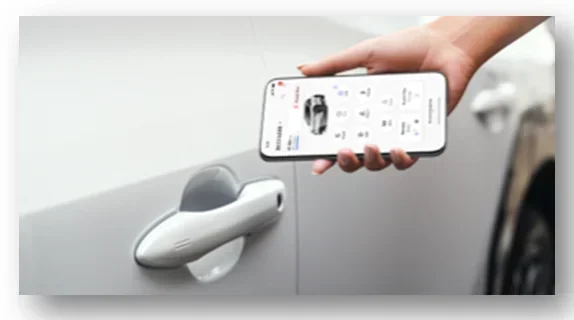
Toyota digital key technology is evolving fast. Newer Toyota models are beginning to support phone-as-a-key features, where your phone literally replaces your key fob entirely. You can unlock the door by simply holding your phone near the door handle.
Toyota is also exploring wireless car access through Ultra-Wideband (UWB) technology. This next-generation wireless standard promises even faster, more precise, and more secure remote access. In the near future, you may not even need to open the app, just tap your phone against the car.
These advancements are part of Toyota’s broader push toward smart car features and seamless Toyota connectivity. The goal is simple, make your car as easy to access as your front door.
Frequently Asked Questions
Can I unlock my Toyota remotely if I do not have the Toyota Connected Services subscription?
No, most remote unlock features require an active Toyota Connected Services subscription. Some newer models may include a free trial period, but after that, you will need to renew the subscription to keep remote access working.
Does Toyota remote unlock work if my phone has no signal?
No, remote unlock requires an internet connection on your phone. If you have no cellular signal or Wi-Fi, the app cannot send commands to your car. In this case, you will need to use your physical key fob.
Is it safe to unlock my Toyota using the app?
Yes, Toyota uses strong encryption and two-factor authentication to protect your remote unlock commands. The system is designed to be very secure, and millions of Toyota owners use it daily without issues.
Can I unlock just one door remotely, or does it unlock all doors?
The Toyota app typically unlocks all doors at once. However, some models and settings allow you to choose which doors unlock. Check your specific vehicle’s manual or the app settings for available options.
What should I do if the Toyota app says my car is unlocked but the doors are still locked?
This usually means the telematics module in your car did not receive the command. Try refreshing the app, checking your internet connection, and then sending the command again. If the problem persists, restart the car’s infotainment system or contact Toyota roadside assistance.
Can I use Toyota remote unlock on a leased or financed Toyota?
Yes, remote unlock works on leased and financed Toyotas the same way it works on owned vehicles. The Toyota Connected Services subscription may be included in your lease or financing agreement for a set period, so check with your dealer or lender.
Conclusion
The answer to the question “Can Toyota Unlock My Car Remotely?” is a clear yes. With the right Toyota model, an active Connected Services subscription, and the Toyota mobile app installed on your phone, you can unlock your car from almost anywhere in the world. The convenience of Toyota smartphone integration is hard to beat, and the technology continues to improve with each new model year.
Toyota remote unlock is not just a fancy gimmick. It is a practical tool that saves time, prevents lockouts, and adds a layer of security to your daily routine. Whether you are a busy parent juggling errands or a professional who values efficiency, this feature makes your life easier.
Set up your Toyota app today, keep your subscription active, and enjoy the peace of mind that comes with knowing your car is just a tap away. The future of Toyota connectivity is here, and it fits right in your pocket.