How Do I Clear My Toyota Maintenance Message Quickly
Clearing your Toyota maintenance message is simple once you know the right steps for your model. Whether you drive a Toyota Corolla, Camry, or RAV4, this guide walks you through every method to reset the maintenance light quickly. Learn the exact reset procedures, avoid common mistakes, and keep your Toyota running smoothly.
That little maintenance light on your Toyota dashboard can be really annoying. You know the one. It pops up right when you are in the middle of a busy week, and suddenly you are wondering what it means and how to get rid of it. If you have been searching for how do I clear my Toyota maintenance message, you are in the right place. This guide covers everything you need to know about resetting the maintenance light on any Toyota model, step by step.
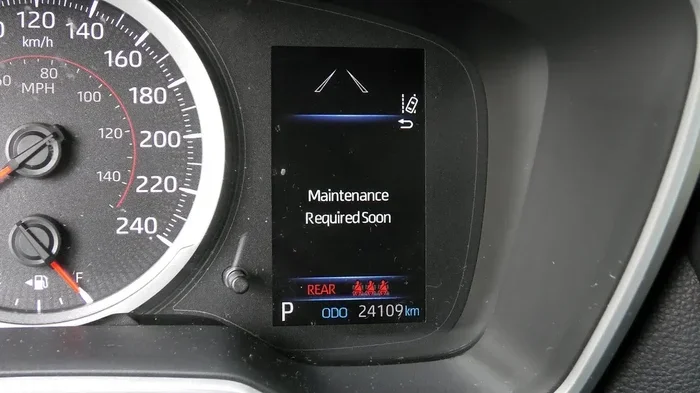
Whether you drive a Toyota Corolla, Camry, RAV4, or any other Toyota model, the reset process is straightforward once you know the right buttons to press. The maintenance message is not a sign of a broken car. It is simply a service reminder that tells you it is time for routine maintenance like an oil change or tire rotation. But clearing the light correctly matters, and doing it the wrong way can cause frustration. We will walk you through every method, explain why the light comes on in the first place, and help you avoid the mistakes most people make.
By the end of this article, you will feel confident resetting the maintenance light yourself. You will also know when it is smart to visit a Toyota service center instead. Let us get started and clear that annoying message for good.
Key Takeaways
- Easy Reset Process: Most Toyota models let you clear the maintenance message using the trip meter and steering wheel buttons in under two minutes.
- Model-Specific Steps: Different Toyota models use slightly different reset methods, so it is important to follow the right procedure for your vehicle.
- Do Not Ignore the Light: The maintenance message is a service reminder, not a warning of a serious problem, but it should still be addressed promptly.
- Common Mistakes Exist: Holding the wrong button or resetting too early are the most frequent errors people make when trying to clear the light.
- Professional Help Is Available: If the reset methods do not work, a Toyota service center can clear the message using diagnostic tools.
- Prevention Tips Work: Following the recommended maintenance schedule helps prevent the message from returning too soon.
📑 Table of Contents
- Understanding the Toyota Maintenance Message
- How to Clear Your Toyota Maintenance Message
- Toyota Maintenance Message Reset for Popular Models
- Common Mistakes When Clearing the Toyota Maintenance Light
- When to Visit a Toyota Service Center
- Preventing the Maintenance Message from Coming Back Too Soon
- Final Thoughts on Clearing Your Toyota Maintenance Message
Understanding the Toyota Maintenance Message
Before you learn how to reset the light, it helps to understand what it actually means. The Toyota maintenance message is part of the vehicle’s onboard maintenance reminder system. This system tracks your driving habits and mileage to estimate when your car needs service.
What Triggers the Maintenance Light
The maintenance light usually comes on based on two factors. The first is mileage. Most Toyota vehicles are programmed to display the message every 5,000 miles or 6,000 miles, depending on the model and year. The second factor is time. Even if you do not drive very often, the system may trigger the reminder after a certain number of months. Here are the most common triggers:
- Oil change interval: The most common reason the light appears. Toyota recommends an oil change every 5,000 to 10,000 miles depending on the engine type and driving conditions.
- Tire rotation reminder: Some Toyota models include tire rotation intervals in the maintenance schedule.
- Brake inspection: The system may remind you to check your brake pads and rotors.
- Fluid check: Coolant, transmission fluid, and brake fluid levels are all part of the maintenance schedule.
- Time-based reminder: If you drive fewer than 5,000 miles per year, the system may trigger the light based on a 12-month calendar cycle.
Why You Should Never Ignore the Maintenance Light
Some people ignore the maintenance message for months. While it is not an emergency warning like the check engine light, ignoring it can still cause problems. Regular maintenance keeps your Toyota running smoothly and extends the life of your engine. Skipping oil changes, for example, can lead to engine wear over time. The maintenance light is your car’s way of saying, “Hey, I need a little attention.” Listening to it is one of the easiest ways to protect your investment.
How to Clear Your Toyota Maintenance Message
Now for the part you have been waiting for. Clearing the Toyota maintenance message is not complicated, but the exact steps vary slightly depending on your model and year. Below, we cover the three most common methods used across Toyota vehicles.
Method 1: Using the Trip Meter Reset Button
This is the most common method and works on most Toyota models from 2005 onward. You will need access to the trip meter on your dashboard or steering wheel controls. Here is how to do it:
- Turn the ignition to the “ON” position. Do not start the engine. Just press the power button without pressing the brake pedal. You should see the dashboard lights come on.
- Locate the trip meter reset button. On most Toyota models, this is the button labeled “Trip” or “TRIP” on the dashboard or steering wheel.
- Press and hold the reset button. Hold it down for about 10 to 15 seconds.
- Watch the display. The maintenance light should start flashing. Keep holding the button.
- Release the button after the light flashes. The message should now be cleared from the display.
- Turn the ignition off and then back on. Check that the maintenance message is gone.
This method works on the Toyota Corolla, Toyota Camry, and many other popular models. If the light does not clear after the first attempt, try holding the button for a few seconds longer. Patience is key here.
Method 2: Using the Steering Wheel Controls
Newer Toyota models, especially those from 2015 onward, often use steering wheel controls instead of dashboard buttons. If your Toyota has a digital display on the instrument cluster, this method is for you:
- Press the “Menu” or “Setup” button on the steering wheel. This brings up the vehicle settings menu on the dashboard display.
- Navigate to the “Maintenance” or “Vehicle Info” section. Use the arrow buttons on the steering wheel to scroll through the options.
- Select “Reset Maintenance” or “Clear Service Reminder.” Press the “OK” or “Enter” button to confirm.
- The system will ask you to confirm the reset. Select “Yes” or “Confirm” to complete the process.
- Exit the menu and turn the ignition off. The maintenance message should no longer appear when you restart the car.
Different Toyota models label these options slightly differently. Some may say “Odometer” or “Trip A.” If you cannot find the reset option, try scrolling through all the menu items. The reset function is usually buried one or two levels deep in the settings.
Method 3: Using a Diagnostic Tool
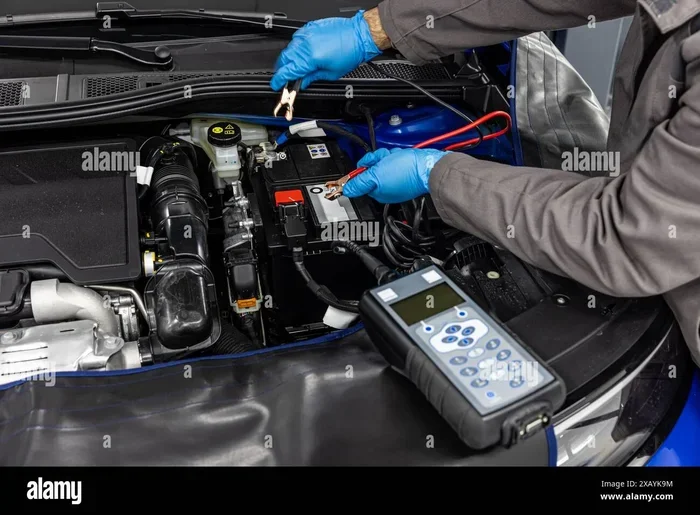
If the first two methods do not work for your Toyota, a diagnostic tool is your next best option. Toyota diagnostic scanners and OBD-II scanners can communicate directly with your vehicle’s computer system. Here is what you need to know:
- OBD-II scanners: These are affordable tools available at most auto parts stores. You plug them into the OBD-II port under your steering column. The scanner reads and clears maintenance codes from the vehicle’s computer.
- Toyota Techstream: This is Toyota’s official diagnostic software. It is more advanced and is typically used by professional mechanics and Toyota dealerships.
- When to use a scanner: If your maintenance light keeps coming back after you reset it, a diagnostic tool can check for underlying issues that may be causing the message to reappear.
Using a diagnostic tool is the most reliable method, especially for older Toyota models or vehicles with complex maintenance systems. You can buy an OBD-II scanner for under $30, and it is a handy tool to keep in your garage.
Toyota Maintenance Message Reset for Popular Models
Every Toyota model has its own quirks. What works on a Toyota Camry might be slightly different on a Toyota RAV4. Below, we break down the reset process for some of the most popular Toyota models.
Toyota Corolla Maintenance Light Reset
The Toyota Corolla is one of the best-selling cars in the world, and resetting its maintenance light is easy. Follow the trip meter reset method described above. For Corolla models from 2014 and newer, you can also use the steering wheel controls. Simply hold the “Trip” button on the steering wheel, turn the ignition to ON, and wait for the message to clear. This method works for both the Corolla sedan and the Corolla hatchback.
Toyota Camry Maintenance Light Reset
The Toyota Camry uses a similar reset process. For most Camry models, press and hold the trip meter reset button while turning the ignition to the ON position. Hold the button for about 10 seconds until the maintenance light starts flashing. Release the button, and the message should disappear. For Camry models with a touchscreen display, navigate to the vehicle settings menu and select “Reset Maintenance.”
Toyota RAV4 Maintenance Light Reset
The Toyota RAV4, especially the newer models, can be a little tricky. For RAV4 models with a digital instrument cluster, use the steering wheel buttons to access the maintenance menu. For older RAV4 models, the trip meter reset button on the dashboard works just fine. If your RAV4 has a hybrid powertrain, the reset process is the same as the gas version. The maintenance reminder system is not tied to the type of engine.
Common Mistakes When Clearing the Toyota Maintenance Light
Even though resetting the maintenance light is simple, people make mistakes all the time. Here are the most common errors and how to avoid them.
Mistake 1: Turning the Key to “ACC” Instead of “ON”
One of the biggest mistakes is not putting the ignition in the right position. You need the ignition in the “ON” position, which means the dashboard lights are fully on but the engine is not running. If you only put it in “ACC,” the reset function may not activate. Always make sure the full dash display is lit before you start the reset process.
Mistake 2: Releasing the Button Too Early
Timing matters when you are holding the reset button. Most people let go after five seconds, but the system needs 10 to 15 seconds to register the command. Be patient and keep holding the button until you see the maintenance light flash or change on the display.
Mistake 3: Resetting Without Completing the Service
This one is obvious but happens all the time. Some people reset the maintenance light without actually getting their oil changed or their tires rotated. The light will come right back because the system still detects that service is due. Always complete the maintenance first, then reset the light.
Mistake 4: Confusing the Maintenance Light with the Check Engine Light
The maintenance light and the check engine light are not the same thing. The maintenance light is a routine reminder. The check engine light signals a problem with your vehicle’s emissions system or engine. If your check engine light is on, you need a different approach, and you should have the vehicle inspected by a professional.
When to Visit a Toyota Service Center
Most of the time, you can clear the maintenance message yourself without any help. But there are situations where visiting a Toyota service center makes sense. If you have tried all the reset methods and the light keeps coming back, there may be an underlying issue. A professional technician can run a full diagnostic check and make sure everything is working properly.
You should also visit a service center if your Toyota is still under warranty. Some warranty programs require you to get maintenance performed at an authorized dealer. Clearing the light yourself will not void your warranty, but keeping a record of professional maintenance does help protect your coverage. Additionally, if your dashboard shows multiple warning lights at once, do not try to reset them yourself. This could indicate a serious problem that needs immediate attention.
Preventing the Maintenance Message from Coming Back Too Soon
Once you have successfully cleared the maintenance message, you probably want to keep it from coming back too early. Here are a few tips to help you stay on track with your Toyota’s maintenance schedule.
- Follow the recommended service interval: Toyota recommends servicing your vehicle every 5,000 miles or 6,000 miles for most models. Check your owner’s manual for the exact interval for your specific vehicle.
- Keep a maintenance log: Write down every oil change, tire rotation, and fluid check in a notebook or app. This helps you stay organized and gives you proof of maintenance if you ever sell the car.
- Use genuine Toyota parts: Using OEM Toyota parts and fluids helps your vehicle run at its best and keeps the maintenance reminder system accurate.
- Reset the light only after service is complete: This is the single most important rule. Resetting without servicing will just cause the message to return quickly.
- Drive consistently: The maintenance reminder system tracks your driving patterns. Stop-and-go city driving may trigger the light sooner than highway driving. Being aware of this can help you anticipate when the message will appear.
Taking care of your Toyota does not have to be complicated. The maintenance message is just a friendly nudge from your car. Once you know how to respond to it, it becomes part of your regular routine rather than a source of stress.
Final Thoughts on Clearing Your Toyota Maintenance Message
Clearing the Toyota maintenance message is one of the simplest things you can do as a car owner. Whether you use the trip meter button, the steering wheel controls, or a diagnostic scanner, the process takes only a few minutes. The key is to follow the right steps for your specific Toyota model and to always complete the actual maintenance before resetting the light.
Remember that the maintenance light is not something to fear. It is a helpful reminder designed to keep your vehicle in top shape. By staying on top of your Toyota maintenance schedule, you protect your engine, improve fuel efficiency, and maintain the resale value of your car. If you ever feel unsure about the process, your local Toyota service center is always ready to help. Now go ahead and clear that light with confidence.
Frequently Asked Questions
How do I reset the maintenance light on my Toyota after an oil change?
After completing your oil change, turn the ignition to the ON position without starting the engine. Press and hold the trip meter reset button for 10 to 15 seconds until the maintenance light flashes. Release the button, turn the ignition off, and then restart the car. The message should be cleared.
Why does my Toyota maintenance light keep coming back after I reset it?
If the maintenance light keeps returning, it usually means the service has not been completed yet, or there is a fault in the maintenance reminder system. Make sure you have actually performed the required service. If the light persists despite completing maintenance, visit a Toyota service center for a diagnostic check.
Can I drive my Toyota with the maintenance light on?
Yes, you can safely drive your Toyota with the maintenance light on. The light is a service reminder, not a critical warning. However, it is best to schedule your maintenance soon to keep your vehicle running smoothly and to avoid potential issues from delayed service.
What is the difference between the maintenance light and the check engine light on a Toyota?
The maintenance light is a routine reminder for scheduled service like oil changes and inspections. The check engine light indicates a problem with the engine or emissions system. If the check engine light is on, you should have the vehicle inspected immediately. The maintenance light is not urgent and can be reset after service.
Do I need any special tools to clear the Toyota maintenance message?
No special tools are needed for most Toyota models. You can reset the maintenance message using the trip meter button or steering wheel controls built into your vehicle. If those methods do not work, an affordable OBD-II scanner from any auto parts store will do the job.
How often should I reset the Toyota maintenance message?
You should reset the maintenance message every time you complete a scheduled service, such as an oil change or tire rotation. Most Toyota models require service every 5,000 to 10,000 miles. Resetting the light after each service keeps your maintenance schedule on track.