How Do I Activate My Car Remote A Step by Step Guide
Learning how to activate your car remote is easier than you think. This step by step guide walks you through the entire process, from finding the right button to syncing your car remote key fob with your vehicle. You will also discover how to fix common problems and keep your vehicle remote entry working smoothly for years to come.
You step out of your car, walk a few steps away, and press the button on your car remote. Nothing happens. No locks. No lights. Just silence.
It is frustrating, right? You are standing in the parking lot, fumbling with your keys, wondering what went wrong. The good news is that this problem is almost always fixable. Whether your remote start car system just stopped responding or you bought a new replacement remote, activating it is a straightforward process.
In this guide, we will walk you through every step to get your car remote key fob working again. We will cover simple activation methods, common problems, battery replacements, and tips to keep your vehicle remote entry system running smoothly. By the end, you will know exactly what to do and why it works.
Key Takeaways
- Simple Activation Process: Most car remotes follow a basic pairing method that takes just a few minutes.
- Battery Matters: A weak battery is the top reason car remotes stop working, and replacing it is quick and cheap.
- Common Problems Have Easy Fixes: Signal interference, faulty buttons, and sync issues can usually be solved at home.
- Know When to Call a Pro: Some activation problems need professional help, especially with newer push button start systems.
- Prevention Saves Time: Simple habits like keeping your remote dry and replacing batteries on schedule prevent most issues.
- Universal Remotes Work Too: Aftermarket options offer flexibility if your original remote is lost or damaged.
📑 Table of Contents
- Why Your Car Remote Might Need Activation
- How to Activate Your Car Remote Step by Step
- Common Car Remote Activation Problems and How to Fix Them
- How to Replace the Battery in Your Car Remote
- When to Seek Professional Help for Your Car Remote
- Tips to Keep Your Car Remote Working Longer
- How to Choose the Right Replacement Remote
- Understanding Your Car Remote Signal and Technology
- Key Takeaways
Why Your Car Remote Might Need Activation
Before we dive into the steps, it helps to understand why your remote might not be working. Many people assume something is broken, but the real cause is often much simpler.
Common Reasons Your Remote Stops Working
Your car lock remote can stop responding for several reasons. Here are the most common ones:
- Dead battery: The battery inside your key fob dies after one to three years. This is the number one cause of remote failure.
- Lost pairing: Your remote lost its connection to the car. This can happen after a battery change or a power surge.
- Signal interference: Other electronics, tall buildings, or even another remote nearby can block the signal.
- Water damage: Dropping your remote in water or exposing it to heavy rain can damage the internal circuits.
- Worn out buttons: Over time, the rubber buttons inside the remote wear down and stop making proper contact.
- Wrong frequency: Some aftermarket remotes do not match your car’s original car remote frequency.
Understanding the cause helps you pick the right fix. If it is a dead battery, you just need a replacement. If it is a lost pairing, you need to reactivate the remote. Let us get into the steps.
How to Activate Your Car Remote Step by Step
Activating your car remote does not require a mechanic or expensive tools. Most vehicles use a simple pairing process. Below, we break it down into clear, easy steps.
Step 1: Gather What You Need
Before you start, make sure you have everything ready. You will need your car key, your remote, and a fresh battery if the old one is dead. Having everything in hand saves you from interrupting the process halfway through.
Here is a quick checklist:
- Your car key or ignition key
- The remote you want to activate
- A new CR2025 or CR2032 battery (check your remote model)
- Your car owner manual (helpful but not always required)
Step 2: Get Inside Your Car
Sit in the driver seat and close all doors. Make sure no one else is near the car. You want a clear signal path between your remote and the vehicle. Some cars require you to be within a few feet of the driver door for the pairing to work.
Turn the ignition to the “on” position without starting the engine. On most cars, you just turn the key to the second slot. On push button start vehicles, press the start button without pressing the brake pedal.
Step 3: Find the Remote Activation Button
Look for a small button labeled “Remote” or with a lock icon on your car’s dashboard or steering column. In newer vehicles, this might be part of the infotainment system. On older cars, it could be a separate button near the steering wheel.
Press and hold this button for about five seconds. You should see a light flash or hear a beep. This tells the car it is ready to pair with a new remote.
Step 4: Press the Lock Button on Your Remote
Now, pick up your car remote key fob and press the lock button. Hold it for about three seconds. You should see the car doors lock or hear a confirmation sound.
If nothing happens, try pressing the lock button again. Sometimes it takes two or three attempts for the car to recognize the remote. Do not worry. This is normal.
Step 5: Repeat for Additional Remotes
If you have more than one remote to activate, repeat step four within thirty seconds of the first successful pairing. Most cars allow you to pair up to four remotes at once.
After pairing all remotes, turn the ignition off and step out of the car. Test each remote from a distance of about ten feet. If the doors lock and unlock, you are all set.
Step 6: Test Your Remote Thoroughly
Do not just test the lock button. Try the unlock button, the trunk release, and the panic button if your remote has one. Testing all functions ensures everything is working properly.
Walk about fifteen feet away from the car and test again. This checks the car remote signal range. If the remote works at a distance, your activation was successful.
Common Car Remote Activation Problems and How to Fix Them
Even when you follow the steps exactly, things can go wrong. Here are the most common issues and how to solve them.
The Remote Does Not Respond at All
If pressing the button does nothing, the battery is likely dead. Open the remote case and replace the battery. A new battery costs about two to five dollars and takes less than a minute to swap.
After replacing the battery, try activating the remote again using the steps above. In most cases, this solves the problem completely.
The Remote Works But Only Up Close
If your remote start car remote only works when you are right next to the car, the signal might be weak. This can happen when the battery is low or when there is interference from nearby electronics.
Try moving away from other cars and electronic devices. Test again from a normal distance. If the range is still short, replace the battery and try once more.
The Car Does Not Recognize the Remote
Sometimes the car simply will not pair with the remote. This can happen if the remote is not compatible or if the car’s system needs a reset.
Try resetting the car’s remote system. Turn the ignition off, wait thirty seconds, and then try the activation process again. If it still fails, the remote might be faulty or the wrong model for your vehicle.
Buttons Feel Sticky or Unresponsive
If the buttons on your remote feel mushy or do not spring back, the internal rubber contacts are worn out. You can try cleaning them with a small amount of contact cleaner spray. If that does not work, the remote needs replacement.
How to Replace the Battery in Your Car Remote
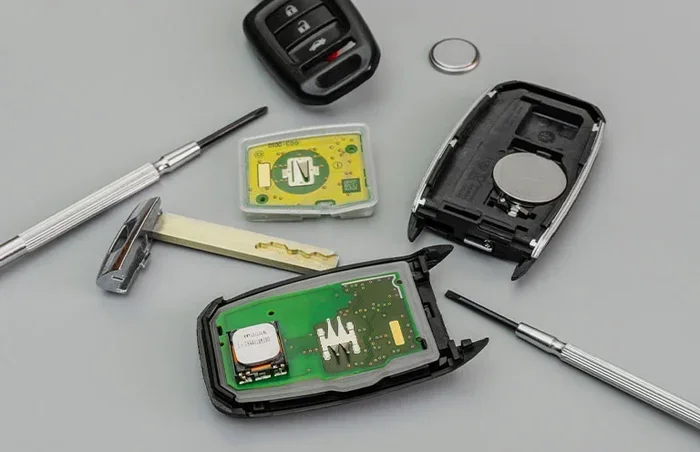
Replacing the battery in your car remote key fob is one of the easiest things you can do. Most remotes use a standard CR2025 or CR2032 coin cell battery. Here is how to do it.
Finding the Battery Compartment
Flip your remote over and look for a small notch or groove along the seam. Use a flathead screwdriver or a coin to gently pry the two halves apart. Be careful not to force it too hard. The battery should pop out easily.
Installing the New Battery
Take note of which side the old battery faces. Place the new battery in the same orientation. The positive side usually faces up. Snap the two halves of the remote back together until you hear a click.
Test the remote before putting it back in your pocket. If it works, you are done. If not, double check the battery orientation and try again.
How Often Should You Replace the Battery?
Most car remote battery replacements are needed every one to three years. If you notice the signal getting weaker, do not wait for it to die completely. Replace the battery right away to avoid getting locked out.
When to Seek Professional Help for Your Car Remote
Most remote activation issues can be solved at home. But some situations call for a professional touch.
Signs You Need a Professional
Watch for these warning signs that your problem is beyond a DIY fix:
- The remote still does not work after replacing the battery and following the activation steps.
- Your car’s dashboard shows a warning light related to the key or remote system.
- You recently bought a used car and do not know the previous remote settings.
- The remote was exposed to water, extreme heat, or a hard drop and now feels physically damaged.
- Your vehicle uses a smart key or proximity system that requires specialized programming.
A locksmith or car dealership can reprogram your vehicle remote entry system quickly. They have the tools and software to handle advanced systems. It costs more than a DIY fix, but it saves you time and frustration.
How Much Does Professional Remote Activation Cost?
Expect to pay between fifty and two hundred dollars for professional remote programming. The exact cost depends on your car make and model. Luxury vehicles and newer models with advanced security systems tend to cost more.
Tips to Keep Your Car Remote Working Longer
Prevention is always better than repair. A few simple habits can extend the life of your car lock remote and save you from future headaches.
Keep Your Remote Dry
Water is the enemy of electronics. Avoid leaving your remote in a wet pocket or on the dashboard in the rain. If it gets wet, dry it immediately and remove the battery if possible.
Replace Batteries Before They Die
Do not wait until your remote stops working to change the battery. Set a reminder every two years to swap in a fresh one. This keeps your car remote activation process smooth and prevents unexpected lockouts.
Store Your Remote Properly
Keep your remote away from strong magnets, microwaves, and other electronics that can interfere with the signal. A small pouch or the side pocket of your bag works well for storage.
Clean the Buttons Regularly
Dust and grime can build up around the buttons and cause them to stick. Wipe the remote surface with a soft, damp cloth once a week. This keeps the buttons responsive and the signal strong.
Consider a Universal Remote as a Backup
If your original remote is lost or damaged, a universal car remote can be a great backup. These remotes work with many car brands and are easy to program. Just make sure to check compatibility before purchasing.
How to Choose the Right Replacement Remote
If your original remote is beyond repair, you have two main options: an OEM remote from the dealership or an aftermarket remote from a third-party seller.
OEM vs Aftermarket Remotes
OEM remotes are made by your car manufacturer. They are guaranteed to work with your vehicle but cost more. Aftermarket remotes are made by third-party companies and are much cheaper. Many aftermarket remotes work just as well as OEM ones.
Here is a quick comparison:
- OEM Remote: Guaranteed compatibility, higher price, often requires professional programming
- Aftermarket Remote: Affordable, widely available, easy to self-program in most cases
- Universal Remote: Works with multiple vehicles, budget-friendly, may lack advanced features
If you are comfortable following instructions, an aftermarket remote is a great choice. It saves you money and gives you the satisfaction of fixing the problem yourself.
Understanding Your Car Remote Signal and Technology
Modern vehicle remote entry systems use radio frequency signals to communicate with your car. Most remotes operate at 315 MHz or 433 MHz, depending on your region and car model.
The signal travels from the remote to the car’s receiver antenna. When the car receives the correct code, it locks or unlocks the doors. This whole process happens in less than a second.
Newer cars use rolling code technology, which changes the access code every time you press a button. This makes your car remote key fob much more secure against signal copying. It also means that if your remote loses pairing, you need to re-sync it using the car’s system.
Understanding this technology helps you troubleshoot problems more effectively. If your remote works sometimes but not others, signal interference might be the culprit. If it never works at all, the battery or pairing is likely the issue.
Key Takeaways
- Simple Activation Process: Most car remotes follow a basic pairing method that takes just a few minutes.
- Battery Matters: A weak battery is the top reason car remotes stop working, and replacing it is quick and cheap.
- Common Problems Have Easy Fixes: Signal interference, faulty buttons, and sync issues can usually be solved at home.
- Know When to Call a Pro: Some activation problems need professional help, especially with newer push button start systems.
- Prevention Saves Time: Simple habits like keeping your remote dry and replacing batteries on schedule prevent most issues.
- Universal Remotes Work Too: Aftermarket options offer flexibility if your original remote is lost or damaged.
Frequently Asked Questions
How do I know if my car remote battery is dead?
If your remote stops working completely or only works when you are very close to the car, the battery is likely dead. Replacing the battery is quick and inexpensive, and it solves the problem in most cases.
Can I activate a car remote myself without going to a dealer?
Yes, most car remotes can be activated at home using the pairing method in your owner manual. You do not need a dealer for standard remotes. Only advanced smart key systems might require professional help.
How far should my car remote work from the vehicle?
A working car remote should lock or unlock your car from about 20 to 50 feet away. If it only works within a few feet, the battery may be low or there could be signal interference from nearby electronics.
What type of battery does a car remote use?
Most car remotes use a CR2025 or CR2032 coin cell battery. You can find these at any grocery store, pharmacy, or electronics shop for just a couple of dollars.
How long does it take to activate a car remote?
The entire activation process usually takes about five to ten minutes. If you need to replace a battery first, add another minute or two. It is a quick and easy task you can do in your driveway.
Will a universal car remote work with my vehicle?
Universal remotes are designed to work with many car brands and models. Check the compatibility list on the packaging before buying. Most universal remotes come with clear programming instructions for DIY activation.
=== CONCLUSION ===
Activating your car remote does not have to be a stressful experience. With the right steps and a little patience, you can get your car remote key fob working in just a few minutes. Start by checking the battery, then follow the activation process for your specific vehicle model. Most problems have simple solutions that you can handle right at home.
Remember to keep your remote dry, replace the battery before it dies, and store it away from strong electronics. These small habits go a long way in preventing future issues. If you ever run into a problem you cannot solve, a professional locksmith or dealership can help you get back on track.
Now that you know how to activate your car remote, you are prepared for whatever comes your way. Keep this guide handy, and you will never be stranded in the parking lot again.