Does Toyota Camry Have Android Auto or Apple CarPlay
Yes, the Toyota Camry does have Android Auto on most newer models, along with Apple CarPlay support. Both smartphone integration features let you access navigation, music, and messaging safely through the touchscreen or voice commands. The availability depends on your model year, trim level, and the infotainment system installed.
So you are shopping for a Toyota Camry and you want to know one thing. Can you use Android Auto? It is a fair question. Almost everyone relies on their phone for music, maps, and messaging these days. You do not want to buy a car and then realize your favorite apps do not work with it. The good news is that the Toyota Camry has you covered. Most modern Camry models support both Android Auto and Apple CarPlay. But the details matter. Not every trim level has the same tech. Not every year offers the same features. And the way you connect your phone can vary too.
In this guide, we will walk through everything you need to know about the Toyota Camry and Android Auto. We will cover which model years have it. We will explain how to set it up. We will compare it with Apple CarPlay. And we will share tips to get the most out of your infotainment system. Whether you are a tech lover or just someone who wants a simple way to stream music and get directions, this article has you covered.
Key Takeaways
- Android Auto is available on Toyota Camry models from 2019 onward, depending on the trim and infotainment system.
- Apple CarPlay is also supported, giving iPhone users a seamless smartphone integration experience.
- Wireless and wired options exist depending on the model year and technology package.
- The Toyota infotainment system offers a user-friendly touchscreen with clear menus and responsive controls.
- Voice commands and hands-free calling work with both Android Auto and Apple CarPlay for safer driving.
- Keeping your system updated ensures the best performance and access to the latest apps.
📑 Table of Contents
- Does the Toyota Camry Have Android Auto?
- Apple CarPlay on the Toyota Camry
- Toyota Camry Infotainment System Overview
- How to Connect Your Phone to the Toyota Camry
- Android Auto vs Apple CarPlay on the Camry
- Common Issues and How to Fix Them
- Expert Insights on Toyota Camry Smartphone Integration
- Key Takeaways
- Frequently Asked Questions
- Conclusion
Does the Toyota Camry Have Android Auto?
The short answer is yes. The Toyota Camry has Android Auto on most models from the 2019 model year and newer. But the experience depends on a few things. Your trim level matters. Your infotainment system matters. And even the technology package you chose can change what you get.
Toyota made a smart move when it brought Android Auto to the Camry lineup. It recognized that drivers want seamless smartphone integration. They want to use Google Maps, Spotify, WhatsApp, and other favorite apps right from the dashboard. Android Auto makes that possible. It mirrors the apps from your phone onto the car’s touchscreen display.
Which Camry Trims Support Android Auto?
Here is the breakdown of Android Auto availability by trim level on the Toyota Camry:
- LE trim: Android Auto is available on models with the upgraded infotainment system. Base models may need an optional package.
- SE trim: Android Auto comes standard on most SE trims with the touchscreen audio system.
- XLE trim: This trim level typically includes Android Auto as part of the standard tech package.
- XSE trim: Full Android Auto support is standard on the XSE.
- TRD trim: The TRD version also supports Android Auto with its upgraded audio system.
- Hybrid trims: Both the LE Hybrid and XLE Hybrid support Android Auto.
Model Year Compatibility
If you are looking at older Camry models, the news is not all bad. The 2019 Camry was the first year Toyota offered Android Auto as standard on most trims. Before that, you might find it only on higher trims or not at all. Here is a quick look at the timeline:
- 2018 and older: Android Auto was not widely available on the Camry. Some higher trims may have had it.
- 2019: Toyota introduced Android Auto across most Camry trims. This was a big step forward.
- 2020 and newer: Android Auto is standard on nearly all Camry models with a touchscreen.
- 2024 and 2025 models: The latest Camry models offer the most advanced infotainment experience.
Always check the specific vehicle you are looking at. The dealer can confirm whether the model you are considering has Android Auto built in.
Apple CarPlay on the Toyota Camry
While we are on the topic of smartphone integration, it is worth talking about Apple CarPlay. If you drive an iPhone, this is the feature you want. The Toyota Camry supports Apple CarPlay on the same model years and trims that support Android Auto. It works in a very similar way. It projects your iPhone’s key apps onto the car’s screen.
One nice thing about Apple CarPlay is that it works wirelessly on many newer Camry models. You do not need to plug in a cable. Your phone connects automatically when you get in the car. This is a huge convenience. It means no fumbling with cables or dealing with a tangled cord in your center console.
Wireless Apple CarPlay vs. Wired Connection
Not all Camry models offer wireless Apple CarPlay. Here is what to expect:
- Wireless Apple CarPlay: Available on 2022 Camry models and newer with the JBL audio package or higher trims. It connects through Bluetooth.
- Wired Apple CarPlay: Available on 2019 and newer models. You need a Lightning cable to connect your iPhone.
Wireless connection is clearly the better option. It is cleaner and more convenient. But a wired connection still works great. You will not miss out on any features either way.
Toyota Camry Infotainment System Overview
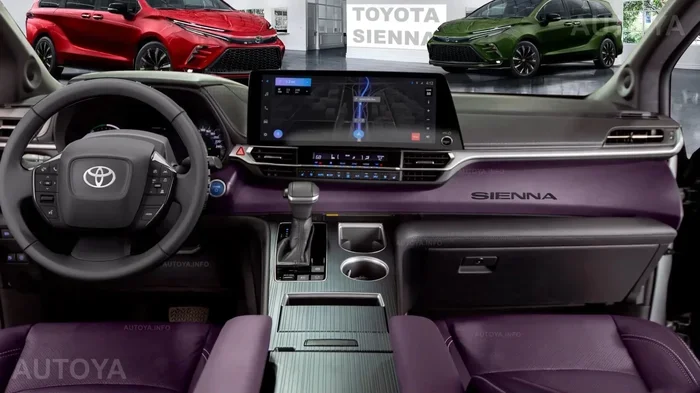
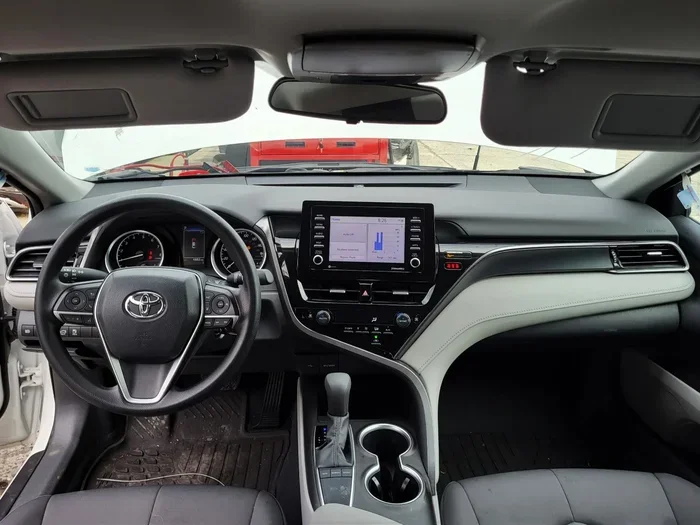
The Toyota Camry uses a multimedia system that serves as the hub for all your digital needs. It is the screen in the center of the dashboard. It controls your audio, navigation, phone calls, and smartphone integration. Understanding how it works helps you get the most out of your car.
Touchscreen Display
The Camry’s touchscreen display is one of the standout features of the infotainment system. It is responsive and easy to navigate. The menus are clear and well-organized. You can find what you need without taking your eyes off the road for too long. The display size varies depending on the trim level, but it is always large enough to read comfortably.
Here are some things to know about the touchscreen:
- Display size: Ranges from 7 inches on base models to 9 inches on higher trims.
- Resolution: Sharp and clear, even in bright sunlight.
- Touch responsiveness: Fast and accurate, with minimal lag.
- Physical controls: Some models include a volume knob and shortcut buttons for quick access.
Toyota Smart Connect and Entune
Toyota used to offer a service called Entune for connected car features. The newer Camry models use Toyota Smart Connect instead. This subscription service gives you access to remote start, vehicle tracking, and other smart features through the Toyota app on your phone. It works alongside Android Auto and Apple CarPlay to give you a complete connected experience.
With Toyota Smart Connect, you can do things like:
- Start the engine remotely from your phone.
- Check fuel levels and tire pressure.
- Locate your vehicle on a map.
- Send directions from your phone to the car’s navigation system.
How to Connect Your Phone to the Toyota Camry
Setting up Android Auto or Apple CarPlay on your Toyota Camry is straightforward. You do not need to be a tech expert. The process takes just a few minutes the first time. After that, it becomes second nature.
Connecting Android Auto
Follow these steps to connect Android Auto to your Camry:
- Make sure your phone has the Android Auto app installed from the Google Play Store.
- Plug your phone into the USB port in the center console.
- On the car’s touchscreen, select the Android Auto icon.
- Follow the on-screen prompts to grant permissions and set up the connection.
- Once connected, your apps will appear on the screen.
If your Camry supports wireless Android Auto, you can skip the cable. Just make sure Bluetooth is turned on in your phone settings. The car should detect your phone automatically when you get in.
Connecting Apple CarPlay
Here is how to set up Apple CarPlay on your Camry:
- Plug your iPhone into the USB port using a Lightning cable.
- On the car’s screen, tap the CarPlay icon.
- If prompted, unlock your iPhone and tap “Trust This Computer.”
- Your CarPlay apps will load on the display.
For wireless CarPlay, go to your iPhone settings and select CarPlay. Choose your Toyota Camry from the list of available vehicles. The connection happens automatically from that point on.
Quick Tips for a Smooth Connection
- Use a high-quality USB cable. Cheap cables can cause connection problems.
- Keep your phone’s software updated to the latest version.
- Restart both your phone and the car’s infotainment system if you experience issues.
- Clear the cache in the Android Auto app if apps are not loading properly.
- Make sure your phone has enough storage space for the apps you want to use.
Android Auto vs Apple CarPlay on the Camry
Both Android Auto and Apple CarPlay offer excellent smartphone integration on the Toyota Camry. But they are not identical. Here is a side-by-side look at what each platform brings to the table.
| Feature | Android Auto | Apple CarPlay |
|---|---|---|
| Compatible phones | Android smartphones | iPhone |
| Wireless support | Available on 2021+ models | Available on 2022+ models |
| Navigation apps | Google Maps, Waze | Apple Maps, Google Maps |
| Voice assistant | Google Assistant | Siri |
| Messaging | WhatsApp, Messages, etc. | iMessage, WhatsApp |
| Music apps | Spotify, YouTube Music, Pandora | Apple Music, Spotify, Pandora |
| Setup ease | Simple USB or Bluetooth | Simple USB or Bluetooth |
| Text message alerts | Yes, with read-aloud feature | Yes, with Siri read-aloud |
Both platforms are excellent choices. Your decision should come down to which phone you use. If you have an Android phone, Android Auto is the natural fit. If you have an iPhone, Apple CarPlay is the way to go. The good news is that the Toyota Camry supports both, so you are covered either way.
Which Is Better for the Camry?
Honestly, both work great on the Camry. The touchscreen is responsive with either platform. The voice commands are accurate. And the overall experience is smooth. If you are an Android user, you will love Google Maps integration and the Google Assistant. If you are an iPhone user, Siri and Apple Maps work seamlessly. You really cannot go wrong with either option.
Common Issues and How to Fix Them
Even with a great system like the Toyota Camry’s infotainment setup, you might run into occasional hiccups. These problems are usually easy to fix. Here are the most common issues and their solutions.
Android Auto Not Connecting
If Android Auto refuses to connect, try these steps:
- Unplug and replug the USB cable.
- Restart the Android Auto app on your phone.
- Clear the app cache in your phone’s settings.
- Update the Android Auto app to the latest version.
- Check that USB debugging is enabled in your phone’s developer options.
Apple CarPlay Showing a Black Screen
A black screen with CarPlay can be frustrating. Try these fixes:
- Restart your iPhone.
- Try a different USB cable or port.
- Go to iPhone settings and toggle CarPlay off and back on.
- Reset the car’s infotainment system by holding the power button for 10 seconds.
Audio Cutting Out During Calls or Music
If your audio keeps cutting out, the problem is often the connection. A loose USB cable is the most common culprit. Try a different cable or a different USB port in the car. Also, make sure your phone is not in battery saver mode, as this can interfere with the connection.
Apps Not Loading or Lagging
Slow app performance is usually a phone issue, not a car issue. Close background apps on your phone. Free up storage space. Restart your phone before getting in the car. These simple steps often solve the problem entirely.
Expert Insights on Toyota Camry Smartphone Integration
Automotive technology experts agree that the Toyota Camry is one of the best midsize sedans for smartphone integration. The infotainment system is intuitive. The support for both Android Auto and Apple CarPlay makes it versatile. And the inclusion of wireless connectivity on newer models puts it ahead of many competitors.
Experts also point out that Toyota has been quick to adopt the latest smartphone projection technology. The Camry is not stuck in the past with outdated systems. It stays current with regular infotainment updates and new features. This forward-thinking approach is one of the reasons the Camry remains a top choice in the sedan segment.
If you are considering a used Camry, always confirm the infotainment system supports Android Auto or Apple CarPlay. A Carfax report or a quick check with the dealer can tell you exactly what tech features are included. It is a small step that saves a lot of disappointment later.
Key Takeaways
- Android Auto is available on the Toyota Camry from 2019 onward, with wireless support on 2021 and newer models.
- Apple CarPlay is also supported, with wireless connectivity on 2022 and newer models.
- All trims from LE to TRD offer smartphone integration on the touchscreen display.
- Setup is simple and takes just a few minutes the first time you connect your phone.
- Common connection issues are usually solved with a new cable, app update, or system restart.
- The Toyota Camry’s infotainment system is one of the best in its class for smartphone mirroring and app access.
Frequently Asked Questions
Does every Toyota Camry have Android Auto?
Not every single Camry has Android Auto. Models from 2019 and newer on most trims include it. However, base models from 2018 and older may not have it. Always check the specific vehicle’s features before purchasing.
Can I use wireless Android Auto on the Toyota Camry?
Yes, wireless Android Auto is available on Toyota Camry models from 2021 and newer. You do not need a USB cable. Your phone connects through Bluetooth automatically when you get in the car.
Is Apple CarPlay better than Android Auto on the Camry?
Neither is objectively better. Both work well on the Camry’s infotainment system. Your choice depends on which phone you use. iPhone users will prefer Apple CarPlay, and Android users will prefer Android Auto. Both offer navigation, music, and hands-free calling.
Can I add Android Auto to an older Toyota Camry?
Yes, you can add Android Auto to older Camry models using an aftermarket head unit. Several brands offer retrofit infotainment systems that replace the factory radio. This is a popular upgrade for Camry owners with older model years.
Does the Toyota Camry support YouTube Music and Spotify on Android Auto?
Yes, both YouTube Music and Spotify work with Android Auto on the Toyota Camry. You can also use Pandora, iHeartRadio, and other popular streaming apps. Just make sure the apps are installed and updated on your phone.
How do I update Android Auto on my Toyota Camry?
Android Auto updates through the Google Play Store on your phone. The car’s infotainment system updates through the Toyota app or at the dealership. Keeping both your phone and the car system updated ensures the best performance and access to new features.
Conclusion
The Toyota Camry is a fantastic sedan, and its support for Android Auto and Apple CarPlay makes it even better. Whether you are commuting to work, taking a road trip, or just running errands, having your favorite apps at your fingertips makes the drive more enjoyable and safer. The Toyota Camry Android Auto integration is smooth, responsive, and easy to use.
If you are still on the fence about which Camry to buy, the tech features alone are a strong reason to choose this model. The infotainment system is modern and capable. The smartphone projection works flawlessly. And the availability of both Android Auto and Apple CarPlay means you are not locked into one ecosystem.
Take the time to test drive a Camry with the infotainment system. Connect your phone and see how it works for you. Once you experience the convenience of smartphone integration in the Camry, you will wonder how you ever drove without it. The Toyota Camry continues to prove that it is not just a reliable car. It is a smart car too.