Does the Toyota Corolla Cross Have Wireless Apple CarPlay
Yes, the Toyota Corolla Cross offers wireless Apple CarPlay, but only on select trim levels and model years. The base trims typically come with wired connectivity, while higher-end trims like the XSE and Limited may include the wireless feature. Always confirm the exact specs before purchasing.
Does the Toyota Corolla Cross have wireless Apple CarPlay? If you are shopping for a compact crossover and want seamless smartphone integration, this is the question you need answered. The Toyota Corolla Cross is a popular choice for buyers who want a stylish SUV with modern tech features. But not every trim level offers the same connectivity options. In this guide, we will break down everything you need to know about Apple CarPlay availability, wireless vs wired options, and how to get the most out of your Toyota Corolla Cross infotainment system. By the end, you will know exactly what to expect and how to choose the right trim for your needs.
The Toyota Corolla Cross has gained a strong reputation in the compact SUV market. It combines fuel efficiency, reliability, and a well-designed cabin. One of the most asked questions from buyers is whether this model supports wireless Apple CarPlay. The answer depends on several factors, including the model year, trim level, and market. Let us dive into the details so you can make an informed decision.
Understanding your smartphone integration options before buying a car saves time and frustration. Many buyers assume all new vehicles come with wireless connectivity. That is not always true. The Toyota Corolla Cross follows a trim-based approach, meaning your experience depends on the specific configuration you choose. Let us explore this in depth.
Key Takeaways
- Wireless Apple CarPlay is available on higher trim levels of the Toyota Corolla Cross, not all versions.
- Trim level matters most when determining if you get wireless or wired connectivity.
- Model year differences can affect which CarPlay version and features are included.
- Setting up wireless CarPlay is simple once your phone is paired and connected.
- Wired CarPlay still works well and offers a stable connection for all trims.
- Always check with your dealer to confirm the exact features of the specific vehicle you are buying.
📑 Table of Contents
- What Is Apple CarPlay and Why Does It Matter?
- Does the Toyota Corolla Cross Have Wireless Apple CarPlay?
- Toyota Corolla Cross Trim Levels and CarPlay Features
- How to Set Up Apple CarPlay on the Corolla Cross
- Wireless vs Wired Apple CarPlay: What Is the Difference?
- Common Issues with Apple CarPlay on the Toyota Corolla Cross
- Is the Toyota Corolla Cross the Right Choice for You?
- Final Thoughts
What Is Apple CarPlay and Why Does It Matter?
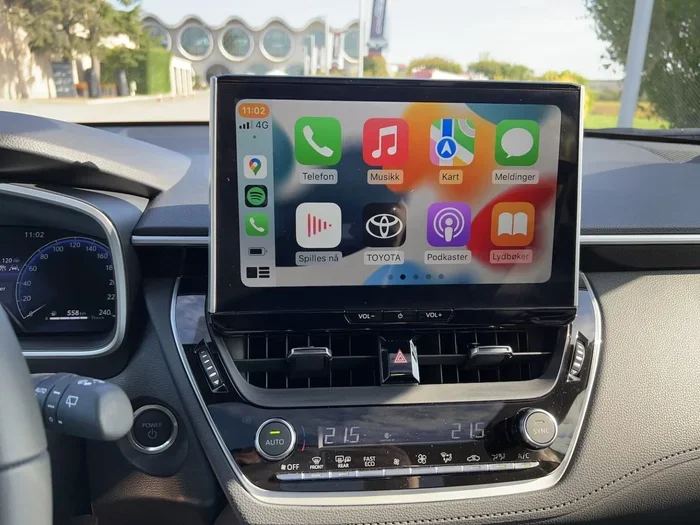
Apple CarPlay is Apple’s smartphone mirroring system. It lets you access your iPhone’s features through your car’s display. You can make calls, send messages, listen to music, and use navigation apps. All of this happens without taking your hands off the wheel or your eyes off the road.
The system works by connecting your iPhone to the car’s Toyota infotainment system. Once connected, the car screen mirrors your phone’s interface in a simplified, driver-friendly format. This is one of the most valued features for modern car buyers.
Why Wireless CarPlay Is a Game Changer
Wireless Apple CarPlay eliminates the need for a cable. You just connect once, and the system pairs automatically every time you get in the car. This is a huge convenience. No more fumbling with cables or dealing with a loose connection.
Here are some key benefits of going wireless:
- No cable clutter on your dashboard or console.
- Automatic reconnection every time you start the car.
- Faster setup after the initial pairing process.
- Cleaner look inside your vehicle’s cabin.
- Less wear and tear on your phone’s charging port.
For many drivers, the difference between wired and wireless feels like night and day. Once you go wireless, going back to a cable feels outdated. This is why so many people ask whether the Toyota Corolla Cross supports this feature.
Does the Toyota Corolla Cross Have Wireless Apple CarPlay?
The direct answer is yes, but it depends on the trim level. The Toyota Corolla Cross does not offer wireless Apple CarPlay across all versions. The base trims come with wired connectivity, while the higher trims include wireless support.
This is an important distinction. If wireless Apple CarPlay is a must-have for you, you need to target the right trim. Let us look at how the different trims compare.
Trim-Level Breakdown for Apple CarPlay
Here is a quick look at how Apple CarPlay compatibility works across the Toyota Corolla Cross trim levels:
| Trim Level | Apple CarPlay | Wireless? | Screen Size |
|---|---|---|---|
| LE (Base) | Yes | No (Wired) | 8-inch |
| XLE | Yes | No (Wired) | 8-inch |
| SE | Yes | No (Wired) | 8-inch |
| XSE | Yes | Yes (Wireless) | 10-inch |
| Limited | Yes | Yes (Wireless) | 10-inch |
As you can see, the wireless Apple CarPlay feature is limited to the top two trims. The XSE and Limited versions come with a larger 10-inch touchscreen and wireless connectivity. The lower trims use an 8-inch screen and require a USB cable for CarPlay.
Expert Insight
Always confirm the exact features with your Toyota dealership before finalizing a purchase. Trim specifications can vary slightly by market and model year. A dealer can confirm whether a specific vehicle includes wireless smartphone integration.
Toyota Corolla Cross Trim Levels and CarPlay Features
Choosing the right trim for the Toyota Corolla Cross involves more than just CarPlay. Each trim level comes with its own set of features. Let us break them down and focus on what matters for connectivity.
LE and XLE Trims: Solid but Wired
The LE and XLE trims are the entry-level options. They offer a solid driving experience and essential tech features. Both include Apple CarPlay and Android Auto support. However, the connection is wired through a USB cable.
If you do not mind using a cable, these trims work perfectly fine. The Toyota infotainment screen is responsive and easy to navigate. The 8-inch display provides clear graphics and intuitive controls.
Quick Tip: If you have the LE or XLE trim, a high-quality braided USB-C cable can improve your experience. Cheap cables sometimes cause connection drops or slow charging.
SE Trim: A Sporty Middle Ground
The SE trim adds a sportier feel to the Toyota Corolla Cross. It includes unique styling elements and a slightly upgraded interior. Apple CarPlay is still wired on this trim, but the overall package feels more premium.
The SE is a good choice if you want a balance of style and value. You get the essential connectivity without paying for the top-tier wireless features. For many daily commuters, this trim hits the sweet spot.
XSE and Limited Trims: The Wireless Advantage
The XSE and Limited trims are where wireless Apple CarPlay shines. These top-tier trims come with a 10-inch touchscreen and full wireless connectivity. The experience is seamless and modern.
Here is what you get with wireless smartphone integration on these trims:
- Automatic phone pairing when you enter the vehicle.
- Wireless charging support on some configurations.
- Larger display for better visibility.
- Enhanced audio quality through the car’s premium sound system.
- Multiple user profiles that remember your preferences.
The wireless experience on the XSE and Limited trims is smooth and reliable. Once paired, your phone connects every time you start the car. This level of convenience is hard to beat.
How to Set Up Apple CarPlay on the Corolla Cross
Setting up Apple CarPlay on your Toyota Corolla Cross is straightforward. Whether you have a wired or wireless connection, the process is simple. Here is how to get started.
Setting Up Wireless Apple CarPlay
Follow these steps for a smooth wireless setup:
- Make sure your iPhone is updated to the latest iOS version.
- Turn on Bluetooth and Wi-Fi on your iPhone.
- Start your Toyota Corolla Cross and make sure the infotainment system is on.
- Go to the Settings menu on the car’s display.
- Select Apple CarPlay and choose Wireless.
- Follow the prompts on both your phone and the car screen.
- Confirm the pairing and test the connection.
Once paired, your iPhone will automatically connect to the Toyota Corolla Cross every time you get in. The system remembers your preferences, including your favorite apps and playlists.
Setting Up Wired Apple CarPlay
If your trim has wired connectivity, the setup is even simpler:
- Plug your iPhone into the USB port using a Lightning or USB-C cable.
- Unlock your iPhone and tap “Trust” if prompted.
- Apple CarPlay will launch automatically on the car screen.
- Adjust your preferences in the CarPlay settings.
Quick Tip: Always use an Apple-certified cable for the best results. Third-party cables can sometimes cause connectivity issues or slow data transfer.
Common Mistakes to Avoid
- Using a damaged or low-quality cable. This causes frequent disconnections and frustration.
- Ignoring software updates. Both your iPhone and the car’s infotainment system need to be up to date.
- Not clearing previous pairings. If you are switching phones, delete old connections first.
- Assuming all trims are the same. Always verify the specific features of your trim level.
Wireless vs Wired Apple CarPlay: What Is the Difference?
The difference between wired and wireless Apple CarPlay is significant. Both deliver the same core features, but the experience is not identical. Let us compare them side by side.
| Feature | Wired CarPlay | Wireless CarPlay |
|---|---|---|
| Connection Method | USB Cable | Bluetooth and Wi-Fi |
| Setup Speed | Plug and play | One-time pairing |
| Daily Convenience | Requires cable each time | Automatic connection |
| Connection Stability | Very stable | Stable, but can occasionally glitch |
| Phone Charging | Yes | No (unless separate wireless charger) |
| Available on All Trims | Yes | No (XSE and Limited only) |
| Cable Clutter | Yes | No |
Both options work well for daily driving. Wired Apple CarPlay offers a more reliable connection and charges your phone simultaneously. Wireless Apple CarPlay offers more convenience and a cleaner cabin.
Most users find that wireless connectivity is worth the upgrade if it fits their budget. The automatic pairing alone saves time and hassle every single day. However, if you are on a tighter budget, wired CarPlay still delivers an excellent experience.
Quick Tips for the Best CarPlay Experience
- Restart your iPhone weekly to keep CarPlay running smoothly.
- Clear your infotainment cache if the system feels slow.
- Keep your iPhone within range for wireless connections.
- Use Siri for hands-free control of calls and messages.
- Set your preferred navigation app in CarPlay settings for quick access.
Common Issues with Apple CarPlay on the Toyota Corolla Cross
Even with a great system, you may run into occasional issues. Apple CarPlay on the Toyota Corolla Cross is generally reliable, but problems can happen. Here are the most common ones and how to fix them.
CarPlay Won’t Connect
This is the most common complaint. If Apple CarPlay fails to connect, try these steps:
- Restart both your iPhone and the car’s infotainment system.
- Check your USB cable for damage or wear.
- Make sure Bluetooth and Wi-Fi are turned on for wireless connections.
- Delete the CarPlay pairing from both your phone and the car, then reconnect.
- Update your iPhone and the car’s software to the latest versions.
Connection Drops Frequently
Frequent disconnections can be annoying. This often happens with wireless connections if your phone moves slightly. To fix this:
- Keep your phone in the same spot every time you drive.
- Check for interference from other Bluetooth devices.
- Reset the car’s infotainment system by holding the power button for 10 seconds.
Audio or Video Glitches
Sometimes the audio stutters or the video lags. This is usually a software issue. Updating your iPhone and the car’s firmware often resolves this. Also, closing background apps on your phone can free up resources for a smoother smartphone mirror experience.
Expert Insight
According to Toyota service advisors, most CarPlay connectivity issues are resolved with a simple software update. Always check for the latest infotainment updates at your Toyota dealership. A quick update can fix problems that seem complex at first glance.
Is the Toyota Corolla Cross the Right Choice for You?
The Toyota Corolla Cross is an excellent compact crossover for many buyers. It offers strong fuel economy, a comfortable ride, and modern tech features. But the right car depends on your priorities.
If wireless Apple CarPlay is important to you, you will need to step up to the XSE or Limited trim. These versions deliver the premium connectivity experience that modern drivers expect. The 10-inch screen and wireless features make daily driving more enjoyable.
On the other hand, if you are budget-conscious and do not mind a cable, the LE or XLE trims still offer full Apple CarPlay compatibility. The core features are all there, and the driving experience is excellent.
Here are a few things to consider before deciding:
- Your daily driving routine. Do you use navigation and music every day?
- Your budget. Wireless CarPlay adds cost, but it adds real convenience.
- Your phone model. Make sure your iPhone is compatible with the latest CarPlay features.
- Your tech preferences. Do you value a clean cabin or are you okay with a cable?
The Toyota Corolla Cross delivers strong value across all trim levels. No matter which version you choose, you get a reliable, feature-rich compact SUV that fits modern life well.
Final Thoughts
So, does the Toyota Corolla Cross have wireless Apple CarPlay? The answer is yes, on the XSE and Limited trims. The base trims offer wired connectivity, which still works well for most drivers. Your choice depends on your budget, preferences, and how much you value wireless convenience.
Before making a purchase, always test drive the specific trim you are considering. Ask the dealer to demonstrate the Apple CarPlay setup in person. This hands-on experience will tell you everything you need to know about the Toyota Corolla Cross infotainment system.
Take your time, compare the trims, and choose the Toyota Corolla Cross configuration that fits your lifestyle best. The right setup makes every drive more connected, safer, and more enjoyable.