Can a Dealership Install Apple CarPlay for Your Car
Yes, a dealership can install Apple CarPlay in many vehicles, but it depends on your car’s infotainment system and model year. Apple CarPlay brings your iPhone’s features to your car’s touchscreen, making calls, maps, and music safer and easier. Whether you have a factory setup or need an aftermarket adapter, a dealership offers professional installation that keeps your warranty intact. Read on to learn exactly what to expect, how much it costs, and whether your car qualifies.
You just bought a car, and you are excited to get Apple CarPlay running on the big screen up front. But then you wonder, can a dealership install Apple CarPlay for your car? Maybe your vehicle does not have it built in, or perhaps you are not sure if your current setup supports it. The good news is that many dealerships can absolutely handle this for you. In this guide, we will walk through everything you need to know about getting Apple CarPlay installed at a dealership. We will cover costs, compatibility, the actual installation process, and much more. By the end, you will know exactly what to expect and whether this is the right move for you.
Apple CarPlay has become one of the most popular features in modern cars. It lets you access your phone’s apps, maps, music, and messages right on your car’s display. The system is designed to keep your eyes on the road and your hands on the wheel. If your car does not come with Apple CarPlay out of the box, you are not out of luck. Many dealerships now offer installation services that can bring this feature to your vehicle. Let us dive into the details.
Key Takeaways
- Dealerships can install Apple CarPlay: Many dealerships offer professional Apple CarPlay installation for compatible vehicles.
- Factory CarPlay vs. aftermarket matters: Your car’s original system determines whether a simple software update or a hardware retrofit is needed.
- Costs range from free to $500+: The price depends on your car’s system, the type of CarPlay, and labor charges.
- Wired and wireless options exist: Dealerships can set up both wired and wireless Apple CarPlay depending on your setup.
- Warranty stays protected: Having a dealership handle the installation ensures your vehicle warranty remains valid.
- Compatibility is key: Not all cars support Apple CarPlay, so checking your model before visiting is essential.
- Professional installation reduces issues: A dealership setup minimizes connectivity problems and ensures everything works smoothly.
📑 Table of Contents
- What Is Apple CarPlay and Why Does It Matter?
- Can a Dealership Install Apple CarPlay for Your Car?
- How the Installation Process Works
- Apple CarPlay Cost: What to Expect
- Factory CarPlay vs. Aftermarket CarPlay
- Common Issues and How to Fix Them
- Should You Get Apple CarPlay Installed at a Dealership?
- Frequently Asked Questions
- Conclusion
What Is Apple CarPlay and Why Does It Matter?
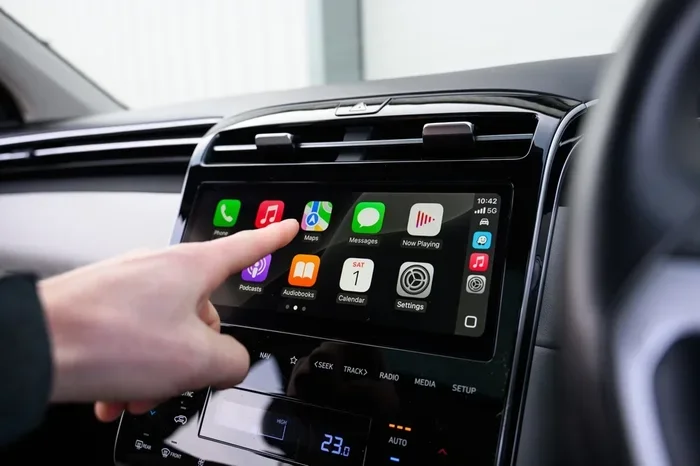
Apple CarPlay is a smart system that mirrors key functions from your iPhone onto your car’s infotainment screen. Once connected, you can use navigation, make calls, send messages, and listen to music without touching your phone directly. The system is designed with safety in mind, offering a simplified interface that is easy to read and use while driving.
Here is what Apple CarPlay gives you access to:
- Maps and navigation with turn-by-turn directions
- Phone calls and SMS text messaging
- Music apps like Apple Music, Spotify, and Podcasts
- Voice control through Siri
- Third-party apps that are CarPlay-compatible
The system works through a USB cable or wirelessly via Bluetooth. Newer cars tend to support wireless CarPlay, while older models may only offer a wired connection. Either way, the experience is smooth and user-friendly. If your car does not have Apple CarPlay, you are missing out on a convenient and safer way to use your phone on the road.
Why People Love Apple CarPlay
There is a reason Apple CarPlay has become a standard feature in so many new vehicles. It is simple to use, it keeps your phone’s interface familiar, and it reduces distractions. Instead of fumbling with your phone while driving, everything you need lives on the car’s screen. You can ask Siri to send a text, pull up a restaurant on Maps, or queue up your favorite playlist. The system also receives updates from Apple, so it keeps getting better over time. For many drivers, adding Apple CarPlay to an older car feels like upgrading to a brand-new vehicle.
Can a Dealership Install Apple CarPlay for Your Car?
The short answer is yes, in most cases. A dealership can install Apple CarPlay for your car, but the exact process depends on a few factors. These include your car’s make and model, the year it was manufactured, and the type of infotainment system it currently has. Some vehicles come with Apple CarPlay ready but just need a software update. Others require a full hardware retrofit that involves replacing the factory head unit.
Before you visit a dealership, it helps to understand what your car needs. Here are the three main scenarios:
Scenario 1: Your car already supports Apple CarPlay. In this case, the dealership can simply activate the feature or push a software update. This is usually quick and may even be free if your car is still under warranty.
Scenario 2: Your car has a compatible head unit but needs a cable or adapter. Some older infotainment systems can support Apple CarPlay with the right adapter or cable. A dealership can install this hardware and configure the software for you.
Scenario 3: Your car has no Apple CarPlay capability at all. In this situation, the dealership may need to replace the entire infotainment unit with one that supports Apple CarPlay. This is the most involved option and will cost more, but it is still very doable.
The best first step is to call your dealership’s service department and ask if your specific car model supports Apple CarPlay installation. They can look up your vehicle by its VIN and give you a clear answer right away.
Which Car Brands Work Best with Dealership Apple CarPlay Installations?
Most major car brands work well with dealership installations. Brands like Ford, Toyota, Honda, Chevrolet, BMW, Mercedes-Benz, and Hyundai have robust dealer networks that routinely handle Apple CarPlay setups. Luxury brands often have more advanced infotainment systems that may require specialized technicians, but most dealerships are equipped to handle the job. If you drive a less common brand, it is still worth asking. Many dealerships have access to universal retrofit kits that work across different makes and models.
How the Installation Process Works
If you have decided to go ahead, you might be wondering what actually happens during the installation. The process varies depending on your car’s needs, but here is a general overview of what you can expect.
Step 1: Vehicle Assessment
The first thing the dealership will do is assess your vehicle. They will check your car’s make, model, year, and current infotainment system. They may plug in a diagnostic tool to see what your system is capable of. This step helps them determine whether you need a simple software update, a hardware adapter, or a full head unit replacement.
Step 2: Parts and Software Preparation
Once the assessment is complete, the dealership will gather the necessary parts and software. If your car needs a new head unit, they will order the correct model. If you only need a software update, they will prepare the update file. Most dealerships keep common parts in stock, but some may need to order them, which could add a few days to the timeline.
Step 3: Installation
On installation day, a technician will work on your car. If it is a software update, the process is usually quick and painless. The technician connects your car to their system, uploads the update, and tests Apple CarPlay to make sure everything works. If a hardware change is needed, the technician will carefully remove the old infotainment unit and install the new one. They will also run all the necessary wiring and connections.
Step 4: Testing and Setup
After the installation, the technician will test everything thoroughly. They will check that Apple CarPlay connects properly, that the touchscreen responds correctly, and that all features like navigation, music, and phone calls work as they should. They may also help you set up your preferences, such as your default navigation app and Siri settings. This is a great time to ask any questions you might have about using the new feature.
Quick Tip: Bring your iPhone to the appointment. The technician will need to pair it with the system during setup. Make sure your phone is fully charged and updated to the latest iOS version for the smoothest experience.
Apple CarPlay Cost: What to Expect
Cost is one of the biggest questions people have when considering Apple CarPlay installation at a dealership. The price can vary quite a bit depending on what your car needs. Let us break down the possible costs.
Software Update or Activation
If your car already has the hardware to support Apple CarPlay, the dealership may only need to run a software update or activate the feature. In many cases, this is free, especially if your car is still under warranty. Even if there is a small charge, it is usually under $100.
Hardware Adapter Installation
If your car needs an adapter or cable to enable Apple CarPlay, the cost will be higher. These adapters typically range from $50 to $200 for the part alone. Add labor charges, and the total cost might land between $150 and $300. This is a more affordable option compared to a full head unit replacement.
Full Head Unit Replacement
If your car has no Apple CarPlay capability, you will likely need a new infotainment head unit. The cost for the part alone can range from $200 to $800 or more, depending on your car’s make and model. Labor charges for the installation can add another $100 to $300. In total, you might be looking at $300 to $1,000 or more for a complete retrofit.
Factors That Affect the Price
Several factors can influence the final cost of your Apple CarPlay installation:
- Your car’s brand and model — Luxury and rare vehicles may require specialized parts
- Your location — Dealership labor rates vary by region
- Whether you have a warranty — Warranty coverage can reduce or eliminate the cost
- The type of Apple CarPlay — Wireless CarPlay may require additional hardware
- Additional features — Some installations include upgrading your car’s speakers or display at the same time
Before agreeing to any work, always ask for a written estimate from the dealership. This protects you from unexpected charges and gives you a clear picture of the total cost.
Factory CarPlay vs. Aftermarket CarPlay
When exploring Apple CarPlay options, you will often hear the terms factory CarPlay and aftermarket CarPlay. Understanding the difference can help you make the best decision for your car and your budget.
What Is Factory CarPlay?
Factory CarPlay means the feature was built into your car by the manufacturer. It comes installed on the original infotainment system and works seamlessly with your vehicle. Factory CarPlay usually offers the best integration, the smoothest performance, and the most features. If your car has factory CarPlay, you may only need a software update to get it running.
What Is Aftermarket CarPlay?
Aftermarket CarPlay refers to any Apple CarPlay setup that was added after the car was built. This could be through a dealership retrofit, an aftermarket adapter, or a third-party installer. Aftermarket CarPlay can work just as well as factory CarPlay, but the experience may vary depending on the quality of the installation and the hardware used.
Which Is Better?
Factory CarPlay is generally considered superior because it is designed specifically for your car’s system. However, aftermarket CarPlay installed by a dealership can be nearly as good. The key is to have a professional handle the installation. A dealership-trained technician will know how to integrate the system properly, which is something a DIY approach or a generic installer may not deliver.
Quick Tips for the Best Apple CarPlay Experience
Whether you get factory or aftermarket Apple CarPlay, these tips will help you get the most out of the system:
- Keep your iPhone updated to the latest iOS version
- Use a high-quality USB cable if you are going with a wired connection
- Restart your car’s infotainment system occasionally to keep it running smoothly
- Disable unnecessary apps on your phone before driving to reduce distractions
- Set up Siri for hands-free control of calls, messages, and navigation
Common Issues and How to Fix Them
While Apple CarPlay is generally reliable, you may run into occasional issues. Here are some common problems and what you can do about them.
Apple CarPlay Not Connecting
If Apple CarPlay will not connect, try these steps first. Unplug the USB cable and plug it back in. Restart your iPhone and your car’s infotainment system. Make sure Siri is enabled on your phone. If the problem persists, visit your dealership for a diagnostic check. They can test both your car’s system and your phone to pinpoint the issue.
CarPlay Keeps Disconnecting
A loose connection is the most common cause of frequent disconnections. Check that your cable is secure and not damaged. If you have a wireless setup, make sure Bluetooth is turned on and your phone is within range. A dealership technician can also check for software conflicts that might be causing the issue.
Touchscreen Not Responding to CarPlay
If the touchscreen does not respond when Apple CarPlay is active, try turning CarPlay off and back on. You can also try restarting your phone. If the problem continues, the dealership can run a system diagnostic to check for hardware or software faults.
Audio Quality Issues
Some users report poor audio quality when using Apple CarPlay. This is often caused by a low-quality USB cable or a faulty connection. Try using a different cable or a different USB port in your car. If the issue persists, the dealership can check your car’s audio system and make adjustments as needed.
Expert Insight: Dealership technicians see these issues all the time. They have the tools and training to diagnose and fix problems quickly. Trying to troubleshoot on your own can sometimes make things worse, so do not hesitate to reach out to your dealer for help.
Should You Get Apple CarPlay Installed at a Dealership?
Deciding whether to have a dealership install Apple CarPlay comes down to a few key considerations. Let us weigh the pros and cons to help you make an informed choice.
Pros of Dealership Installation
- Professional expertise — Technicians are trained specifically for your car’s brand and model
- Warranty protection — Dealership work does not void your vehicle’s warranty
- Genuine parts — You get OEM-quality components that match your car’s system
- Software support — The dealership can update and maintain the system over time
- Peace of mind — Everything is done correctly the first time
Cons of Dealership Installation
- Higher cost — Dealership labor rates tend to be higher than independent shops
- Scheduling — You may need to book an appointment and wait for parts
- Limited to brand — Some dealerships only work on their own brand’s vehicles
For most people, the benefits of dealership installation outweigh the downsides. The professional quality, warranty protection, and use of genuine parts make it a smart choice. If cost is a concern, you can always ask the dealership for a detailed breakdown of the charges before committing to the work.
Frequently Asked Questions
Can a dealership install Apple CarPlay in any car?
Not every car supports Apple CarPlay, but many do. A dealership can check your vehicle’s compatibility by looking up your VIN. If your car’s infotainment system is compatible, the dealership can install Apple CarPlay through a software update, adapter, or head unit replacement. It is always best to confirm compatibility before scheduling an appointment.
How long does it take a dealership to install Apple CarPlay?
The installation time varies depending on what your car needs. A simple software update might take just 30 minutes. A hardware adapter installation could take a couple of hours. A full head unit replacement may take half a day or more. Your dealership can give you a more accurate timeline once they assess your vehicle.
Is Apple CarPlay installation at a dealership covered by warranty?
If your car is still under warranty and Apple CarPlay was supposed to be included, the dealership may cover the cost of installation. Even if the feature was not part of your original package, having a dealership perform the installation typically does not void your existing warranty. Always confirm this with your service advisor before proceeding.
Can I use Apple CarPlay wirelessly after a dealership installation?
Yes, if your car supports wireless Apple CarPlay, the dealership can set it up for you. Wireless CarPlay uses Bluetooth and Wi-Fi to connect your iPhone without a cable. However, not all cars support wireless connectivity. The dealership will let you know whether your vehicle is capable of wireless CarPlay during the assessment phase.
What is the difference between Apple CarPlay and Android Auto?
Apple CarPlay is designed for iPhone users, while Android Auto is made for Android phones. Both systems offer similar features like navigation, messaging, and music playback on your car’s screen. The main difference is the ecosystem they work with. A dealership can often install both systems if your car’s infotainment supports them.
Can I install Apple CarPlay myself instead of going to a dealership?
Some aftermarket CarPlay adapters can be installed by yourself, but the process varies in difficulty. DIY installations may void your warranty and can lead to connectivity issues if not done correctly. A dealership installation ensures the system is set up properly and works seamlessly with your car’s existing features. For most drivers, the dealership route is the safer and more reliable option.
Conclusion
The answer to whether a dealership can install Apple CarPlay is a clear yes for most vehicles. Whether your car needs a simple software update, a hardware adapter, or a full infotainment upgrade, a dealership has the expertise and equipment to get the job done right. The process is straightforward, the results are reliable, and you get the added benefit of keeping your vehicle warranty intact.
Apple CarPlay is a game-changer for anyone who spends time on the road. It makes navigation easier, calls safer, and music more accessible. If your car does not have it yet, there is a good chance a dealership can bring it to you. Start by calling your local dealer, asking about compatibility, and getting a cost estimate. From there, the process is simple and well worth the investment.
Do not let an outdated infotainment system hold you back. With the right installation, you can enjoy all the benefits of Apple CarPlay in your daily drive. Take the first step today and ask your dealership if they can make it happen for you.