Is It Good to Reset Your Car Computer for Smoother Driving
Resetting your car computer can be a simple yet powerful way to restore smooth driving, clear error codes, and improve fuel economy. This guide covers when it makes sense, how to do it safely, and what benefits you can expect. Learn the right methods, avoid common mistakes, and keep your vehicle running at its best.
Have you ever wondered if resetting your car computer is actually a good idea?
Many drivers face this question when their vehicle starts acting up. Strange warning lights, rough idling, or poor fuel economy can all point to a need for a car computer reset. But is it safe? Does it really help? And more importantly, will it make your driving smoother?
The truth is, resetting your car computer can solve many common issues. It clears old error codes, resets adaptive settings, and gives your vehicle a fresh start. Think of it like restarting your phone when it starts acting glitchy. Sometimes a simple reset is all you need to get things running right again.
In this article, we will walk you through everything you need to know about is it good to reset your car computer. You will learn when it makes sense, how to do it safely, and what benefits you can expect. Whether you are a DIY mechanic or a curious car owner, this guide has you covered.
Key Takeaways
- A car computer reset clears old data and error codes: It gives your ECU a fresh start, which can resolve many common driving issues and restore smooth performance.
- Reset after battery replacement or part installation: These are the most common triggers for a reset. The ECU needs to relearn and recalibrate after these changes.
- Always fix the real problem first: Never reset to hide a warning light without addressing the underlying issue. This only masks problems and can lead to bigger repairs.
- Use an OBD2 scanner for precise resets: This tool lets you target specific codes and monitor sensor data, giving you more control over the reset process.
- Complete a full drive cycle after resetting: This allows the ECU to relearn and adapt to your driving, ensuring you get the full benefits of the reset.
- Do not reset too frequently: Regular resets disrupt the adaptive learning process. Only reset when there is a clear and valid reason to do so.
- Maintain sensors and use quality fuel: These simple habits keep your car computer healthy and reduce the need for frequent resets.
📑 Table of Contents
- What Does Resetting Your Car Computer Actually Do?
- When Should You Consider Resetting Your Car Computer?
- How to Reset Your Car Computer the Right Way
- Benefits You Can Expect After a Reset
- Common Mistakes to Avoid When Resetting
- Quick Tips for a Successful Reset
- Expert Insights on Long-Term Car Computer Health
- Key Takeaways
- Conclusion
What Does Resetting Your Car Computer Actually Do?
Before you jump into the reset process, it helps to understand what is happening under the hood. Your car computer, also known as the engine control module or ECU, manages many critical systems. It controls fuel injection, ignition timing, idle speed, and emission systems. The powertrain control module, or PCM, is a related unit that oversees both the engine and transmission.
How the ECU Works in Your Vehicle
The ECU is essentially the brain of your car. It collects data from dozens of sensors throughout the vehicle. These sensors monitor things like oxygen levels, engine temperature, and throttle position. Based on this data, the ECU makes real-time adjustments to keep your engine running smoothly.
Over time, the ECU learns your driving habits. It adapts to things like your acceleration style and typical driving conditions. This is called adaptive learning. While this is generally helpful, it can sometimes cause problems. Old learned values may not serve you well anymore, especially after parts changes or repairs.
What Happens When You Perform a Car Computer Reset
When you reset your car computer, you are essentially clearing the stored data and error codes. The ECU goes back to its factory default settings. This means it forgets all the adaptive learning it has accumulated.
After a reset, the ECU starts fresh. It begins relearning your driving patterns from scratch. This can fix issues caused by incorrect learned values. It can also clear stubborn warning lights like the check engine light.
However, a reset does not fix physical problems. If a sensor is damaged or a part is worn out, resetting the computer will not repair it. Think of it as clearing the dashboard, not fixing the engine. Always diagnose the real issue first.
When Should You Consider Resetting Your Car Computer?
Not every car problem requires a computer reset. Knowing when to do it can save you time and effort. Here are the most common situations where a reset makes sense.
After Replacing a Car Battery
One of the most common reasons to reset your car computer is after a battery replacement. When you disconnect the battery, the ECU loses all its stored data. This is normal and expected. After reconnecting the battery, the system needs time to relearn.
Some drivers notice rough idle or poor shifting after a battery change. This happens because the ECU has to rebuild its adaptive maps. A controlled reset can help speed up this process and get your vehicle back to normal faster.
When the Check Engine Light Keeps Coming Back
If your check engine light keeps returning after you fix the problem, a reset might help. Sometimes the ECU holds onto old codes even after the issue is resolved. A reset clears these lingering codes and gives the system a clean slate.
But here is the important part. You should only reset the light after you have actually fixed the underlying issue. Resetting without fixing the problem is like hiding a warning sign. The light will come back, and you might miss a real problem.
After Installing New Car Parts
Have you recently installed new parts like a cold air intake, new sensors, or an upgraded exhaust? Your ECU may need a reset to adjust to the new components. New parts can change how the engine breathes and performs.
A reset allows the ECU to recalibrate itself for the new setup. This helps your vehicle run at its best with the updated parts. It is a simple step that many people overlook after modifications.
When You Notice Poor Fuel Economy
Are you filling up more often than usual? Poor fuel economy can sometimes be linked to outdated ECU adaptations. If the computer has learned inefficient driving patterns, a reset might help restore better mileage.
Keep in mind that fuel economy issues can have many causes. A reset is one tool in your toolbox, not a magic fix. Combine it with regular car maintenance for the best results.
How to Reset Your Car Computer the Right Way
Resetting your car computer is not as scary as it sounds. There are a few methods you can use, and some are simpler than others. Let us walk through the most common approaches.
Comparison of Reset Methods
| Method | Cost | Precision | Difficulty | Side Effects |
|---|---|---|---|---|
| Battery Disconnect | Free | Full ECU reset | Easy | Resets radio, clock, and other settings |
| OBD2 Scanner | $20-$100 | Targeted code clearing | Moderate | Minimal impact on other systems |
| Ignition Cycle | Free | Varies by vehicle | Moderate | Varies by make and model |
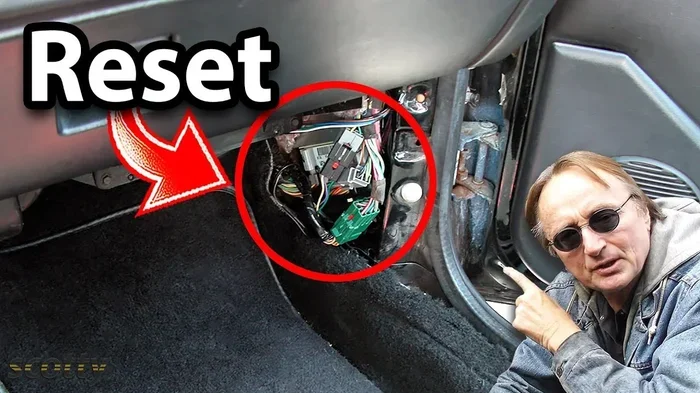
Method 1: Disconnect the Car Battery
The most popular method is to disconnect the car battery. This is simple and requires no special tools. Here is how you do it:
- Turn off your engine and all electrical systems.
- Open the hood and locate the battery.
- Using a wrench, disconnect the negative terminal first.
- Wait at least 15 to 30 minutes.
- Reconnect the negative terminal and tighten it securely.
- Start your car and let it idle for a few minutes.
This method works well for most vehicles. It clears the ECU memory and resets adaptive values. However, it also resets other settings like your radio presets and clock.
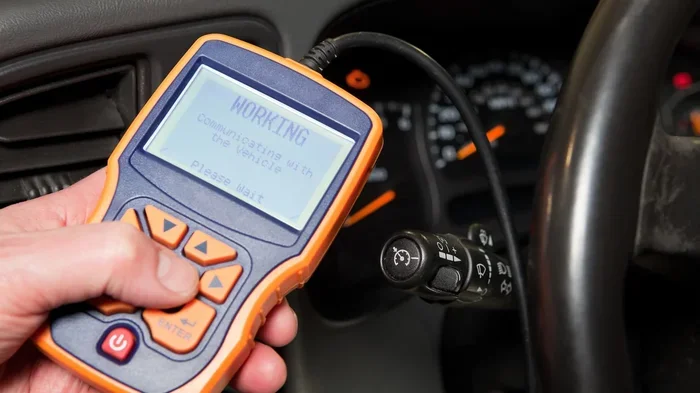
Method 2: Use an OBD2 Scanner
A more precise method is to use an OBD2 scanner. This tool connects to your car’s diagnostic port. It allows you to clear specific error codes without affecting other settings.
Here is why many people prefer this method:
- It targets only the ECU, not other systems.
- You can read and clear specific diagnostic trouble codes.
- It provides real-time data on sensor readings.
- It helps you verify that the reset was successful.
You can buy an affordable OBD2 scanner for under $30. If you do a lot of DIY car maintenance, this tool is a must-have.
Method 3: Use the Ignition Cycle Method
Some vehicles allow you to reset the computer through a specific ignition cycle. This method varies by car brand and model. Generally, it involves turning the key on and off in a specific sequence.
Check your owner’s manual for the exact steps for your vehicle. This method is less common but can be effective for certain makes and models.
What Is a Drive Cycle and Why Does It Matter?
After resetting your car computer, you need to complete a drive cycle. A drive cycle is a specific driving pattern that allows the ECU to relearn and calibrate itself.
During a drive cycle, the ECU tests various sensors and systems. It rebuilds its adaptive maps based on your driving. Without completing a proper drive cycle, the reset may not fully take effect.
A typical drive cycle involves:
- Starting the cold engine and letting it idle.
- Driving at moderate speeds on city streets.
- Driving at highway speeds for several miles.
- Allowing the engine to cool down naturally.
This process can take 30 minutes to a few hours depending on your vehicle. Patience is key during this phase.
Benefits You Can Expect After a Reset
So what happens after you reset your car computer? Most drivers notice several positive changes. Let us look at the key benefits.
Improved Vehicle Performance
One of the most noticeable benefits is smoother engine operation. After a reset, the ECU recalibrates fuel delivery and ignition timing. This often results in a more responsive and smoother ride.
Many drivers report better acceleration and reduced hesitation. The engine feels more lively and responsive. This is especially true if the old adaptive values were causing lag or roughness.
Better Fuel Efficiency
A fresh start for your ECU can lead to improved fuel efficiency. The computer recalculates the optimal fuel-to-air ratio based on current conditions. This can restore the mileage you had when your car was new.
Some drivers see a 3 to 5 percent improvement in fuel economy after a reset. While this may seem small, it adds up over time. Regular resets combined with good driving habits can make a real difference in your fuel efficiency.
Clearing Stubborn Error Codes
If you have been dealing with a persistent check engine light, a reset can help. Clearing old codes gives you a clean baseline. You can then monitor whether the light returns, which tells you if the problem is truly fixed.
This is especially useful when you are troubleshooting intermittent issues. A reset helps you separate real problems from phantom codes caused by temporary glitches in the onboard diagnostics system.
Smoother Transmission Shifting
Your car computer also controls the transmission. After a reset, the transmission control module relearns its shift points. This often results in smoother, more confident gear changes.
Drivers of automatic vehicles often notice less harsh shifting after a reset. The transmission feels more refined and responsive. This is a subtle but welcome improvement for daily driving.
Common Mistakes to Avoid When Resetting
Resetting your car computer is straightforward, but mistakes can happen. Avoid these common pitfalls to get the best results.
Resetting Without Fixing the Underlying Problem
This is the biggest mistake people make. If your check engine light is on because of a real problem, resetting the computer will not fix it. The light will simply come back, and the problem may worsen over time.
Always diagnose the issue first. Use an OBD2 scanner to read the codes. Fix the actual problem before performing a reset. This ensures you are not masking a serious issue that could lead to costly repairs.
Disconnecting the Battery While the Engine Is Running
Never disconnect the battery while the engine is running. This can cause voltage spikes that damage sensitive electronics. Always turn off the engine completely before disconnecting any battery terminals.
Also, be aware that disconnecting the battery can reset other systems. Your radio, power windows, and clock settings may need to be reprogrammed. Some vehicles may also need a special reset procedure for the power windows after a battery disconnect.
Not Completing a Full Drive Cycle After the Reset
As we mentioned earlier, a drive cycle is essential after a reset. Skipping this step means the ECU does not fully relearn your driving patterns. You may not get the full benefits of the reset.
Take the time to complete a proper drive cycle. It is a small investment of time that pays off in smoother performance and better fuel economy.
Resetting Too Frequently
There is no need to reset your car computer regularly. Doing it too often can actually cause more problems than it solves. The ECU needs time to build up new adaptive data.
As a rule of thumb, only reset when there is a clear reason to do so. Routine resets are not necessary and can disrupt the ECU’s learning process. Trust the adaptive system to do its job.
Quick Tips for a Successful Reset
Follow these practical tips to make sure your reset goes smoothly and delivers the best results.
- Gather your tools first: Have your OBD2 scanner, wrench set, and owner’s manual ready before you start.
- Note down your settings: Write down your radio presets and clock time before disconnecting the battery so you can restore them easily.
- Check for software updates: Some resets work better after a software update. Check with your dealer for the latest ECU firmware.
- Drive gently after the reset: Avoid aggressive driving for the first 50 miles. Let the ECU relearn at a gentle pace.
- Monitor the check engine light: If it returns within a few days, there is still an unresolved issue that needs attention.
- Keep a maintenance log: Record when you reset and why. This helps track patterns and prevents unnecessary resets in the future.
Expert Insights on Long-Term Car Computer Health
Keeping your car computer in good shape goes beyond just resetting it. Here are some expert tips to maintain optimal vehicle performance over the long haul.
Keep Your Sensors Clean
The ECU relies on data from various sensors. Dirty or faulty sensors send incorrect information, which can cause poor performance. Regularly clean sensors like the mass airflow sensor and oxygen sensor.
Use a proper sensor cleaner available at any auto parts store. A few dollars spent on cleaning can prevent costly misdiagnoses and unnecessary resets. Clean sensors mean accurate data, which means better vehicle performance.
Use Quality Fuel and Oil
Believe it or not, the fuel and oil you use affect your car computer’s performance. Low-quality fuel can cause carbon buildup and sensor contamination. This leads to inaccurate readings and poor engine behavior.
Stick with reputable fuel brands and follow the manufacturer’s oil recommendations. Clean fuel and fresh oil help the ECU work with accurate data. This simple habit reduces the need for frequent resets.
Address Warning Signs Promptly
Do not ignore early warning signs like slight rough idling or minor hesitation. These small issues can indicate sensor problems or fuel system issues. Addressing them early prevents them from escalating into bigger problems.
Regular car diagnostic checks can catch issues before they trigger warning lights. Many auto parts stores offer free diagnostic scans. Take advantage of this service to stay ahead of problems and keep your car running smoothly.
Keep Software Updated
Modern vehicles receive software updates from the manufacturer. These updates can improve ECU performance and fix known bugs. Check with your dealer about available updates for your vehicle.
While not all updates require a reset, some do. Staying current with software keeps your car running at its best and can prevent the need for frequent resets. It is an easy step that many drivers overlook.
Key Takeaways
- A car computer reset clears old data and error codes: It gives your ECU a fresh start, which can resolve many common driving issues and restore smooth performance.
- Reset after battery replacement or part installation: These are the most common triggers for a reset. The ECU needs to relearn and recalibrate after these changes.
- Always fix the real problem first: Never reset to hide a warning light without addressing the underlying issue. This only masks problems and can lead to bigger repairs.
- Use an OBD2 scanner for precise resets: This tool lets you target specific codes and monitor sensor data, giving you more control over the reset process.
- Complete a full drive cycle after resetting: This allows the ECU to relearn and adapt to your driving, ensuring you get the full benefits of the reset.
- Do not reset too frequently: Regular resets disrupt the adaptive learning process. Only reset when there is a clear and valid reason to do so.
- Maintain sensors and use quality fuel: These simple habits keep your car computer healthy and reduce the need for frequent resets.
Conclusion
So, is it good to reset your car computer? The answer is yes, when done correctly and for the right reasons. Resetting your car computer can bring noticeable improvements in performance, fuel economy, and driving smoothness. It is a simple yet effective tool in your car maintenance toolkit.
However, it is not a magic fix for every problem. Always diagnose issues first, fix them properly, and then reset if needed. Think of a reset as a fresh start, not a substitute for real repairs.
Whether you use the battery disconnect method or an OBD2 scanner, the key is to follow the right process. Complete a drive cycle afterward and give your ECU time to relearn. With these steps, you can enjoy a smoother, more responsive driving experience every time you get behind the wheel.
Take the time to understand your vehicle’s needs. A well-maintained car computer leads to a well-running car. And that means more miles of trouble-free driving for you. Start with the basics, stay consistent with your car maintenance, and your vehicle will reward you with years of reliable service.