How to Take Off Maintenance Required After Oil Change
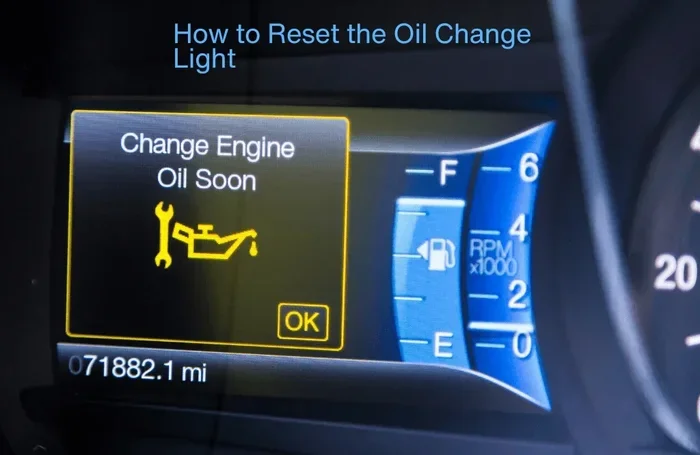
Learning how to take off maintenance required after oil change is a simple skill every car owner should have. The maintenance required light is part of your car’s oil life monitoring system, and resetting it after an oil change keeps your service tracking accurate. With just a few button presses, you can clear the dashboard warning light and stay on top of your car maintenance schedule.
You just got your oil changed. You feel good about keeping your car in great shape. But then you notice it. That little light on your dashboard that says “Maintenance Required.” It is annoying. It is also confusing. You just did the very thing that should turn it off. So why is it still there?
The good news is that how to take off maintenance required after oil change is usually very simple. You do not need to be a mechanic. You do not need expensive tools. In most cases, a few button presses will do the trick. This guide will walk you through the exact steps for your car. You will learn why the light comes on, how to reset it, and what to do if it stays on.
We will cover popular car brands and models. We will share tips to avoid common mistakes. And we will help you keep your car running smoothly for years to come. Whether you drive a Toyota, Honda, Ford, or Chevrolet, this guide has you covered. Let us get started.
Key Takeaways
- The maintenance required light is not an emergency warning. It is a routine reminder based on your car’s oil life monitoring system.
- Resetting the light after an oil change is quick and easy. Most procedures take less than a minute and require no special tools.
- Every car brand has a slightly different reset process. Always follow the correct procedure for your specific vehicle model.
- Common mistakes include resetting too early or skipping the reset entirely. Both can mess up your oil change tracking.
- Keep a service history log for your records. This helps with resale value and staying organized with maintenance tasks.
- See a professional if other warning signs appear alongside the light. The maintenance required light alone is not a cause for panic.
📑 Table of Contents
Why Does the Maintenance Required Light Come On?
Before you learn how to turn off the maintenance required light, it helps to understand why it comes on in the first place. The light is part of your car’s oil life monitoring system. This system tracks your driving habits and engine conditions. It estimates when your oil needs to be replaced.
Unlike older cars that use mileage alone, modern vehicles use a smart algorithm. The system looks at engine temperature, driving style, and time between drives. When the oil life drops to a certain point, the dashboard warning light turns on.
How the Oil Life Monitoring System Works
Your car has an oil life monitoring system built into the engine computer. This system does not measure oil quality directly. Instead, it tracks factors that affect oil degradation. Here is what it monitors:
- Engine running hours and temperature
- Number of short trips versus long drives
- Idle time and stop-and-go driving
- Driving in extreme heat or cold
- Overall vehicle usage patterns
Based on all of this data, the system calculates your remaining oil life percentage. When it drops to around 15 percent, the maintenance reminder light comes on. This is your signal that an oil change is due soon.
What Triggers the Maintenance Reminder?
Several things can trigger the maintenance required light. The most common cause is simply reaching the oil change interval. Most modern cars recommend an oil change every 5,000 to 10,000 miles. But the exact interval depends on your car model and driving conditions.
Other triggers include:
- Rough driving conditions like towing or off-roading
- Frequent short trips under three miles
- Driving in very hot or very cold climates
- Heavy traffic or stop-and-go commuting
- Dusty or dirty road environments
All of these factors cause your oil to break down faster. The system adjusts the service interval accordingly. This is why some drivers need an oil change sooner than others.
How to Take Off Maintenance Required After Oil Change
Now for the part you have been waiting for. How to take off maintenance required after oil change depends on your car brand. Each manufacturer uses a slightly different reset procedure. But the general idea is the same. You need to access the trip or maintenance menu on your dashboard.
Here is the good news. Most reset procedures take less than a minute. You do not need any special equipment. Just follow the steps for your specific car. Below, we cover the most popular brands and models.
Reset Procedure for Toyota Vehicles
Toyota makes this process very straightforward. Here are the steps to reset the maintenance required light on most Toyota models:
- Turn the ignition to the “ON” position. Do not start the engine.
- Press the trip button on your dashboard until the odometer screen shows “Trip A.”
- Turn the ignition off and then back to “ON.”
- Press and hold the trip button for about 10 seconds.
- The maintenance light should start to flash.
- Release the button and press it again for three seconds.
- The light should now be off and the counter reset to zero.
If this does not work for your Toyota model, try holding the trip button for 15 seconds instead. Some newer Toyota models use the steering wheel controls on the left side of the instrument cluster.
Reset Procedure for Honda Vehicles
Honda vehicles have a slightly different process. Here is how to reset the maintenance required light on most Honda cars:
- Turn the ignition to the “ON II” position. This is the position where the gauges light up but the engine is off.
- Press and hold the select/reset knob on the lower left side of the instrument panel.
- Hold the knob for about 10 seconds.
- The maintenance light should begin to blink.
- Release the knob and press it again three times within five seconds.
- The light should turn off and the oil life indicator will reset to 100 percent.
For Honda models with a steering wheel control, you can use the right arrow button instead of the select knob. The process is the same but uses different controls.
Reset Procedure for Ford Vehicles
Ford vehicles use the information display screen for the reset process. Here is what to do:
- Use the steering wheel controls to navigate to the main menu on your display screen.
- Select “Settings” and then choose “Vehicle Maintenance.”
- Find the option for “Oil Life” or “Maintenance Required.”
- Press the OK or Reset button to enter the reset mode.
- Follow the on-screen prompts to confirm the reset.
- The maintenance light should turn off and the oil life will reset to 100 percent.
For older Ford models without a screen, the process is different. You may need to press the gas pedal three times within five seconds with the ignition in the “ON” position.
Reset Procedure for Chevrolet Vehicles
Chevrolet vehicles also use the information display. Here is the reset process:
- Press the “Info” button on the steering wheel until the maintenance menu appears.
- Press and hold the “Set” or “Reset” button for about five seconds.
- The system will prompt you to confirm the reset.
- Press and hold the button again for three seconds.
- The maintenance required light should turn off.
For Chevrolet models with a trip odometer, you can also try turning the ignition to “ON” and pressing the trip odometer reset stalk. Hold it for 10 seconds until the light flashes and then release.
Reset Procedure for Other Car Brands
Many other car brands follow similar patterns. Here are quick tips for some additional brands:
- Nissan: Turn the ignition to ON, press the trip button repeatedly until the maintenance screen appears, then hold the button for 10 seconds.
- BMW: Use the iDrive controller to navigate to Vehicle Info, then select Service and choose Reset.
- Jeep: Turn the key to ON, press the gas pedal three times within 10 seconds, then release.
- Subaru: Hold the trip reset stalk for about 10 seconds while the ignition is in the ON position.
If your car brand is not listed here, check your owner’s manual. The reset procedure is always documented there. You can also search online for your specific model and year.
Common Mistakes When Resetting the Maintenance Light
Even though the reset process is simple, mistakes happen. Here are the most common errors people make when trying to take off the maintenance required light.
Resetting Too Early or Too Late
One of the biggest mistakes is resetting the light before the oil is actually changed. This clears the counter but does not change the oil. Your engine will run on old oil, which can cause serious damage over time.
Another mistake is waiting too long after the oil change to reset the light. The system may still show old oil life data. Always reset the light immediately after the new oil is added and the drain plug is tightened.
Skipping the Reset Procedure Entirely
Some people forget to reset the light at all. This is very common. The maintenance required light stays on for months. It becomes a constant annoyance on the dashboard. Eventually, people just ignore it along with other warning lights. This is a bad habit.
Skipping the reset means your oil life monitoring system will not track accurately. The next oil change interval will be off. This can lead to overdue oil changes or unnecessary early services.
Using the Wrong Reset Method
Every car brand has its own reset procedure. Using the wrong method will not work. Some people try the Toyota method on a Honda. This will not reset the maintenance required light. Always use the correct procedure for your specific vehicle.
If you are unsure, search for your car model and year online. Many car forums and YouTube videos walk you through the exact steps. This can save you a lot of frustration.
Tips to Keep Your Car Maintenance on Track
Taking off the maintenance required light is just one part of car care. Here are some practical tips to keep your maintenance schedule on track and your car running well.
Set Reminders for Your Next Oil Change
Do not rely solely on your car’s oil life monitoring system. Set your own reminders too. Use your phone calendar or a car maintenance app. Write the next oil change date on your windshield with a grease pencil. Any method works as long as you remember.
Most cars need an oil change every 5,000 to 7,500 miles for conventional oil. Synthetic oil can extend this to 10,000 or even 15,000 miles. Check your owner’s manual for the recommended interval for your specific car.
Keep a Service History Log
Maintaining a service history is one of the best things you can do for your car. Write down every oil change date, mileage, and oil type used. Keep this log in your glove box or a digital file.
A good service history helps you:
- Track when your next oil change is due
- Prove maintenance records if you sell the car
- Identify patterns in engine performance
- Catch potential problems early
- Stay organized with all vehicle service needs
Understand Your Oil Life Percentage
Many modern cars display an oil life percentage on the dashboard. This number tells you exactly how much life remains in your current oil. When the percentage drops to 15 percent, it is time to schedule an oil change.
Do not wait until the percentage hits zero. By that point, your oil has been degraded for a while. Staying ahead of the maintenance schedule protects your engine and extends its lifespan.
Use Quality Oil and Filters
The quality of oil you use matters a lot. Always use the oil type recommended by your car manufacturer. This information is in your owner’s manual. Using the wrong oil can reduce engine performance and trigger the maintenance light sooner.
Similarly, always use a high-quality oil filter. A cheap filter may not trap contaminants effectively. This means dirty oil circulates through your engine. Over time, this causes wear and tear on engine components.
When to See a Professional
Most of the time, resetting the maintenance required light is a DIY job. But there are situations where you should see a professional mechanic.
Signs That Something Is Wrong Beyond the Light
The maintenance required light is a routine reminder. It is not an emergency warning. But if you notice other symptoms along with the light, pay attention. These could indicate a real problem:
- The oil pressure warning light is also on
- You hear unusual engine noises like knocking or ticking
- The oil level drops rapidly between changes
- Your exhaust emits dark or blue smoke
- The engine runs hotter than normal
- The check engine light is illuminated
If any of these symptoms appear, do not just reset the light. Have a mechanic inspect your vehicle. These signs could point to engine problems that need immediate attention.
Maintaining Your Service History for Resale Value
If you plan to sell your car someday, a complete service history is essential. Buyers look for proof that the car was well maintained. Resetting the maintenance light after every oil change is part of that proof.
Keep all service receipts and records. Many dealerships can provide a service history printout if you bought your car from them. This documentation adds value and builds trust with potential buyers.
Final Thoughts on Taking Off the Maintenance Required Light
Learning how to take off maintenance required after oil change is a simple but important skill. Every car owner should know how to do this. It takes just a few minutes and keeps your dashboard clean and clear.
Remember that the maintenance required light is a helpful tool. It reminds you to take care of your car at the right time. Resetting it after an oil change keeps the system accurate and your car running well.
Follow the steps in this guide for your specific car brand. Avoid common mistakes like resetting too early or using the wrong procedure. Keep up with your regular maintenance schedule. Your car will thank you with better performance and a longer lifespan.
Now that you know how to reset the maintenance required light, you are ready. The next time you get an oil change, you can handle the reset yourself with confidence. Keep this guide handy for reference whenever you need it.
Frequently Asked Questions
What does the maintenance required light mean?
The maintenance required light is a reminder from your car’s oil life monitoring system. It tells you that your oil change interval is approaching. It does not mean your car has a serious problem. It is simply a scheduled maintenance notification based on your driving patterns and engine conditions.
Can I drive with the maintenance required light on?
Yes, you can safely drive with the maintenance required light on. This light is not an emergency warning. It is a routine reminder that an oil change is due soon. However, you should not ignore it for too long. Driving with old oil for extended periods can harm your engine over time.
How often should I reset the maintenance required light?
You should reset the light every time you get an oil change. This keeps your oil life monitoring system accurate. Each reset sets the counter back to 100 percent, giving you a fresh service interval. Consistent resetting helps you stay on top of your car maintenance schedule.
Why won’t my maintenance required light turn off after resetting?
If the light stays on after resetting, you may have used the wrong procedure for your car model. Double-check your owner’s manual for the exact steps. Also make sure the oil was actually changed before resetting. In rare cases, a faulty sensor or electrical issue may be the cause, which a mechanic can diagnose.
Is it safe to reset the maintenance light myself?
Absolutely. Resetting the maintenance required light is a safe and simple process. It does not require any mechanical knowledge or special tools. You are just clearing a reminder, not changing any engine settings. Anyone can do it following the correct steps for their vehicle.
Does resetting the maintenance light affect my car’s warranty?
No, resetting the maintenance light does not affect your car’s warranty in any way. It simply clears a dashboard reminder. Your service records are still tracked separately by your mechanic or dealership. Always keep your service receipts and records for warranty claims and resale purposes.