How Do I Reset My Maintenance Indicator The Easy Way
Resetting your maintenance indicator is a simple process that keeps your car running smoothly and your dashboard clear. Whether you need to reset the maintenance light after an oil change or a service visit, this guide walks you through every method. You will learn the easy steps for most vehicle brands, common mistakes to avoid, and when a reset is not enough.
Have you ever glanced at your dashboard and seen a little wrench or service light staring back at you? It is easy to panic, but the truth is, resetting your maintenance indicator is one of the simplest things you can do as a car owner. This light, often called the maintenance light or service indicator, reminds you that it is time for routine care like an oil change or tire rotation.
In this guide, we will show you exactly how to reset your maintenance indicator the easy way. We will cover the steps for popular car brands, common mistakes to avoid, and tips to keep your maintenance reminder system working properly. Whether you drive a Honda, Toyota, Ford, or Chevrolet, you will find the help you need right here.
Most people think they need a mechanic to clear that little light on the dash. But with a few simple steps, you can handle it yourself. Let us walk through it together so you can get back on the road with confidence.
Key Takeaways
- Easy DIY Process: Resetting your maintenance indicator is something you can do at home in minutes with no special tools.
- Brand-Specific Steps: Different car brands use different reset procedures, and we cover the most common ones.
- Reset After Service: Always reset the maintenance light after completing an oil change or scheduled service.
- Know the Difference: A maintenance indicator is not the same as a serious warning light, and mixing them up can cost you.
- Trip Meter Matters: Using the trip meter correctly is key to resetting the service reminder on most vehicles.
- When to See a Pro: Some maintenance lights signal deeper issues that a simple reset will not fix.
- Prevent Future Alerts: Following your maintenance schedule helps you avoid unexpected dashboard warnings.
📑 Table of Contents
- What Is a Maintenance Indicator?
- How to Reset Your Maintenance Indicator
- Common Mistakes When Resetting Your Maintenance Indicator
- When Should You Reset the Maintenance Light?
- Tips for Keeping Your Maintenance System Accurate
- When a Reset Is Not Enough
- Final Thoughts on Resetting Your Maintenance Indicator
What Is a Maintenance Indicator?
Your maintenance indicator is a dashboard light that tells you it is time for scheduled vehicle care. It usually looks like a wrench, a small car icon, or the words “Service Due.” This light is part of your car’s oil life system or maintenance reminder feature, and it tracks your driving habits to estimate when service is needed.
Why Does the Maintenance Light Come On?
The maintenance light typically activates based on mileage, engine hours, or driving conditions. Most modern vehicles use a smart system that counts down from a set service interval, usually every 5,000 to 10,000 miles. When the counter reaches zero, the light turns on to remind you it is time for an oil change or inspection.
Here are the most common reasons your dashboard warning light might appear:
- Oil change is due based on your car’s oil life monitor
- Scheduled maintenance is approaching, such as a tire rotation or fluid check
- Driving in severe conditions like extreme heat, cold, or stop-and-go traffic
- The system has not been reset after a previous service
- A sensor or module needs attention during routine car maintenance
Maintenance Light vs. Warning Light
It is important to know the difference between a maintenance indicator and a serious dashboard warning light. A maintenance light usually means routine care is needed. Warning lights, like the check engine light or oil pressure light, often signal a problem that needs immediate attention. If you see a red light or a flashing symbol, pull over safely and check your owner’s manual.
How to Reset Your Maintenance Indicator
Resetting your service indicator is straightforward once you know the right steps. The process varies slightly depending on your car brand and model, but the basic idea is the same. You need to turn the ignition on and off in a specific sequence to clear the maintenance reminder from your car’s computer.
The General Reset Method
Before you start, make sure you have completed the actual service. Never reset the light without changing the oil or performing the needed maintenance. Here is the general approach that works for many vehicles:
- Turn the ignition to the ON position without starting the engine. You do this by turning the key or pressing the start button without pressing the brake pedal.
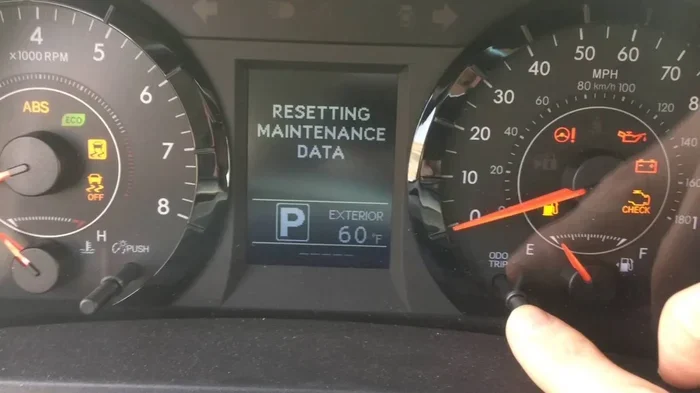
- Press the trip meter button or scroll through the dashboard display until you see the maintenance indicator or the odometer reading.
- Turn the ignition OFF and then back ON within a few seconds.
- Hold the trip meter button or follow the on-screen prompts to clear the service reset message.
- Turn the ignition OFF again, then start the engine to confirm the light is gone.
This service reset procedure works on many older vehicles and some newer models. If it does not work for your car, check the specific steps below for your brand.
Reset Steps for Popular Car Brands
Different car manufacturers use different methods to clear the maintenance light. Here are the most common reset procedures for popular brands:
For Toyota and Lexus vehicles: With the engine off, set the trip meter to the odometer reading. Turn the ignition to ON, then turn it OFF. Press and hold the trip meter reset button, then turn the ignition back to ON. Hold the button until the maintenance light flashes and then clears.
For Honda and Acura vehicles: Turn the ignition to ON (do not start the engine). Press and hold the trip meter reset stem on the dashboard or steering wheel. Turn the ignition to OFF, then back to ON while still holding the stem. Keep holding until the maintenance indicator resets.
For Ford vehicles: Use the steering wheel controls to navigate to the vehicle information menu. Scroll to the maintenance reminder option and select “Reset.” Follow the on-screen prompts to clear the oil change reset message.
For Chevrolet and GMC vehicles: Press the trip button on the instrument cluster until the maintenance due message appears. Turn the ignition OFF, then press and hold the trip button while turning the ignition back ON. Hold the button until the message clears.
Resetting the Maintenance Light on Luxury Brands
BMW, Mercedes-Benz, and Audi vehicles often have more advanced dashboard symbols and display systems. On these cars, you may need to use the steering wheel buttons or the infotainment screen to access the service menu. The general flow is to find the vehicle settings, select “Maintenance” or “Service,” and choose “Reset Service Interval.” If you are unsure, your owner’s manual will have the exact steps for your specific model.
Common Mistakes When Resetting Your Maintenance Indicator
Even though resetting the maintenance light is simple, people still make mistakes that cause frustration. Let us look at the most common errors and how to avoid them.
Resetting Without Completing the Service
The biggest mistake is clearing the light before actually doing the work. If you reset the maintenance indicator without changing the oil or performing the scheduled service, you are just hiding the problem. The light will come back, and you may forget about the real maintenance need. Always complete the service first, then reset the light.
Not Following the Correct Sequence
Every car brand has its own reset procedure, and doing the steps out of order will not work. Some people try random button combinations, which can lead to confusion. Stick to the correct sequence for your vehicle, and if you are unsure, look it up in the owner’s manual or search for your specific model online.
Ignoring the Trip Meter Setting
On many vehicles, you need the trip meter set to the odometer reading before starting the reset process. If you skip this step or are on the wrong display, the service reset will not work. Always double-check that you are viewing the correct screen before pressing any buttons.
Holding Buttons Too Short or Too Long
Timing matters when resetting the maintenance reminder. Holding a button for just one second might not be enough, while holding it for ten seconds could trigger a different function. Watch for the light to flash or the screen to change, and release the button at the right moment.
When Should You Reset the Maintenance Light?
Knowing when to reset your maintenance indicator helps you stay on top of your vehicle care schedule. Here are the best times to clear the light:
- After an oil change: This is the most common reason to reset the light. Once the new oil is in and the old oil is disposed of properly, clear the oil life system.
- After any scheduled service: Whether it is a tire rotation, brake inspection, or fluid top-off, reset the reminder once the work is done.
- After replacing a parts component: Some maintenance schedules include replacing filters, spark plugs, or belts. Reset the light after these services.
- Before a long road trip: If your maintenance is current, resetting the light gives you a clean dashboard and peace of mind for the journey ahead.
On the other hand, do not reset the light if you notice other problems, such as strange noises, reduced performance, or additional warning lights. In those cases, visit a mechanic to diagnose the issue before clearing anything.
Tips for Keeping Your Maintenance System Accurate
A well-maintained maintenance reminder system helps you stay on track with your car care routine. Here are some practical tips to keep everything running smoothly.
Follow Your Owner’s Manual
Your vehicle’s owner’s manual is the best resource for understanding your specific maintenance schedule. It tells you the recommended service interval for your model and the exact steps to reset the indicator. Keep a copy in your glove box for easy reference.
Use the Trip Meter to Track Mileage
Many drivers rely on the trip meter to monitor miles between services. After resetting the maintenance indicator, note the odometer reading or trip distance. This makes it easy to track when the next service is due and helps you stay ahead of the maintenance alert.
Keep a Maintenance Log
Write down every service visit, including the date, mileage, and type of maintenance performed. A simple log helps you remember when to reset the light and gives you a record to share with your mechanic. Over time, this log becomes a valuable tool for maintaining your vehicle’s health.
Set a Phone Reminder
Even with a working maintenance reminder system, it helps to set a phone alert a week before your expected service date. This gives you time to schedule an appointment or gather the supplies you need. It also ensures you never miss a critical car maintenance deadline.
When a Reset Is Not Enough
Sometimes, clearing the maintenance indicator does not solve the problem. If the light comes back shortly after a reset, or if it appears alongside other warning symbols, there may be an underlying issue. Here are signs that you need professional help:
- The maintenance light returns immediately after resetting
- You see a red or flashing warning light on the dashboard
- The check engine light is on along with the service indicator
- Your vehicle shows signs of poor performance, such as rough idling or reduced fuel economy
- You have completed all scheduled maintenance but the light will not go away
In these situations, a certified mechanic can run a diagnostic scan to identify the root cause. The service indicator may be connected to a sensor or module that needs professional attention. Do not ignore persistent lights, as they can point to issues that worsen over time.
Final Thoughts on Resetting Your Maintenance Indicator
Resetting your maintenance indicator does not have to be complicated or expensive. With the right steps and a little patience, you can clear that annoying light in just a few minutes. The key is to complete the actual service first, follow the correct reset procedure for your vehicle, and know when the light means something more serious.
Remember, the maintenance reminder is there to help you take better care of your car. It keeps track of your service interval and reminds you when routine care is due. By staying on top of these alerts and resetting them properly, you extend the life of your vehicle and avoid costly repairs down the road.
Now that you know how easy it is to reset your maintenance indicator, you can handle it yourself the next time that wrench icon lights up on your dash. Keep this guide handy, follow the steps for your car brand, and enjoy a cleaner, clearer dashboard. Your car will thank you for it.
Frequently Asked Questions
Can I reset my maintenance indicator without changing the oil?
Yes, you can reset the light without changing the oil, but you should not. The maintenance indicator exists to remind you of needed service. Resetting it without completing the work just delays necessary care and could lead to engine damage over time.
How do I know which reset method works for my car?
The best way is to check your vehicle’s owner’s manual or search online for your specific make, model, and year. Most cars follow a similar process, but small differences exist between brands and models. Always use the method designed for your vehicle.
Will resetting the maintenance light clear any error codes?
No, resetting the maintenance indicator only clears the service reminder. It does not erase diagnostic trouble codes or fix actual problems. If you have a check engine light or other warning, a separate diagnostic process is needed to address those issues.
How often should I reset my maintenance indicator?
You should reset the light every time you complete a scheduled service, such as an oil change or tire rotation. Most vehicles need service every 5,000 to 10,000 miles, so the reset frequency depends on your driving habits and the service interval set by your manufacturer.
What if the maintenance light will not go away after resetting?
If the light persists after a proper reset, there may be an unresolved issue or a faulty sensor. Check that you followed the correct service reset procedure for your vehicle. If the problem continues, visit a mechanic to run a diagnostic check and inspect the relevant systems.
Is it safe to drive with the maintenance light on?
In most cases, a maintenance indicator is not an immediate safety concern. It simply means routine service is due. However, if the light is accompanied by other warning symbols or your vehicle feels abnormal, it is best to address the issue promptly to avoid potential problems.
=== CONCLUSION ===
Resetting your maintenance indicator is a quick, easy task that every car owner should know how to do. It saves you time, money, and a trip to the mechanic for something you can handle yourself. By following the step-by-step methods in this guide, you can confidently clear the maintenance light after any service and keep your dashboard clean and informative.
Remember to always complete the service before resetting, follow the correct sequence for your vehicle brand, and pay attention to other dashboard symbols that may need professional care. With these simple tips, your maintenance reminder system will work exactly as designed, helping you stay on top of your vehicle’s health for years to come.