How to Know If Your Car Has a GPS Navigation System
Finding out if your car has a GPS navigation system is simple. You can check your dashboard for a touchscreen, look for a navigation icon, or consult your owner’s manual. Whether your car navigation came factory-installed or was added later, this guide covers every method to identify it.
Have you ever sat in your car and wondered, “Does my car have a GPS navigation system?” It is a very common question. Many drivers buy used cars or new models without fully knowing what tech came with the vehicle. The good news is that figuring this out is not hard at all. You do not need to be a car expert. With a few simple checks, you can find out in just minutes.
GPS navigation systems have become a standard feature in most modern vehicles. They help drivers find the best routes, avoid traffic, and reach destinations with ease. But not every car has one. Some vehicles come with basic radios and no map display at all. Others have large screens but may only support music or phone calls. This article will walk you through every way to check for car navigation so you never have to guess again.
Let us start with the most obvious sign.
Key Takeaways
- Check your dashboard screen: A touchscreen or display unit is often the first sign of built-in GPS navigation.
- Look for a navigation icon: A symbol with arrows or a map logo on your infotainment system usually means car navigation is present.
- Read your owner’s manual: The manual will clearly list all features, including whether your vehicle has a navigation unit.
- Check the VIN: You can use your Vehicle Identification Number to look up factory options and confirm OEM navigation.
- Know the difference between built-in and aftermarket: A factory navigation system is different from a phone mount or portable GPS device.
- Explore smartphone alternatives: If your car lacks navigation, apps like Google Maps or Waze can serve as a great car GPS tracker.
- Understand the features: Turn-by-turn directions, voice guidance, and route planning are hallmarks of a true satellite navigation setup.
📑 Table of Contents
- What Is a GPS Navigation System?
- How to Check If Your Car Has Navigation
- Signs Your Car Has a Built-In Navigation System
- How to Tell If Navigation Was Added Aftermarket
- Common Navigation Features to Look For
- What to Do If Your Car Does Not Have GPS Navigation
- Common Mistakes People Make When Checking for Car Navigation
- Final Thoughts
What Is a GPS Navigation System?
Before we dive into the checks, let us quickly understand what a GPS navigation system actually is. GPS stands for Global Positioning System. It uses satellites orbiting the Earth to pinpoint your exact location. A car GPS navigation system takes that location data and shows it on a screen as a map. It then gives you turn-by-turn directions to your destination.
A true vehicle GPS system does more than just show where you are. It plans routes, estimates arrival times, and offers voice guidance so you keep your eyes on the road. Some systems also update maps over time, show traffic conditions, and suggest nearby points of interest like gas stations or restaurants.
Built-In vs. Aftermarket Navigation
Not all car navigation systems are the same. There are two main types you should know about.
Built-in navigation comes factory-installed in your car. It is part of the original design. The screen, software, and GPS receiver are all built into the dashboard. This is what people call OEM navigation or factory navigation system setup.
Aftermarket navigation means someone added a GPS unit after the car was made. This could be a portable device mounted on the windshield or a touchscreen system installed by a dealer or shop. Some drivers also use their smartphones as a car GPS tracker with a mount and app.
Both types offer satellite navigation benefits, but built-in systems tend to integrate better with the car’s overall infotainment system.
How to Check If Your Car Has Navigation
Now let us get to the real question. How do you actually know if your car has a GPS navigation system? There are several easy methods you can try right now.
Method 1: Look at Your Dashboard Screen
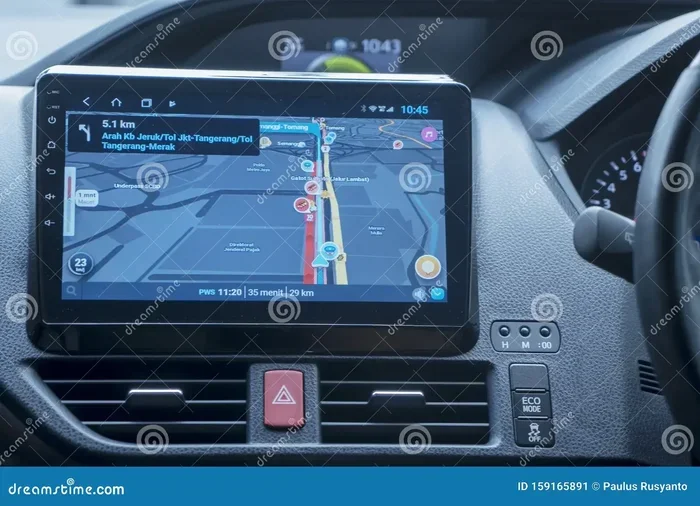
The first thing to do is look at your dashboard. Many modern cars have screens built into the center console. These screens are part of the car infotainment system. If your car has a touchscreen, there is a good chance it supports car navigation.
But here is the catch. Not every touchscreen means navigation. Some cars only have screens for the radio, climate control, or backup camera. So you need to look deeper.
Turn on the ignition without starting the engine. Watch what appears on the screen. If you see a navigation icon or a map symbol on the home screen, your car likely has built-in navigation. The icon might look like a small compass, a map with a pointer, or three arrows forming a route.
Quick Tip: If your car has a physical button labeled “Navigation” or “NAV” on the dashboard or steering wheel, that is a strong sign of a GPS navigation system.
Method 2: Check Your Owner’s Manual
Your car’s owner’s manual is one of the best resources. It lists every feature your vehicle has. Flip through the manual and look for sections about the infotainment system or navigation features.
If the manual has a chapter on navigation, you can be confident your car has a GPS receiver and map display. If there is no mention of navigation at all, your car probably does not have it built in.
Lost your manual? No problem. You can usually find a digital copy on the car manufacturer’s website. Just enter your make, model, and year, and download the PDF.
Method 3: Use Your VIN to Look Up Features
Every car has a unique Vehicle Identification Number, or VIN. This 17-character code tells the story of your vehicle. It includes details about the engine, trim level, and factory options.
You can use your VIN to check if your car came with OEM navigation. Here is how:
- Find your VIN on the driver’s side dashboard or door jamb.
- Visit your car manufacturer’s website or a VIN decoder tool online.
- Enter the VIN and look for the “Options” or “Features” section.
- Search for terms like “navigation,” “GPS,” or “map system.”
This method is very reliable. It tells you exactly what your car was built with from the factory.
Method 4: Explore the Infotainment Menu
If your car has a screen, go into the settings or home menu. Look for a section called “Navigation,” “Maps,” or “Route.” If you find any of these, your car has a navigation unit.
Some cars show a GPS icon in the status bar at the top of the screen when the navigation feature is active. This small symbol looks like a satellite dish or a location pin. Seeing this icon means your car navigation system is working and receiving GPS signals.
Method 5: Ask a Dealer or Mechanic
If you are still unsure, your local dealer can help. They can look up your car by VIN and tell you exactly what options it has. A trusted mechanic can also inspect your dashboard and confirm whether a GPS navigation system is present.
This is especially helpful if you bought a used car and the previous owner removed or hid the navigation features.
Signs Your Car Has a Built-In Navigation System
Now that you know the methods, let us look at the clear signs that your car has built-in navigation.
You See a Map or Route on the Screen
The most obvious sign is seeing a map on your dashboard display. When you tap the screen and a map display appears with your current location, you have a GPS navigation system. The map should show roads, streets, and your position as a blinking dot or arrow.
Some systems also show points of interest like gas stations, restaurants, and hospitals directly on the map. This is a hallmark of a full navigation app built into the car.
You Get Turn-by-Turn Voice Directions
If your car speaks to you and says things like “Turn left in 500 feet” or “Recalculating route,” it has voice guidance. This is a key feature of any satellite navigation system. The voice comes through your car speakers and guides you along the route planning path.
Not all voice systems mean navigation. Some cars have voice commands for phone calls or music. But if the voice gives you directions based on a destination, that is a clear sign of car navigation.
Your Screen Has a Dedicated Navigation Button
Look at your dashboard or center console. Do you see a button with the word “NAV” or a map icon? Many cars with factory navigation system setups have a dedicated physical button. Pressing it launches the navigation unit directly.
Some cars also have a “Home” button on the navigation screen that sets your home address for quick routing. This is another strong indicator.
Your Car Has a Premium or Luxury Trim
Higher trim levels often come with more tech features. If your car is a higher-end model or luxury version, there is a good chance it includes built-in navigation. Check the trim badge or the original window sticker to confirm.
Manufacturers like BMW, Mercedes-Benz, Audi, and Lexus almost always include GPS navigation in their mid-to-upper trims. But even some affordable brands offer it as an option or standard on certain models.
How to Tell If Navigation Was Added Aftermarket
Sometimes car navigation was not part of the original factory setup. Someone added it later. Here is how to spot an aftermarket GPS unit.
Look for a Separate or Swollen Dashboard Unit
Aftermarket navigation units often look different from the factory dashboard. They might be a different color, size, or brand. If the screen does not match the rest of your car’s interior design, it was likely added later.
Some aftermarket units are portable and sit on the dash or windshield with a suction mount. These are easy to spot and are not integrated into the car’s infotainment system.
Check for a Non-OEM Brand
Common aftermarket GPS brands include Garmin, TomTom, Magellan, and Rand McNally. If you see one of these names on your screen or unit, the GPS navigation system was added after purchase.
Aftermarket units work well but may not connect seamlessly with your car’s systems. They might not show rearview camera feeds or integrate with steering wheel controls.
Look for a Second Screen
If your car has two screens and one is clearly just for navigation, it might be an aftermarket add-on. Factory systems usually have one integrated screen that handles navigation, audio, and climate control together.
Common Navigation Features to Look For
Whether your GPS navigation system is factory-built or added later, it should have certain features. Here is what to look for:
- Map Display: A visual map showing roads, your location, and destinations.
- Turn-by-Turn Directions: Step-by-step spoken and visual guidance to your destination.
- Voice Guidance: Audio prompts that tell you when to turn or change lanes.
- Route Planning: The ability to choose the fastest, shortest, or preferred route.
- Points of Interest Search: Finding nearby gas stations, restaurants, hotels, and more.
- Traffic Updates: Real-time info about road congestion and delays.
- GPS Signal Indicator: A small icon showing the GPS receiver is connected to satellites.
- Destination Entry: A way to type in or speak an address or place name.
If your car’s screen has most of these features, you have a solid car navigation setup. If it only has a map with no directions, it might just be a basic display without full satellite navigation capability.
Quick Tips for Using Your Car Navigation
Once you confirm your car has a GPS navigation system, here are some quick tips to get the most out of it:
- Update your maps regularly. Outdated maps can lead you to wrong or closed roads.
- Set your home address. This lets you start navigation with one tap.
- Use voice commands. Keep your hands on the wheel and eyes on the road.
- Mount your phone as a backup. If your built-in system is outdated, a navigation app on your phone can fill the gap.
- Turn on traffic data. This helps you avoid jams and find faster routes.
What to Do If Your Car Does Not Have GPS Navigation
Not every car comes with a GPS navigation system. That is perfectly fine. You have several great options to add car navigation to your ride.
Use a Smartphone Mount and App
The easiest and cheapest option is to use your phone. Apps like Google Maps, Apple Maps, and Waze offer full GPS navigation with turn-by-turn directions and voice guidance. All you need is a good dashboard mount and a phone charger.
These apps are free, update constantly, and offer real-time traffic data. Many drivers find that smartphone navigation apps work just as well as built-in systems.
Buy an Aftermarket GPS Unit
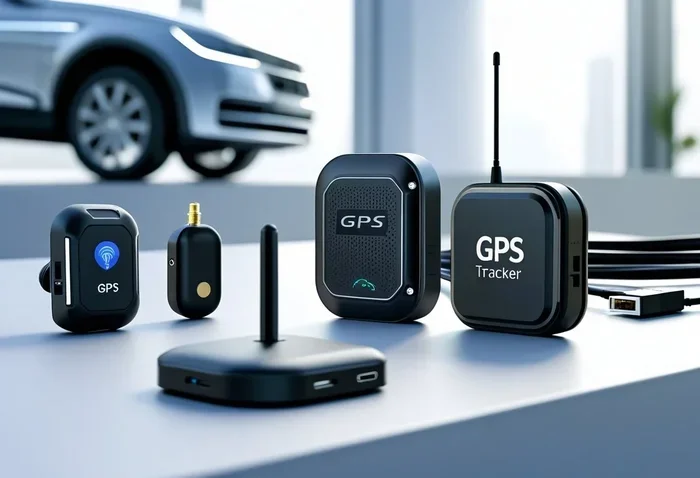
You can purchase a standalone GPS tracker or navigation unit from stores or online. Brands like Garmin and TomTom make reliable devices that mount on your windshield or dashboard.
These units do not need a phone connection and work anywhere with a clear view of the sky. They are great for road trips and areas with poor cell service.
Upgrade Your Infotainment System
Some car owners choose to upgrade their factory head unit. An aftermarket infotainment system with built-in GPS navigation can replace your old radio and screen. These systems often support Apple CarPlay, Android Auto, and Bluetooth too.
Just make sure the new unit fits your car’s dashboard and wiring. A professional installer can help with this.
Common Mistakes People Make When Checking for Car Navigation
Here are some mistakes to avoid when trying to figure out if your car has a GPS navigation system:
- Confusing a touchscreen with navigation: Not every screen means your car has car navigation. Some screens only control the radio or climate.
- Assuming all new cars have GPS: Even some 2020s models come with basic audio systems and no map display or navigation app.
- Forgetting to check the manual: The owner’s manual is the most direct way to confirm factory navigation options.
- Ignoring the VIN lookup: This is one of the most accurate methods and is often overlooked.
- Mixing up a backup camera screen with navigation: A rearview camera feed is not the same as a GPS receiver or satellite navigation system.
Avoiding these mistakes will save you time and give you a clear answer about your car’s navigation features.
Final Thoughts
Knowing whether your car has a GPS navigation system is useful for every driver. It helps you understand what tech your vehicle offers and how to get the most from it. Whether you have built-in navigation or need to add a car GPS tracker or app, the steps in this guide will help you figure it out.
Start with the dashboard screen. Look for a navigation icon or GPS symbol. Check your owner’s manual. Run a VIN lookup. Explore the infotainment menu. These simple steps will give you a definitive answer.
If your car does not have vehicle GPS capabilities, do not worry. Smartphone apps and aftermarket units make route planning and turn-by-turn directions easy and affordable. The most important thing is that you stay informed and make smart choices about your car’s features.
Take a few minutes today to check your car. You might be surprised by what you find. And if you discover you do not have GPS navigation, you now know exactly how to add it. Safe travels and happy navigating!
Frequently Asked Questions
How do I know if my car has a built-in GPS navigation system?
Look for a touchscreen display on your dashboard and check for a navigation icon or map symbol on the home screen. Press any button labeled “NAV” or “Navigation.” If a map with your location appears, your car has built-in GPS navigation. You can also check your owner’s manual or use your VIN to confirm factory car navigation features.
Can I add GPS navigation to a car that does not have it?
Yes, absolutely. You can use a smartphone with a navigation app like Google Maps or Waze and a dashboard mount. You can also buy a standalone GPS unit from brands like Garmin or TomTom. Another option is upgrading your infotainment system with an aftermarket unit that includes satellite navigation capabilities.
What is the difference between OEM navigation and aftermarket GPS?
OEM navigation comes factory-installed and is integrated into your car’s infotainment system. It usually works seamlessly with steering controls and the car’s display. Aftermarket GPS is added later and may be a portable device or a separate screen. Aftermarket units work well but may not blend in as nicely with your car’s original design.
Do all new cars come with a GPS navigation system?
No, not all new cars have GPS navigation. Some base models come with only a basic radio and small display. Even some newer vehicles skip built-in navigation entirely, relying on drivers to use their smartphones. Always check the features list or owner’s manual before assuming your car has car navigation.
How accurate is a built-in car GPS navigation system?
Built-in GPS navigation systems are very accurate when they have a clear view of the sky. They receive signals from multiple satellites to pinpoint your location within a few meters. However, tall buildings, tunnels, and dense forests can sometimes weaken the GPS signal and cause temporary inaccuracies.
Is it better to use a phone navigation app or built-in car GPS?
Both have advantages. Built-in GPS navigation systems are integrated into your car and do not depend on your phone’s battery or data connection. Phone navigation apps offer more frequent map updates, real-time traffic data, and points of interest. Many drivers use both together for the best route planning experience.
=== CONCLUSION ===
Now you know exactly how to check if your car has a GPS navigation system. Whether you look at your dashboard, explore the infotainment menu, read the owner’s manual, or run a VIN lookup, you have all the tools you need. Understanding your car’s navigation features makes every drive smoother and more confident.
If your car has built-in navigation, take time to learn its features and keep your maps updated. If it does not, adding a GPS navigation system is easier and more affordable than ever. Use a smartphone app, grab a portable GPS unit, or upgrade your infotainment system. The choice is yours.
Stay safe on the road, explore new routes, and enjoy the benefits of modern car navigation. You are now fully equipped to know exactly what your car can do.