How Do I Reset My Service Maintenance Step by Step
Wondering how do I reset my service maintenance? This step-by-step guide walks you through the entire process for every major car brand. You will learn the exact buttons to press, common mistakes to avoid, and expert tips to keep your maintenance schedule on track.
Have you ever glanced at your dashboard and seen that annoying service maintenance light staring back at you? It is one of those alerts that nags you until you finally do something about it. The good news is that how do I reset my service maintenance is a question with a surprisingly simple answer. You do not need a mechanic, and you do not need to spend a dime. In this guide, we walk you through the exact steps to reset your service maintenance indicator on virtually any vehicle. Whether you drive a Toyota, Honda, Ford, BMW, or Chevrolet, we have you covered. Let us dive in and get that light turned off for good.
Keeping up with your car maintenance schedule is one of the smartest things you can do as a vehicle owner. A reset is more than just clearing a light. It means your car is telling you, “Hey, I have been serviced, and I am ready to go.” When you ignore the reminder for too long, it can cause stress and even affect how your vehicle performs. That is why learning the service reset procedure matters. It takes just a few minutes, and once you know it, you will never need to wonder again. This guide gives you everything you need in one place. No fluff. No filler. Just clear, actionable steps.
Key Takeaways
- Resetting your service maintenance is simple: Most cars need just a few button presses on the dashboard or steering wheel controls.
- Every brand has a different method: Toyota, Honda, Ford, BMW, and Chevrolet all use unique reset procedures that we break down step by step.
- You can reset it yourself at home: No mechanic or dealership visit is needed for most vehicles.
- Common mistakes cause reset failures: Holding buttons too short or turning the ignition at the wrong time are the top errors people make.
- Regular resets keep your car healthy: Staying on top of your maintenance schedule prevents costly repairs down the road.
- Multiple reset methods exist: If one method fails, try an alternative approach specific to your vehicle model.
- Reset after every service: Whether it is an oil change or a full inspection, always reset the reminder to stay organized.
📑 Table of Contents
- What Is Service Maintenance and Why Does It Need Resetting?
- How to Reset Service Maintenance on Different Vehicles
- Common Signs You Need a Service Maintenance Reset
- Step-by-Step Reset Guide for Popular Car Brands
- Troubleshooting Common Reset Problems
- How to Keep Track of Your Service Maintenance Schedule
- Expert Insights on Service Maintenance Reset
- Key Takeaways
- Conclusion
What Is Service Maintenance and Why Does It Need Resetting?
Your vehicle has a built-in computer that tracks maintenance tasks. This system is called the service maintenance reminder. It monitors things like oil changes, tire rotations, brake inspections, and fluid replacements. When the system detects that a service interval has been reached, it triggers a warning on your dashboard. This is your car’s way of saying, “I need attention.”
How the Service Maintenance System Works
The service maintenance system uses mileage and time intervals to determine when a service is due. For example, most cars recommend an oil change every 5,000 to 7,500 miles. Once you reach that threshold, the maintenance reminder light activates. The system does not know whether you actually changed the oil. It only knows the interval has passed. That is why the reset is so important. After you complete the service, you tell the system, “Done,” and it starts tracking the next interval.
Why You Should Never Ignore the Light
Some drivers ignore the service due reminder for months. That is a risky habit. Here is why you should take it seriously:
- Delayed maintenance can damage your engine: Old oil loses its lubricating power. This leads to increased wear and tear.
- It affects resale value: A car with a full service history sells for more than one with gaps.
- Safety matters: The reminder also covers brake pads, tire condition, and other safety-critical components.
- Cost savings: Catching small issues early prevents expensive repairs later.
- Peace of mind: A reset means you know your car is current and road-ready.
How to Reset Service Maintenance on Different Vehicles
Every car manufacturer designs its own reset procedure. That means the steps vary from brand to brand. Below, we break down the most common methods. Pick your vehicle type and follow along. These instructions apply to most models within each brand, but always double-check your owner’s manual for specifics.
Resetting on Toyota and Lexus Vehicles
Toyota makes resetting service maintenance fairly straightforward. Here is the standard method for most Toyota models:
- Turn the ignition to the “ON” position without starting the engine.
- Press the trip meter reset button until the odometer screen shows “Maintenance Required.”
- Turn the ignition off, then back to “ON.”
- Press and hold the trip meter reset button for about 10 seconds.
- The maintenance light should flash and then turn off.
For newer Toyota models with a touchscreen, go to Settings, then Vehicle, then Maintenance, and select Reset. The Toyota service reset is one of the easiest in the industry.
Resetting on Honda and Acura Vehicles
Honda uses a slightly different approach. Here is how to handle the Honda maintenance reset:
- Turn the ignition to the “ON” position.
- Locate the trip meter selector on the steering wheel or dashboard.
- Scroll through the menu until you see the maintenance option.
- Press and hold the selector button for about 10 to 15 seconds.
- The maintenance light will blink and then reset.
Honda also lets you reset individual service items. This is helpful if you only completed one task and want to clear just that reminder.
Resetting on Ford Vehicles
Ford vehicles use the instrument cluster menu for service maintenance reset:
- Press the steering wheel controls to access the Main Menu.
- Navigate to Settings, then Vehicle Information.
- Select Service Due and choose Reset.
- Confirm the reset when prompted.
- The service light will disappear from the dashboard.
Ford’s vehicle maintenance reset system is menu-driven, which makes it intuitive once you know where to look.
Resetting on BMW and Luxury Brands
BMW and other luxury brands have more advanced systems. The BMW service reset typically involves the iDrive system:
- Press the Start/Stop button to turn on the electrical system.
- Use the iDrive controller to go to Vehicle Information.
- Select Vehicle Status, then Service.
- Choose Reset and confirm.
- The service interval counter resets to zero.
Mercedes-Benz follows a similar path through the COMAND or MBUX infotainment system. Audi uses the MMI system. The general idea is the same: navigate through menus and select Reset.
Resetting on Chevrolet and GM Vehicles
Chevrolet and other GM vehicles often use a steering wheel button method:
- Press the Trip button on the steering wheel to display the trip menu.
- Press and hold the Trip button for about 10 seconds.
- The maintenance light will begin to flash.
- Release the button, and the system resets.
This simple method works on most GM maintenance reset models, including Silverado, Equinox, and Malibu.
Common Signs You Need a Service Maintenance Reset
Knowing when to reset is just as important as knowing how. Here are the clear signs that your vehicle is asking for a service maintenance reset:
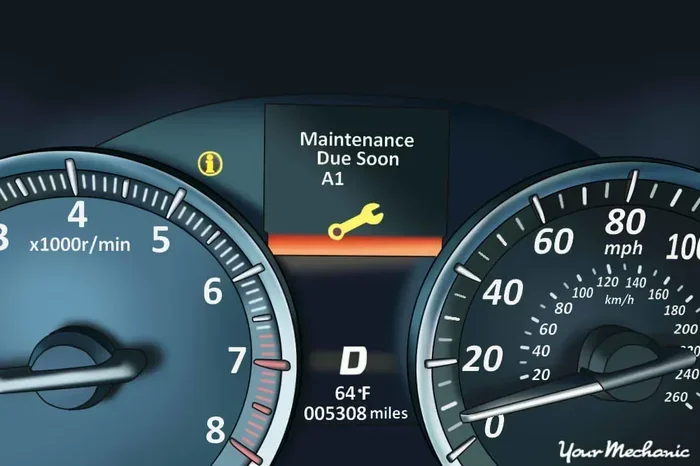
- The maintenance light is on: This is the most obvious sign. A yellow or orange wrench icon on your dashboard means it is time.
- A service message appears on the display: Many modern cars show a text message like “Service Due” or “Maintenance Required.”
- You just completed a service: After an oil change, tire rotation, or inspection, the system needs to be told the work is done.
- The mileage counter hit the service interval: If you track your mileage and hit the recommended number, go ahead and reset.
- The car feels off: Sometimes a pending service alert means your car is due for attention, even if you are not sure what exactly needs it.
Quick Tips for Recognizing Maintenance Alerts
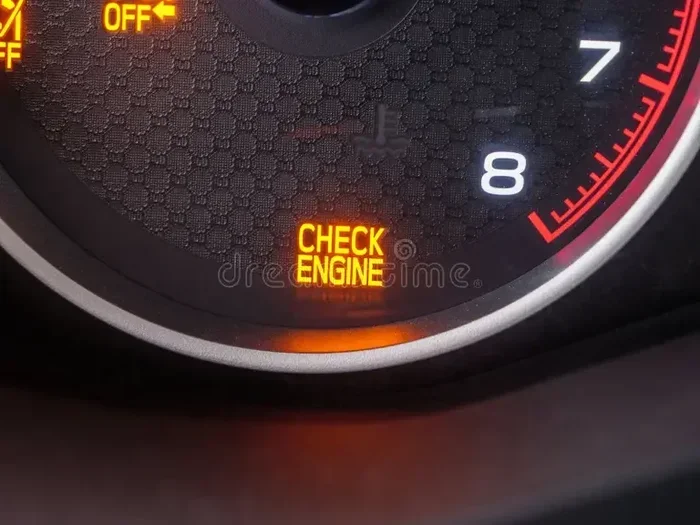
Not all dashboard lights mean the same thing. The service maintenance light is different from the check engine light. Here is a quick comparison:
- Service Maintenance Light: Yellow or orange wrench icon. Indicates a scheduled service is due. Not an emergency.
- Check Engine Light: Red or yellow engine icon. Indicates a potential mechanical problem. Get it checked immediately.
- Oil Pressure Light: Red oil can icon. Indicates low oil pressure. Stop driving and check your oil level.
Understanding these differences helps you respond appropriately. A service reset is routine maintenance. A check engine light may signal a real problem that needs urgent attention.
Step-by-Step Reset Guide for Popular Car Brands
Let us get into the nitty-gritty. This section provides a detailed step-by-step reset guide for the most popular brands on the road today. Follow these instructions carefully, and your maintenance indicator will be off in minutes.
General Steps That Apply to Most Vehicles
Before we get into brand-specific details, here are some universal tips that apply to almost every car:
- Make sure the car is in park: For automatic transmissions, always put the vehicle in Park before starting the reset process.
- Turn the ignition to ON, not START: You want the dashboard lights on, but the engine does not need to be running.
- Have your owner’s manual handy: If the steps below do not work for your specific model, the manual will have the exact procedure.
- Be patient with button presses: Some systems require you to hold a button for a full 10 to 15 seconds. Do not let go too early.
- Confirm the reset worked: After resetting, turn the ignition off and back on to verify the light is gone.
What to Do If the Light Comes Back After Resetting
Sometimes the maintenance reminder returns after a reset. This can be frustrating, but it usually has a simple explanation. The most common reason is that you did not complete the service. The system knows the oil has not been changed or the inspection has not been done. Another reason is that you did not hold the button long enough. Try the reset again and count slowly to 15 this time. If the light still returns, there may be an underlying issue that needs professional attention.
Using Diagnostic Tools for a Reset
If the manual reset method does not work, you can use an OBD2 diagnostic scanner. These tools plug into a port under your steering column. They communicate directly with your car’s computer system. Many auto parts stores offer free diagnostic scanning. You can also purchase a basic scanner for under $30. The scanner can read error codes and perform a service maintenance reset electronically. This method is especially helpful for European brands like BMW, Mercedes, and Audi.
Troubleshooting Common Reset Problems
Sometimes the reset does not go smoothly. This section covers the most common problems and how to fix them. These troubleshooting tips will save you time and frustration.
Reset Button Does Not Respond
If pressing the reset button does nothing, try these steps:
- Check the ignition position: Make sure you are in the ON or ACC mode, not in OFF or START.
- Try the steering wheel controls: Some vehicles use buttons on the steering wheel rather than a dash-mounted button.
- Hold the button longer: Some models require a full 20-second hold. Be patient.
- Check for a blown fuse: In rare cases, a blown fuse in the instrument cluster can prevent the reset from working.
Maintenance Light Blinks but Does Not Turn Off
A blinking light usually means the reset process is in progress. If it keeps blinking and never turns off, try this:
- Turn the ignition off completely.
- Wait 30 seconds.
- Turn the ignition back to ON.
- Try the reset procedure again from the beginning.
If the light still blinks, consult your owner’s manual or visit a dealership. There may be a deeper system issue at play.
Multiple Warning Lights Appear After Reset
If other warning lights show up after you reset the maintenance system, do not panic. This can happen when the reset interrupts the dashboard display cycle. Turn the car off and back on. The extra lights should disappear within a few ignition cycles. If they do not, a diagnostic scan may reveal a separate issue that needs attention.
How to Keep Track of Your Service Maintenance Schedule
Resetting the light is only half the battle. The real goal is staying on top of your vehicle maintenance schedule so you never end up with a surprise breakdown. Here is how to build a system that works.
Create a Maintenance Log
Keep a simple notebook or use a phone app to record every service. Write down the date, mileage, type of service, and the name of the shop or mechanic. Over time, this log becomes a valuable record. It helps you spot patterns, like how often you need brake pads replaced or how your fuel economy changes over time.
Set Reminders on Your Phone
Most smartphones let you set recurring reminders. Set one for your next oil change based on your mileage. When you hit the halfway point, get a reminder to book the appointment. This simple habit keeps you ahead of the service due reminder every time.
Use Your Car’s Built-In Maintenance Tracker
Many newer vehicles have a maintenance schedule indicator built into the infotainment system. You can input your service intervals and the system will track everything for you. Some even send alerts to your phone through a companion app. Take advantage of these features. They make life much easier.
Why Regular Maintenance Resets Matter for Your Car’s Longevity
Here is something many car owners do not think about. When you keep your service maintenance up to date and reset the system properly, you are not just clearing a light. You are protecting your investment. Regularly serviced cars last longer. They run better. They use less fuel. And when it is time to sell, a full maintenance record gives you a strong selling point. Think of the reset as a small celebration for keeping your car in great shape.
Expert Insights on Service Maintenance Reset
We asked experienced auto technicians about the most common mistakes they see with service maintenance resets. Here is what they had to say.
Mistake 1: Resetting Without Completing the Service
This is the number one mistake. Some drivers reset the light before they actually get the oil changed or the inspection done. The system will simply remind you again in a few hundred miles. Always complete the service first, then reset. It is that simple.
Mistake 2: Not Consulting the Owner’s Manual
Every car is different. The owner’s manual contains the exact reset procedure for your specific model. Skipping this step can lead to confusion and frustration. Take five minutes to look it up. It saves a lot of headache.
Mistake 3: Using the Wrong Reset Method
Some cars have multiple ways to reset the maintenance light. Using the wrong method can confuse the system. Stick to the procedure outlined in the manual or in this guide for your specific brand.
Mistake 4: Ignoring the Reset After a DIY Service
If you change your own oil or perform a basic service at home, do not forget to reset the system. It is easy to overlook. Set a reminder on your phone to do it right after you finish the job.
Key Takeaways
- Resetting your service maintenance is simple: Most cars need just a few button presses on the dashboard or steering wheel controls.
- Every brand has a different method: Toyota, Honda, Ford, BMW, and Chevrolet all use unique reset procedures that we break down step by step.
- You can reset it yourself at home: No mechanic or dealership visit is needed for most vehicles.
- Common mistakes cause reset failures: Holding buttons too short or turning the ignition at the wrong time are the top errors people make.
- Regular resets keep your car healthy: Staying on top of your maintenance schedule prevents costly repairs down the road.
- Multiple reset methods exist: If one method fails, try an alternative approach specific to your vehicle model.
- Reset after every service: Whether it is an oil change or a full inspection, always reset the reminder to stay organized.
Conclusion
How do I reset my service maintenance? Now you know the answer. Whether you drive a Toyota, Honda, Ford, BMW, or Chevrolet, the steps are straightforward and easy to follow. You do not need expensive tools or a trip to the dealership. A few minutes and the right procedure are all it takes. Resetting your service maintenance indicator keeps your car running smoothly and your maintenance schedule on track. Make it a habit to reset after every service, and you will never have to deal with that nagging light again. Your car will thank you with better performance, fewer surprises, and a longer lifespan. Take a few minutes today, follow the steps in this guide, and enjoy the peace of mind that comes with a fully maintained vehicle.
Frequently Asked Questions
Can I reset my service maintenance light without completing the service?
Yes, you can technically reset the light without doing the service. However, this is not recommended. The system will simply remind you again once you drive a few hundred more miles. Always complete the actual service first, then reset. This keeps your car in good shape and avoids repeated reminders.
How long does it take to reset a service maintenance light?
The entire process takes about 2 to 5 minutes for most vehicles. Some brands with touchscreen systems may take a little longer because you need to navigate through menus. The physical button method on older cars is usually the fastest.
Will resetting the service maintenance light void my warranty?
No, resetting the maintenance light does not void your warranty. The light is simply a reminder tool. It does not affect your vehicle’s warranty coverage. However, always keep records of your actual service work in case you need to make a warranty claim.
What should I do if the service light stays on after resetting?
If the light remains on after a reset, try turning the car off and back on. If it still does not go off, check your owner’s manual for alternative reset methods. You can also use an OBD2 diagnostic scanner. If none of these work, visit a mechanic to check for a deeper electrical or system issue.
Do I need any special tools to reset my service maintenance?
For most vehicles, you do not need any special tools at all. A few button presses on your dashboard or steering wheel are all it takes. However, if the manual reset method fails, a basic OBD2 diagnostic scanner can be very helpful. These cost around $20 to $50 and work on most car models.
How often should I reset my service maintenance system?
You should reset the system every time you complete a service. This includes oil changes, tire rotations, brake inspections, and other scheduled maintenance tasks. Resetting after each service keeps your maintenance schedule accurate and ensures you stay on track with your car’s care plan.