How Do I Get Navigation on My Toyota with Easy Steps
Getting navigation on your Toyota is easier than you think. Whether your Toyota came with a factory-built-in system or you want to add one after market, this guide covers everything. You will learn how to check if your Toyota already has navigation, set up the system, and troubleshoot common issues. We also explore aftermarket options like Apple CarPlay and Android Auto that bring smart navigation to any Toyota model.
So you just bought a Toyota and you want to know how to get navigation working. Maybe your Toyota came with a navigation option and you are not sure how to use it. Or perhaps your older model does not have GPS at all and you want to add it. Either way, you are in the right place.
Getting navigation on your Toyota does not have to be complicated. Toyota offers several built-in and aftermarket options that make driving easier. This guide walks you through every step in plain language. By the end, you will know exactly what your Toyota needs and how to set it up quickly.
Navigation in a car is not just about finding directions. It also helps you discover new places, avoid traffic, and reach your destination safely. A good Toyota GPS system turns your daily commute into a smoother experience. Let us dive into everything you need to know about adding navigation to your Toyota.
Key Takeaways
- Factory Navigation: Many Toyota models come with built-in GPS navigation through the Entune or Multimedia system.
- Aftermarket Options: You can add navigation via smartphone apps, aftermarket head units, or dealer-installed kits.
- Setup Is Simple: Most Toyota navigation systems require just a few steps to configure and start using.
- Regular Updates Matter: Keeping your Toyota maps updated ensures accurate directions and routing.
- Smartphone Integration: Apple CarPlay and Android Auto offer flexible navigation without extra hardware.
- Troubleshooting Helps: Simple resets and checks can fix most Toyota navigation problems.
📑 Table of Contents
- Understanding Toyota Navigation Options
- How to Check If Your Toyota Already Has Navigation
- Adding Navigation to Your Toyota
- Setting Up and Using Toyota Navigation
- Common Toyota Navigation Problems and How to Fix Them
- Expert Tips for Getting the Most Out of Toyota Navigation
- Comparison: Navigation Options for Toyota
- Key Takeaways
- Conclusion
Understanding Toyota Navigation Options
Before you start, it helps to know what navigation options exist for Toyota vehicles. Toyota has evolved its technology over the years, and different models come with different systems. Understanding these options saves you time and money.
Factory-Built-In Navigation Systems
Many newer Toyota models come with a factory-installed navigation system. These systems are built right into the dashboard and use a dedicated screen. The most common Toyota factory systems include Toyota Entune and the Toyota Multimedia system. They offer turn-by-turn directions, voice commands, and preloaded maps.
Factory navigation works without needing a phone or internet connection in most cases. The maps are stored on a built-in hard drive or SD card. This means you can still get directions even in areas with poor cell service. Popular models like the Toyota Camry, Toyota RAV4, and Toyota Highlander often include these systems as optional or standard features.
Aftermarket Navigation Solutions
If your Toyota does not have built-in navigation, you have great aftermarket options. Aftermarket navigation units replace your factory radio and add GPS capability. Brands like Garmin, Pioneer, and Kenwood make excellent units that fit Toyota dashboards easily.
Another popular option is using your smartphone as a navigation tool. Apps like Google Maps, Waze, and Apple Maps work great in Toyotas. You can mount your phone on the dash or connect it through Bluetooth. This is often the most affordable way to add GPS navigation to any Toyota.
Smartphone Integration: Apple CarPlay and Android Auto
Modern Toyotas support Apple CarPlay and Android Auto. These systems mirror your phone screen onto the car display. You get access to navigation apps, music, and messaging right from the dashboard. Apple CarPlay works with iPhones, while Android Auto works with Android phones.
This is a fantastic option if you want up-to-date maps and real-time traffic data. The maps update automatically through your phone’s data connection. Many Toyota owners prefer this method because it is always current and easy to use.
How to Check If Your Toyota Already Has Navigation
Before buying anything, check whether your Toyota already has a navigation system. This step saves you from spending money on something you already own. Here is how to find out.
Check Your Dashboard and Controls
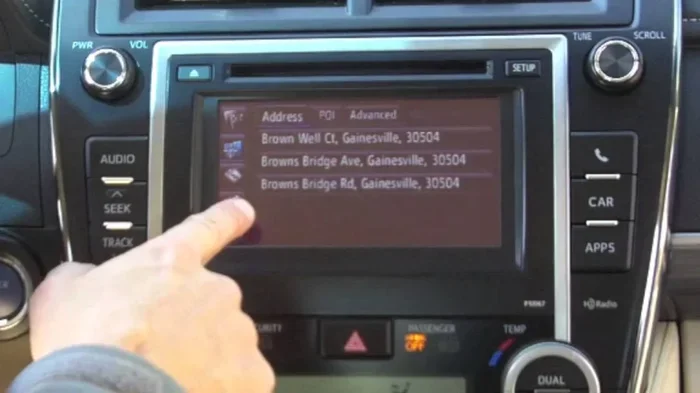
Look at your Toyota’s dashboard. If you see a large touchscreen display, there is a good chance it has navigation. Toyota navigation screens usually show a map icon or a “Nav” button on the home screen. Press it to see if the system is already active.
You can also check your control panel. Look for buttons labeled “Map,” “Guidance,” or “Navigation.” If you see these, your Toyota likely has a built-in system. The Toyota infotainment system in newer models always includes a navigation icon on the main menu.
Check Your Owner Manual
Your Toyota owner manual is a great resource. Flip to the section on the audio or multimedia system. It will list all the features your car has, including navigation. If the manual mentions “navigation,” “GPS,” or “map display,” you are all set.
You can also find your Toyota model and trim online. Toyota’s website lets you look up any vehicle by year, model, and trim level. It shows all factory features, including whether navigation was included. This is a quick and reliable way to confirm.
Check the Vehicle Identification Number
Your Toyota’s VIN contains detailed information about factory options. You can use the VIN to check if navigation was installed when the car was built. Contact a Toyota dealer and provide your VIN. They can pull up the full build sheet and tell you exactly what features came with the vehicle.
This method works especially well for used Toyota vehicles. If you bought the car secondhand, the previous owner may not remember all the features. A quick VIN check clears up any confusion.
Adding Navigation to Your Toyota
If your Toyota does not have navigation, do not worry. You have several ways to add it. Each option has its own benefits and price range. Let us explore them one by one.
Option 1: Dealer-Installed Navigation Kit
Visiting a Toyota dealer is one of the most reliable ways to add navigation. Dealers can install an OEM navigation kit that matches your Toyota’s interior. These kits are designed specifically for your model and year. They integrate seamlessly with your existing audio and display systems.
The dealer will handle all the wiring and programming. You get a warranty on the installation, which gives you peace of mind. However, dealer-installed kits can be expensive. Expect to pay anywhere from $500 to $2,000 depending on your Toyota model and the system chosen.
This option is best for people who want a clean, factory-quality setup. It also works well for Toyota owners who plan to keep their car for many years. The Toyota dealer navigation install ensures everything works perfectly with your vehicle.
Option 2: Aftermarket Navigation Head Unit
An aftermarket head unit is a popular choice for adding navigation. These units replace your factory radio and come with built-in GPS. They offer larger screens, better resolution, and more features than factory systems in older Toyotas.
Popular brands include Pioneer, Kenwood, and Sony. Many of these units also support Apple CarPlay and Android Auto. This means you get the best of both worlds: a dedicated GPS unit plus smart phone integration.
Installation can be done at a car audio shop or by a DIY enthusiast. The cost typically ranges from $200 to $800 for the unit alone. Installation labor adds another $100 to $300. Overall, this is a cost-effective way to upgrade your Toyota’s navigation and audio experience.
Option 3: Smartphone Mount and Navigation Apps
The simplest and most affordable option is using your smartphone. A dashboard or vent mount holds your phone securely while driving. You then use a navigation app like Google Maps, Waze, or Apple Maps for directions.
This method has many advantages. The maps are always up to date because they pull from the internet. You get real-time traffic updates, accident alerts, and alternate routes. Best of all, you do not need to buy any extra hardware.
The only downside is that your phone screen is smaller than a built-in system. Also, you need a reliable data connection for real-time features. A good phone mount and a quality navigation app make this a very practical solution for most Toyota owners.
Option 4: Portable GPS Devices
Portable GPS devices from brands like Garmin and TomTom are still a great option. These small units mount on your windshield or dashboard. They are not tied to your Toyota’s system and work in any vehicle.
Portable GPS units offer dedicated mapping and routing without using your phone. They often have better battery life and more detailed maps for certain regions. You can unplug them and take them with you when you leave the car.
These devices cost between $100 and $300. They are a solid choice for Toyota owners who travel frequently or drive in unfamiliar areas. A portable GPS is a reliable backup even if you already have another navigation method.
Setting Up and Using Toyota Navigation
Once you have navigation set up, it is time to learn how to use it effectively. Proper setup makes a big difference in your daily driving experience.
Initial Setup for Factory Toyota Navigation
For factory navigation systems, start by turning on the system. Press the “Nav” or “Map” button on your Toyota dashboard. The system will guide you through the initial setup process. You will need to set your preferred language, units (miles or kilometers), and routing preferences.
Next, enter your home address. This allows the system to suggest routes home with one touch. You can also save other frequent destinations like work or favorite restaurants. The Toyota navigation setup process is straightforward and takes only a few minutes.
Make sure your system date and time are correct. This helps the GPS lock onto satellites faster. Most Toyota systems update the time automatically, but it is good to double-check.
Using Navigation While Driving
Always enter your destination before you start driving. Pull over if you need to adjust the route while on the road. Safe driving comes first, and typing an address at high speed is dangerous.
Use voice commands whenever possible. Toyota navigation systems support voice input for destinations. Simply press the voice button and say the address or place name. The system processes your request and starts guiding you. This keeps your eyes on the road and hands on the wheel.
Pay attention to the turn-by-turn prompts. The Toyota GPS navigation system will announce upcoming turns well in advance. Follow the visual arrows on the screen and listen to the spoken directions. If you miss a turn, the system will automatically recalculate your route.
Updating Your Toyota Navigation Maps
Maps become outdated over time. Roads change, new businesses open, and traffic patterns shift. Keeping your Toyota map update current ensures you get the best directions. Most Toyota factory systems allow you to update maps through a USB drive or online subscription.
Check with your Toyota dealer for map update availability. Some models offer free updates for the first few years. After that, you may need to purchase a subscription. The cost is usually reasonable and well worth the accuracy you gain.
For smartphone-based navigation, updates happen automatically. Google Maps and Waze update their databases continuously. You do not need to do anything except keep your app current. This is one of the biggest advantages of using a phone for Toyota car navigation setup.
Common Toyota Navigation Problems and How to Fix Them
Even the best navigation systems can have issues from time to time. Knowing how to troubleshoot saves you frustration and unnecessary trips to the dealer.
Navigation Screen Not Responding
If your Toyota navigation not working or the screen is frozen, try a soft reset first. Turn off the ignition, wait 30 seconds, and restart the car. This clears temporary glitches and often solves the problem immediately.
If a soft reset does not work, try a hard reset. Locate the reset button on the navigation unit or disconnect the car battery for a few minutes. Refer to your owner manual for the exact reset procedure for your Toyota model. A hard reset restores the system to its default settings.
GPS Signal Lost
A lost GPS signal is a common issue, especially in tunnels or dense urban areas. The system needs a clear view of the sky to connect to satellites. If you lose signal, pull over safely and wait a few moments for it to reconnect.
Check that your antenna is not damaged. The antenna is usually built into the rear windshield or roof of the Toyota. If the antenna is cracked or loose, the GPS signal weakens. A Toyota dealer can inspect and replace the antenna if needed.
Maps Not Displaying Correctly
If your map shows the wrong location or roads appear outdated, you need a map update. Outdated maps are one of the most common reasons for navigation errors. Follow the update process for your specific Toyota system to get the latest map data.
Also check that your system software is current. Toyota occasionally releases firmware updates that improve map performance. Your dealer can install these updates during a routine service visit. Keeping everything current prevents most map display issues.
Expert Tips for Getting the Most Out of Toyota Navigation
A few simple tips can make your Toyota navigation experience much better. These insights come from experienced Toyota owners and automotive experts.
First, always keep your phone charged if you use smartphone navigation. A dead phone means no directions. A car charger keeps your phone powered up during long trips. This is especially important if you rely on apps like Google Maps or Waze.
Second, learn the shortcuts on your Toyota system. Most navigation units have quick-access buttons for home, recent destinations, and favorites. Using these shortcuts saves time and reduces distractions while driving.
Third, use the navigation system even on routes you know well. It keeps you updated on traffic conditions and road closures. You might discover faster routes that you never knew existed. The Toyota navigation feature is designed to make every trip better, even the familiar ones.
Fourth, clean your screen regularly. A smudgy or dirty screen makes the map hard to read. Use a microfiber cloth to wipe the display gently. This small habit improves visibility and makes navigation much easier at a glance.
Finally, stay patient when the system recalculates. If you miss a turn or take a wrong exit, the Toyota GPS navigation will find a new route quickly. Trust the system and follow the new directions. It usually finds a better path than you would have chosen on your own.
Comparison: Navigation Options for Toyota
Not sure which navigation option is right for you? Here is a quick comparison of the most popular choices for Toyota owners.
- Factory Navigation: Built into the car, seamless integration, high quality, but expensive to add after purchase.
- Aftermarket Head Unit: Affordable upgrade, features-rich, supports CarPlay and Android Auto, requires professional or DIY installation.
- Smartphone Apps: Free or low cost, always updated, uses phone data, smaller screen, depends on phone battery.
- Portable GPS: Works in any car, dedicated device, no phone needed, can be moved between vehicles, extra mount required.
Each option has its strengths. Your choice depends on your budget, how often you use navigation, and whether you want a permanent or portable solution. For most Toyota owners, a combination of factory or aftermarket navigation with smartphone backup works best.
Key Takeaways
- Factory Navigation: Many Toyota models come with built-in GPS navigation through the Entune or Multimedia system.
- Aftermarket Options: You can add navigation via smartphone apps, aftermarket head units, or dealer-installed kits.
- Setup Is Simple: Most Toyota navigation systems require just a few steps to configure and start using.
- Regular Updates Matter: Keeping your Toyota maps updated ensures accurate directions and routing.
- Smartphone Integration: Apple CarPlay and Android Auto offer flexible navigation without extra hardware.
- Troubleshooting Helps: Simple resets and checks can fix most Toyota navigation problems.
Conclusion
Getting navigation on your Toyota is a straightforward process once you know your options. Whether your Toyota came with a factory system or you need to add one, the right solution exists for every budget and every driver. From dealer-installed kits to simple smartphone apps, you have the power to turn your Toyota into a smart, connected vehicle.
Start by checking what your Toyota already has. Then choose the option that fits your needs and budget. Set up the system properly, keep your maps updated, and enjoy every drive with confidence. A well-set-up Toyota navigation system makes every trip safer, faster, and more enjoyable.
Take action today. Follow the steps in this guide and get your Toyota navigation running smoothly. You will wonder how you ever drove without it. Safe travels and happy navigating!
Frequently Asked Questions
Can I add navigation to any Toyota model?
Yes, you can add navigation to virtually any Toyota model. Options include dealer-installed kits, aftermarket head units, and smartphone navigation apps. The best choice depends on your Toyota year, model, and budget. Even older Toyotas can get navigation through affordable aftermarket solutions.
How much does it cost to install navigation in a Toyota?
Costs vary widely. A dealer-installed OEM navigation kit can cost between $500 and $2,000. Aftermarket head units range from $200 to $800 for the unit, plus installation fees. Smartphone apps and portable GPS devices are the most affordable options, often costing under $100.
Does Toyota navigation work without internet?
Yes, factory Toyota navigation systems work without internet. The maps are stored locally on the system. However, real-time traffic updates and live routing require a data connection. Smartphone navigation apps need internet for live features but can work offline with downloaded maps.
How often should I update my Toyota navigation maps?
You should update your Toyota maps at least once a year. Roads change frequently, and outdated maps can lead to wrong directions. Check with your Toyota dealer for the latest update options and pricing for your specific model.
Is Apple CarPlay better than built-in Toyota navigation?
Many Toyota owners prefer Apple CarPlay because maps are always current and the interface is familiar. CarPlay uses your phone’s processing power and data connection for real-time updates. However, built-in navigation offers a more integrated experience and does not depend on your phone battery.
What should I do if my Toyota navigation keeps losing signal?
First, try a soft reset by turning off the car and waiting 30 seconds. Check that your GPS antenna is not damaged. Also make sure your maps are up to date. If the problem persists, visit a Toyota dealer for a professional inspection of the navigation hardware.