Does the Dodge Charger Have Apple CarPlay Yes or No
The Dodge Charger does offer Apple CarPlay, but availability depends on the model year and trim level. Newer Dodge Charger models from 2021 onward come with wireless Apple CarPlay as standard or optional, while older years require a USB connection. Whether you drive a Dodge Charger R/T, SRT, or GT trim, this guide covers everything you need to know about smartphone integration in the Dodge Charger.
If you are a Dodge Charger owner or thinking about buying one, you have probably wondered about smartphone integration. The question on many minds is simple: does the Dodge Charger have Apple CarPlay? The answer is not a straightforward yes or no. It depends on the model year, the trim level, and the specific features your vehicle includes. In this article, we break down everything you need to know about Apple CarPlay compatibility in the Dodge Charger.
We will cover which years support it, how to set it up, what trims include it, and what to do if your Dodge Charger does not have it. Whether you are looking for hands-free calling, navigation apps, or music streaming, this guide has you covered. Let us dive right in.
Key Takeaways
- Apple CarPlay is available: Most Dodge Charger models support Apple CarPlay, but the connection method varies by year and trim.
- Wireless capability exists: Newer Dodge Charger trims from 2021 and up offer wireless Apple CarPlay for a cable-free experience.
- Older models need a USB cable: If you own a Dodge Charger from 2015 to 2020, you will likely need a USB connection to use Apple CarPlay.
- Not all trims are equal: Higher trims like the Dodge Charger SRT and GT typically include Apple CarPlay as standard.
- Setup is simple: Connecting your iPhone takes just a few steps, whether wired or wireless.
- Android Auto is also available: Many Dodge Charger models support both Apple CarPlay and Android Auto for full smartphone integration.
- Check your specific model: Always verify your exact Dodge Charger year and trim before assuming Apple CarPlay support.
📑 Table of Contents
- What Is Apple CarPlay and Why Does It Matter?
- Does the Dodge Charger Have Apple CarPlay?
- How to Set Up Apple CarPlay on a Dodge Charger
- Apple CarPlay Features Available on the Dodge Charger
- Apple CarPlay vs. Android Auto on the Dodge Charger
- What If Your Dodge Charger Does Not Have Apple CarPlay?
- Common Mistakes to Avoid With Apple CarPlay on the Dodge Charger
- Expert Insights on Apple CarPlay and the Dodge Charger
- Key Takeaways
- Conclusion
What Is Apple CarPlay and Why Does It Matter?
Before we get into the specifics of the Dodge Charger, let us talk about what Apple CarPlay actually is. Apple CarPlay is a feature that mirrors your iPhone onto your car’s infotainment display. It lets you access your phone’s most important functions right from the dashboard screen. Think of it as a safe, driver-friendly way to use your phone while on the road.
With Apple CarPlay, you can make calls, send messages, listen to music, and use navigation apps like Google Maps or Apple Maps. The system uses Siri voice control so you can keep your hands on the wheel and your eyes on the road. It is one of the most popular smartphone integration features available in cars today.
How Apple CarPlay Works
Connecting your iPhone to Apple CarPlay is straightforward. You can use a USB cable or connect wirelessly, depending on your vehicle. Once connected, the car’s display shows a simplified version of your iPhone interface. You see your most-used apps in a clean, driver-friendly layout. The system automatically adjusts to keep things safe and easy to use while driving.
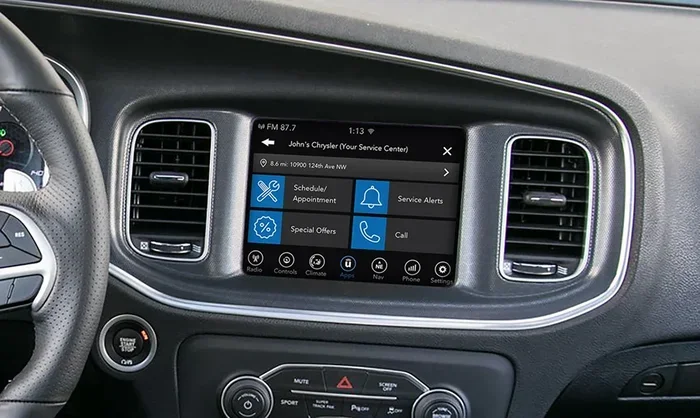
The Dodge Charger uses the Uconnect infotainment system to run Apple CarPlay. Uconnect has been a staple in Dodge vehicles for years, and it has evolved significantly over time. Older versions of Uconnect supported Apple CarPlay through a wired connection only. Newer versions bring wireless capabilities and smoother performance.
Does the Dodge Charger Have Apple CarPlay?
So, does the Dodge Charger have Apple CarPlay? The short answer is yes, for most model years and trims. But the details matter. Let us look at how Apple CarPlay availability breaks down across different Dodge Charger generations and trim levels.
Apple CarPlay by Model Year
The Dodge Charger has gone through several generational changes, and each one brought updates to the infotainment system. Here is how Apple CarPlay support breaks down by era:
- 2011 to 2014 Dodge Charger: These older models do not support Apple CarPlay. The Uconnect systems in these years predate the feature entirely.
- 2015 to 2020 Dodge Charger: These models introduced Apple CarPlay support, but it was available through a USB cable connection only. Wireless Apple CarPlay was not yet an option.
- 2021 and newer Dodge Charger: Starting in 2021, Dodge updated the infotainment system. These models offer wireless Apple CarPlay on many trims, making the experience much more convenient.
If you own a Dodge Charger from 2015 or newer, there is a good chance you have Apple CarPlay. But always double-check your specific trim and model details to be sure.
Apple CarPlay by Trim Level
Not every Dodge Charger trim is created equal when it comes to tech features. Here is how Apple CarPlay availability works across the different trims:
- Dodge Charger SXT: The base SXT trim includes Apple CarPlay as part of the standard Uconnect infotainment system. This is a great starting point for smartphone integration.
- Dodge Charger R/T: The R/T trim also supports Apple CarPlay. Higher trim levels often come with larger screens and better sound systems, which enhances the overall experience.
- Dodge Charger GT: The GT trim includes Apple CarPlay and often adds extra tech features like upgraded audio and larger displays.
- Dodge Charger SRT: The high-performance SRT trims come with the most advanced Uconnect systems. Wireless Apple CarPlay is standard on most SRT models, along with premium audio and navigation.
- Dodge Charger Hellcat: Even the powerful Hellcat variants support Apple CarPlay. The focus on performance does not mean you lose out on modern tech features.
As a general rule, the higher the trim level, the better the infotainment experience. But even the base trims of the Dodge Charger offer solid Apple CarPlay support in recent years.
How to Set Up Apple CarPlay on a Dodge Charger
Setting up Apple CarPlay on your Dodge Charger is easy. The process is slightly different depending on whether you have a wired or wireless connection. Here is how to get it running on your Dodge Charger.
Wired Apple CarPlay Setup
If your Dodge Charger uses a wired connection, follow these steps:
- Plug one end of a USB cable into your iPhone.
- Connect the other end of the cable to the USB port in your Dodge Charger. The port is usually located in the center console or the armrest area.
- Your infotainment display should recognize the connection automatically.
- Tap the Apple CarPlay icon on the screen to launch it.
- Follow the on-screen prompts to allow permissions and set up your preferences.
Once connected, you can access your apps, make calls, and stream music directly from the car’s display. The wired connection is reliable and typically charges your phone at the same time.
Wireless Apple CarPlay Setup
If your Dodge Charger supports wireless Apple CarPlay, the process is even simpler:
- Make sure your iPhone is updated to the latest iOS version.
- Go to your iPhone settings and select General, then CarPlay.
- On the Dodge Charger’s infotainment screen, navigate to Settings and look for Phone or Connectivity.
- Select Wireless CarPlay and follow the prompts to pair your iPhone.
- Once paired, your Apple CarPlay interface will appear automatically when you start the car.
Wireless Apple CarPlay eliminates the need for cables, which makes the experience much cleaner and more convenient. You just get in the car, and everything is ready to go.
Quick Tips for Apple CarPlay Setup
- Use a high-quality USB cable if going wired. Cheap cables can cause connection issues and slow charging.
- Restart your iPhone if Apple CarPlay does not connect the first time.
- Make sure your Dodge Charger’s infotainment system is updated to the latest software version.
- Clear your Bluetooth connections if you are having trouble pairing wirelessly.
- Keep your iPhone unlocked during the initial setup process.
Apple CarPlay Features Available on the Dodge Charger
Once you have Apple CarPlay connected on your Dodge Charger, you get access to a range of useful features. These features make driving safer, more connected, and more enjoyable. Here is what you can expect from smartphone integration in the Dodge Charger.
Navigation and Maps
One of the most popular uses of Apple CarPlay is navigation. You can use Apple Maps, Google Maps, Waze, or any other compatible navigation app on your Dodge Charger’s display. These apps provide real-time traffic updates, turn-by-turn directions, and points of interest along your route.
The larger infotainment screens on newer Dodge Charger models make navigation especially easy to read. You get clear directions without squinting at a small phone screen. Siri voice control lets you ask for directions hands-free, which keeps your focus on the road.
Music and Audio Streaming
Music streaming is another big reason people use Apple CarPlay. You can access Apple Music, Spotify, Pandora, Amazon Music, and many other audio apps directly from your Dodge Charger’s display. You can browse playlists, search for songs, and control playback with just a few taps.
The Dodge Charger’s sound system pairs well with Apple CarPlay to deliver quality audio. If you have a higher trim like the SRT or R/T, the premium audio system makes music streaming through Apple CarPlay a truly enjoyable experience.
Hands-Free Calling and Messaging
Safety is a top priority when driving, and Apple CarPlay helps with that. You can make and receive calls through the Dodge Charger’s infotainment system without ever touching your phone. Siri voice control lets you dictate and send text messages, read incoming messages aloud, and respond without taking your eyes off the road.
The hands-free calling feature works seamlessly with your iPhone. When someone calls you, the caller ID shows up on the Dodge Charger’s display, and you can answer with a voice command or a tap on the screen.
Third-Party Apps Compatibility
Beyond the built-in Apple apps, Apple CarPlay supports a wide range of third-party apps. You can use messaging apps like WhatsApp and iMessage, podcast apps like Spotify and Apple Podcasts, and even audiobook apps. The Dodge Charger infotainment system makes it easy to switch between apps and keep everything running smoothly.
Just keep in mind that not every iPhone app is compatible with Apple CarPlay. Apple curates the apps that work with the system to ensure safety and functionality. Stick with the apps that are labeled as Apple CarPlay compatible for the best experience.
Apple CarPlay vs. Android Auto on the Dodge Charger
If you have ever compared Apple CarPlay to Android Auto, you know both systems offer similar core features. The Dodge Charger supports both Apple CarPlay and Android Auto on most models from 2015 onward. This gives you flexibility depending on which smartphone you use.
Here is a quick comparison of the two systems on the Dodge Charger:
- Apple CarPlay offers deeper integration with iPhone features like Siri, iMessage, and Apple Maps. It also supports wireless connectivity on newer Dodge Charger models.
- Android Auto provides excellent support for Google Maps, Spotify, and other Android-friendly apps. It works well on Dodge Chargers that support it.
- Both systems offer hands-free calling, voice commands, and easy access to your favorite apps while driving.
- Wireless support varies. Newer Dodge Charger models with the latest Uconnect system tend to support wireless versions of both Apple CarPlay and Android Auto.
Ultimately, the choice between Apple CarPlay and Android Auto comes down to your phone and personal preference. Both systems deliver a great smartphone integration experience on the Dodge Charger.
What If Your Dodge Charger Does Not Have Apple CarPlay?
If your Dodge Charger does not support Apple CarPlay, do not worry. There are still options to bring modern smartphone integration to your vehicle. Here are some solutions you can explore.
Aftermarket Apple CarPlay Adapters
An aftermarket Apple CarPlay adapter is a popular solution for older Dodge Charger models. These devices plug into your car’s existing infotainment system and add Apple CarPlay functionality. Some adapters support wireless connectivity, which makes them a great upgrade for vehicles that only had wired support originally.
Popular brands like AA WirelesCarPlay, Carlinkit, and others make adapters that work well with the Dodge Charger’s Uconnect system. These adapters typically range from $100 to $300, depending on the features they offer.
Upgrade the Infotainment System
Some Dodge Charger owners choose to upgrade the entire infotainment unit. An aftermarket head unit with built-in Apple CarPlay and Android Auto support can transform the experience in an older Dodge Charger. These units often include larger screens, better sound processing, and modern connectivity options like Bluetooth 5.0 and USB-C charging.
Keep in mind that upgrading the infotainment system can be more expensive than an adapter. It also involves more installation work. But the result is a much smoother and more modern infotainment experience in your Dodge Charger.
Use Bluetooth for Basic Functions
If you do not want to invest in an adapter or upgrade, you can still use Bluetooth for basic functions. Most Dodge Charger models support Bluetooth for hands-free calling and audio streaming. It is not as feature-rich as Apple CarPlay, but it keeps you connected while driving.
Bluetooth works well for phone calls and streaming music from your phone. You just lose the ability to use navigation apps on the car’s display and access the simplified Apple CarPlay interface. For many drivers, Bluetooth is a solid backup option.
Common Mistakes to Avoid With Apple CarPlay on the Dodge Charger
Even though setting up Apple CarPlay on the Dodge Charger is straightforward, there are some common mistakes that can cause frustration. Here are a few to watch out for.
- Using a low-quality USB cable: A cheap or damaged cable can prevent Apple CarPlay from connecting properly. Always use a high-quality, certified cable.
- Not updating the infotainment software: Dodge releases software updates for the Uconnect system that improve Apple CarPlay performance. Keep your system updated.
- Ignoring iPhone settings: Make sure Apple CarPlay is enabled in your iPhone settings under General. Also ensure your iPhone is unlocked during the initial connection.
- Overloading the infotainment system: Running too many apps at once can slow down the Dodge Charger’s display. Close apps you are not using for smoother performance.
- Assuming wireless works on all models: Not every Dodge Charger with Apple CarPlay supports wireless. Check your specific model year and trim before assuming.
Avoiding these mistakes will help you get the most out of Apple CarPlay on your Dodge Charger. A little preparation goes a long way toward a seamless experience.
Expert Insights on Apple CarPlay and the Dodge Charger
We asked automotive experts about Apple CarPlay in the Dodge Charger, and here is what they had to say.
Tech reviewers consistently praise the Dodge Charger’s Uconnect infotainment system for its clean interface and responsive performance. The addition of wireless Apple CarPlay in recent model years has been a major upgrade. Experts note that the larger display screens on newer Chargers make Apple CarPlay much easier to use while driving.
Dodge Charger owners often highlight smartphone integration as one of the features they appreciate most. The ability to use navigation apps, stream music, and make hands-free calls through the car’s display adds real value to the driving experience. Many owners also appreciate that Apple CarPlay works reliably across most Dodge Charger trims.
Automotive engineers point out that the Dodge Charger’s Apple CarPlay implementation is solid but not the most advanced on the market. Some competing vehicles offer faster wireless connections and more seamless integration. However, the Dodge Charger delivers a dependable Apple CarPlay experience that meets the needs of most drivers.
Key Takeaways
- Apple CarPlay is available on most Dodge Charger models: From 2015 onward, the Dodge Charger supports Apple CarPlay across many trim levels.
- Wireless support is available on newer models: Dodge Charger models from 2021 onward offer wireless Apple CarPlay on select trims, providing a cable-free experience.
- Older models require a USB connection: If your Dodge Charger is from 2015 to 2020, you will need a USB cable to use Apple CarPlay.
- Setup is quick and easy: Whether wired or wireless, connecting your iPhone to Apple CarPlay on the Dodge Charger takes just a few minutes.
- Not all trims include it equally: Higher trims like the SRT and GT offer the best infotainment experience with larger screens and more features.
- Aftermarket options exist for older models: If your Dodge Charger does not support Apple CarPlay, adapters and infotainment upgrades can add the feature.
- Always verify your specific model: Check your Dodge Charger’s year, trim, and Uconnect version to confirm Apple CarPlay compatibility.
Conclusion
So, does the Dodge Charger have Apple CarPlay? The answer is a clear yes for most model years and trims. Whether you drive a Dodge Charger SXT, R/T, GT, SRT, or Hellcat, you can expect Apple CarPlay support on models from 2015 onward. Newer Dodge Chargers from 2021 and up bring the added convenience of wireless Apple CarPlay, making the experience even better.
Setting up Apple CarPlay on your Dodge Charger is simple, and the features it provides are genuinely useful. From navigation apps to music streaming and hands-free calling, smartphone integration adds real value to your driving experience. Even if your Dodge Charger is an older model, aftermarket adapters can bring Apple CarPlay functionality to your vehicle.
The Dodge Charger remains one of the most popular muscle cars on the road, and its support for Apple CarPlay ensures it keeps pace with modern technology. Whether you are commuting to work or hitting the open road, having your favorite apps at your fingertips makes every drive better. If you have not yet connected Apple CarPlay to your Dodge Charger, now is the perfect time to do so.
Frequently Asked Questions
Which Dodge Charger years have Apple CarPlay?
Dodge Charger models from 2015 onward support Apple CarPlay. Models from 2021 and newer may offer wireless Apple CarPlay depending on the trim level. Older models from 2011 to 2014 do not support the feature.
Is Apple CarPlay standard on all Dodge Charger trims?
Not all trims include Apple CarPlay as standard. However, most trims from 2015 onward offer it as either standard or optional equipment. The SXT, R/T, GT, SRT, and Hellcat trims generally support Apple CarPlay on recent model years.
Can I use Apple CarPlay wirelessly on a Dodge Charger?
Yes, but only on newer Dodge Charger models from 2021 and up. Wireless Apple CarPlay depends on the specific trim and Uconnect system version. Older models from 2015 to 2020 require a USB cable connection.
Does the Dodge Charger support both Apple CarPlay and Android Auto?
Yes, most Dodge Charger models from 2015 onward support both Apple CarPlay and Android Auto. This gives you flexibility whether you use an iPhone or an Android phone. Both systems work through the Uconnect infotainment display.
Can I add Apple CarPlay to an older Dodge Charger?
Yes, you can add Apple CarPlay to older Dodge Charger models using an aftermarket adapter. Brands like AA WirelesCarPlay and Carlinkit make adapters that work with the Dodge Charger’s Uconnect system. You can also upgrade to an aftermarket infotainment unit for a more comprehensive solution.
Why is Apple CarPlay not working on my Dodge Charger?
If Apple CarPlay is not working, try using a different USB cable or port. Restart both your iPhone and the Dodge Charger’s infotainment system. Make sure Apple CarPlay is enabled in your iPhone settings under General. Also check for any available software updates for your Dodge Charger’s Uconnect system.