Does Subaru EyeSight Record Video While You Are Driving
So, does Subaru EyeSight record video while you are driving? The short answer is no, Subaru EyeSight does not function as a dash cam or video recorder. The EyeSight system uses dual cameras for driver assistance, not for storing or recording footage for later playback. However, it does capture critical data during safety events like pre-collision braking. If you want video recordings of your drives, you will need a separate aftermarket dash cam.
You have probably seen those dash cam videos online showing incredible near-misses or surprising moments on the road. Maybe you have wondered whether your Subaru EyeSight system could do the same thing. The question of does Subaru EyeSight record video comes up a lot among Subaru owners and car enthusiasts alike. Let us clear this up once and for all.
The truth is that Subaru EyeSight is a brilliant safety system, but it is not designed to record or store video. It uses cameras, yes, but for a very different purpose than a traditional dash cam. Understanding what EyeSight actually does will help you get the most out of your Subaru and decide if you need additional recording equipment.
Key Takeaways
- EyeSight Does Not Record Video: Subaru EyeSight is a driver assistance system, not a dash cam or video recorder.
- Dual Cameras Work Behind the Scenes: The system uses two cameras mounted near the rearview mirror to monitor the road and detect obstacles.
- Data Is Stored Temporarily: EyeSight logs safety event data like pre-collision braking moments, but does not save video clips.
- No Playback Feature Exists: You cannot review EyeSight footage after an accident or drive.
- Aftermarket Dash Cams Are the Solution: If you want video recording, a dedicated dash cam is the best option for Subaru owners.
- EyeSight Focuses on Safety, Not Surveillance: The system is designed to prevent accidents, not to document them.
- Privacy Is Respected: Subaru does not store or transmit video data from the EyeSight system to external servers.
📑 Table of Contents
- How Subaru EyeSight Works
- Does Subaru EyeSight Record Video?
- What the EyeSight Cameras Actually Capture
- EyeSight vs Aftermarket Dash Cams
- How to Access EyeSight Data After an Incident
- Privacy and Data Concerns with EyeSight
- Common Misconceptions About EyeSight and Video
- Final Thoughts on Subaru EyeSight and Video Recording
How Subaru EyeSight Works
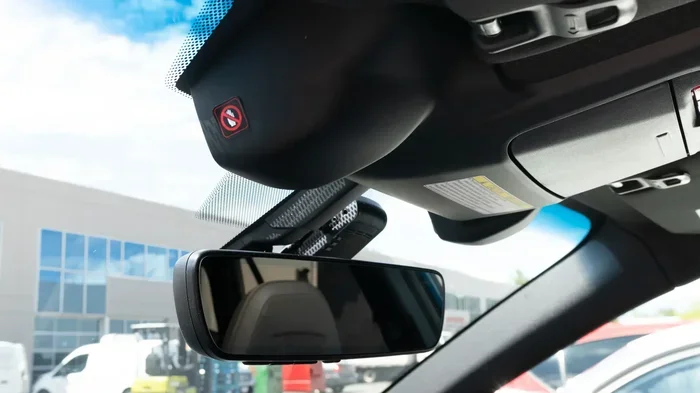
Before we dive into the video recording question, it helps to understand how the EyeSight system actually functions. Subaru EyeSight is a driver-assist technology that relies on a pair of stereo cameras. These cameras sit right behind the rearview mirror on the inside of your windshield. They work together to create a 3D view of what is happening ahead on the road.
The Dual Camera Setup
The two cameras in the EyeSight system are spaced apart, much like human eyes. This stereo setup allows the system to judge distance and depth. It can detect vehicles, pedestrians, cyclists, and even lane markings. The cameras continuously scan the road ahead while you drive.
Here is what the EyeSight system uses those cameras for:
- Preblictional Braking: It can apply the brakes automatically if it detects an imminent collision.
- Adaptive Cruise Control: It maintains a safe following distance from the vehicle ahead.
- Lane Keep and Assist: It helps keep you centered in your lane.
- Throttle Management: It can reduce engine power if it detects an obstacle.
- Driver Attention Monitor: It watches for signs of driver distraction or drowsiness.
All of these features work in real time. The system processes visual data instantly and can react faster than a human driver in many situations. This is what makes Subaru EyeSight one of the most respected safety systems on the road today.
Does Subaru EyeSight Record Video?
Now for the big question. Does Subaru EyeSight record video while you are driving? The direct answer is no. The EyeSight system does not record, store, or save any video footage. It is not a surveillance system or a dash cam. The cameras in EyeSight are sensors, not recording devices.
Think of it this way. The EyeSight cameras are like your eyes. They look at the road, they process information, and they help you make better driving decisions. But your eyes do not record a video of everything you see during a drive, right? EyeSight works the same way. It sees, it analyzes, and it acts. But it does not save a video file.
What About Safety Event Data?
While EyeSight does not record video, it does log safety event data. If the system activates precollision braking or detects a potential crash, it records a short window of sensor data. This includes things like:
- Vehicle speed at the time of the event
- Brake application timing
- Distance to detected objects
- Camera input readings from the moment of detection
This data is stored temporarily in the vehicle’s memory. It is not video, but it can be useful for understanding what happened during a safety event. Some Subaru dealerships can access this data if needed. However, this is not the same as having a video recording of your drive.
Why Subaru Chose Not to Include Video Recording
You might wonder why Subaru did not build video recording into EyeSight. There are a few good reasons for this. First, storing video requires a lot of memory and storage space. Continuous video recording would need a large and expensive storage system in the vehicle. Second, privacy concerns would be significant. Many drivers would not want a system constantly recording their driving habits and sharing that data.
Third, Subaru designed EyeSight to be a safety tool, not a surveillance tool. The goal is to prevent accidents, not to document them. Adding video recording would change the fundamental purpose of the system. Subaru kept EyeSight focused on what it does best: keeping you safe on the road.
What the EyeSight Cameras Actually Capture
The EyeSight cameras capture a live feed of the road ahead, but only for processing purposes. This live feed is not saved or stored anywhere in the vehicle. The cameras scan the environment, identify objects, and send data to the EyeSight control unit. That unit makes decisions in milliseconds based on what it sees.
The cameras have a wide field of view, typically covering the road ahead and a good portion of the lane. They can detect objects at various distances, from close vehicles to pedestrians further ahead. The stereo vision system gives EyeSight a depth perception advantage over single-camera systems.
One interesting thing to note is that the EyeSight cameras also support other Subaru features. For example, they help with the Subaru DriverFocus system, which monitors driver attention. They also assist with certain camera-based functions like the rearview camera display. But again, none of this involves recording or storing video.
EyeSight vs Aftermarket Dash Cams
If you want video recording in your Subaru, you will need to look beyond EyeSight. Aftermarket dash cams are the go-to solution for Subaru owners who want to record their drives. These devices are widely available, relatively affordable, and easy to install.
Key Differences at a Glance
| Feature | Subaru EyeSight | Aftermarket Dash Cam |
|---|---|---|
| Records Video | No | Yes |
| Primary Purpose | Driver Assistance | Video Recording |
| Camera Type | Stereo Vision Sensors | Single or Dual Video Cameras |
| Footage Storage | No Storage | SD Card or Cloud |
| Playback Available | No | Yes |
| Safety Features | Yes (Braking, Cruise, etc.) | Limited (Some have ADAS) |
| Installation | Built-In | DIY or Professional |
| Cost | Included with Vehicle | $50 to $300+ |
As you can see, EyeSight and dash cams serve completely different purposes. EyeSight is all about active safety. A dash cam is all about capturing what happens on the road. Many Subaru owners choose to have both. EyeSight keeps you safe while driving, and a dash cam captures the evidence if something goes wrong.
Best Dash Cams for Subaru Owners
If you are shopping for a dash cam to pair with your Subaru, here are a few popular options that work well with EyeSight-equipped vehicles:
- Garmin Dash Cam Series: Known for reliability and clear video quality. Models like the Garmin Dash Cam 67W offer wide-angle views and GPS tracking.
- BlackVue Dual Channel Dash Cams: These record both the front and rear of your vehicle. They are popular among Subaru owners who want full coverage.
- Nextbase Dash Cams: A great mid-range option with good video resolution and easy setup.
- Vantrue Dash Cams: Budget-friendly options that still deliver solid video quality.
When choosing a dash cam, look for at least 1080p resolution. A wide-angle lens covering 130 degrees or more is ideal. And make sure the dash cam does not obstruct your view of the rearview mirror or interfere with the EyeSight cameras mounted behind it.
How to Access EyeSight Data After an Incident
If you are involved in a minor incident and want to check what the EyeSight system recorded, there are a few things you should know. EyeSight does not provide video playback, but it does store event data temporarily.
Here is what you can do after an incident:
- Check with Your Subaru Dealer: They may be able to retrieve the safety event data from the vehicle’s computer. This is not video, but it includes sensor logs from the event.
- Use the Subaru Starlink System: Some newer Subaru models with Starlink may have accident notification features. These can alert emergency services and share vehicle data.
- Check for an Aftermarket Dash Cam: If you have a separate dash cam installed, that is where your video footage will be stored. Always check your dash cam’s SD card after any incident.
The bottom line is that EyeSight alone will not give you video evidence of what happened on the road. This is why many safety-conscious drivers pair their Subaru with a dedicated dash cam.
Privacy and Data Concerns with EyeSight
Privacy is a big concern for many drivers these days. You might be wondering whether Subaru is watching you through the EyeSight cameras. The good news is that Subaru does not monitor, record, or transmit your driving video to any external server or third party.
The EyeSight cameras only process data in real time inside the vehicle. No footage is uploaded to the cloud. No one at Subaru headquarters is watching your drives. The system operates locally and independently within your car.
That said, Subaru does collect some vehicle data for diagnostics and service purposes. This is standard for modern cars with advanced technology. But this data does not include video recordings of your driving. If you have concerns about data privacy, you can review Subaru’s privacy policy or ask your dealer for more details.
Common Misconceptions About EyeSight and Video
There are several misconceptions floating around about Subaru EyeSight and video recording. Let us clear up a few of the most common ones.
Myth 1: EyeSight Records a Continuous Video Loop
This is false. EyeSight does not record anything continuously. It uses its cameras only for real-time processing and does not store any video data.
Myth 2: EyeSight Footage Can Be Used in Insurance Claims
Since EyeSight does not record video, you cannot use it as evidence for insurance claims. You would need an aftermarket dash cam for that purpose.
Myth 3: The Cameras on Your Windshield Are Dash Cams
The cameras near your rearview mirror are EyeSight sensors, not recording devices. They look similar to dash cam cameras but serve a completely different function.
Myth 4: EyeSight Footage Is Automatically Sent to Subaru
No data from the EyeSight cameras is sent to Subaru or any third party. The system works entirely offline within your vehicle.
Final Thoughts on Subaru EyeSight and Video Recording
To recap, does Subaru EyeSight record video while you are driving? No, it does not. The EyeSight system is a powerful driver-assist technology that uses cameras for safety, not for recording. It processes visual data in real time to help you avoid collisions and drive more confidently. But it does not save, store, or play back any video footage.
If video recording is important to you, a dash cam is the way to go. These devices are affordable, easy to install, and give you peace of mind on every drive. Pairing a dash cam with Subaru EyeSight gives you the best of both worlds: active safety and video evidence.
Subaru EyeSight is a fantastic system that has earned a strong reputation for safety. It is not designed to be a video recorder, and that is okay. It does its job incredibly well, and understanding its limits helps you use it to its full potential. So the next time someone asks you, does Subaru EyeSight record video, you will know the answer with confidence.
Drive safe, enjoy your Subaru, and consider adding a dash cam if you want to capture the road ahead. Your EyeSight system will keep you safe, and your dash cam will keep you covered.
Frequently Asked Questions
Can I view EyeSight camera footage after an accident?
No, Subaru EyeSight does not store or save any video footage. The cameras only process data in real time for safety features. If you need video evidence after an accident, you will need a separate aftermarket dash cam installed in your Subaru.
Does Subaru EyeSight work as a dash cam?
No, Subaru EyeSight is not a dash cam. It is a driver-assist system that uses dual cameras to detect obstacles and help prevent collisions. It does not record or store any video while you drive.
Can Subaru access EyeSight camera footage remotely?
No, Subaru cannot access EyeSight camera footage remotely. The system operates entirely within the vehicle and does not transmit video data to Subaru or any external server. All processing happens locally inside the car.
Will adding a dash cam interfere with Subaru EyeSight?
A properly installed dash cam should not interfere with EyeSight. However, you should never mount a dash cam in front of the EyeSight cameras, which are located behind the rearview mirror. Blocking those cameras can disable or reduce the effectiveness of EyeSight safety features.
Does the Subaru DriverFocus system record video?
No, the Subaru DriverFocus system does not record video. It uses an infrared camera to monitor driver attention and detect signs of drowsiness or distraction. It does not store or save any video footage of the driver or the road.
Can I get EyeSight data from my Subaru dealer?
Yes, your Subaru dealer may be able to retrieve safety event data from the EyeSight system after an incident. This data includes sensor logs like speed, braking, and object detection, but it is not video footage. It can still be useful for understanding what happened during a safety event.
=== CONCLUSION ===
The answer to does Subaru EyeSight record video is clear: it does not. Subaru EyeSight is a safety-focused system that uses cameras to help you drive more safely, but it does not record, store, or play back video. If you want video recordings of your drives, you need a dedicated dash cam. Understanding this distinction helps you get the most out of your Subaru and makes you a smarter, more informed driver.