Do You Have to Pay Monthly for Navigation in Your Car
Do you have to pay monthly for navigation in a car? The short answer is no. Many drivers can use free navigation apps like Google Maps or Waze to get turn-by-turn directions without spending a dime. However, if your vehicle comes with a built-in car navigation system, you might face a monthly navigation fee or a one-time cost for map updates subscription. The good news is that there are plenty of ways to get GPS navigation service without paying a recurring charge. In this guide, we will walk you through every option so you can choose the best car navigation system for your budget and needs.
Have you ever sat in your car and wondered, “Do I really need to pay monthly for navigation?” It is a fair question. Many drivers assume that car navigation always comes with a recurring bill. The truth is that the answer depends on your vehicle, your preferences, and the tools you choose.
Some factory navigation systems do require a monthly fee for maps or a GPS subscription. But plenty of free alternatives exist today. You can use your smartphone, a standalone device, or even free apps to get directions without spending a single dollar each month. This guide will help you understand every option so you can make a smart choice.
Key Takeaways
- No mandatory monthly fee: You do not have to pay monthly for navigation. Free apps like Google Maps and Waze work great.
- Built-in systems may cost: Factory car navigation systems sometimes require a GPS subscription for live features.
- Phone-based options are free: Using Apple CarPlay or Android Auto gives you full navigation at zero cost.
- Aftermarket GPS devices are a one-time purchase with no recurring fees.
- Live traffic updates are available for free through several apps.
- Map updates are often free online or through the app store.
- Connected car services vary by brand, so always check before buying.
📑 Table of Contents
What Is Built-In Car Navigation?
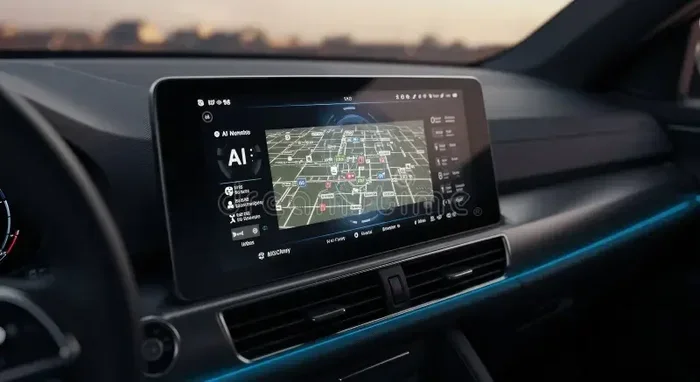
When you buy a new car, it may come with a built-in car navigation system. This is a car infotainment system that shows maps and gives you directions right on the dashboard screen. You do not need to use your phone. The system works on its own.
These systems use satellite navigation technology. They talk to GPS satellites to figure out where you are. Then they show you the best route to your destination. Some systems also offer live traffic updates, which help you avoid jams and road closures.
How Factory Navigation Systems Work
Most factory navigation systems come pre-installed when you buy a new car. Brands like Ford, BMW, Toyota, and Chevrolet all offer them. The screen is usually built into the dashboard. You can tap it to enter a destination or search for a place.
Here is how these systems typically work:
- The system uses GPS satellites to track your location.
- It pulls map data from a built-in database.
- It calculates the best route based on your destination.
- It gives you voice-guided turn-by-turn directions.
- Some systems offer live traffic updates and points of interest.
The problem is that many of these systems need a navigation subscription to unlock certain features. Without it, you may get basic maps but miss out on real-time traffic data, weather alerts, and search features.
Quick Tips:
- Check your car manual to see if your built-in car navigation system requires a subscription.
- Ask the dealer about free trial periods before you commit.
- Some brands offer free navigation for the first year after purchase.
How Much Does It Cost to Pay Monthly for Navigation?
If you have a factory navigation system, you might wonder about the navigation app cost. The truth is that prices vary a lot. Some systems are free to use, while others charge a monthly navigation fee.
Here is a quick look at what you might expect:
| Navigation Type | Monthly Cost | What You Get |
|---|---|---|
| Factory built-in navigation (basic) | $0 | Static maps, basic directions |
| Factory built-in navigation (premium) | $5-$15 | Live traffic, weather, search |
| Aftermarket GPS device | $0 | Full navigation, no subscription |
| Smartphone app (Google Maps) | $0 | Full navigation, live traffic |
| Smartphone app (Waze) | $0 | Community alerts, fastest routes |
| Apple CarPlay / Android Auto | $0 | Phone-based navigation on car screen |
| Premium navigation app (Sygic, etc.) | $5-$10 | Offline maps, no ads |
As you can see, you do not have to pay monthly for navigation if you do not want to. There are many free navigation alternatives that work just as well as paid systems.
Why Some Systems Charge a Monthly Fee
Car makers argue that connected car services cost them money. They pay for data plans, server costs, and map updates. So they pass some of that cost to the driver. This is why certain GPS navigation service features come with a recurring charge.
But here is the thing. Many of these features are also available for free through your phone. You just need to know where to look.
Common Mistakes:
- Assuming all built-in systems require a monthly fee. Some do not.
- Not checking if your car offers a free trial period.
- Paying for a GPS subscription when a free app would work just as well.
Free Navigation Alternatives You Can Use Today
You do not need to spend money on car navigation every month. There are many free navigation apps that give you great directions, live traffic, and voice guidance. Here are the best options.
Google Maps
Google Maps is one of the most popular free navigation apps in the world. It gives you turn-by-turn directions, live traffic updates, and estimated arrival times. It also shows you gas prices, restaurants, and other points of interest along your route.
To use it in your car, you can mount your phone on the dashboard or connect it through Apple CarPlay or Android Auto. The experience feels just like a built-in system, but it costs nothing.
Waze
Waze is a community-driven navigation app. It gets traffic and road hazard updates from other drivers. If there is a crash, speed trap, or road closure ahead, Waze will alert you. Many drivers love Waze because it finds the fastest route based on real-time data.
Waze is completely free. There are no monthly fees and no map updates subscription to worry about. It is a great choice for daily commuters.
Apple CarPlay and Android Auto
If your car supports Apple CarPlay or Android Auto, you can mirror your phone screen on the car display. This gives you access to all your favorite free navigation apps right from the dashboard.
Both platforms are free to use. You just need a compatible phone and a car that supports them. Most new cars made after 2018 come with one or both of these systems.
Expert Insight: Many drivers switch from factory navigation to Apple CarPlay or Android Auto because the phone apps are more up-to-date and offer better search results. The in-car GPS experience is just as good, if not better.
Other Free Options Worth Trying
Here are a few more free navigation apps that are worth a look:
- Sygic – Offers free basic navigation with optional premium features.
- HERE WeGo – Great offline maps that work without internet.
- MapQuest – A classic navigation tool that is still free and reliable.
- Organic Maps – Privacy-focused and completely free with no ads.
Quick Tips:
- Download offline maps before you travel to save data and work without a signal.
- Use a phone mount to keep your screen visible and safe while driving.
- Charge your phone while using navigation to prevent battery drain.
Factory Navigation vs Aftermarket GPS Systems
When it comes to car navigation systems, you have two main choices. You can use the system that comes with your car, or you can buy a separate aftermarket GPS device. Each has its pros and cons.
Factory Built-In Navigation
A factory navigation system is built into the car from the start. It looks clean and integrated. The screen matches the rest of the dashboard. Many drivers like the feel of a built-in system because it does not clutter the windshield.
However, factory systems can be expensive to update. Some require a map updates subscription that costs money every year. The software may also become outdated faster than phone apps.
Aftermarket GPS Devices
An aftermarket GPS device is a separate unit you buy and mount in your car. Brands like Garmin and TomTom make popular models. These devices come with preloaded maps and do not require a monthly navigation fee.
The downside is that they are not as sleek as built-in systems. They sit on your dashboard or windshield. They also do not connect to your car’s features like backup cameras or audio systems.
Which One Should You Choose?
For most drivers, a smartphone with a free navigation app is the best choice. It is cheaper, more up-to-date, and more flexible. But if you prefer a clean, integrated look, a factory system may be worth it.
Expert Insight: Many car experts now recommend using your phone for navigation instead of paying for a built-in system. The navigation without subscription approach saves money and gives you access to better, more frequent app updates.
Common Mistakes:
- Buying an expensive factory navigation package when a free app would work just as well.
- Not checking if your car already has a free navigation feature you can use.
- Ignoring Apple CarPlay and Android Auto as navigation options.
When Is a Paid Navigation Subscription Worth It?
Not everyone should avoid paying for navigation. There are situations where a paid GPS subscription makes sense. Let us look at when it is worth the money.
You Travel Frequently in Remote Areas
If you drive in areas with poor cell service, a factory navigation system with offline maps can be very helpful. Free phone apps need internet to work well. A built-in system with preloaded maps does not need a signal.
You Want Seamless Integration
Some drivers prefer the look and feel of a built-in system. It does not look like a phone stuck to the dashboard. The directions appear right on the factory screen. This can feel more professional and less distracting.
You Need Advanced Features
Some premium car navigation systems offer features that free apps do not. These include built-in Wi-Fi, over-the-air updates, and integration with the car’s safety systems. If these features matter to you, a monthly fee for maps might be worth it.
But remember. You can always start with free options and see if they meet your needs. If they do, you save money every month.
Quick Tips:
- Try free apps for a month before paying for any navigation service.
- Check if your car brand offers discounted or free navigation for loyal customers.
- Read the fine print on any navigation subscription before you sign up.
How to Avoid Paying for Navigation Every Month
Want to get GPS navigation service without the ongoing cost? It is easier than you think. Here are practical steps to avoid monthly navigation fees.
Use Your Smartphone
The easiest way to avoid paying is to use your phone. Apps like Google Maps, Waze, and Apple Maps are free. You just need a phone mount and a way to charge your device while driving.
Connect Through Apple CarPlay or Android Auto
If your car supports these systems, use them. They let you see your phone’s navigation app on the car screen. You get the best of both worlds. A big screen and free navigation.
Buy an Aftermarket GPS Device
A standalone GPS device from Garmin or TomTom costs money upfront but has no monthly fee for maps. You get lifetime map updates with many models. This is a great option if you do not want to rely on your phone.
Check for Free Trials
If you have a factory system, check if it offers a free trial. Many car brands give you 3 to 12 months of free navigation. Use that time to decide if you really need the paid version.
Expert Insight: The best way to avoid navigation subscription cost is to stay informed. Check your car settings, read your owner’s manual, and explore free apps. Most drivers are surprised to find that they do not need to pay at all.
Common Mistakes:
- Forgetting to cancel a free trial before it turns into a paid subscription.
- Not checking if your car already includes free navigation features.
- Assuming that more expensive navigation is always better.
Real-World Example: How One Driver Saved $180 a Year
John bought a new SUV with a factory navigation system. The dealer told him it would cost $15 per month for full features. John did some research and found that Google Maps on Android Auto gave him everything he needed for free. He canceled the subscription and saved $180 a year. His navigation worked just as well, if not better.
This is a common story. Many drivers pay for car navigation features they do not need. A little research can save you a lot of money.
Conclusion
So, do you have to pay monthly for navigation in a car? The answer is a clear no. You have many options to get GPS navigation service without spending a dime each month. Free apps like Google Maps and Waze work great. Apple CarPlay and Android Auto give you a big-screen experience at no cost. And aftermarket GPS devices offer a one-time purchase with no recurring fees.
Factory car navigation systems can be convenient, but they are not always necessary. Before you sign up for a GPS subscription, try the free options first. You might be surprised at how well they work.
The best car navigation system is the one that fits your needs and your budget. Do not let a monthly navigation fee catch you off guard. Take control of your choices and find the option that works best for you. Safe travels!