Do Nissan Altimas Lock Automatically When You Park
Do Nissan Altimas Lock Automatically? Most modern Nissan Altimas come with an intelligent auto-lock system that engages when you walk away from the vehicle. This feature uses the Intelligent Key and proximity sensors to secure your car without any extra effort. Here’s everything you need to know about how it works, which models have it, and how to customize the settings.
Have you ever walked away from your car and wondered, Do Nissan Altimas Lock Automatically? It’s a simple question, but the answer depends on your model year and trim. Most Nissan Altimas built after 2013 come with an automatic door lock system as part of the Intelligent Key package. This system is designed to boost vehicle security and give drivers peace of mind. You step out, walk a few paces away, and the doors click shut on their own. No need to press a button or turn the key. It’s one of those small convenience features that quickly becomes indispensable.
The auto-lock function is more than just a luxury. It acts as a quiet guardian for your car. When you’re loading groceries, rushing to a meeting, or simply distracted by a phone call, the system ensures your doors are secure. It works hand-in-hand with the keyless entry system and the anti-theft alarm. Understanding how this feature operates, which Altima models include it, and how to tweak its settings can save you time and worry. In this guide, we’ll walk through everything you need to know about the Nissan Altima auto lock system.
Key Takeaways
- Auto-Lock is Standard on Most Models: Nearly every Nissan Altima from the 2013 model year onward includes an automatic door lock system as part of the Intelligent Key package.
- It Works with Proximity Sensors: The system uses a smart key and door sensors to detect when you leave the vehicle and locks all doors automatically.
- You Can Adjust the Settings: Through the driver’s door controls or the NissanConnect infotainment system, you can turn auto-lock on or off and set a delay timer.
- Older Models May Need an Upgrade: Pre-2013 Altimas often lack factory auto-lock, but affordable aftermarket kits can add the feature easily.
- Common Issues Are Easy to Fix: Problems like delayed locking or failure to lock usually trace back to a weak key fob battery, a faulty door sensor, or a simple setting toggle.
- Pairing with Remote Start Boosts Security: When you use remote start, the auto-lock feature engages shortly after the engine starts, keeping the car secure while it idles.
📑 Table of Contents
Do Nissan Altimas Lock Automatically? The Short Answer
The short answer is yes, with a few important details. The vast majority of Nissan Altimas sold in the United States since the 2013 model year come equipped with an automatic door lock system. This feature is tied directly to the Intelligent Key system. When you remove the smart key from the vehicle and close the door, the car detects the key’s absence and initiates a lock sequence. All doors and the liftgate lock within a few seconds.
However, not every Altima trim or model year behaves exactly the same. The system can be customized. Some owners prefer the doors to lock only after the car reaches a certain speed, while others want them to lock the moment the key moves away. Nissan built in flexibility so you can choose what works best for your daily routine. If you’re unsure whether your specific Altima has this feature, check the owner’s manual or look for the auto-lock setting in the driver’s door controls.
How the Auto-Lock System Works
The auto-lock system relies on a few core components working together seamlessly. Understanding these parts helps you troubleshoot issues and appreciate the engineering behind the feature.
The Role of the Intelligent Key
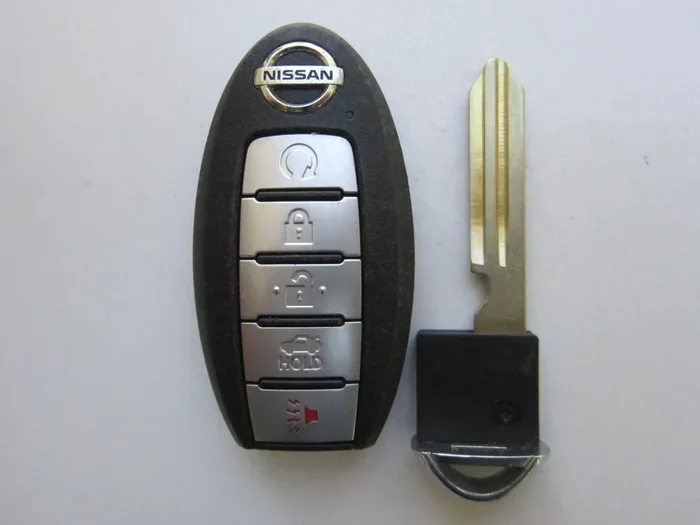
The Intelligent Key is the brain of the system. It emits a low-frequency signal that the car’s antennas can detect. When the key is inside the vehicle, the system knows you are present. The moment you take the key outside and close the door, the antennas register the key’s departure. This triggers the door lock actuator to engage. The actuator is a small electric motor attached to each door lock mechanism. It receives a signal from the body control module and physically moves the lock to the secured position.
Proximity Sensors and Door Sensors
Your Altima uses proximity sensors located in the door handles and the rear liftgate. These sensors confirm that all doors and the liftgate are fully closed before sending the lock command. If a door is ajar, the system will not lock and will usually give you a visual or audible warning. This prevents you from accidentally locking your keys inside the car. The sensors also monitor the lock status and report back to the dashboard indicator light.
When Does the Lock Engage?
The default behavior is straightforward. Once you exit the vehicle, close the door, and walk beyond a certain distance (typically about 6 feet), the doors lock automatically. There is a short delay of roughly 3 to 5 seconds to allow you to return if you forgot something. This delay is a safety measure. It gives you a window to reopen the door without triggering the alarm. After the delay, the lock engages and the indicator light on the dashboard flashes once to confirm the action.
Which Nissan Altima Models Have Automatic Locking?
Auto-lock availability varies by model year and trim level. Here’s a breakdown of the most common Nissan Altima generations and their lock features.
| Model Year | Trims with Auto-Lock | Keyless Entry Required? | Notes |
|---|---|---|---|
| 2013–2018 | All trims (S, SR, SV, SL, Platinum) | Yes | Standard on all models with Intelligent Key. No manual toggle needed. |
| 2019–2023 | All trims | Yes | Added NissanConnect integration. You can adjust lock settings via the touchscreen. |
| 2024 | All trims (S, SR, SV, SL, Platinum) | Yes | Latest Intelligent Key design with improved sensor range. Auto-unlock also available. |
| 2007–2012 | SL and Platinum trims only | Yes | Base models (S, SR, SV) did not include auto-lock as standard. |
| 2002–2006 | Not available | N/A | Manual locks or optional keyless entry. Aftermarket kits recommended. |
If you own an older Altima and miss this convenience, you can install an aftermarket auto-lock module. These kits plug into the existing door lock wiring and add a proximity sensor. The cost is typically between $80 and $200, and installation takes about an hour. It’s a simple upgrade that brings modern security to a classic car.
How to Adjust Auto-Lock Settings
Nissan designed the Altima’s auto-lock system to be user-friendly. You can change how and when the doors lock without visiting a dealer. Two main methods exist: the driver’s door control panel and the NissanConnect infotainment screen.
Using the Driver’s Door Controls
On the driver’s door panel, you’ll find a button with a lock icon and an arrow. Press and hold this button for about 5 seconds until the hazard lights flash once. This enters the settings mode. Then, press the same button again to cycle through the options:
- Option 1: Auto-Lock When Ignition Off. The doors lock automatically when you turn the engine off and open the driver’s door.
- Option 2: Auto-Lock When Moving. The doors lock once the car reaches about 15 mph. This is the default for many drivers.
- Option 3: Auto-Lock Off. Disables the automatic locking entirely. You must lock the doors manually each time.
To save your choice, close the driver’s door. The system will remember the last setting you selected.
Adjusting Settings Through NissanConnect
If your Altima has the touchscreen infotainment system, you can access the lock settings from the vehicle menu. Navigate to “Settings,” then “Vehicle,” and look for “Door Lock Preferences.” Here you can toggle auto-lock on or off, adjust the auto-unlock feature, and set a delay timer. The delay timer controls how long you have after exiting the car before the locks engage. You can set it to 0 seconds for immediate locking or 10 seconds for a more relaxed window.
Common Issues and Troubleshooting
Like any electronic system, the auto-lock feature can occasionally act up. Most problems are simple to fix and don’t require a trip to the shop.
Doors Not Locking When You Walk Away
If your Altima fails to lock automatically, the first thing to check is the key fob battery. A weak battery reduces the signal strength, and the car might not detect the key’s departure. Replace the CR2032 battery in the fob. This is the most common cause. Next, inspect the door switch sensors. A dirty or stuck sensor can send a false “door ajar” signal, preventing the lock sequence. Clean the sensor contacts with a bit of electrical contact cleaner.
Delayed Locking or Unlocking
A delay of more than 10 seconds usually points to a software glitch. You can reset the system by disconnecting the negative battery terminal for 15 minutes. This clears the body control module’s memory and often resolves timing issues. If the problem persists, a dealer can reflash the software. This is a free service at most Nissan dealerships.
Auto-Unlock Not Working
Some Altimas feature auto-unlock when you press the brake pedal and shift to Park. If this stops working, check the brake light switch. It’s a small switch near the brake pedal arm. A faulty switch can interrupt the signal. Replacing it is inexpensive and takes about 20 minutes. You can also check the “Auto Unlock” setting in the NissanConnect menu to ensure it’s turned on.
- Always carry your Intelligent Key. The auto-lock system relies on detecting the key’s absence.
- Keep the door sensors clean. Wipe them with a dry cloth when washing the car.
- Replace the key fob battery every 12 months to avoid signal drops.
- If you lock your keys inside, use the NissanConnect app to unlock the doors remotely (if equipped).
- Test the auto-lock feature monthly by walking away and listening for the click.
Expert Insights for Maximizing Security and Convenience
The auto-lock feature is just one piece of the puzzle. You can combine it with other Nissan technologies to create a robust security setup. Here’s what experts recommend.
Pairing Auto-Lock with Remote Start
Remote start is a popular convenience on Nissan Altimas, especially in cold climates. When you start the car remotely, the doors remain unlocked for a short period so you can get in. Once you press the brake and press the lock button on the fob, the auto-lock feature engages. The car locks itself after you begin driving. This seamless flow means you never leave the car unlocked while warming up. It’s a small habit that makes a big difference in vehicle security.
Using the Auto-Unlock Feature Wisely
Auto-unlock when you shift to Park and open the driver’s door is a great safety feature. It ensures you can always exit quickly. However, in crowded parking lots, you might prefer to keep it off. This prevents the doors from unlocking if you bump the shift lever while reaching for your groceries. You can toggle this setting in the same menu where you control auto-lock. Finding the right balance between convenience and security is key.
Keeping Your Smart Key Safe
The Intelligent Key is a small computer. It uses rolling codes to prevent relay attacks. Still, you should store it away from windows and exterior walls when at home. Thieves can use signal amplifiers to trick the car into thinking the key is nearby. Keeping the key in a Faraday pouch or a drawer blocks the signal and adds an extra layer of protection. This simple step complements the auto-lock system perfectly.
- Ignoring the delay setting: A 0-second delay is great for security, but it can be frustrating if you frequently forget items in the car. Set a 5-second delay if you often run back inside.
- Forgetting to turn off auto-unlock in valet situations: If someone else drives your car, they might appreciate the doors staying locked when they park.
- Assuming the liftgate auto-locks: The auto-lock system only covers the doors. The liftgate may need manual locking unless you have the power liftgate with auto-lock option.
- Using after-market key fobs without programming: Non-OEM fobs can interfere with the proximity sensor. Always use genuine Nissan keys or have aftermarket keys professionally programmed.
Key Takeaways for Your Nissan Altima
The auto-lock feature is one of the most practical safety upgrades you’ll find on a Nissan Altima. It works silently in the background, engaging every time you walk away. Whether you drive a brand-new 2024 Altima or a pre-owned 2015 model, the system offers a high level of protection with minimal effort. You can customize the settings to match your driving style, and troubleshooting common issues is straightforward. With a little regular maintenance—like replacing the fob battery and keeping sensors clean—the auto-lock system will serve you reliably for years.
So, do Nissan Altimas lock automatically? Yes, in most cases they do, and it’s one of the smartest convenience features you’ll find. Take a moment today to check your lock settings and make sure the feature is working the way you want. A few small adjustments can make a big difference in your daily driving experience and your car’s overall security.
Frequently Asked Questions
Do all Nissan Altima trims have automatic door locks?
Yes, nearly all Nissan Altima trims from the 2013 model year onward include automatic door locks as part of the Intelligent Key system. Even the base S trim comes with this feature. Older models from 2007 to 2012 may have it only on higher trims like SL and Platinum, so you should check the specific year and trim of your vehicle.
Why does my Nissan Altima lock itself after I walk away?
Your Altima uses proximity sensors to detect when the Intelligent Key moves beyond a certain distance from the vehicle. Once the system senses the key is no longer inside and all doors are closed, it sends a signal to the door lock actuators. This engages the locks automatically, usually within 3 to 5 seconds of your departure.
Can I turn off the auto-lock feature on my Nissan Altima?
Absolutely. You can disable auto-lock through the driver’s door control panel or the NissanConnect infotainment screen. On the door panel, press and hold the lock button for five seconds to enter settings mode, then cycle to the off position. In the infotainment system, go to Settings, Vehicle, and Door Lock Preferences to toggle auto-lock off.
Does the Nissan Altima auto-lock when I use remote start?
Yes, the auto-lock feature works in conjunction with remote start. When you remote start the car, the doors remain unlocked so you can get in. Once you press the brake pedal and press the lock button on the key fob, the system locks the doors. As you begin driving, the auto-lock system engages again to secure the vehicle.
How do I fix my Nissan Altima if the doors don’t lock automatically?
Start by replacing the key fob battery, as a weak signal is the most common cause. Next, check that all doors and the liftgate are fully closed; a slightly ajar door will prevent the lock sequence. If the problem continues, try resetting the system by disconnecting the negative battery terminal for 15 minutes. If these steps don’t help, a visit to a Nissan dealer for a software update or sensor check is usually all that’s needed.
Is it safe to leave my Nissan Altima with auto-lock enabled in a parking lot?
Yes, the auto-lock system is designed to enhance security. It ensures the car is locked the moment you walk away, reducing the chance of someone entering the vehicle. For added safety, always make sure the auto-unlock feature is set to your preference, and consider using the NissanConnect app to check the lock status remotely if your car supports it.