Do I Really Need Subaru Starlink to Use Apple CarPlay
You do not always need Subaru Starlink to use Apple CarPlay. Many Subaru models let you connect your iPhone through a simple USB cable or even wirelessly without paying for the Starlink subscription. However, some newer Subaru vehicles require Starlink for full wireless Apple CarPlay functionality. Understanding the difference can save you money and help you get the smartphone integration you want right away.
If you own a Subaru or are thinking about buying one, you have probably asked yourself this question: do I really need Subaru Starlink to use Apple CarPlay? It is a fair question. The answer is not as simple as yes or no. It depends on your Subaru model, the year it was made, and how you want to connect your phone.
Apple CarPlay is a great feature. It lets you use your iPhone on your car screen safely. You get maps, music, messages, and more. But Subaru has its own system called Starlink. And Starlink adds a layer of confusion. Some Subaru owners pay for Starlink just to get Apple CarPlay. Others do not need it at all. Let us break this down clearly.
In this guide, we will explain exactly how Apple CarPlay works in Subaru vehicles. We will cover which models need Starlink and which do not. We will also share practical tips to save you money. By the end, you will know exactly what you need and what you do not.
Key Takeaways
- Apple CarPlay works without Starlink: Most Subaru models support Apple CarPlay through a USB connection, even without an active Starlink subscription.
- Wireless CarPlay may need Starlink: Some newer Subaru vehicles require the Starlink package for wireless Apple CarPlay and certain infotainment features.
- Aftermarket options exist: You can add wireless Apple CarPlay to older Subaru models using an adapter or an infotainment upgrade.
- Check your model year: Subaru models from 2017 and newer generally offer Apple CarPlay, but the connection method varies by trim and package.
- Save money by skipping Starlink: If you only want Apple CarPlay, you may not need to pay extra for the full Starlink suite of services.
- USB is always an option: A simple USB cable gives you Apple CarPlay on nearly every Subaru with the multimedia system.
📑 Table of Contents
- What Is Subaru Starlink and What Does It Do?
- Understanding Apple CarPlay and How It Connects
- Do You Really Need Subaru Starlink for Apple CarPlay?
- How to Use Apple CarPlay Without Subaru Starlink
- Pros and Cons of Paying for Starlink for Apple CarPlay
- Expert Tips and Common Mistakes
- Final Thoughts on Subaru Starlink and Apple CarPlay
What Is Subaru Starlink and What Does It Do?
Subaru Starlink is a connected services package. It uses a built-in modem in your car to offer features over the air. Think of it as a Wi-Fi hotspot for your vehicle. Starlink gives you internet access, remote start, vehicle tracking, and more. But here is the thing. Not all Starlink features are the same.
How Starlink Works in Subaru Vehicles
When you buy a new Subaru, the Starlink system comes built into the multimedia unit. It uses a dedicated connection to talk to Subaru servers. This is different from Apple CarPlay. Apple CarPlay mirrors your iPhone on the car screen. Starlink does its own thing in the background. The two systems can work together, but they are separate.
Starlink has different tiers of service. Some are free for a limited time. Others require a yearly or monthly fee. The free version usually includes basic safety features. The paid version adds things like remote start and navigation updates. But Apple CarPlay is not always part of the paid plan.
Starlink Features You Get With the Subscription
Here is what a typical Starlink subscription includes:
- Remote engine start through the Subaru app
- Vehicle location and theft alerts
- Navigation map updates for the built-in system
- Wi-Fi hotspot for devices in the car
- Emergency assistance and roadside support
Notice that Apple CarPlay is not always listed here. That is because Apple CarPlay is a feature of the multimedia system, not Starlink. But in some Subaru models, the system needs Starlink to unlock wireless connectivity. This is where the confusion starts.
Understanding Apple CarPlay and How It Connects
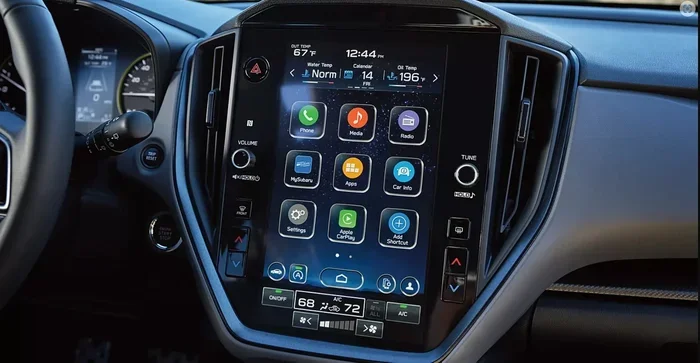
Apple CarPlay is Apple’s smartphone projection system. It brings your iPhone interface to your car screen. You get Siri, Maps, Music, Messages, and supported third-party apps. It works with both iPhone and the Subaru infotainment system. But how it connects matters a lot.
Wired vs Wireless Apple CarPlay
There are two ways to use Apple CarPlay. The first is wired. You plug your iPhone into the USB port. The connection is instant and reliable. Almost every Subaru with Apple CarPlay support offers this option. You do not need Starlink for wired Apple CarPlay. Period.
The second way is wireless. Wireless Apple CarPlay connects through Bluetooth or Wi-Fi. No cables needed. This is more convenient. But wireless CarPlay often requires a compatible multimedia system. And in some Subaru models, that means you need Starlink to enable the wireless connection.
This is the key difference. Wired Apple CarPlay works on almost every Subaru. Wireless Apple CarPlay may depend on Starlink. Let us look at this more closely.
Which Subaru Models Support Apple CarPlay
Most Subaru models from 2017 onward support Apple CarPlay. Here is a quick look at popular models:
- Subaru Outback: Apple CarPlay available on most trims from 2017+
- Subaru Forester: Apple CarPlay standard on 2019+ models
- Subaru Ascent: Full Apple CarPlay support on all trims
- Subaru Crosstrek: Apple CarPlay on 2018+ with the upgraded stereo
- Subaru Legacy: Apple CarPlay on 2020+ trims
- Subaru Impreza: Apple CarPlay available on 2017+
Older models before 2017 may not support Apple CarPlay at all. If your Subaru is from 2017 or newer, there is a good chance it has Apple CarPlay. Check your owner’s manual or the multimedia system settings to confirm.
Do You Really Need Subaru Starlink for Apple CarPlay?
This is the big question. And the honest answer is: it depends. Let us break it into simple cases so you know exactly where you stand.
The Truth About Starlink and CarPlay Compatibility
Here is what you need to know. If you use a USB cable to connect your iPhone, you do not need Subaru Starlink. The multimedia system handles Apple CarPlay on its own. The USB connection bypasses Starlink entirely. You get maps, music, and hands-free calling without paying a dime for Starlink.
But if you want wireless Apple CarPlay, things get tricky. Some Subaru models with wireless CarPlay require the Starlink connected services package. This is especially true for models from 2020 and newer. Subaru bundled wireless CarPlay into the Starlink package on certain trims. So without an active Starlink subscription, the wireless option may be grayed out.
It is not that Apple CarPlay does not work. It is that the car’s system needs Starlink to enable the wireless feature. This is a business decision by Subaru, not a technical limitation of Apple CarPlay itself.
When Starlink Is Required vs Optional
Let us make this simple with a comparison:
| Connection Type | Starlink Needed? | Works Without Starlink? |
|---|---|---|
| Wired Apple CarPlay (USB) | No | Yes, always |
| Wireless Apple CarPlay (2017-2019 models) | Usually no | Yes, on most trims |
| Wireless Apple CarPlay (2020+ models) | Sometimes yes | Depends on trim and package |
| Wireless CarPlay + Wi-Fi hotspot | Yes | No, Starlink required |
| Aftermarket wireless adapter | No | Yes, works independently |
As you can see, wired Apple CarPlay never needs Starlink. Wireless Apple CarPlay on newer models sometimes does. If you are unsure about your specific Subaru, check the owner’s manual or contact a Subaru dealer.
How to Use Apple CarPlay Without Subaru Starlink
Good news. You have options. You can absolutely use Apple CarPlay in your Subaru without paying for Starlink. Here is how.
Using a Simple USB Connection
The easiest way is to use a USB cable. Plug your iPhone into the USB port in your Subaru. The multimedia system will detect your phone. You will see the Apple CarPlay interface on screen. This gives you full access to Maps, Music, Messages, and phone calls. No Starlink needed. No subscription needed. No extra cost.
Make sure you use a high-quality USB cable. A cheap or damaged cable can cause connection issues. Apple-certified cables work best. Also, try the USB port in the center console first. Some Subaru models have USB ports in the back seat too, but the front ports tend to work more reliably with Apple CarPlay.
Aftermarket Solutions and Adapters
If you want wireless Apple CarPlay without Starlink, there is another option. You can use an aftermarket adapter. These small devices plug into your Subaru stereo system and add wireless Apple CarPlay support. They work independently of Starlink. Some popular options include the Carlinkit adapter and the AAWireless adapter.
These adapters are affordable. Most cost between $50 and $150. They plug into the USB port or connect behind the stereo unit. Once installed, they give you wireless Apple CarPlay without any subscription. This is a great option for older Subaru models that do not have wireless CarPlay built in.
Here are some quick tips for choosing an adapter:
- Look for adapters that support your Subaru model year
- Choose one with wireless charging if you need it
- Check for firmware updates from the manufacturer
- Read reviews from other Subaru owners
- Make sure it supports both Apple CarPlay and Android Auto
Infotainment Upgrade Options
For a more permanent solution, you can upgrade the entire multimedia unit. Companies like Pioneer and Sony make aftermarket stereos that fit Subaru dashboards. These units come with Apple CarPlay and Android Auto built in. They do not need Starlink at all. The downside is the cost. A full infotainment upgrade can run $300 to $800 plus installation.
But if you want the best smartphone integration and do not want to deal with Starlink subscriptions, this is the way to go. You get a fresh system with all the latest features.
Pros and Cons of Paying for Starlink for Apple CarPlay
So should you pay for Starlink just for Apple CarPlay? Let us weigh the pros and cons honestly.
Benefits of Keeping Starlink Active
There are some good reasons to keep Starlink active:
- Wireless Apple CarPlay: If your Subaru requires Starlink for wireless CarPlay, paying for the subscription gives you the convenience of going cable-free
- Remote start: You can start your Subaru from your phone before getting in
- Vehicle tracking: You can locate your car if you forget where you parked
- Wi-Fi hotspot: Passengers can use the car’s internet connection
- Navigation updates: The built-in map system stays current
- Roadside assistance: Starlink includes emergency services access
If you use most of these features, Starlink is worth the cost. It is not just about Apple CarPlay. The whole package adds value to your Subaru ownership experience.
Downsides of Paying for Starlink Just for CarPlay
On the other hand, there are reasons to skip Starlink:
- Extra cost: Starlink subscriptions can cost $100 to $500 per year depending on the plan
- You may not need all the features: If you only want Apple CarPlay, paying for remote start and tracking is unnecessary
- USB CarPlay works fine: A cable connection is reliable and costs nothing extra
- Aftermarket alternatives exist: You can get wireless CarPlay for a one-time fee instead of a yearly subscription
- Proprietary software lock-in: Starlink ties you to Subaru’s ecosystem, which may not be worth it for one feature
If you only care about Apple CarPlay and do not use the other Starlink features, paying for the subscription does not make sense. A USB cable or a one-time adapter purchase is the smarter choice.
Expert Tips and Common Mistakes
Let us cover some practical advice. Whether you are a current Subaru owner or planning to buy one, these tips will help you get the best Apple CarPlay experience.
Quick Tips for the Best Experience
Follow these simple tips to get the most out of Apple CarPlay in your Subaru:
- Always update your iPhone. Apple releases CarPlay updates with iOS. Keep your phone current for the best performance
- Use a braided USB-C cable. These cables last longer and connect more reliably than cheap cables
- Restart your multimedia system. If Apple CarPlay acts up, turn the car off and back on. This fixes most connection issues
- Clear your CarPlay apps. Too many apps on CarPlay can slow things down. Keep only the ones you use
- Check your Subaru settings. Go to the multimedia settings and make sure Apple CarPlay is enabled. Sometimes it gets turned off after a reset
- Use Siri for hands-free calls. This keeps your eyes on the road and your hands on the wheel
Common Mistakes to Avoid
Here are mistakes many Subaru owners make with Apple CarPlay:
- Paying for Starlink when you do not need it. Many owners do not realize wired CarPlay works without any subscription. Always check before you pay
- Using a low-quality USB cable. This causes disconnections and frustration. Invest in a good cable
- Assuming all Subaru models are the same. Apple CarPlay support varies by model year and trim. Always verify for your specific vehicle
- Ignoring the aftermarket option. If wireless CarPlay is not working, an adapter can solve the problem for a fraction of the Starlink cost
- Not reading the manual. Your Subaru owner’s manual has all the details about CarPlay and Starlink. It takes 10 minutes to read and saves you money
Final Thoughts on Subaru Starlink and Apple CarPlay
So, do you really need Subaru Starlink to use Apple CarPlay? The short answer is no. For most Subaru owners, a simple USB cable gives you full Apple CarPlay access without any subscription. Wireless Apple CarPlay on newer models may require Starlink, but even then, aftermarket adapters offer a one-time solution.
Subaru Starlink is a great package. It adds convenience and safety features that many owners love. But it is not required for Apple CarPlay. Do not let a salesperson convince you otherwise. Know your options. Check your specific Subaru model and year. Then decide what makes sense for your budget and needs.
The bottom line is this. You have control. Whether you use a cable, an adapter, or pay for Starlink, the choice is yours. Apple CarPlay works in Subarus. That part is clear. Now you know exactly how to make it work for you.
Take a few minutes today. Check your Subaru’s manual. Test a USB connection. Or look into an aftermarket adapter. You will be glad you did. And you will save yourself some money along the way.
Frequently Asked Questions
Can I use Apple CarPlay in my Subaru without any subscription?
Yes, you can. Most Subaru models support Apple CarPlay through a USB cable without any subscription at all. Simply plug your iPhone into the USB port and Apple CarPlay will work. This applies to nearly all Subaru models from 2017 onward, regardless of whether you have Starlink or not.
Which Subaru models require Starlink for wireless Apple CarPlay?
Some newer Subaru models from 2020 and later may require an active Starlink subscription for wireless Apple CarPlay. This is especially true for certain trims that bundle wireless connectivity into the Starlink package. Check your specific model and year or consult a Subaru dealer to confirm.
How much does Subaru Starlink cost per year?
Starlink subscription costs vary. The basic plan starts around $100 per year. Premium plans with more features can cost $200 to $500 per year. The price depends on the services included and the Subaru model. Keep in mind that you do not need Starlink at all if you are fine with wired Apple CarPlay.
Can I add wireless Apple CarPlay to an older Subaru without Starlink?
Yes, you can. Aftermarket adapters like Carlinkit or AAWireless can add wireless Apple CarPlay to older Subaru models. These devices plug into your existing stereo system and work independently of Starlink. They cost between $50 and $150 and are a great budget-friendly option.
Is wired Apple CarPlay as good as wireless in a Subaru?
Wired Apple CarPlay works just as well as wireless for most features. You get maps, music, messages, and hands-free calling. The only difference is the cable. Wired connections are actually more stable and less prone to disconnections. Many Subaru owners prefer wired Apple CarPlay for its reliability.
What should I do if Apple CarPlay is not working in my Subaru?
Start by checking your USB cable. A damaged or low-quality cable is the most common cause. Try a different cable or a different USB port. Restart your Subaru multimedia system by turning the car off and back on. Also make sure Apple CarPlay is enabled in your Subaru settings and that your iPhone is updated to the latest iOS version.