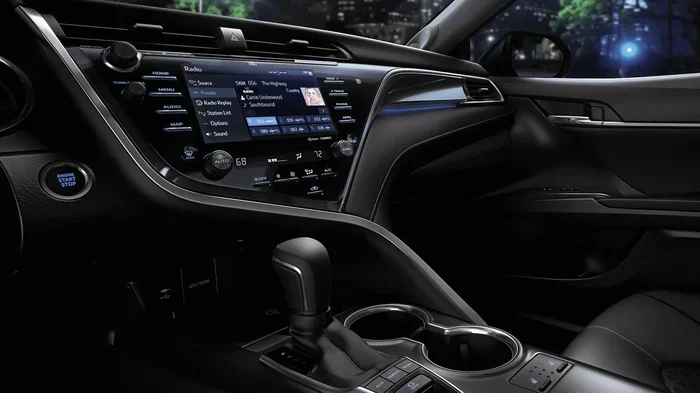
How Do I Deactivate Toyota Connected Services Today
How Do I Deactivate Toyota Connected Services? is an essential topic that provides valuable insights.
Key Takeaways
- Understanding How Do I Deactivate Toyota Connected Services?: Provides essential knowledge
📑 Table of Contents
- What Are Toyota Connected Services?
- Why Would You Want to Deactivate Toyota Connected Services?
- How to Deactivate Toyota Connected Services Step by Step
- Comparison of Deactivation Methods
- Common Mistakes to Avoid When Deactivating
- What Happens After You Deactivate?
- Quick Tips for a Smooth Deactivation Process
- Key Takeaways
- Frequently Asked Questions
- Final Thoughts on Deactivating Toyota Connected Services
What Are Toyota Connected Services?
Before you learn how to turn things off, it helps to understand what you are dealing with. Toyota Connected Services is an umbrella term for a range of digital features built into newer Toyota vehicles. These services use telematics technology to connect your car to the internet and to Toyota’s servers. They work through a built-in wireless carrier connection, usually a SIM card embedded in the vehicle.
These services come in different tiers. Some are free for a limited time, while others require a paid subscription plan. Let us look at the main categories so you know exactly what you might be canceling.
Toyota Entune Suite
Toyota Entune is the infotainment system found in many Toyota models. It provides navigation, music streaming, and app integration. The Entune App Suite connects your phone to the car’s display screen. Some Entune features are free, but premium services like live navigation and enhanced audio require a monthly or annual fee.
Toyota Safety Connect
Toyota Safety Connect focuses on safety and security. It includes features like automatic collision notification, roadside assistance, and stolen vehicle tracking. This service also provides connected navigation with live search capabilities. Most Toyota models come with a trial period, after which you must pay to keep the service active.
ToyotaCare
ToyotaCare is a maintenance and roadside assistance program. It covers routine maintenance and 24-hour towing for a set period. While not strictly a “connected” service in the same way as Entune, it is part of the broader Toyota Connected Services ecosystem and often overlaps with other subscriptions.
Why Would You Want to Deactivate Toyota Connected Services?
People have many reasons for wanting to disable connected features in their Toyota. Understanding these reasons can help you make the best decision for your situation.
Cost Savings
The most common reason is saving money. Subscription fees for Toyota Connected Services can add up quickly. Some plans cost $10 to $50 per month depending on the features. Over a year, that is a significant amount of money for features you may rarely use. Canceling these services can put real cash back in your pocket every month.
Privacy Concerns
Connected cars collect a lot of data. They track your driving habits, location, vehicle performance, and usage patterns. Some owners feel uncomfortable with the level of data sharing involved in vehicle connectivity. Deactivating these services reduces the amount of information sent to Toyota and its partners.
No Longer Needing the Features
Maybe you bought a Toyota with connected services included, but your needs have changed. You might have switched to a different navigation app on your phone. Or you could have moved to an area with excellent cellular coverage and no longer need the built-in features. In these cases, canceling Toyota services makes perfect sense.
Selling or Transferring the Vehicle
If you are selling your Toyota, you may want to remove your personal data and subscriptions. The next owner will likely have their own preferences for connected car services. Deactivating everything before the sale keeps things clean and simple for both parties.
How to Deactivate Toyota Connected Services Step by Step
Now let us get into the actual process. There are several ways to deactivate Toyota Connected Services, and the best method depends on your specific situation. Here are the most effective approaches.
Method 1: Through the Toyota App
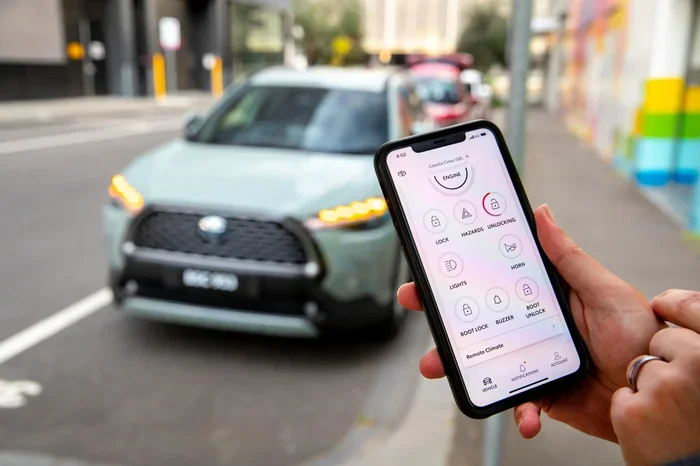
The Toyota app gives you direct control over many connected vehicle features. Here is how to use it to cancel your services:
- Open the Toyota app on your smartphone.
- Log in with your Toyota account credentials.
- Navigate to the “Services” or “Connected Services” section.
- Select the subscription you want to cancel.
- Look for the “Cancel” or “Manage Subscription” option.
- Follow the on-screen prompts to complete the cancellation.
Quick Tip: Make sure you have your vehicle identification number (VIN) handy. You may need it to access certain settings in the app. Also, check that you are logged into the correct account, as some owners have multiple Toyota profiles.
Method 2: Through the Vehicle Infotainment System
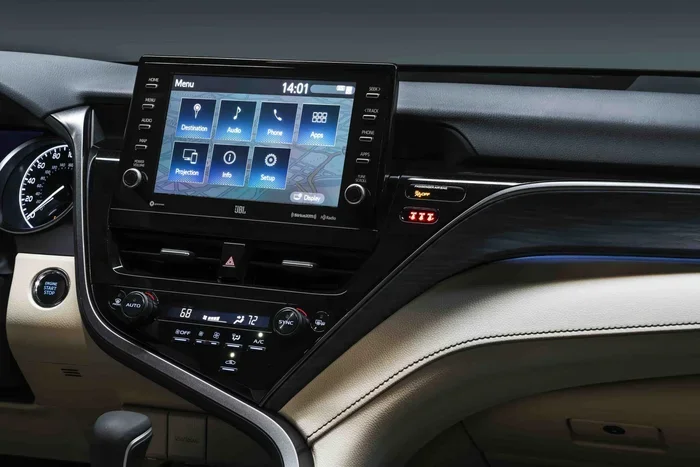
You can also manage and disable connected features directly from your car’s screen. This method works well if you prefer to handle things in the vehicle itself.
- Start your Toyota and press the Home or Menu button on the infotainment screen.
- Go to “Settings” or the “Setup” menu.
- Find the “Connected Services” or “Telematics” option.
- Select the service you want to turn off.
- Choose “Deactivate” or “Unsubscribe.”
- Confirm your choice when prompted.
Quick Tip: Not all Toyota models allow full cancellation through the infotainment system. Some vehicles only let you pause or adjust settings. If you do not see a cancel option on screen, try the app or contact a dealer.
Method 3: Contacting a Toyota Dealer
If the app and the infotainment system do not give you the options you need, a Toyota dealer can help. This is often the most reliable way to cancel Toyota services completely.
- Call your local Toyota dealer or visit in person.
- Provide your VIN and account information.
- Ask the service advisor to deactivate Toyota Connected Services.
- Confirm the cancellation in writing or via email.
- Ask about any remaining subscription periods or refunds.
Expert Insight: Many owners do not realize that dealers have the authority to cancel subscriptions on their end. This is especially helpful if you are having trouble with the online portal or app. A dealer can also confirm that the deactivation is fully processed and will not renew automatically.
Method 4: Calling Toyota Customer Support
You can also reach out to Toyota directly through their customer support line. This works well if you prefer phone communication or if you have questions while canceling.
- Call Toyota customer support at the number listed in your owner’s manual.
- Verify your identity and provide your VIN.
- Tell the representative you want to deactivate Toyota Connected Services.
- Follow their instructions to complete the cancellation.
- Note the confirmation number and date of cancellation.
Quick Tip: Call during off-peak hours to avoid long wait times. Early mornings on weekdays tend to have the shortest hold times. Have your account details ready before you call to speed up the process.
Comparison of Deactivation Methods
Each method for canceling Toyota services has its own advantages. Here is a quick comparison to help you choose the best approach.
| Method | Ease of Use | Time Required | Best For |
|---|---|---|---|
| Toyota App | Very Easy | 5-10 minutes | Quick self-service cancellation |
| Infotainment System | Easy | 5-15 minutes | In-vehicle management |
| Toyota Dealer | Moderate | 30-60 minutes | Complex issues or full deactivation |
| Customer Support Call | Moderate | 15-30 minutes | Guided assistance and questions |
The Toyota app is usually the fastest option. However, if you run into any issues, the dealer route gives you the most thorough and guaranteed result. Choose the method that fits your comfort level and schedule.
Common Mistakes to Avoid When Deactivating
Canceling Toyota Connected Services sounds simple, but there are some pitfalls that can cause frustration. Here are the most common mistakes and how to avoid them.
Not Checking for Automatic Renewal
Many subscription plans automatically renew at the end of each billing cycle. If you forget to cancel before the renewal date, you will be charged again. Always check the renewal date and cancel well in advance. Set a calendar reminder if needed.
Forgetting to Cancel All Services
Toyota Connected Services includes multiple sub-services. You might cancel one but leave another active. Go through each service individually and make sure you have deactivated everything you do not want. Common services people forget include Toyota Safety Connect and connected navigation.
Not Confirming the Cancellation
Never assume a cancellation is complete until you get written confirmation. Check your email for a cancellation confirmation. Also, log back into the app or portal to verify that the services show as inactive. This small step saves a lot of headaches later.
Ignoring Remaining Billing Periods
When you cancel mid-cycle, you usually do not get a refund for the unused portion. However, some plans do offer partial refunds. Ask the representative about this when you deactivate Toyota Connected Services. It never hurts to ask, and you might save some money.
Canceling Without Understanding What You Lose
Some features, like Toyota Safety Connect, provide valuable safety functions. Before you cancel, think about what you are giving up. If you rely on automatic crash notification or roadside assistance, you might want to keep those services active even if you turn off the entertainment features.
What Happens After You Deactivate?
Once you successfully disable connected features in your Toyota, a few things happen. Understanding the aftermath helps set the right expectations.
First, the connected features will stop working. Your navigation will no longer update live. Music streaming apps tied to the system will lose their connection. The safety features like automatic collision notification will also turn off, unless you keep Toyota Safety Connect active separately.
Second, your vehicle will no longer send data to Toyota’s servers. This means less tracking of your driving habits and location. For privacy-conscious owners, this is a welcome change.
Third, any ongoing subscription billing will stop. You should not see any more charges related to Toyota Connected Services on your payment method. However, always check your next billing statement to confirm.
Expert Insight: Some Toyota models allow you to reactivate services later if you change your mind. The process is usually straightforward through the app or dealer. Keep this in mind if you are unsure about permanently canceling everything.
Quick Tips for a Smooth Deactivation Process
- Gather your documents first. Have your VIN, account login details, and payment information ready before you start.
- Do it during business hours. If you need dealer or customer support help, calling during regular hours ensures faster service.
- Screenshot everything. Take screenshots of your cancellation confirmations and any confirmation emails you receive.
- Check for a grace period. Some services have a grace period after cancellation during which you can still access features. Know when your access ends.
- Review your next bill. Check your credit card or bank statement the following month to ensure no new charges appear.
- Ask about data deletion. If privacy is a concern, ask Toyota how your stored data will be handled after cancellation.
Key Takeaways
- Understand the services: Toyota Connected Services includes Entune, Safety Connect, and ToyotaCare, each with its own cancellation process.
- Multiple cancellation methods exist: You can cancel through the Toyota app, the infotainment system, a dealer, or customer support.
- Check for automatic renewal: Always verify the renewal date to avoid unwanted charges.
- Confirm the cancellation: Get written confirmation and verify the status in your account to ensure everything is fully deactivated.
- Know what you lose: Some features, especially safety-related ones, provide real value. Consider keeping those if they benefit you.
- Watch for remaining billing: You may still be charged for the current billing period even after canceling.
- Reactivation is possible: If you change your mind, you can usually reactivate Toyota Connected Services through the same methods.
Frequently Asked Questions
Can I deactivate Toyota Connected Services for free?
Yes, deactivating Toyota Connected Services does not cost anything. You are simply canceling a subscription or turning off a service. There are no cancellation fees from Toyota. However, if you are within a paid billing period, you may not receive a refund for the unused portion of that period.
Will I lose any vehicle functionality after deactivation?
You will lose access to the connected features, such as live navigation, music streaming, and remote services. However, the core driving functions of your Toyota remain fully operational. Basic radio, Bluetooth pairing, and USB connections typically continue to work normally even after you deactivate Toyota Connected Services.
How long does the deactivation process take?
If you use the Toyota app or the infotainment system, deactivation is usually instant or takes just a few minutes. Calling customer support or visiting a dealer may take 15 to 60 minutes depending on wait times. Always confirm the cancellation is complete before you leave the process.
Can I reactivate Toyota Connected Services after canceling?
Yes, in most cases you can reactivate Toyota Connected Services at any time. Simply sign back into the Toyota app or visit a dealer and they can restore the services. You will need to start a new subscription, and any previous cancellation does not lock you out from rejoining.
Do I need to visit a dealer to cancel all services?
No, you do not need to visit a dealer. The Toyota app and the infotainment system allow you to cancel most services on your own. However, if you encounter issues or want to ensure everything is fully removed, visiting a dealer is the most thorough option. They can handle complex cases and confirm the deactivation on their end as well.
Will canceling Toyota Connected Services affect my warranty?
No, canceling Toyota Connected Services does not affect your vehicle warranty. The warranty covers mechanical and electrical issues regardless of whether you have connected services active. These are separate programs, and deactivating one has no impact on the other.
Final Thoughts on Deactivating Toyota Connected Services
Deactivating Toyota Connected Services is a straightforward process once you know the right steps. Whether you want to save money, protect your privacy, or simply simplify your driving experience, you have multiple paths to get it done. The Toyota app gives you quick control, while a dealer visit ensures thorough and complete deactivation.
Remember to check for automatic renewals, confirm your cancellation, and understand what features you will be losing. Taking these precautions helps you avoid surprises and ensures a clean break from connected car services you no longer need.
Ultimately, your Toyota is your vehicle, and you should have full control over what runs on it. Toyota Connected Services are designed to enhance your driving experience, but they should never feel like a burden. If they are not adding value to your life, there is no shame in turning them off. Use the steps in this guide to take back control of your vehicle’s connected features today.
Key Takeaways: Always confirm cancellation in writing, check your next billing cycle, and keep your screenshots for your records. These small habits make the entire process smoother and give you peace of mind. With the right approach, deactivating Toyota Connected Services takes just minutes and saves you money for months to come.