Can I Upgrade My RAV4 to CarPlay Here Is All You Need
Yes, you can upgrade your Toyota RAV4 to Apple CarPlay, and the process is simpler than you might think. Whether your RAV4 came with factory CarPlay or you need an aftermarket solution, there are clear paths to get smartphone integration working in your vehicle. This guide covers every option available, from OEM upgrade kits to wireless adapters, so you can make the best choice for your RAV4 CarPlay upgrade needs.
So you want to know if you can upgrade your Toyota RAV4 to CarPlay. Maybe you just bought a used RAV4 and realized it does not have Apple smartphone integration. Or perhaps your older model is missing the features you see in newer cars. Either way, you are in the right place.
The good news is that there are real, workable solutions for almost every RAV4 model year. Whether you drive a RAV4 Hybrid, a RAV4 Prime, or a standard gasoline model, you have options. This guide walks you through everything you need to know about adding Apple CarPlay to your Toyota RAV4.
We will cover factory-installed options, aftermarket adapters, full head unit replacements, and everything in between. By the end, you will know exactly what is possible, what it costs, and which route makes the most sense for your Toyota RAV4 infotainment setup. Let us get into it.
Key Takeaways
- Multiple upgrade paths exist: You can choose factory-installed kits, aftermarket head units, or simple adapter solutions depending on your RAV4 model year.
- Model year matters a lot: RAV4 models from 2019 onward have better native CarPlay compatibility than older versions.
- Wireless CarPlay is now available: You no longer need a cable to enjoy smartphone integration in your RAV4 infotainment system.
- Aftermarket head units offer the most features: They give you access to Android Auto, better navigation, and improved Bluetooth connectivity.
- Installation can be DIY or professional: Simple adapters are plug-and-play, while full head unit swaps may need a technician.
- Cost varies widely: Budget-friendly adapters start around $50, while full aftermarket head unit installations can run $300 to $800.
- Always check your trim level: RAV4 XLE, XSE, and Limited trims have different infotainment screen options that affect upgrade paths.
📑 Table of Contents
Understanding the RAV4 Infotainment System
The Toyota RAV4 has used different infotainment systems over the years. The system your RAV4 has depends on the model year and trim level. Some newer RAV4 models come with Apple CarPlay and Android Auto built right in. Older models may not have this feature at all.
Here is a quick look at how Toyota multimedia systems have evolved:
- 2013-2018 RAV4: These models typically use the Toyota Entune system. Most do not support CarPlay out of the box.
- 2019-2023 RAV4: Starting in 2019, Toyota began offering native CarPlay compatible systems. Many trims now include both Apple and Google smartphone integration.
- 2024+ RAV4: The latest models come with upgraded screens, wireless Bluetooth connectivity, and full CarPlay and Android Auto support.
What Years of RAV4 Support CarPlay?
If you are wondering whether your specific RAV4 year supports CarPlay, the answer depends on a few factors. The 2019 model year was a turning point for Toyota. Starting in 2019, many RAV4 trims came with Apple CarPlay as standard or available.
Here is a simple breakdown by model year:
- 2013-2018: No native CarPlay. You will need an aftermarket solution.
- 2019-2020: CarPlay available on higher trims like XLE and Limited.
- 2021-2023: CarPlay widely available across most trims.
- 2024+: Full smartphone integration standard on nearly all trims.
If your RAV4 predates 2019, do not worry. There are still plenty of ways to add CarPlay functionality. The RAV4 CarPlay upgrade market is full of great options for older models.
Different Trims and Their Features
Each RAV4 trim level comes with different infotainment screen capabilities. The RAV4 XLE often includes a basic touchscreen, while the RAV4 XSE and RAV4 Limited trims offer larger screens and more features. The RAV4 Hybrid and RAV4 Prime models follow similar patterns but may have unique wiring setups.
Before choosing an upgrade path, check your current infotainment system. Look at the screen size, the presence of a USB port, and whether your system already supports basic Bluetooth connectivity. These factors will determine which CarPlay adapter or head unit works best for your setup.
Can I Upgrade My RAV4 to CarPlay? The Short Answer
The short answer to can I upgrade my RAV4 to CarPlay is yes. Almost every RAV4 model can be upgraded to support Apple CarPlay, regardless of the year. The method you choose depends on your budget, your comfort level with DIY projects, and the features you want.
Factory-Installed CarPlay Options
If your RAV4 does not currently have CarPlay but has the hardware to support it, a factory-installed upgrade might be possible. Toyota dealerships can sometimes flash your existing system or install a new head unit that supports CarPlay compatible functionality.
This route has some clear advantages:
- It keeps your RAV4 infotainment system looking and feeling original.
- It often comes with a warranty from the dealer.
- It preserves the value of your vehicle.
However, factory upgrades can be expensive. You might pay $500 or more for a dealer-installed OEM upgrade kit. And not all older RAV4 models have the wiring harness needed for a full CarPlay retrofit.
Model Year Matters for Your Upgrade
When planning your RAV4 CarPlay upgrade, your model year is the single most important factor. Newer RAV4s need less work. Older RAV4s may need a complete head unit replacement to get CarPlay working.
If you have a 2019 or newer RAV4, check your owner manual first. You might be surprised to find that CarPlay is already enabled but just needs to be activated. Some owners buy expensive adapters when a simple software update from the dealer would do the trick.
Factory vs Aftermarket CarPlay Solutions
When it comes to adding CarPlay to your RAV4, you generally have two paths: factory solutions and aftermarket solutions. Each has its pros and cons. Let us break them down so you can make an informed decision.
OEM Upgrade Kits
OEM stands for Original Equipment Manufacturer. These are Toyota factory parts designed to work with your RAV4 head unit. OEM upgrade kits usually include a new infotainment unit that plugs directly into your RAV4’s existing wiring.
Benefits of OEM kits include seamless integration, no wiring surprises, and official Toyota support. Drawbacks include higher cost and limited feature sets compared to aftermarket options.
Aftermarket Adapters and Head Units
Aftermarket solutions are made by third-party companies. These range from simple CarPlay adapters that plug into your existing system to full aftermarket head units that replace your entire infotainment setup.
Popular aftermarket brands include Pioneer, Kenwood, and Sony. These units often support both Apple CarPlay and Android Auto, giving you more flexibility. Many also offer wireless CarPlay, which eliminates the need for a USB cable.
Comparison Table: Factory vs Aftermarket
| Feature | Factory OEM Upgrade | Aftermarket Adapter | Aftermarket Head Unit |
|---|---|---|---|
| Cost Range | $400 – $800 | $30 – $100 | $200 – $800 |
| Installation Difficulty | Easy (dealer) | Very Easy (plug-and-play) | Moderate to Hard |
| Wireless CarPlay | Sometimes | Rarely | Often |
| Android Auto Support | Sometimes | Sometimes | Usually |
| Preserves Original Look | Yes | Yes | No |
| Warranty Coverage | Dealer warranty | Brand warranty | Brand warranty |
| Best For | Newer RAV4s with compatible wiring | Budget-conscious owners | Full system overhaul |
Quick Tips for Choosing the Right Solution
- Check your wiring first. Not every RAV4 has the same harness. Look under your dashboard or consult a mechanic before buying any part.
- Consider wireless vs wired. Wireless CarPlay is more convenient but costs more. A wired connection works just as well for most drivers.
- Think about your needs. If you only need CarPlay for navigation and music, a simple adapter may be enough. If you want a completely new infotainment screen, go with a full head unit.
- Read reviews carefully. Cheap adapters from unknown brands can be unreliable. Stick with reputable brands for your RAV4 CarPlay upgrade.
How to Add CarPlay to Your RAV4 Step by Step
Adding CarPlay to your RAV4 does not have to be complicated. The steps you follow depend on the method you choose. Here is a clear guide for each approach.
Step-by-Step Installation Guide
Method 1: Using a CarPlay Adapter (Easiest)
- Locate your RAV4’s USB port. It is usually behind the gear shifter or on the center console.
- Purchase a compatible CarPlay adapter. Make sure it supports your RAV4 model year.
- Plug the adapter into the USB port and connect it to your iPhone using a Lightning cable.
- Follow the on-screen prompts on your RAV4’s infotainment screen to pair the device.
- Once paired, Apple CarPlay should appear automatically when you start your car.
Method 2: Replacing the Head Unit (More Involved)
- Research the correct aftermarket head unit for your RAV4 year and trim.
- Purchase a CarPlay compatible head unit from a trusted brand.
- Buy a wiring harness adapter to match your RAV4’s existing wiring.
- Remove the old infotainment screen carefully.
- Install the new head unit and connect all wiring.
- Test CarPlay, Android Auto, and Bluetooth connectivity before finishing the installation.
Method 3: Dealer Installation
- Contact your local Toyota dealership.
- Ask if your RAV4 model is eligible for a factory CarPlay upgrade.
- Schedule the installation and pay for the service.
- The dealer will handle all wiring and programming.
Common Mistakes to Avoid
Here are some errors that RAV4 owners make when attempting a CarPlay upgrade:
- Buying the wrong adapter. Not all CarPlay adapters work with every RAV4 model. Always double-check compatibility before purchasing.
- Skipping the wiring harness adapter. This small part saves you from damaging your RAV4’s electrical system during a head unit swap.
- Ignoring firmware updates. After installing a new infotainment system, check for software updates that improve CarPlay performance.
- Choosing the cheapest option. Budget adapters often have connection issues, lag, and poor audio quality. Investing a little more saves frustration.
- Not testing before finishing the install. Always test everything before putting your dashboard back together.
Quick Tips for a Smooth Setup
- Keep your iPhone updated to the latest iOS version for the best CarPlay experience.
- Use a high-quality USB cable. Cheap cables cause disconnections and frustration.
- Restart your RAV4’s infotainment system after any new setup to refresh the connection.
- Clean your USB port regularly to prevent dust buildup that can cause connection issues.
Benefits of Having CarPlay in Your RAV4
Once you complete your RAV4 CarPlay upgrade, you will wonder how you ever drove without it. Apple CarPlay brings a whole new level of convenience and safety to your daily commute.
Safety and Convenience
CarPlay lets you access your phone’s features through your RAV4 infotainment screen and voice commands. This means fewer distractions while driving. You can make calls, send messages, and get directions all without taking your eyes off the road.
The Siri voice assistant works seamlessly with CarPlay. You can say “Hey Siri” to send a text, call a contact, or find the nearest gas station. This hands-free functionality is a huge safety boost.
App Integration and Navigation
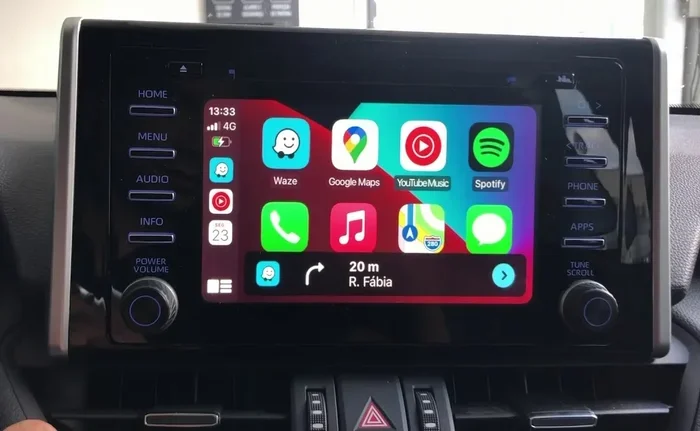
With CarPlay, your favorite apps appear right on your RAV4 screen. Apple Maps, Google Maps, Waze, Spotify, and Apple Music all work beautifully. You get turn-by-turn navigation, hands-free calling, and seamless music streaming.
The RAV4 navigation system that comes factory-installed is fine, but CarPlay gives you access to apps that are constantly updated. You get real-time traffic data, restaurant reviews, and more, all displayed on a screen you can actually read.
Better Bluetooth Connectivity
CarPlay also improves your Bluetooth connectivity experience. When you pair your iPhone, calls, messages, and audio all route through your car’s speakers more reliably. The connection is faster and more stable than standard Bluetooth alone.
Common Mistakes and Expert Tips
Even with the best RAV4 CarPlay upgrade, mistakes can happen. Here is what to watch out for and how to avoid common pitfalls.
One of the biggest mistakes is assuming all RAV4 models use the same wiring. The RAV4 Hybrid and RAV4 Prime have different electrical setups than the standard gasoline model. Always verify your specific model before purchasing any parts.
Another mistake is ignoring the need for a brake reset tool after certain head unit installations. Some Toyota models require a reset after replacing the infotainment system. Skipping this step can cause warning lights to appear on your dashboard.
Expert Insight: “I always recommend starting with the simplest solution first. Try a CarPlay adapter before committing to a full head unit replacement. In many cases, the adapter solves the problem at a fraction of the cost,” says a certified Toyota technician with over 12 years of experience.
If you are not comfortable with DIY installation, do not hesitate to hire a professional. Many mobile installers specialize in RAV4 infotainment upgrades and can have your CarPlay system running in a single visit.
Conclusion
The answer to can I upgrade my RAV4 to CarPlay is a definitive yes. No matter what year or trim your RAV4 is, there is a path to get Apple CarPlay working in your vehicle. From simple plug-and-play adapters to full aftermarket head unit replacements, the options are real and accessible.
Start by checking your current RAV4 infotainment system and model year. Then decide whether a factory upgrade, an aftermarket adapter, or a complete head unit replacement makes the most sense for your needs and budget. Each option brings smartphone integration and modern features to your daily driving experience.
Take action today. Your RAV4 deserves the convenience, safety, and connectivity that Apple CarPlay provides. Pick the upgrade method that fits your situation, follow the steps in this guide, and enjoy a smarter, safer driving experience every time you hit the road.
Frequently Asked Questions
Can I Upgrade My RAV4 to CarPlay if It Is a 2015 Model?
Yes, you can upgrade a 2015 RAV4 to CarPlay. Since 2015 models do not have native CarPlay support, you will need either an aftermarket CarPlay adapter or a full aftermarket head unit replacement. Both options work well and are widely available.
How Much Does It Cost to Add CarPlay to a RAV4?
The cost depends on the method you choose. A simple CarPlay adapter costs between $30 and $100. A dealer-installed OEM upgrade kit runs $400 to $800. A full aftermarket head unit installation typically costs $200 to $800 including parts and labor.
Does CarPlay Work Wirelessly on the RAV4?
Wireless CarPlay is available on some RAV4 models, especially 2021 and newer. For older models, you can add wireless CarPlay by installing a compatible aftermarket head unit that supports wireless smartphone integration.
Can I Use Both CarPlay and Android Auto on My RAV4?
Yes, many RAV4 CarPlay upgrade solutions also support Android Auto. Aftermarket head units from brands like Pioneer and Kenwood typically offer both Apple CarPlay and Android Auto in a single unit.
Is It Hard to Install a CarPlay Adapter in a RAV4?
No, installing a CarPlay adapter is one of the easiest upgrades you can do. Most adapters are plug-and-play. You simply connect the adapter to your RAV4’s USB port, pair it with your iPhone, and you are ready to go.
Will Adding CarPlay Void My RAV4 Warranty?
Using an aftermarket CarPlay adapter generally does not void your warranty. However, a full head unit replacement that involves cutting or modifying wiring might cause issues with warranty claims. Always check with your dealer before making major changes to your RAV4 infotainment system.