Does Tesla Lock When You Walk Away Here Is The Answer
Does Tesla lock when you walk away? Yes, most Tesla models automatically lock when you walk away from the vehicle. This walk-away locking feature uses your phone key or key fob to detect your departure and secures the car without any manual input.
If you’ve ever walked away from your Tesla wondering whether it locked itself, you’re not alone. Does Tesla lock when you walk away? The answer is a clear yes for most models and most situations. Tesla vehicles come with a smart walk-away locking system that detects when you’ve left the area and automatically secures your car. This feature works with your phone key, key fob, or key card and is designed to make your life easier and your vehicle safer. In this guide, we’ll explain exactly how the Tesla auto lock system works, which models support it, and how you can get the most out of it.
Tesla has always been about making technology work for you, and the walk-away lock is a perfect example. When you step out of your car and move a few steps away, the vehicle senses your departure and locks itself. No need to press a button or fumble for your keys. It’s one of those small things that makes a big difference in your daily routine. But how exactly does this system work? What happens if it doesn’t lock? And can you change the settings? These are the questions we’ll answer in this article. Whether you’re a new Tesla owner or you’ve been driving one for years, understanding your vehicle lock features helps you stay safe and get the most from your car.
Key Takeaways
- Tesla vehicles do lock automatically when you walk away, using proximity detection and Bluetooth connectivity.
- All modern Tesla models support walk-away locking, including Model 3, Y, S, and X.
- You can customize the lock delay in your Tesla settings to control how long it takes to lock.
- The Tesla app lets you lock, unlock, and monitor your vehicle remotely from anywhere.
- Combining walk-away lock with Sentry Mode provides maximum security for your Tesla.
- Common issues like false triggers can usually be fixed with simple troubleshooting steps.
- Keep your software updated to ensure the best performance from the auto lock system.
📑 Table of Contents
How Does Tesla Walk-Away Locking Actually Work?
The Tesla walk-away lock is built into the car’s computer system and relies on a few key technologies working together. Understanding the basics helps you trust the system and use it with confidence every day.
The Technology Behind Walk-Away Locking
Tesla uses a combination of sensors and Bluetooth connectivity to know when you’ve left the vehicle. Your phone key or key fob constantly communicates with the car. When the connection drops below a certain range, the Tesla proximity sensor triggers the locking system. This process happens in just a few seconds. You step out, walk a short distance, and hear the doors lock. The car also turns off the lights and may even fold the mirrors, depending on your settings. It’s a seamless experience that feels almost magical.
The system also uses Tesla passive entry technology, which means your car can recognize your key without you needing to take any action. This is the same technology that lets you unlock the door just by touching the handle. The walk-away lock is essentially the reverse of that process. Instead of approaching and unlocking, you leave and the car locks itself.
What Triggers the Auto Lock?
The Tesla walk-away lock activates when the system no longer detects your key nearby. Here are the main triggers:
- Your phone key moves beyond Bluetooth range
- Your key fob is no longer in the vehicle
- You close the door and walk away
- The car’s sensors confirm you’ve left the area
Tesla also considers whether you’ve turned off the car and put it in park. All these signals work together to make sure the lock happens at the right time. You don’t want your car locking while you’re still loading groceries into the trunk. The system is smart enough to wait until you’ve truly left the vicinity.
One important thing to know is that the Tesla walk-away feature uses a combination of Bluetooth Low Energy and ultra-wideband technology in newer models. This gives it a more accurate sense of distance. Older models rely mainly on Bluetooth range, which can be a bit less precise. Either way, the system is designed to be reliable and user-friendly.
Which Tesla Models Support Walk-Away Locking?
The walk-away locking feature is available across Tesla’s lineup. Let’s look at how it works for each model.
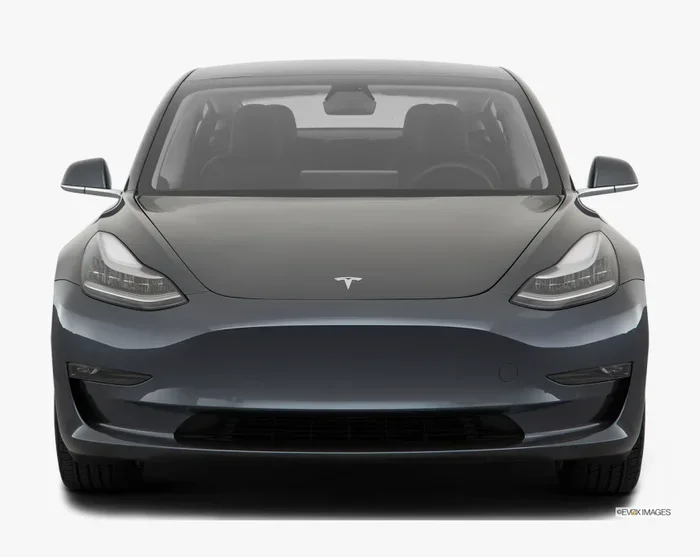
Tesla Model 3 Walk-Away Lock
The Tesla Model 3 was one of the first Teslas to feature walk-away auto lock. It works reliably with both the phone key and the key card. The system is straightforward and has been refined over several years of software updates. Model 3 owners benefit from a clean, simple interface that makes it easy to check the lock status at a glance.
Tesla Model Y Walk-Away Lock
The Tesla Model Y uses the same walk-away locking technology as the Model 3, since they share the same platform. Owners of the Model Y enjoy the same seamless lock experience. Whether you’re stepping out of an SUV or a sedan, the system behaves the same way. The Tesla smart key integration works flawlessly with the Model Y’s larger body and doors.
Tesla Model S and Model X Walk-Away Lock
The Tesla Model S and Model X also support walk-away locking. These larger vehicles benefit from the feature just as much as the smaller models. The Tesla auto lock system on these models has been updated over time through over-the-air software improvements. The falcon-wing doors on the Model X add a unique touch, and the walk-away lock ensures they’re properly secured when you leave.
How to Set Up and Customize Walk-Away Locking
Setting up your Tesla walk-away lock is simple. You can adjust the behavior through the car’s touchscreen or the Tesla app. Here’s everything you need to know to get the most out of this feature.
Enabling Walk-Away Lock in Settings
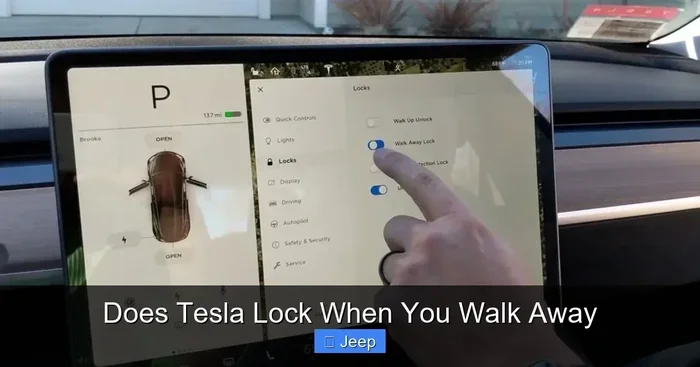
To turn on walk-away locking, go to Controls > Safety & Security > Walk-Away Lock on your touchscreen. Toggle the switch to enable it. Once enabled, your Tesla will automatically lock when you walk away from the vehicle.
If the feature is already on and you want to double-check, this is where you’ll find the setting. Tesla keeps all security options in one convenient place. You can also toggle Tesla passive entry on or off from this same menu, giving you full control over how your car responds to your presence.
Adjusting the Lock Delay Timer
Some Tesla owners prefer a short delay before the car locks. This gives you time to walk a bit further and make sure you haven’t forgotten something. You can customize the lock delay timer in the same settings menu. Here are the typical delay options:
- Immediate lock (zero delay)
- Short delay (about 5 seconds)
- Medium delay (about 10 seconds)
- Long delay (about 30 seconds)
Choose the delay that feels right for you. If you often carry heavy bags, have kids in the car, or frequently go back for something you forgot, a longer delay can be very helpful. The Tesla walk-away system is flexible enough to work with your lifestyle, not the other way around.
Using the Tesla App for Remote Control
The Tesla app gives you remote control over your vehicle’s locking system. You can lock or unlock your car from anywhere using your phone. The app also shows your vehicle’s lock status in real time. This is especially useful if you forgot to lock the car or if you want to check whether the walk-away lock engaged properly.
The app works alongside the automatic system to give you full control. You can also use the app to trigger Tesla remote lock from a distance. This is handy when you’re at home and realize you left the car unlocked at the grocery store. The Tesla connected features make your vehicle feel like an extension of your phone.
Walk-Away Lock vs. Manual Lock: What’s the Difference?
Both methods secure your Tesla, but they work differently. Understanding the differences helps you choose the right approach for each situation.
When to Use Each Method
Walk-away lock is perfect for your daily routine. When you’re heading to work, dropping kids off, or running errands, the automatic lock saves you time. You don’t need to think about it. Just walk away and go. It’s the default method most Tesla owners use without even thinking about it.
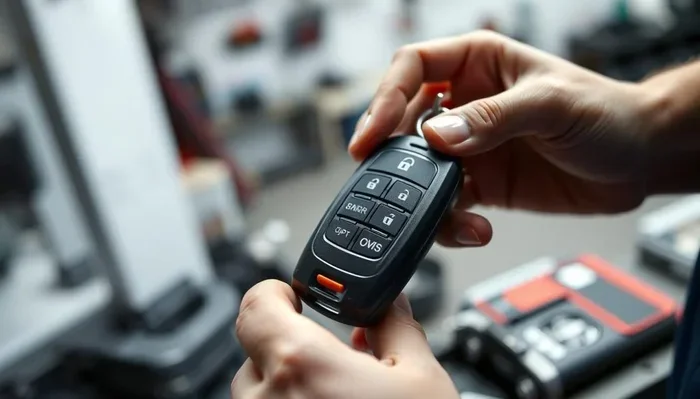
Manual lock gives you more control. You might choose to lock manually when you’re parking in an unfamiliar area or when you want to double-check that the car is secure. Some owners also prefer to lock manually when they have valuables visible inside the vehicle. The Tesla key fob and Tesla key card both allow for manual locking with a simple press of a button.
Comparison Table
| Feature | Walk-Away Lock | Manual Lock |
|---|---|---|
| Automatic | Yes | No |
| Requires Action | No | Yes |
| Lock Delay | Customizable | Instant |
| Best For | Daily routines | Situations needing extra care |
| Remote Control | Via Tesla app | Via Tesla app or physical key |
| Works with Phone Key | Yes | Yes |
| Works with Key Fob | Yes | Yes |
| Works with Key Card | Yes | Yes |
| Lock Confirmation | Via app or dashboard | Audible click and flash |
Both methods use the same locking mechanism on the inside of the car. The difference is simply in how the lock is triggered. You can use both methods interchangeably without any issues. The Tesla vehicle lock hardware is the same regardless of how you activate it.
Common Problems and How to Fix Them
While Tesla’s walk-away locking system is reliable, it’s not perfect. Here are some common issues owners face and the best ways to solve them.
Walk-Away Lock Not Engaging
If your Tesla doesn’t lock when you walk away, the first thing to check is your phone’s Bluetooth connection. Make sure your phone is not in airplane mode and that Bluetooth is turned on. A weak Bluetooth signal can prevent the auto lock from triggering. Also check that your phone is not in battery saver mode, as this can limit background Bluetooth connectivity.
Next, check the walk-away lock setting in your vehicle. It’s possible the feature was accidentally turned off. Go to Controls > Safety & Security and make sure the toggle is on. If both settings look correct, try restarting the car’s touchscreen. Hold down both scroll wheels until the screen goes black and the Tesla logo appears. This often fixes minor software glitches.
False Lock Triggers
Sometimes the Tesla walk-away lock engages when you’re still near the car. This can happen if your phone battery is low or if the Bluetooth signal is weak. The system might interpret a distant signal as you being far away. This is more common in crowded areas like parking garages where Bluetooth signals can bounce off walls and other objects.
To fix this, keep your phone charged and close to your body. Also, make sure your phone key is set as the primary authentication method in the Tesla settings. A strong, consistent Bluetooth signal helps the sensors work correctly. If you’re in a crowded parking lot, you might want to manually lock the car instead of relying on walk-away detection.
Phone Key Connection Issues
If your phone key keeps disconnecting, the walk-away lock may behave unpredictably. Try these steps:
- Restart your phone
- Turn Bluetooth off and back on
- Remove and re-add your phone key in Tesla settings
- Update the Tesla app to the latest version
- Check for available over-the-air software updates for your car
Most connection issues resolve with these simple steps. If problems persist, contact Tesla support for assistance. Keeping your Tesla authentication methods up to date helps prevent unexpected lock behavior.
Expert Tips to Keep Your Tesla Secure
Walk-away locking is just one part of keeping your Tesla safe. Here are some expert tips to boost your vehicle’s security beyond the basics.
Combine Walk-Away Lock with Sentry Mode
Tesla Sentry Mode works hand in hand with walk-away locking. When Sentry Mode is active, your car uses the cameras to monitor its surroundings. If someone approaches your locked vehicle, Sentry Mode alerts you and records the event. Using both features together creates a powerful security setup. Your car locks itself when you walk away, and Sentry Mode keeps watch while you’re gone.
Expert tip: Enable Sentry Mode automatically when you leave the car. You can set this in the Safety & Security settings. This way, even if you forget to turn it on, your Tesla protects itself. It’s one of the best Tesla security features available and pairs perfectly with the walk-away lock.
Use Multiple Authentication Methods
Tesla lets you set up multiple ways to access your car. You can use a phone key, key fob, and key card. Having multiple methods means you’re never locked out if one fails. The Tesla authentication system supports up to three phone keys, two key fobs, and two key cards per vehicle.
Pro tip: Keep a physical key fob in your bag or glove box as a backup. If your phone dies or the Bluetooth connection fails, the key fob ensures you can still access and lock your vehicle. The Tesla key card is another great backup option that fits easily in your wallet.
Keep Your Software Updated
Tesla regularly releases over-the-air updates that improve the auto lock system. These updates can fix bugs, improve sensor accuracy, and add new features. Always install updates when they’re available. You can check for updates by going to Controls > Software. If an update is available, you can schedule it for when you’re not using the car.
Keeping your software current ensures the best performance from all your Tesla’s features. Many owners report that locking behavior improves after updates. Tesla is constantly refining the walk-away locking algorithm based on real-world data and owner feedback.
Quick Tips for Daily Use
- Always keep Bluetooth on for the walk-away lock to work properly
- Check your lock settings after a software update
- Use the Tesla app to confirm your car is locked
- Enable Sentry Mode when parking in unfamiliar areas
- Keep a backup key with you at all times
- Update your phone’s Tesla app regularly for the best experience
- Fold your mirrors in settings to reduce the chance of damage when locking
Common Mistakes to Avoid
Even experienced Tesla owners make mistakes with the locking system. Here are a few to watch out for:
- Assuming the car locked – always verify using the Tesla app or the dashboard icon
- Leaving the key fob in the car – this prevents the walk-away lock from engaging
- Ignoring low phone battery – a dead phone means no phone key and no auto lock
- Not updating software – updates often include fixes for locking issues
- Disabling walk-away lock without realizing it – check your settings periodically
Conclusion
Does Tesla lock when you walk away? Absolutely. The walk-away locking system is one of Tesla’s most convenient and thoughtful features. It works across all current models and keeps your vehicle secure with minimal effort from you. You step out, walk away, and your car takes care of the rest.
By understanding how the system works, customizing your settings, and following the expert tips in this guide, you can get the most out of your Tesla’s auto lock capabilities. Combine walk-away locking with Sentry Mode, keep your software updated, and always have a backup key method ready. These small habits make a big difference in your daily experience and your vehicle’s security.
Your Tesla is designed to work with you, not against you. The walk-away lock is a perfect example of that philosophy. Trust the system, stay informed, and enjoy the peace of mind that comes with knowing your vehicle is always secure when you walk away. Take a moment today to check your walk-away lock settings and make sure everything is configured the way you want it. Your future self will thank you.
Frequently Asked Questions
Does every Tesla model have walk-away locking?
Yes, all current Tesla models including the Model 3, Model Y, Model S, and Model X support walk-away locking. This feature comes standard and does not require any additional hardware or subscriptions. You can enable or disable it in your vehicle’s Safety & Security settings.
Can I lock my Tesla manually if walk-away lock is turned off?
Absolutely. You can always lock your Tesla manually using the key fob, key card, or the Tesla app. Walk-away lock and manual lock use the same locking mechanism, so either method works perfectly. Many owners use both depending on the situation.
Why doesn’t my Tesla lock when I walk away sometimes?
This usually happens when your phone’s Bluetooth signal is weak or when your phone is in airplane mode. Other causes include a low phone battery, walk-away lock being accidentally disabled, or a software glitch. Try checking your Bluetooth connection, restarting the car’s touchscreen, and verifying the walk-away lock setting is enabled.
Does walk-away lock work with the Tesla key card?
Yes, the walk-away lock system works with the phone key, key fob, and key card. However, the phone key and key fob use Bluetooth for proximity detection, while the key card uses NFC. The system detects when any of these authentication methods move out of range and triggers the lock.
Can I use the Tesla app to confirm my car is locked?
Yes, the Tesla app shows your vehicle’s lock status in real time. You can also use the app to manually lock or unlock your car from anywhere. This is a great way to double-check that the walk-away lock engaged properly, especially when you’re away from your vehicle.
Is walk-away lock the same as Sentry Mode?
No, they are different features. Walk-away lock automatically locks your doors when you leave the car. Sentry Mode uses the car’s cameras to monitor the surroundings and record any suspicious activity. They work together to provide complete security, but they serve different purposes. You can use walk-away lock without Sentry Mode and vice versa.