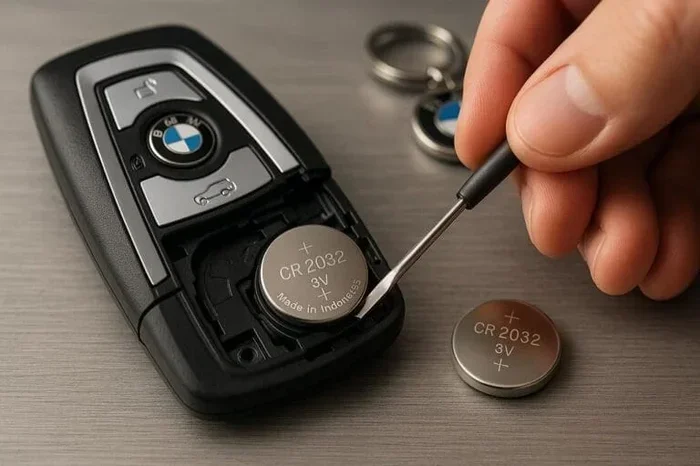
Do You Have to Reprogram a Key Fob When the Battery Dies
Do You Have to Reprogram a Key Fob When the Battery Dies? In most cases, the answer is no. Simply replacing the coin cell battery often restores full function without any special steps. However, some vehicles require a quick reprogramming or reset to re-establish the connection between the key fob and the car’s security system.
If your key fob suddenly stops working, you might wonder if you need to reprogram it after replacing the battery. The short answer is: Do You Have to Reprogram a Key Fob When the Battery Dies? In most cases, the answer is no. A simple battery swap often brings the remote back to life. However, some vehicles require a quick reprogramming step to re-establish the connection. Let’s walk through everything you need to know.
Your car key fob is a small remote that lets you lock, unlock, and even start your vehicle with a push of a button. Inside, a tiny coin cell battery powers the signal. When that battery dies, the remote stops sending the key fob signal to the car. The good news is that fixing this problem is usually easy. You just need the right battery and a little know-how.
Key Takeaways
- Most key fobs don’t need reprogramming after a battery change: A simple battery swap usually restores full function.
- Some vehicles require a reset: Certain car models need a reprogramming step to re-sync the remote.
- Check your owner’s manual first: It will tell you if reprogramming is necessary for your specific make and model.
- Use the right battery type: A CR2032 coin cell is common, but always verify the correct size.
- Professional help is available: A dealer or locksmith can handle reprogramming if you’re unsure.
- Prevent future issues: Keep a spare battery on hand and replace it before it fully dies.
📑 Table of Contents
- What Happens When Your Key Fob Battery Dies?
- Do You Have to Reprogram a Key Fob When the Battery Dies?
- How to Reprogram Your Key Fob After a Battery Swap
- Common Mistakes That Cause Key Fob Problems After Battery Replacement
- When to Call a Professional for Key Fob Programming
- How to Prevent Key Fob Battery Issues
- Conclusion
What Happens When Your Key Fob Battery Dies?
Why the Battery Matters
The key fob battery is the heart of your remote. It sends a low-energy radio signal to your vehicle’s receiver. When the battery is fresh, the remote key fob works from a good distance. You can stand across the parking lot and lock your doors. But when the battery gets weak, the key fob range shrinks. You might need to stand right next to the car for it to work.
A dead battery means no signal at all. You may still be able to use the physical key blade to unlock the door. But features like remote start, trunk release, or panic alarm will not work. This is a clear sign that it is time for a key fob battery replacement.
Signs Your Key Fob Battery Is Low
Watch for these early warnings that your key fob battery dies soon:
- Reduced range: You have to be within a few feet of the car for the lock and unlock commands to work.
- Intermittent function: The remote works sometimes but not others. This often happens when the battery is fading.
- Delayed response: There is a lag between pressing the button and the car reacting.
- Warning light: Some newer vehicles show a key fob not working message on the dashboard.
If you notice any of these signs, grab a spare battery and swap it out quickly. Waiting too long can leave you stranded with a dead battery and no remote access.
Do You Have to Reprogram a Key Fob When the Battery Dies?
The Short Answer: Most Cars Don’t Need Reprogramming
For the vast majority of vehicles, replacing the battery does not erase the key fob programming. The remote stores its unique ID in both the fob and the car’s computer. Swapping in a fresh battery does not wipe that memory. Once the new key fob battery is in place, the remote should work right away. You do not need to go through a full reprogram key fob process.
This is true for most Toyota, Honda, Ford, Chevrolet, and Nissan models. If your key fob still works after battery change without any extra steps, you are one of the lucky ones. Just make sure you use the correct battery type, usually a CR2032 coin cell.
When Reprogramming Is Actually Required
So, do you have to reprogram a key fob when the battery dies? There are exceptions. Some car brands use a more complex vehicle security system. If the battery dies completely or if the car’s computer loses power (for example, after a jump start or battery disconnect), the system may forget the remote’s ID. In those cases, you must reprogram the remote key fob to re-sync it.
Here are situations that often trigger the need for reprogramming:
- The key fob battery dies completely and stays dead for a long time.
- You replaced the car’s main 12-volt battery.
- The vehicle’s computer lost power due to a blown fuse or wiring issue.
- You bought a used car and the previous owner’s key fobs were not properly cloned.
In these cases, a simple battery swap is not enough. You will need to run a key fob reset or full programming sequence. The exact steps depend on your car’s make and model.
Quick Tip: Check Your Owner’s Manual
Before you do anything, flip through your owner’s manual. It will clearly state whether a battery change requires reprogramming. Many manuals have a dedicated section on key fob replacement. If you do not have the physical book, search for a PDF version online using your vehicle’s year, make, and model. This one step can save you a lot of guesswork.
How to Reprogram Your Key Fob After a Battery Swap
Step-by-Step Reprogramming for Popular Car Brands
If your vehicle does need reprogramming, the process is usually straightforward. Below is a comparison table showing how different brands handle key fob programming after a battery change.
| Car Brand | Reprogramming Steps | Difficulty |
|---|---|---|
| Toyota | Close all doors. Turn ignition to ON (do not start). Press and hold the lock button on the fob for 3 seconds, then press the unlock button. Repeat within 5 seconds for each fob. | Easy |
| Honda | Turn the ignition to the ON position (II). Press the lock button on the fob. Within 5 seconds, turn the ignition back to OFF (I). Then turn it back to ON (II) and press the lock button again. | Easy |
| Ford | Turn the ignition from OFF to RUN 8 times within 10 seconds (the 8th time must end on RUN). The doors will lock and unlock to confirm programming mode. Press any button on the fob within 20 seconds. | Medium |
| Chevrolet | Close all doors. Turn the ignition to ON and press the unlock button on the driver’s door. Then turn the ignition to OFF and back to ON within 5 seconds. Press the lock button again and turn the ignition to OFF. | Medium |
| BMW | Turn the ignition to ON. Press and hold the unlock button on the fob for 5 seconds. Then press the lock button for 2 seconds. Release both buttons. The doors will lock and unlock to confirm. | Medium |
| BMW (with Comfort Access) | The process is similar but requires the key to be in the designated start area. Consult the specific model guide for exact steps. | Harder |
These steps are general guides. Always double-check with your specific model’s instructions. If the key fob programming fails, try again slowly. Make sure the new key fob battery is fresh and inserted correctly.
Using the Key Fob Reset Button
Some key fobs have a small reset button on the back or inside the battery compartment. You may need a paperclip or a small pin to press it. This key fob reset clears any error codes and forces the fob to reconnect to the car. After pressing the reset, try locking and unlocking the doors from a few feet away.
If the reset button does not work, move on to the full reprogramming sequence described above. In rare cases, you might need to hold the reset button for 10 seconds while the ignition is in the ON position.
Quick Tips for Smooth Reprogramming
Follow these tips to make your key fob reprogramming go smoothly:
- Use a brand-new battery. Do not mix old and new batteries.
- Make sure the battery is oriented correctly with the positive side up.
- Stand within arm’s reach of the car when testing the remote.
- Complete the steps quickly. Many systems time out after 10 to 20 seconds.
- Repeat the process for each spare key fob you have.
Common Mistakes That Cause Key Fob Problems After Battery Replacement
Using the Wrong Battery Type
This is the number one mistake people make. Not all key fob batteries are the same. While CR2032 is the most common size, some fobs use CR2025, CR1632, or even rechargeable batteries. Check the old battery carefully before buying a replacement. Putting the wrong type in can cause the key fob not working issue even after the swap. The key fob signal will be weak or completely absent.
Forgetting to Reset the System
Some drivers change the battery and immediately assume the remote is broken. They do not realize the car’s vehicle security system needs a reset. If the battery was completely dead for days, the car may have entered a security lockout mode. You must manually reset the system by following the reprogramming steps for your brand. Skipping this step is a common reason people think they need a key fob replacement when they really do not.
Ignoring Interference Issues
Sometimes the problem is not the battery or the programming. It is interference. Other electronic devices nearby can block the key fob signal. Try moving away from large metal structures, tall buildings, or crowded areas. Also, keep your phone and other remotes away from the car key fob when testing. If the remote works in a clear area, interference was the culprit.
When to Call a Professional for Key Fob Programming
Dealer vs. Locksmith
If you have tried the steps above and your key fob still does not work, it is time to call for help. You have two main options: a car dealer or a mobile locksmith. Both can handle dealer programming and key fob reprogramming. Dealers have access to the latest software and proprietary tools. Locksmiths often charge less and can come to your location. Choose whichever fits your budget and urgency.
Before you call, gather your vehicle identification number (VIN) and proof of ownership. The professional will need these to verify your identity and pair the new or reprogrammed remote key fob to your car.
Aftermarket Key Fob Considerations
If your original key fob is damaged beyond repair, you might consider an aftermarket key fob. These are less expensive than OEM (original equipment manufacturer) remotes. However, not all aftermarket fobs plug-and-play. Some require additional key fob programming or a visit to a professional. Always check compatibility before purchasing. A cheap aftermarket fob that needs constant reprogramming can cost more in the long run.
Expert Insights
According to automotive technicians, the majority of key fob battery issues are solved with a simple replacement. True reprogramming needs are less common than people think. The experts recommend keeping a spare battery in your glove box at all times. This prevents the panic of a dead battery in a parking lot. They also advise against letting the battery run down completely. Replacing it at the first sign of weakness keeps the vehicle security system stable and avoids unnecessary key fob reset procedures.
How to Prevent Key Fob Battery Issues
Replace Batteries Before They Die
The best way to avoid key fob reprogramming headaches is proactive maintenance. Most key fob batteries last two to three years. Set a calendar reminder to replace yours every two years. Do not wait for the remote key fob to stop working. A scheduled swap keeps your lock and unlock functions reliable and prevents sudden failures.
Keep a Spare Key Fob Handy
Having a second key fob is a lifesaver. If one remote stops working, you can use the backup while you troubleshoot the first. Store the spare in a safe place, like a drawer at home or a secure compartment in your bag. Just make sure the spare battery is also fresh. A key fob replacement with a new battery can serve as your emergency backup.
Protect Your Fob from Extreme Temperatures
Heat and cold drain batteries faster. Avoid leaving your car key fob on the dashboard in direct sunlight during summer. In winter, keep it in an inside pocket close to your body. The warmth helps maintain battery life. This simple habit extends the time between key fob battery replacements and reduces the chance of a dead battery at the worst possible moment.
Conclusion
The question Do You Have to Reprogram a Key Fob When the Battery Dies? does not have a one-size-fits-all answer. For most cars, a simple battery swap is all you need. Your key fob will work again without any extra steps. But for certain models, especially those with advanced security features, a quick reprogramming or reset is necessary to re-establish the connection. Always check your owner’s manual first. Use the correct battery type. Follow the reprogramming steps carefully if required. With a little preparation, you can keep your remote key fob working flawlessly for years to come.
Take a moment today to check your key fob battery status. If it has been more than two years since your last change, grab a replacement CR2032 battery and do a quick test. A few minutes of prevention can save you from the frustration of a key fob not working when you need it most. Stay ahead of the problem, and your car key fob will always be ready when you are.
Frequently Asked Questions
Can a dead key fob battery damage the car’s computer?
No, a dead battery in the remote will not harm your vehicle’s computer. The fob simply stops sending signals. However, if you try to force the fob open or use corrosive batteries, that could cause damage. Always use fresh, factory-recommended batteries to keep everything safe.
How long does it take to reprogram a key fob after a battery change?
For most vehicles, the key fob reprogramming process takes less than two minutes. You just need to follow the specific sequence for your car brand. If you are doing it for the first time, give yourself five extra minutes to read the steps carefully and work at a calm pace.
What type of battery do most key fobs use?
The vast majority of car key fobs use a CR2032 coin cell battery. This is a 3-volt lithium battery that is easy to find at any grocery store, pharmacy, or auto parts shop. Always double-check your owner’s manual or the markings on the old battery to be sure.
Will my car start if the key fob battery dies?
It depends on your vehicle. Many newer cars with push-button start will not start if the key fob battery is completely dead. However, you can usually start the car by placing the dead fob directly against the start button or in a designated backup reader. The car reads the fob’s internal chip even with a dead battery, but you must act quickly before the system times out.
Is it safe to reprogram a key fob myself?
Yes, it is generally safe. The reprogramming process does not alter your car’s core systems. It simply updates the list of recognized remotes. If you follow the steps in your owner’s manual carefully, you will not cause any damage. If you feel unsure, a locksmith or dealer can do it for a small fee.
How often should I replace my key fob battery?
Plan to replace the key fob battery every two to three years. If you notice the remote key fob range getting shorter or the buttons feeling less responsive, it is time for a change. Waiting until the fob stops working completely can leave you locked out, so proactive replacement is the best approach.