Is Entune Navigation Free Everything You Need To Know
Is Entune Navigation free? The answer depends on your Toyota model and trim level. Some owners get full access at no extra cost, while others need a paid subscription for premium features. This guide breaks down every detail so you know exactly what you are getting.
When you pull up to a dealership or look at your current Toyota, one question often pops up fast: is Entune Navigation free? The short answer is: it depends. Some Toyota owners get the full navigation package at no extra charge, while others need to pay for a subscription to unlock certain features.
Entune Navigation is Toyota’s built-in infotainment system. It gives drivers GPS guidance, traffic updates, and app connectivity right from the dashboard touchscreen. The system has changed a lot over the years, and so has its pricing structure. Understanding what you get and what you pay for can save you both money and frustration down the road.
This guide breaks down everything you need to know. We will walk through the free features, the paid options, how to set it up, and common problems owners face. By the time you finish reading, you will know exactly where you stand with Entune Navigation in your specific Toyota model.
Key Takeaways
- Free and Paid Options Available: Entune Navigation comes in both free and subscription-based tiers depending on your Toyota trim and model year.
- Built-In GPS Guidance: The system offers real-time GPS directions, traffic updates, and destination search without always needing a phone.
- App Connectivity: Entune integrates with popular apps for music, weather, and news right on your touchscreen display.
- Subscription Matters: Some premium features like live traffic and map updates require a paid Entune subscription plan.
- Easy Setup Process: Setting up Entune Navigation is straightforward and works with both Apple CarPlay and Android Auto.
- Trim Level Differences: Higher-end Toyota trims often include Entune Navigation at no extra cost, while base models may offer it as an add-on.
📑 Table of Contents
What Is Toyota Entune Navigation?
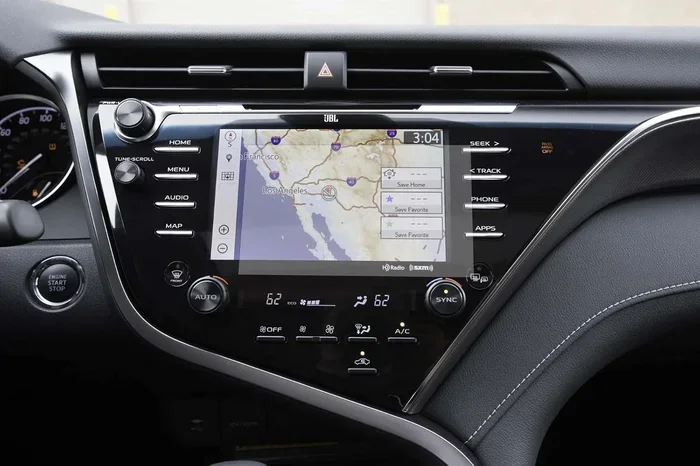
Toyota Entune Navigation is a built-in infotainment system found in many Toyota vehicles. It combines GPS navigation, audio entertainment, and smartphone connectivity into one easy-to-use interface. The system runs through a touchscreen display mounted on the dashboard.
Over the years, Toyota has updated Entune several times. Each version brought new features and better performance. The latest versions offer wireless connectivity, real-time traffic data, and seamless app integration. But the core purpose remains the same: to make driving safer and more convenient.
How Entune Works in Toyota Vehicles
The Entune system uses a built-in GPS antenna to receive satellite signals. This allows it to calculate your location and provide turn-by-turn directions. The system also connects to your smartphone through Bluetooth pairing or a USB cable. This connection lets you access music, calls, and apps directly from the car’s screen.
Most Entune systems include a touchscreen display that ranges from six to eight inches. The interface is designed to be simple and intuitive. You can use voice commands to search for destinations or change the music without taking your hands off the wheel. The GPS guidance works independently of your phone, which is a big advantage on long road trips.
Which Toyota Models Support Entune Navigation?
Entune Navigation is available across many Toyota models. Here are some of the most popular ones:
- Toyota Camry – Mid-size sedan with full Entune support
- Toyota RAV4 – Compact SUV with navigation as an available feature
- Toyota Corolla – Compact sedan with Entune in higher trims
- Toyota Highlander – Three-row SUV with premium infotainment
- Toyota Tacoma – Pickup truck with Entune in select trims
- Toyota Tundra – Full-size truck with navigation options
- Toyota Avalon – Full-size sedan with advanced Entune features
Not every trim level includes Entune Navigation. Base models often come with a basic audio system, while higher trims add the navigation package. Always check the specific vehicle features for your model year before making a purchase decision.
Is Entune Navigation Free or Paid?
This is the big question, and the answer is not a simple one. Is Entune Navigation free? In many cases, yes. But there are important details you need to understand. The cost depends on your vehicle trim, the model year, and the specific Entune package installed.
The Free Version: What You Get
Many Toyota vehicles come with a basic version of Entune at no extra cost. This free version typically includes:
- Basic GPS navigation with preloaded maps
- Turn-by-turn voice guidance
- Destination search by name or address
- FM radio and Bluetooth audio streaming
- Basic traffic information
The free version gives you solid navigation capabilities. You can find routes, get directions, and listen to music through Bluetooth. However, some advanced features are locked behind a paywall. These include live traffic updates, real-time weather, and enhanced app integrations.
Paid Subscriptions and Premium Features
Toyota offers subscription plans that unlock premium features. These plans typically range from one to five years, depending on when you purchased the vehicle. The subscription service includes:
- Live traffic updates for better route planning
- Real-time weather alerts
- Enhanced app connectivity
- Map updates and corrections
- Priority customer support
The subscription cost varies. Some plans start as low as a few dollars per month, while annual plans offer better value. Toyota has also offered free trial periods for new vehicle purchases. This lets you test the premium features before committing to a paid subscription service.
| Feature | Free Version | Paid Subscription |
|---|---|---|
| Basic GPS Navigation | Yes | Yes |
| Turn-by-Turn Directions | Yes | Yes |
| Preloaded Maps | Yes | Yes |
| Live Traffic Updates | No | Yes |
| Real-Time Weather | No | Yes |
| App Connectivity | Limited | Full Access |
| Map Updates | No | Yes |
| Bluetooth Audio | Yes | Yes |
As you can see from the comparison table, the free version covers the basics well. But if you want live traffic and map updates, you will need the paid plan. For many daily commuters, the free version works just fine. But if you travel frequently or drive in heavy traffic areas, the subscription adds real value.
Key Features of Entune Navigation
Entune Navigation comes packed with features designed to make your drive smoother. Let us look at the most useful ones in detail.
GPS and Route Planning
The GPS system in Entune uses satellite signals to pinpoint your location. It then calculates the best route to your destination. You can search for places by name, address, or category like restaurants and gas stations.
The route planning feature lets you choose between the fastest route, the shortest route, or a route that avoids tolls and highways. This flexibility is helpful for daily commuters and road trippers alike. The system also saves your recent destinations for quick access. Real-time directions update automatically as you drive off course.
Traffic Updates and Live Guidance
Live traffic updates are one of the most valuable features of built-in navigation. The system receives real-time data about road conditions, accidents, and construction zones. It then adjusts your route to help you avoid delays.
With the paid subscription, you get live traffic data throughout your drive. The free version may show basic traffic info, but it is not as detailed. For anyone who drives in busy cities, live traffic updates can save significant time every week. The system reroutes you automatically when it detects a faster path.
App Integration and Connectivity
Entune connects to your smartphone through Bluetooth pairing or a USB connection. This gives you access to apps for music, podcasts, and news. You can also make hands-free calls and send messages using voice commands.
The system supports both Apple CarPlay and Android Auto in newer models. This means you can use your favorite phone apps directly on the car’s screen. Wireless connectivity in newer vehicles makes this process even smoother. You do not need to plug in any cables. Smartphone integration brings a whole new level of convenience to your daily commute.
Voice Commands and Hands-Free Control
One of the best safety features of Entune is voice control. You can say “Call home” or “Navigate to nearest gas station” without touching the screen. This keeps your eyes on the road and hands on the wheel.
The voice recognition system has improved over the years. It understands natural language and responds quickly. Even in noisy environments, the system picks up commands accurately. This is especially useful when you are driving with passengers or listening to loud audio streaming.
Audio Streaming and Entertainment
Entune Navigation doubles as an audio entertainment hub. You can stream music from your phone through Bluetooth. The system also supports AM/FM radio and, in some models, satellite radio. You can switch between sources with just a tap on the screen.
For podcast lovers, Entune lets you access popular apps through smartphone integration. Some models also support audio streaming services like Spotify and Pandora. This makes long drives more enjoyable and keeps everyone in the car entertained. The wireless connectivity means seamless switching between your phone and the car’s audio system.
How to Set Up and Use Entune Navigation
Setting up Entune Navigation is straightforward. Even if you are not tech-savvy, you can get it running in minutes. Here is a simple guide to help you get started.
Step-by-Step Setup Guide
- Turn on the ignition and make sure the touchscreen is active.
- Go to the Entune home screen by pressing the Entune button on the dashboard.
- Select Navigation from the main menu.
- Pair your smartphone through Bluetooth or connect via USB cable.
- Allow location access when prompted so the GPS can find your position.
- Search for a destination using the on-screen keyboard or voice command.
- Choose your route and start navigating.
That is all there is to it. The system will guide you turn by turn. If you get lost, you can always press the “Go Back” button to reroute. The setup process works the same way across most Toyota models.
Quick Tips for Best Performance
- Keep your maps updated. Outdated maps can lead to wrong directions. Check for updates through the Entune app or visit a Toyota dealer.
- Use voice commands when driving. This keeps you safe and focused on the road.
- Charge your phone. Navigation uses battery power. Keep your phone plugged in for long trips.
- Clear the cache regularly. This helps the system run faster and prevents glitches.
- Download offline maps. This ensures you still have navigation in areas with poor cell signal.
Common Mistakes to Avoid
- Ignoring software updates. Toyota releases updates that fix bugs and improve performance. Always install them when prompted.
- Not checking subscription status. Some features stop working when your trial period ends. Keep track of your subscription plan.
- Using the GPS in tunnels. GPS signals can be weak in tunnels and underground parking. Plan your route before entering.
- Overloading the system with apps. Too many apps running at once can slow down the touchscreen. Close apps you are not using.
Entune Navigation vs Other Built-In Systems
How does Entune Navigation compare to other built-in systems? Let us look at a few popular alternatives.
Entune vs Apple CarPlay Navigation
Apple CarPlay mirrors your iPhone on the car’s screen. It gives you access to Apple Maps, Siri, and your favorite apps. Entune, on the other hand, is Toyota’s own system with its own built-in maps and features.
Apple CarPlay is great if you already use Apple Maps. The maps are always up to date because they sync with your phone. Entune Navigation, however, works even without a phone connection. This is a big advantage for long road trips where cell service may be spotty.
Many newer Toyota models offer both Entune and Apple CarPlay. This gives you the best of both worlds. You can use Entune for built-in features and CarPlay for real-time map updates from your phone.
Entune vs Google Maps and Waze
Google Maps and Waze are popular phone-based navigation apps. They offer real-time traffic, community reports, and constantly updated maps. Entune Navigation provides similar features but through the car’s built-in system.
The advantage of Entune is that it is built into the vehicle. You do not need to mount your phone or worry about it falling off the dashboard. The larger touchscreen also makes it easier to see directions while driving. The built-in navigation system is integrated into the vehicle’s design, which means a cleaner and safer setup.
However, phone apps like Waze often have more real-time community data. Other drivers report accidents, speed traps, and road closures instantly. Entune relies on its own traffic data sources, which may not be as fast or detailed in some areas. For the best results, many drivers use both together.
Common Problems and How to Fix Them
Like any technology, Entune Navigation can have issues. Here are the most common problems and how to solve them.
GPS Signal Issues
If your GPS shows the wrong location or loses signal, try these fixes:
- Drive to an open area away from tall buildings or tunnels
- Check that the GPS antenna is not blocked by a roof rack or cargo
- Restart the infotainment system by holding the power button for 10 seconds
- Make sure your vehicle’s software is up to date
Most GPS issues are temporary and fix themselves once you move to an open area. If the problem persists, visit a Toyota service center for a diagnostic check. The GPS antenna is designed to work well in most conditions, but physical obstructions can interfere with satellite signals.
Software Updates and Map Errors
Outdated maps can cause routing errors. Toyota releases map updates periodically. You can check for updates through the Entune app on your phone or by visiting a dealer. Some updates are free, while others may require a subscription.
If the touchscreen freezes or becomes unresponsive, a soft reset often helps. Disconnect the battery for a few minutes and reconnect it. This refreshes the system and clears minor glitches. Keeping your software up to date prevents most common issues from occurring in the first place.
Subscription Renewal Issues
Some owners report that their Entune features stop working after the free trial ends. To avoid this surprise, check your subscription status regularly. You can manage your subscription through the Entune app or by contacting Toyota customer service.
If you decide the subscription is not worth it, you can always use the free version of Entune Navigation. The basic GPS and Bluetooth features remain available regardless of your subscription status. It is always a good idea to set a reminder before your trial period expires.
Conclusion
So, is Entune Navigation free? The answer is both yes and no. The basic navigation features come at no extra cost with most Toyota vehicles. You get GPS guidance, route planning, and Bluetooth connectivity without paying a dime. However, premium features like live traffic updates, real-time weather, and map updates require a paid subscription.
Your best move is to check your specific Toyota model and trim level. Look at what comes standard and what requires a subscription. If you mostly drive familiar routes, the free version may be all you need. But if you travel often or navigate through busy city traffic, the paid subscription adds real value.
Entune Navigation is a solid built-in system that makes driving easier and safer. Whether you use the free version or pay for premium features, it serves its purpose well. Take some time to explore the system, set up your preferences, and enjoy the ride. Knowing exactly what is included helps you make the most of your Toyota’s vehicle features.
Frequently Asked Questions
Do all Toyota models come with Entune Navigation for free?
Not all Toyota models include Entune Navigation for free. Base trims often come with a basic Entune audio system, while navigation is available in higher trims or as an add-on package. Check your specific model and trim to confirm what is included with your vehicle.
How much does the Entune Navigation subscription cost?
The subscription cost varies by plan and model year. Some plans start around $50 to $100 per year, while longer-term plans may offer better value. Toyota has also offered free trial periods for new vehicle buyers. Contact your local dealer for current pricing details.
Can I use Entune Navigation without a smartphone?
Yes, you can use Entune Navigation without a smartphone. The built-in GPS and preloaded maps work independently. However, connecting your phone unlocks additional features like app connectivity, live traffic updates, and hands-free calling through Bluetooth pairing.
How often do Entune maps need to be updated?
Toyota recommends updating your maps at least once a year. Road changes, new addresses, and route adjustments happen frequently. You can check for map updates through the Entune app or by visiting a Toyota service center for assistance.
What should I do if Entune Navigation stops working?
If Entune Navigation stops working, try restarting the system first. Hold the power button for 10 seconds to turn it off and back on. If that does not help, check for software updates or visit a Toyota dealer for professional diagnostics and support.
Is Entune Navigation better than using Google Maps on my phone?
Both have their strengths. Entune Navigation offers a larger screen, built-in GPS, and hands-free operation. Google Maps on your phone provides real-time community data and always-updated maps. Many drivers use both together for the best navigation experience on the road.