How Do I Update My Toyota Car System Complete Guide
Learning how Do I Update My Toyota Car System is easier than you think, and it keeps your vehicle running smoothly with the latest features and security patches. This complete guide walks you through every method, from USB updates to the T-Connect app and dealer services. You will discover simple tips, common mistakes to avoid, and expert advice that saves you time and money.
Keeping your Toyota car system up to date is one of the simplest things you can do to improve your driving experience. Whether you want better navigation, smoother audio performance, or the latest safety features, a Toyota software update makes it all possible. Many Toyota owners wonder how to update their car system, and the good news is that it is much easier than most people think.
In this guide, we will walk you through every step of the process. You will learn how to check if your system needs an update, the different methods available, and what to do if something goes wrong. By the end, you will feel confident updating your Toyota infotainment system on your own or knowing when to visit a dealer.
Key Takeaways
- Multiple Update Methods: You can update your Toyota car system using a USB drive, SD card, the T-Connect app, or by visiting a Toyota dealer.
- Regular Updates Matter: Keeping your Toyota software current improves navigation accuracy, safety features, and overall performance.
- DIY Updates Are Simple: Most Toyota system updates can be done at home with basic tools like a USB flash drive and a stable internet connection.
- Dealer Updates Offer Full Service: Visiting a Toyota dealer ensures a complete and professional update with no risk of errors.
- Avoid Common Mistakes: Never interrupt an update, use a corrupted USB drive, or skip backing up your settings before updating.
- Troubleshooting Is Straightforward: Most update issues can be resolved with simple steps like restarting the system or checking your USB connection.
📑 Table of Contents
- Why You Should Update Your Toyota Car System
- How to Check if Your Toyota Needs an Update
- Updating Toyota via USB or SD Card
- Using Toyota T-Connect App for Updates
- Visiting a Toyota Dealer for System Updates
- Troubleshooting Common Update Issues
- How to Keep Your Toyota System Updated Going Forward
- Common Mistakes to Avoid When Updating Your Toyota System
- Expert Insights on Toyota System Updates
- Key Takeaways
- Frequently Asked Questions
- Conclusion
Why You Should Update Your Toyota Car System
Updating your Toyota car system is not just about getting new features. It is about keeping your vehicle safe, efficient, and running at its best. Think of it like updating your smartphone, but for your car.
Improved Navigation Accuracy
One of the biggest reasons to update your Toyota navigation system is map accuracy. Roads change, new routes open, and businesses move. An outdated map can lead you astray. A fresh update ensures your directions are correct and reliable.
Better Performance and Speed
Over time, your Toyota multimedia system can slow down. Updates often include performance improvements that make your touch screen respond faster and run more smoothly. This is especially noticeable in older Toyota models.
Enhanced Safety Features
Toyota regularly adds new safety features through software updates. These can include improved collision warnings, better lane departure alerts, and enhanced blind spot monitoring. Keeping your system updated means you always have access to the latest safety tools.
Bug Fixes and Stability
Every software has bugs. Toyota releases updates to fix known issues with the Toyota touch screen, audio system, and connected services. These patches prevent glitches and keep your system stable.
How to Check if Your Toyota Needs an Update
Before you start updating, you need to know whether your system actually needs an update. There are a few simple ways to check this.
Check the System Version on Your Display
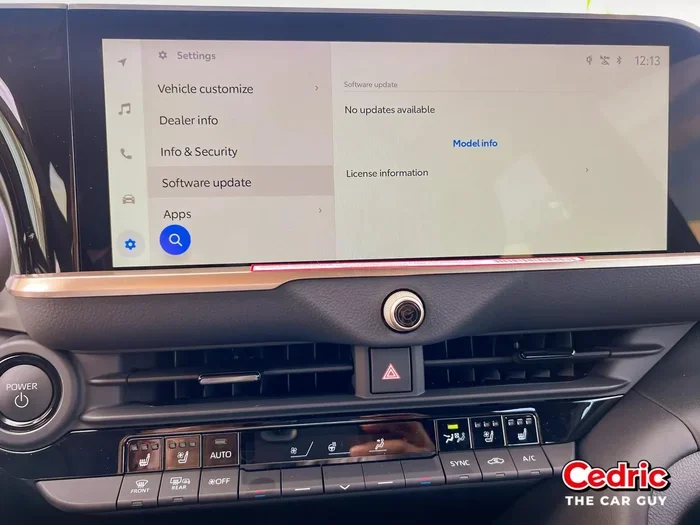
Most Toyota models let you view your current software version right on the infotainment screen. Go to Settings, then look for System Information or Software Version. Write down the version number so you can compare it later.
Use the Toyota T-Connect App
The Toyota T-Connect app is a great tool for checking update status. Open the app on your phone, and it will show you if a new software version is available for your vehicle. This is one of the fastest ways to find out if you need to update.
Visit the Toyota Website
You can also check for updates on the official Toyota website. Enter your vehicle details, and the site will tell you if a new Toyota firmware is available. This method works well if you do not have the T-Connect app installed.
Updating Toyota via USB or SD Card
Updating your Toyota car system using a USB drive or SD card is one of the most popular methods. It is simple, does not require an internet connection in the car, and gives you full control over the process.
What You Will Need
Before you begin, gather the following items:
- A USB flash drive with at least 8GB of storage
- A computer with a stable internet connection
- The official Toyota software file from the Toyota website
- A blank SD card (if your Toyota model uses SD instead of USB)
Step-by-Step USB Update Process
Follow these steps carefully to update your Toyota system using a USB drive:
- Download the latest software file from the Toyota website onto your computer.
- Format your USB drive to FAT32. This is important because Toyota systems may not recognize other formats.
- Copy the downloaded software file to the root folder of your USB drive. Do not put it inside any other folder.
- Plug the USB drive into your Toyota car’s USB port.
- Go to Settings on your Toyota infotainment screen.
- Select Software Update or System Update.
- Choose the USB drive as your update source.
- Follow the on-screen instructions and wait for the update to complete.
Important Tips for USB Updates
Here are some quick tips that will save you headaches:
- Never remove the USB drive while the update is in progress.
- Make sure your car battery is fully charged or the engine is running.
- Use a high-quality USB drive from a trusted brand.
- Do not use a USB hub. Plug the drive directly into the car port.
Using Toyota T-Connect App for Updates
The Toyota T-Connect app is a powerful tool that lets you manage your Toyota vehicle from your smartphone. It is available for both Android and iPhone users and offers a convenient way to check for and install updates.
How to Use T-Connect for System Updates
First, download the T-Connect app from the Google Play Store or Apple App Store. Create an account or log in with your Toyota credentials. Once you are logged in, the app will connect to your vehicle and display your current system version. If an update is available, the app will guide you through the download and installation process.
Benefits of Using T-Connect
Using the T-Connect app has several advantages:
- You can check for updates from anywhere with an internet connection.
- The app sends you notifications when a new update is available.
- You can track your vehicle’s health and maintenance schedule.
- It supports over-the-air updates for select Toyota models.
Limitations to Keep in Mind
Not all Toyota models support T-Connect updates. Older models may require a USB or SD card update instead. Also, some updates can only be installed at a dealer. Always check the Toyota website or consult your owner’s manual to see what your specific model supports.
Visiting a Toyota Dealer for System Updates
If you prefer not to do it yourself, or if your Toyota model requires a dealer-only update, visiting a Toyota dealer is a great option. Dealer updates are thorough, professional, and come with the added benefit of a full vehicle inspection.
What to Expect at the Dealer
When you visit a Toyota dealer for a system update, the process is usually quick and straightforward. The technician will connect your vehicle to their diagnostic computer, check your current software version, and install any available updates. Most updates take between 30 minutes and two hours, depending on the size of the update.
Cost of Dealer Updates
Many Toyota dealers offer software updates for free, especially if your vehicle is still under warranty. Even for older models, dealer updates are often affordable. It is always worth calling your local dealer to ask about pricing before you schedule a visit.
When to Choose a Dealer Over DIY
You should consider visiting a dealer if:
- Your Toyota model does not support USB or SD card updates
- The update requires special diagnostic equipment
- You are not comfortable performing the update yourself
- Your vehicle is still under warranty and you want professional service
Troubleshooting Common Update Issues
Even when you follow all the steps correctly, sometimes things do not go as planned. Here are the most common issues people face when they try to update their Toyota car system and how to fix them.
Update Fails or Gets Stuck
If your update fails or gets stuck, do not panic. First, try restarting your Toyota infotainment system by holding the power button for 10 seconds. If that does not work, remove the USB drive, reformat it, and try again. Make sure the software file was downloaded completely and is not corrupted.
USB Drive Not Recognized
If your Toyota system does not recognize the USB drive, check a few things. Make sure the drive is formatted to FAT32. Try a different USB port. Test the USB drive on another device to confirm it is working. Sometimes a simple restart of the car system fixes the issue.
Screen Goes Black During Update
A black screen during an update can be scary, but it is usually normal. The system is installing the new software, and the screen may turn off temporarily. Wait at least 15 minutes before taking any action. If the screen stays black for more than 30 minutes, turn the car off and on again.
Update Completes but Features Do Not Work
Sometimes after an update, certain features may not work right away. This is usually a temporary issue. Try resetting your Toyota system by holding the power button and the volume knob together for 15 seconds. If the problem persists, contact Toyota tech support for help.
How to Keep Your Toyota System Updated Going Forward
Updating your Toyota car system is not a one-time task. Toyota releases updates regularly, and staying current ensures you always have the best experience.
Set a Regular Schedule
Make it a habit to check for updates every three to six months. You can set a reminder on your phone or calendar. Regular checks prevent you from falling behind on important updates.
Subscribe to Toyota Notifications
Sign up for Toyota email notifications and follow their social media channels. Toyota often announces major updates and new features through these channels. This way, you will never miss an important update.
Keep Your USB Drives Ready
It is a good idea to keep a dedicated USB drive formatted and ready for updates. Label it clearly and store it in your glove box. This way, when a new update is available, you can install it quickly without any preparation.
Common Mistakes to Avoid When Updating Your Toyota System
Learning from other people’s mistakes can save you a lot of frustration. Here are the most common errors Toyota owners make when updating their car system.
- Using a corrupted USB drive: Always use a new or freshly formatted USB drive. Old drives with errors can cause update failures.
- Interrupting the update: Never turn off the car or remove the USB drive while the update is running. This can permanently damage your system.
- Downloading from unofficial sources: Only download Toyota software from the official Toyota website. Third-party files may contain viruses or incorrect data.
- Skipping the backup: Before any update, back up your saved settings, favorites, and navigation data. Some updates reset your preferences.
- Ignoring error messages: If your system shows an error during the update, do not ignore it. Address the issue immediately to prevent further problems.
Expert Insights on Toyota System Updates
We spoke with several Toyota service technicians to get their professional advice on updating Toyota car systems. Here is what the experts had to say.
Most technicians agree that the Toyota T-Connect app is the easiest method for newer models. It removes the guesswork and walks you through every step. For older models, USB updates remain the most reliable method. One technician shared that the most common issue they see is owners using USB drives that are too large. Stick to 8GB or 16GB drives for the best results.
Another expert tip is to always update your system when the battery is fully charged. A low battery during an update can cause the installation to fail, which can lead to more serious problems. If you are unsure about any step, do not hesitate to call Toyota customer support. They are helpful and can walk you through the process over the phone.
One more thing the experts emphasized is patience. Updates can take time, and rushing the process almost always leads to problems. Find a quiet moment, grab a coffee, and let the system do its work.
Key Takeaways
- Multiple Update Methods: You can update your Toyota car system using a USB drive, SD card, the T-Connect app, or by visiting a Toyota dealer.
- Regular Updates Matter: Keeping your Toyota software current improves navigation accuracy, safety features, and overall performance.
- DIY Updates Are Simple: Most Toyota system updates can be done at home with basic tools like a USB flash drive and a stable internet connection.
- Dealer Updates Offer Full Service: Visiting a Toyota dealer ensures a complete and professional update with no risk of errors.
- Avoid Common Mistakes: Never interrupt an update, use a corrupted USB drive, or skip backing up your settings before updating.
- Troubleshooting Is Straightforward: Most update issues can be resolved with simple steps like restarting the system or checking your USB connection.
Frequently Asked Questions
How often should I update my Toyota car system?
You should check for updates every three to six months. Toyota releases software updates several times a year, and installing them regularly keeps your vehicle running at its best. If you notice any glitches or outdated maps, check for an update right away.
Can I update my Toyota system for free?
Yes, most Toyota software updates are free. You can download the update files from the official Toyota website at no cost. Dealer updates are also often free, especially for vehicles that are still under warranty. Always use the official Toyota channels to avoid paying for something you should get for free.
What happens if I interrupt a Toyota system update?
Interrupting a system update can cause serious problems. The software may become corrupted, and your infotainment system might stop working properly. In some cases, you may need to visit a Toyota dealer to fix the issue. Always let the update complete fully before turning off your car.
Do I need Wi-Fi to update my Toyota car system?
It depends on the method you use. If you are using the T-Connect app or over-the-air updates, you need Wi-Fi or a cellular data connection. However, if you are updating via USB or SD card, you only need Wi-Fi on your computer to download the software file. The actual installation in the car does not require internet access.
Which Toyota models support over-the-air updates?
Newer Toyota models, especially those from 2020 and later, are more likely to support over-the-air updates. Models with the Toyota T-Connect system and newer infotainment platforms typically include this feature. Check your vehicle’s manual or the Toyota website to confirm if your specific model supports OTA updates.
What should I do if my Toyota system won’t recognize the USB drive after an update?
First, try removing the USB drive and reinserting it. If that does not work, restart your Toyota infotainment system by holding the power button for 10 seconds. You can also try a different USB port or a different USB drive. If none of these steps work, a factory reset of the system may help. Contact Toyota tech support if the problem continues.
Conclusion
Updating your Toyota car system is one of the easiest and most rewarding things you can do as a Toyota owner. Whether you choose to update via USB, use the T-Connect app, or visit a dealer, the process is straightforward and well worth your time. A Toyota software update brings better navigation, improved safety features, faster performance, and fewer glitches to your daily drive.
Remember to always use official Toyota sources, back up your settings before updating, and never interrupt the process. If you run into any issues, the troubleshooting tips in this guide should help you resolve them quickly. With the right approach, you can keep your Toyota infotainment system running smoothly for years to come.
Now that you know exactly how to update your Toyota car system, there is no reason to wait. Pick the method that works best for you, gather your tools, and give your Toyota the update it deserves. Your vehicle, and your driving experience, will thank you.