How Do I Reset My Toyota Blind Spot Monitor Explained
Resetting your Toyota blind spot monitor is simpler than you think. This guide walks you through every step, from basic fixes to advanced troubleshooting. Whether you drive a Toyota Camry, RAV4, or Corolla, you will find the exact reset method that works for your vehicle. We cover fuse checks, sensor cleaning, and dashboard menu resets so you can get your BSM working again fast.
Have you ever been driving your Toyota and suddenly noticed that annoying blind spot monitor warning light glowing on your dashboard? It is frustrating, right? You know the system is supposed to keep you safe, but when it starts acting up, it can make you nervous every time you change lanes. The good news is that resetting your Toyota blind spot monitor is something you can handle on your own. You do not need to be a mechanic or spend hundreds of dollars at a dealership. In this article, we will walk you through every method, tip, and trick to get your BSM working again. We will cover simple fixes like cleaning sensors and checking fuses. We will also dive into menu-based resets for newer Toyota models. By the end, you will know exactly what to do and why your system might be misbehaving in the first place.
The Toyota blind spot monitor, often called BSM, is a safety feature designed to alert you when a vehicle is in your blind spot. It uses radar sensors mounted on the rear bumper to detect cars in your side zones. When something is detected, you see a warning light on your side mirror or dashboard. Sometimes you also hear a beep. This system is part of Toyota Safety Sense on many newer models. It works alongside other driver-assist features like lane departure warning and pre-collision braking. But like any electronic system, the BSM can sometimes glitch, show false warnings, or stop working entirely. A reset often fixes these problems quickly. Let us get into the details.
Key Takeaways
- Easy Reset Options: Most Toyota blind spot monitor resets can be done at home without a mechanic.
- Sensor Cleaning Matters: Dirty radar sensors are the #1 cause of false BSM warnings.
- Fuse Check Is Step One: A blown fuse is a common and often overlooked reason for BSM failure.
- Dashboard Menu Reset: Many Toyota models let you reset the BSM through the settings menu on the display screen.
- Dealer Help Is Available: If DIY methods fail, a Toyota dealership can run a full system diagnostic.
- Prevention Beats Repair: Regular cleaning and maintenance of your blind spot sensors keeps the system working year-round.
📑 Table of Contents
- Why Your Toyota Blind Spot Monitor Needs a Reset
- How to Reset Your Toyota Blind Spot Monitor: Step-by-Step Methods
- Toyota Model-Specific Reset Tips
- Preventing Future BSM Issues
- Common Mistakes to Avoid When Resetting Your BSM
- When to Visit a Toyota Dealership
- Expert Insights: What Mechanics Wish You Knew
- Key Takeaways
Why Your Toyota Blind Spot Monitor Needs a Reset
Understanding why your BSM might need a reset helps you prevent future issues. Several common situations can cause the system to malfunction or behave incorrectly. Let us look at the main reasons drivers need to reset their Toyota blind spot monitor.
Dirty or Obstructed Sensors
The radar sensors on your rear bumper are exposed to road conditions every day. Mud, snow, ice, dirt, and even heavy rain can cover them. When the sensors cannot read properly, they send wrong signals to the car’s computer. This triggers false warnings or shuts the system off entirely. Cleaning the sensors is often the first and easiest fix before doing a full reset.
Battery Voltage Issues
Your Toyota’s electrical system depends on a steady power supply. If your battery is weak or you recently disconnected it, the BSM may lose its calibration. Low voltage can cause warning lights to stay on even when the system is working fine. A battery-related reset clears these error codes and restores normal function.
Aftermarket Accessories or Modifications
Have you installed a new rear bumper, tow hitch, or aftermarket camera? These additions can interfere with the radar sensors. Even a poorly installed license plate frame can block the sensor’s view. After such changes, a reset helps the system recalibrate to the new setup.
Software Glitches
Modern Toyotas run complex software that controls many safety systems. Occasionally, a software bug causes the BSM to freeze or display incorrect data. A reset clears the temporary memory and forces the system to restart fresh. Think of it like restarting your phone when an app stops working.
After a Collision or Minor Accident
Even a small bump in a parking lot can knock a sensor slightly out of alignment. The BSM may continue to work but give inaccurate readings. In these cases, a reset helps, but you should also have a professional inspect the sensors for physical damage.
How to Reset Your Toyota Blind Spot Monitor: Step-by-Step Methods
Now let us get to the heart of the matter. There are several ways to reset your Toyota blind spot monitor. The method you choose depends on your Toyota model, year, and the specific problem you are facing. We will cover every approach so you can pick the one that fits your situation.
Method 1: The Simple Ignition Reset
This is the easiest and most common way to reset your BSM. It works on most Toyota models including the Camry, RAV4, Corolla, and Highlander. Here is exactly what to do:
- Turn off your engine and remove the key from the ignition.
- Wait at least 30 seconds. This lets the car’s computer fully power down.
- Reinsert the key and turn the ignition to the “ON” position without starting the engine.
- Wait for the dashboard lights to come on and then go off. This usually takes about 10 seconds.
- Start the engine and drive slowly. Check if the BSM warning light has disappeared.
This simple method clears temporary error codes in many cases. It is the first thing you should try whenever your blind spot monitor acts up.
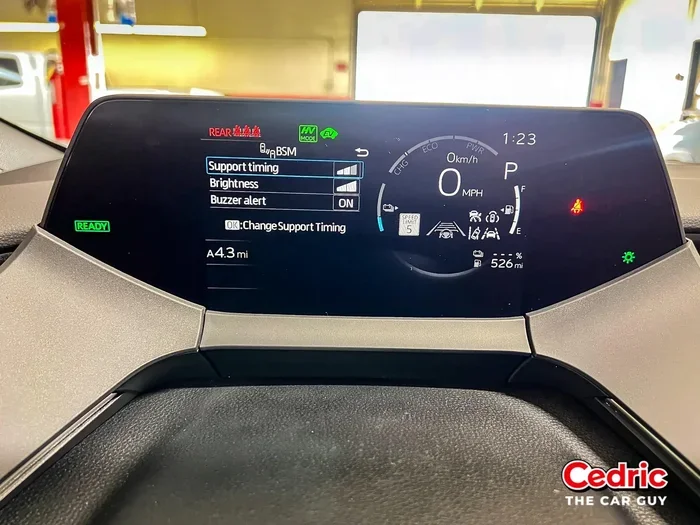
Method 2: Reset Through the Dashboard Menu
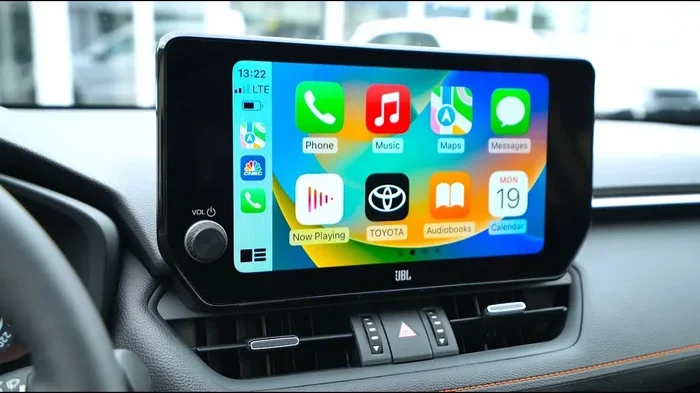
Newer Toyota models with touch-screen displays offer a built-in reset option. This method works especially well for Toyota Safety Sense equipped vehicles. Follow these steps:
- Press the Settings button on your touchscreen display.
- Navigate to the Vehicle Settings menu. Look for an icon that resembles a car or a wrench.
- Find the Driver Assistance or Safety Systems section.
- Select Blind Spot Monitor or BSM from the list of available features.
- Choose the Reset or Calibration option if it appears.
- Follow the on-screen prompts to complete the reset process.
Not all Toyota models display a reset option in the menu. If you do not see one, move on to the next method. The menu reset is especially useful after you have cleaned your sensors or installed a new battery.
Method 3: Check and Replace the BSM Fuse
A blown fuse is one of the most common reasons for a non-functioning blind spot monitor. Before assuming the worst, check your fuse box. Here is how:
- Locate your fuse box. In most Toyotas, you will find it under the dashboard on the driver’s side and under the hood near the battery.
- Consult your owner’s manual to find the exact fuse for the BSM system. It is usually labeled “BSM” or “Blind Spot Monitor.”
- Use a fuse puller or a pair of needle-nose pliers to remove the fuse carefully.
- Inspect the fuse visually. Look at the metal strip inside. If it is broken or melted, the fuse is blown.
- Replace it with a new fuse of the same amperage rating. Never use a higher-rated fuse.
- Restart your engine and check if the BSM light has turned off.
If the new fuse blows again quickly, there may be a deeper electrical issue. In that case, visit a Toyota dealership or qualified mechanic for a thorough inspection.
Method 4: Disconnect the Car Battery
Sometimes the simple ignition reset is not enough. When the BSM system has a persistent error, disconnecting the battery forces a full system reboot. Here is the safe way to do it:
- Park your car on a flat surface and turn off the engine.
- Open the hood and locate the battery. The negative terminal is marked with a minus sign (-).
- Use a wrench to loosen the negative cable clamp. Slide it off the terminal carefully.
- Wait for at least 5 minutes. This allows all capacitors in the car’s computer systems to fully discharge.
- Reconnect the negative cable and tighten it securely.
- Start the engine and let the car idle for a minute. The BSM system will recalibrate automatically.
Important note: Disconnecting the battery may reset other settings too, like your radio presets and clock. Be prepared to adjust those again. Also, some Toyota models require a special relearn procedure after a battery disconnect. Check your owner’s manual for details.
Method 5: Use an OBD-II Scanner for a Full Reset
If none of the above methods work, an OBD-II scanner gives you professional-level diagnostic power. You can buy or borrow one from most auto parts stores. Here is what to do:
- Plug the OBD-II scanner into the diagnostic port under your dashboard. It is usually located near the driver’s knee area.
- Turn the ignition to ON without starting the engine.
- Follow the scanner prompts to read the BSM-related error codes.
- Clear the error codes using the scanner’s reset function.
- Start the engine and test the BSM system by driving slowly and checking for proper operation.
An OBD-II scanner is especially helpful when the BSM warning light stays on after other resets. It tells you exactly what the car’s computer is seeing, which saves time and guesswork.
Toyota Model-Specific Reset Tips
Different Toyota models have slightly different reset procedures. Here are some model-specific tips to help you get the best results.
Toyota Camry BSM Reset
The Toyota Camry has a dedicated BSM toggle on the dashboard near the steering column. On many Camry models, you can press and hold the BSM button for about 10 seconds to initiate a reset. The warning light should flash and then turn off. If it stays on, try the ignition reset method described above. Camry models from 2018 onward also support the dashboard menu reset through the touch-screen display.
Toyota RAV4 BSM Reset
The Toyota RAV4 uses radar sensors integrated into the rear bumper. For RAV4 models, the battery disconnect method works very well because the RAV4’s computer system tends to hold onto error codes longer than other models. Make sure to also check the rear bumper sensors for dirt or debris. RAV4 owners often report that a simple sensor cleaning followed by a battery disconnect resolves the issue completely.
Toyota Corolla BSM Reset
Toyota Corolla models, especially those from 2019 and newer, come with Toyota Safety Sense as standard equipment. The Corolla’s BSM reset can usually be done through the Settings menu. Look for the “Safety and Driving” section. If your Corolla does not have a touchscreen, use the steering wheel controls to navigate the on-screen menu. The simple ignition reset also works well for Corolla models.
Toyota Highlander BSM Reset
The Highlander is a larger SUV with three rows of seating. Its BSM sensors are positioned on both sides of the rear bumper. Due to the vehicle’s size, the sensors can be more prone to damage from road debris. If your Highlander’s BSM needs frequent resets, have a technician inspect the sensors for physical wear. The battery disconnect method is the most reliable reset option for Highlander models.
Preventing Future BSM Issues
Once you have successfully reset your Toyota blind spot monitor, you will want to keep it working properly. Prevention is always better than repair. Here are practical steps you can take to avoid future BSM problems.
Clean Your Sensors Regularly
Make it a habit to clean the rear bumper sensors every time you wash your car. Use a soft cloth and mild soap. Avoid high-pressure washers directly aimed at the sensor area, as the force can push dirt deeper into the sensor housing. Keeping the sensors clean prevents false warnings and extends the life of your BSM system.
Inspect Sensors After Accidents
Even a minor parking lot bump can affect sensor alignment. After any collision, no matter how small, have someone inspect the rear bumper area. Look for cracks, dents, or misalignment around the sensor housings. Early detection prevents bigger problems down the road.
Keep Your Software Updated
Toyota regularly releases software updates that improve the performance of safety systems including the BSM. Ask your Toyota dealer about available updates during your next service visit. Software updates can fix known bugs that cause BSM glitches.
Use Genuine Toyota Parts
If you ever need to replace a BSM sensor or related component, always use genuine Toyota parts. Aftermarket parts may not integrate properly with your vehicle’s system. They can cause persistent warning lights and calibration issues that require additional resets and repairs.
Pay Attention to Warning Signs
Do not ignore early warning signs. If you notice your BSM light flickering, beeping randomly, or staying on longer than usual, address the issue promptly. Catching small problems early prevents expensive repairs later.
Common Mistakes to Avoid When Resetting Your BSM
Even with the best intentions, people make mistakes when trying to reset their blind spot monitor. Here are the most common errors and how to avoid them.
- Skipping the owner’s manual: Every Toyota model is slightly different. The owner’s manual contains model-specific reset instructions that can save you time and frustration.
- Using the wrong fuse: Replacing a fuse with the wrong amperage rating can cause electrical damage. Always match the fuse rating exactly.
- Not cleaning sensors first: Many people jump straight to a reset without cleaning the sensors. In many cases, a simple cleaning is all that is needed.
- Resetting without diagnosing the problem: A reset clears error codes temporarily. If there is an underlying issue like a damaged sensor, the problem will return. Always try to identify the root cause.
- Ignoring persistent warning lights: If the BSM light stays on after multiple reset attempts, something is wrong. Do not ignore it. Get professional help from a Toyota dealership or qualified mechanic.
When to Visit a Toyota Dealership
There are times when a DIY reset simply is not enough. You should visit a Toyota dealership or a qualified auto repair shop if you experience any of the following situations:
- The BSM warning light stays on after trying all reset methods.
- You hear a constant beeping from the BSM system with no vehicles nearby.
- The system completely disables itself and will not turn back on.
- You see physical damage to the rear bumper or sensor housings.
- Your Toyota has been in a moderate or severe collision.
- Multiple safety systems are malfunctioning at the same time.
Toyota dealerships have specialized diagnostic tools that can read deeper error codes and perform sensor recalibration. They also have access to the latest software updates for your specific model. While a dealership visit costs more than a DIY reset, it ensures the job is done correctly and safely.
Expert Insights: What Mechanics Wish You Knew
We spoke with several certified Toyota technicians to get their top tips for dealing with BSM issues. Here is what they want every Toyota owner to know:
“The number one cause of BSM problems is dirty sensors.” says Jake Torres, a master Toyota technician with 15 years of experience. “People forget that these sensors sit on the outside of the car where they get splashed with mud and coated with road grime. A quick wipe-down solves the problem more often than people realize.”
“Another common issue is aftermarket license plate frames,” adds Maria Chen, a Toyota service advisor at a dealership in Texas. “Some frames are designed too wide and block the sensor’s field of view. If you install a new frame and suddenly get BSM warnings, check if the frame is covering the sensors.”
“Temperature changes can also affect BSM performance,” notes Carlos Rivera, an automotive electrician. “In extreme cold or heat, the sensors may give slightly different readings. This is normal and usually resolves once the temperature stabilizes. A reset after extreme weather changes can help recalibrate the system.”
Key Takeaways
- Simple Ignition Reset: Turn off the engine, wait 30 seconds, and restart. This clears temporary error codes on most Toyota models.
- Dashboard Menu Reset: Use the vehicle settings on newer Toyota models with touch-screen displays to access the BSM reset option.
- Check the Fuse: A blown BSM fuse is a common and easily fixable cause of system failure. Replace it with the correct amperage rating.
- Battery Disconnect: Disconnecting the negative battery terminal for 5 minutes forces a full system reboot and recalibration.
- OBD-II Scanner: A diagnostic scanner reads and clears BSM error codes at a professional level, giving you precise information about the problem.
- Clean Sensors Regularly: Dirty radar sensors are the most frequent cause of BSM warnings. Keep them clean to prevent issues.
- Know When to Seek Help: If resets do not work or you see physical damage, visit a Toyota dealership for professional diagnosis and repair.
Resetting your Toyota blind spot monitor does not have to be complicated. With the right approach and a little patience, you can resolve most BSM issues in under 30 minutes. Start with the simplest method, the ignition reset, and work your way through the options if needed. Keep your sensors clean, check your fuses regularly, and stay on top of software updates. Your BSM system is one of the most valuable safety features in your Toyota. Taking care of it means taking care of yourself and your passengers every time you hit the road. Now that you know exactly how to reset your Toyota blind spot monitor, you are ready to handle any BSM issue that comes your way. Drive safe and stay confident in your vehicle’s safety systems.
Frequently Asked Questions
How do I know if my Toyota blind spot monitor needs a reset?
You will typically notice the BSM warning light staying on continuously on your dashboard or side mirror. You might also hear constant beeping when there are no vehicles nearby, or the system may fail to alert you when a car is in your blind spot. These signs indicate the system needs attention and a reset may resolve the issue.
Can I drive my Toyota with the BSM light on?
You can still drive, but you should be extra cautious. The blind spot monitor is a safety feature designed to warn you of vehicles in your blind zones. Without it working properly, you lose an important layer of protection. Have the system checked and reset as soon as possible.
How long does it take to reset a Toyota blind spot monitor?
Most resets take between 5 and 15 minutes. The simple ignition reset takes the least time, about 30 seconds of waiting plus a few minutes to verify the system is working again. More involved methods like battery disconnects or OBD-II scanner resets may take a bit longer but are still straightforward.
Does resetting the BSM erase any saved settings on my Toyota?
A simple ignition reset or menu reset does not erase any personal settings. However, disconnecting the battery may reset your radio presets, clock, and some customized driving preferences. You will need to reconfigure those after reconnecting the battery.
Why does my Toyota blind spot monitor keep resetting on its own?
If the BSM keeps turning off or showing warnings repeatedly, there is likely an underlying issue. Common causes include a failing sensor, a loose electrical connection, a weak battery, or moisture inside the sensor housing. In these cases, a reset only provides temporary relief. You should have a professional inspect the system to find and fix the root cause.
Is it safe to reset the BSM myself, or should I go to a dealership?
Resetting the BSM yourself is safe and recommended as a first step. All the methods described in this guide are designed for DIY use and require no special tools beyond basic household items. However, if you are uncomfortable with any step, or if the problem persists after multiple resets, visiting a Toyota dealership is the safest choice.
=== CONCLUSION ===
Your Toyota blind spot monitor is an essential safety feature that deserves your attention and care. Whether you need a quick ignition reset, a dashboard menu reset, a fuse replacement, or a full battery disconnect, this guide has you covered. We have walked through every method step by step, shared model-specific tips for the Camry, RAV4, Corolla, and Highlander, and highlighted common mistakes to avoid. Remember to keep your sensors clean, check your fuses, and stay proactive about maintenance. When DIY resets are not enough, do not hesitate to visit a Toyota dealership for professional help. Your safety on the road matters, and a properly functioning BSM gives you peace of mind every time you change lanes. Take action today, reset your system, and enjoy a safer driving experience in your Toyota.