Can Two People Use the Toyota App and Share Features
Yes, two people can use the Toyota App and share many features. The Toyota App allows multiple users to link their accounts to the same vehicle, giving each person access to remote start, lock/unlock, vehicle location, and more. Setting up a second user is simple and can be done right from the app.
Key Takeaways
- Multiple Users Supported: The Toyota App lets you add a second user to share key features with a spouse, family member, or trusted friend.
- Easy Setup Process: You can link another person through the app settings in just a few simple steps.
- Shared Features Include Remote Start, Lock/Unlock, and Vehicle Tracking: Both users can control many vehicle functions from their own phones.
- Some Limitations Exist: Not all features are shareable, and each user needs their own Toyota account.
- Great for Families and Couples: Sharing the app adds convenience for households with more than one driver.
- Troubleshooting Is Straightforward: Most common issues have simple fixes you can do yourself.
📑 Table of Contents
- Can Two People Use the Toyota App and Share Features?
- How the Toyota App Works for Multiple Users
- Features You Can Share with Another Person
- Setting Up a Second User on the Toyota App
- Benefits of Sharing the Toyota App
- Limitations and Things to Know
- Troubleshooting Common Issues
- Expert Tips for Getting the Most from the Toyota App
- Frequently Asked Questions
- Final Thoughts
Can Two People Use the Toyota App and Share Features?
If you have ever wondered, “Can two people use the Toyota App?” the short answer is yes. The Toyota App, also known as the Toyota mobile app, is designed to let more than one person access a single vehicle’s features. Whether you share your car with a spouse, a teen driver, or a co-worker, the app gives each person the ability to control certain functions from their own phone.
This is a big deal for families and couples who share a vehicle. Instead of passing the phone back and forth to lock the doors or start the engine, both people can handle these tasks independently. Toyota connected services make this possible through a feature set that supports multiple user accounts linked to one vehicle.
But here is the thing, not every feature is shareable. Some functions are tied to the primary account holder only. And setting up a second user does require a few steps you need to follow carefully. In this article, we will walk you through everything you need to know about sharing the Toyota App with another person.
By the end, you will understand exactly which features you can share, how to set up a second user, and what limitations you should keep in mind. Let us dive in.
How the Toyota App Works for Multiple Users
The Toyota App is built on a platform called Toyota Connected Services. This system connects your smartphone to your vehicle through the cloud. It uses vehicle connectivity technology to let you perform actions like remote start, lock/unlock, and locate your car from anywhere.
When it comes to multiple users, the app uses a shared vehicle model. One vehicle can be linked to more than one Toyota account. Each person logs in with their own credentials and gets access to the shared features. Think of it like a shared family calendar, but for your car.
Creating Your Toyota App Profile
Before you can share the app with someone else, each person needs their own Toyota account. This is a simple process that starts with downloading the Toyota App from the App Store or Google Play Store.
Here is what each user needs to do:
- Download the Toyota App on their smartphone.
- Create a new account using their email address.
- Set up a secure password and verify their identity.
- Link their profile to the shared vehicle using the Vehicle Identification Number (VIN).
Once the profile is set up, the user can immediately start accessing shared features. The primary account holder has full control over what permissions are granted to the second user.
Linking Your Vehicle to Multiple Accounts
Linking a vehicle to more than one account is straightforward. The primary account holder goes into the app settings and selects the option to add a new user. From there, they can invite the second person via email or by sharing a direct link.
The second person accepts the invitation, logs in, and the vehicle appears in their app dashboard. Both users can now see the same vehicle information and control the same features. This process works for most Toyota models including the Camry, RAV4, Highlander, and Tacoma.
Features You Can Share with Another Person
The Toyota App offers a range of features that both users can access once the second account is set up. These features make daily life easier and add a layer of convenience for shared vehicle owners.
Remote Start and Lock/Unlock
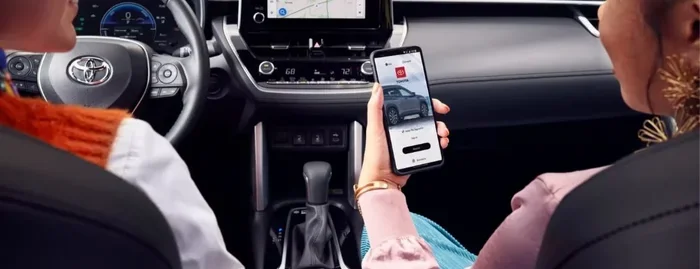
One of the most popular features people want to share is remote start. With this feature, either user can start the car from their phone, even before getting in. This is especially useful in cold weather or hot summer days when you want the car warmed up or cooled down before you drive.
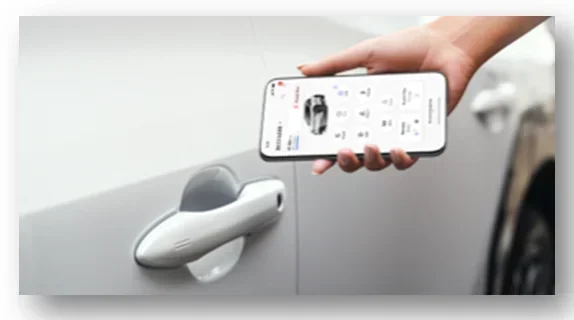
The lock/unlock function works the same way. Both users can lock or unlock the doors remotely. If you are picking up your partner and they forgot to lock the car, they can do it from their phone. No need to walk back to the vehicle.
Vehicle Location and Status
The app includes a vehicle location feature that shows exactly where your car is parked. Both users can see this on a map in real time. This is helpful in large parking lots or when you forget where you parked at the mall.
You can also check the vehicle status from the app. This includes fuel level, tire pressure, oil life, and maintenance alerts. Both users stay informed about the health of the shared vehicle.
Safety and Security Features
The Toyota App includes Toyota Safety Connect features that can be shared between users. These include automatic collision notification, roadside assistance, and stolen vehicle locator services. If an alert is triggered, both users receive a notification on their phones.
This adds an extra layer of security for families. Even if the primary account holder is not near the vehicle, the second user can still receive important safety alerts and take action if needed.
Climate Control and Smart Key
Some Toyota models support remote climate control through the app. Both users can pre-cool or pre-heat the cabin before getting in. This feature works especially well with Toyota’s smart key system, which allows keyless entry and push-button start.
The myT platform, which is Toyota’s connected services ecosystem, ties all of these features together. It gives both users a seamless experience whether they are using an iPhone or an Android device.
Setting Up a Second User on the Toyota App
Now that you know what features you can share, let us talk about how to actually set up a second user. The process is designed to be simple, but there are a few steps you need to follow in the right order.
Step-by-Step Setup Process
Follow these steps to add a second user to your Toyota App:
- Open the Toyota App on your phone and log in to your primary account.
- Tap the menu icon and go to Settings.
- Select “Vehicle Users” or “Add User.”
- Enter the email address of the second user.
- Send the invitation.
- The second user receives an email with a link to accept the invitation.
- They create their account (if they do not already have one) and log in.
- The vehicle now appears in their app.
That is it. The entire process takes less than five minutes. Both users can now access the shared features right away.
Permissions and Limitations for the Second User
The primary account holder controls what the second user can and cannot do. By default, most shared features are enabled. But you can customize permissions if you want more control.
For example, you might want to let your spouse lock and unlock the car but not start it remotely. Or you might want to give a teen driver access to vehicle location but not to climate control. The app allows you to adjust these settings from the primary account dashboard.
Keep in mind that each user must have their own Toyota account. You cannot share a single login between two people. This is an important security measure that protects your account and vehicle data.
Benefits of Sharing the Toyota App
Sharing the Toyota App with another person brings several real-world benefits. Let us look at why this feature is so valuable for different types of users.
Convenience for Families
For families sharing one vehicle, the Toyota App is a game changer. Parents can check on the car from their own phones. Teens can use remote start to warm up the car before school. Spouses can unlock the car for each other without needing to be physically present.
The Toyota remote connect feature set makes family life smoother. No more waiting outside in the rain while someone digs for the keys. No more walking to the car to unlock it for a family member who is running late.
Business and Fleet Use
Small business owners who use Toyota vehicles for work can also benefit. The app allows multiple employees to access the same vehicle for deliveries, service calls, or client visits. The vehicle location feature helps managers track which vehicle is where at any given time.
This is especially useful for businesses with a small fleet of Toyota trucks or vans. The Toyota fleet management capabilities built into the app save time and improve efficiency.
Peace of Mind and Security
Knowing that someone else can access your vehicle’s features gives you peace of mind. If you are ever locked out, your partner can unlock the car. If your vehicle is stolen, both users can track its location and share that information with the police.
The Toyota Safety Connect system ensures that help is always just a tap away, no matter which user is in the vehicle or nearby.
Limitations and Things to Know
While the Toyota App supports multiple users, there are some limitations you should be aware of. Understanding these upfront helps you set the right expectations.
What You Cannot Share
Not every feature in the Toyota App is shareable between users. Here are some things that typically remain tied to the primary account only:
- Billing and payment methods for connected services.
- Account-level settings like notification preferences and privacy options.
- Maintenance scheduling tied to the primary owner’s profile.
- Subscription management for premium connected features.
The primary account holder is always responsible for the subscription and any associated costs. The second user gets access to the vehicle functions but does not control the billing side of things.
Device Compatibility
The Toyota App works on both iOS and Android devices. However, both users should make sure their phones are running a supported operating system version. Older devices may not support all features of the app.
As a quick tip, check the Toyota website for the latest compatibility list before setting up a second user. This saves you from frustration if your device does not support a particular feature.
One Vehicle, Two Active Users at the Same Time
Both users can be logged into the app at the same time. This means you and the other person can both see the vehicle status and even send commands simultaneously. However, if both users try to send conflicting commands at the same time, the app will process them in the order they were received.
Troubleshooting Common Issues
Like any app, the Toyota App can sometimes have issues. Here are the most common problems users face when sharing the app and how to fix them.
Login Problems for the Second User
If the second user cannot log in after accepting the invitation, try these steps:
- Make sure the email address used for the invitation is correct.
- Check that the second user has a stable internet connection.
- Try logging out and logging back in.
- Update the Toyota App to the latest version.
- If the issue persists, uninstall and reinstall the app.
Most login issues are resolved with a simple app update or a restart of the phone.
Connectivity Issues with the Vehicle
If commands sent from the app do not reach the vehicle, the problem is usually a connectivity issue. The Toyota App relies on a cellular connection to communicate with the vehicle. Here is what to check:
- Make sure the vehicle has a clear view of the sky for GPS signal.
- Check that the vehicle’s connected services subscription is active.
- Restart the vehicle’s infotainment system.
- Verify that both the phone and the vehicle have internet access.
Sometimes simply turning the vehicle off and back on fixes the connectivity problem. This refreshes the connection between the car and the Toyota servers.
Features Not Responding After Setup
If some features work for the primary user but not for the second user, go back to the permissions settings. The second user may not have been granted access to that specific feature. You can adjust this from the primary account dashboard under “Vehicle Users.”
Also, make sure both users are using the latest version of the Toyota App. Older app versions may not support all shared features.
Expert Tips for Getting the Most from the Toyota App
Want to get the most out of sharing the Toyota App with another person? Here are some tips from experienced Toyota owners and tech experts.
- Keep both apps updated. Toyota regularly releases updates that improve performance and add new features. Staying current ensures both users have the same experience.
- Use Wi-Fi for initial setup. Linking a vehicle to a second account uses a lot of data. Set up the connection while both phones are on Wi-Fi to avoid eating into your data plan.
- Set clear boundaries. If you are sharing the app with a teen driver or a coworker, discuss which features they should use and which ones they should not.
- Review permissions regularly. Every few months, check the user settings to make sure the second user still has the permissions you intended.
- Explore the myT app ecosystem. Toyota offers additional apps and services that complement the main Toyota App. These include trip planning, fuel tracking, and maintenance reminders.
- Contact Toyota support if needed. If you run into issues you cannot fix, Toyota’s customer support team is just a phone call away. They can walk you through the setup process step by step.
Frequently Asked Questions
Can I share the Toyota App with someone who does not own the vehicle?
Yes, you can share the Toyota App with someone who does not own the vehicle. The primary account holder can invite any person to link their account to the shared vehicle. This is useful for spouses, family members, or trusted friends who regularly drive the same car.
Do both users need a Toyota account to use the shared features?
Yes, each user must have their own Toyota account to access the shared features. You cannot share a single login between two people. Creating a second account is free and takes just a few minutes through the Toyota App.
Is there a limit to how many people can use the Toyota App for one vehicle?
Toyota allows multiple users to be linked to a single vehicle, but the exact number may vary by model and region. Most vehicles support at least two shared users. For the most accurate information, check with your Toyota dealer or the official Toyota website.
Can the second user access all the same features as the primary user?
Not all features are shared equally. The primary account holder has full control and can manage which features the second user can access. Core features like remote start, lock/unlock, and vehicle location are typically shared, while billing and subscription management remain with the primary user only.
Does sharing the Toyota App affect my subscription or connected services plan?
No, sharing the app does not require a separate subscription for the second user. The connected services plan covers the vehicle itself, not individual users. Both users can access the shared features using the same subscription plan.
What should I do if the second user cannot see the vehicle in the app?
If the second user does not see the vehicle after accepting the invitation, try logging out and back in. Make sure the app is updated to the latest version. If the problem continues, remove the user from the vehicle settings and re-add them. You can also contact Toyota support for assistance.
Final Thoughts
The Toyota App is a powerful tool that makes owning and driving a Toyota more convenient than ever. And the fact that it supports multiple users makes it even better. Whether you are sharing your car with a partner, a family member, or a coworker, the app gives everyone the ability to stay connected to the vehicle.
Can two people use the Toyota App? Absolutely. With a simple setup process and a wide range of shareable features, the Toyota App is built for real-world shared vehicle use. Remote start, lock/unlock, vehicle location, safety alerts, and climate control are all within reach for both users.
The key is to set up the second user correctly, understand the permissions, and keep the app updated. Follow the steps outlined in this guide, and you and your shared user will be enjoying a seamless connected experience in no time.
So go ahead, invite that second user, and make the most of your Toyota App. The convenience it brings to your daily routine is well worth the few minutes it takes to set things up.