How Do I Activate Toyota Connect A Complete Walkthrough
Wondering how do I activate Toyota Connect? This complete walkthrough gives you every step you need, from initial setup to troubleshooting common issues. You will learn how to register your Toyota account, use the Toyota app, and unlock connected features like remote start, navigation, and emergency assistance.
If you just bought a new Toyota or upgraded your vehicle, you might be wondering how do I activate Toyota Connect. The good news is that the process is straightforward, and once it is set up, you will unlock a whole range of smart features that make driving easier, safer, and more connected. Toyota Connect brings together navigation, remote services, emergency assistance, and more into one seamless package.
Whether you are tech-savvy or not, this guide will walk you through everything you need to know. We will cover the different activation methods, what you need before you start, and how to fix common problems. By the end, you will feel confident navigating the Toyota Connect ecosystem like a pro.
Toyota Connect is not just a fancy name. It is a real connected car service that lets you interact with your vehicle from your phone. Think of it as a bridge between you and your Toyota. You can check your fuel level, start the engine remotely, locate your car, and even get live traffic updates. All of this works through the Toyota app or the built-in infotainment system in your car.
Key Takeaways
- Toyota Connect activation is simple: You need a Toyota account, a compatible vehicle, and a stable internet connection.
- Multiple methods exist: You can activate through the Toyota app, the touchscreen infotainment system, or by visiting a Toyota dealer.
- Connected features add real value: Remote start, vehicle tracking, Wi-Fi hotspot, and emergency assistance make driving safer and more convenient.
- Common activation issues are fixable: Most problems relate to Wi-Fi connectivity, account login, or outdated software.
- Subscription plans matter: Some Toyota Connect features require a paid subscription, so check your plan before expecting full access.
- Keep your app updated: Regular updates ensure smooth performance and access to the latest features.
📑 Table of Contents
- What Is Toyota Connect and Why Does It Matter?
- What You Need Before Activating Toyota Connect
- How Do I Activate Toyota Connect: Step-by-Step Guide
- Setting Up the Toyota App After Activation
- Exploring Toyota Connect Features After Activation
- Troubleshooting Common Toyota Connect Activation Issues
- Toyota Connect Subscription Plans and Costs
- Quick Tips for a Smooth Toyota Connect Experience
- Common Mistakes to Avoid When Activating Toyota Connect
- Expert Insights: Getting the Most from Toyota Connect
- How Toyota Connect Compares to Other Connected Car Services
- Frequently Asked Questions About Toyota Connect Activation
- Conclusion
What Is Toyota Connect and Why Does It Matter?
Toyota Connect is Toyota’s suite of connected car services. It uses built-in telematics to link your vehicle with cloud-based services. This means your car can communicate with your smartphone, receive over-the-air updates, and provide real-time data about your vehicle’s health and location.
Here is what Toyota Connect typically offers:
- Remote vehicle access: Lock doors, start the engine, and check fuel levels from your phone.
- Emergency assistance: Automatic crash notification and roadside help at the push of a button.
- Navigation and traffic: Live maps, route planning, and real-time traffic updates.
- Wi-Fi hotspot: Turn your car into a mobile Wi-Fi hotspot for passengers.
- Vehicle health reports: Get alerts about maintenance needs and service schedules.
- Stolen vehicle tracking: Help locate your car if it is ever stolen.
These features are especially useful for daily commuters, families, and anyone who wants more control over their vehicle. Toyota Connect turns a regular car into a smart car. The system works through a combination of built-in hardware in your vehicle and the Toyota app on your smartphone.
How Toyota Connect Differs from Older Systems
Older Toyota models used a system called Entune. While Entune offered some connected features, it was limited compared to what Toyota Connect provides today. Toyota Connect is more integrated, faster, and offers a wider range of services. If your vehicle supports Toyota Connect, you are getting the latest and best in Toyota’s connected car technology.
What You Need Before Activating Toyota Connect
Before you dive into the activation process, make sure you have everything ready. Skipping this step can lead to frustration later. Here is a quick checklist of what you need.
1. A Compatible Toyota Vehicle
Not every Toyota model supports Toyota Connect. The service is available on most newer models, typically from 2018 onwards. Popular compatible models include the Toyota Camry, Toyota RAV4, Toyota Highlander, Toyota Corolla, and Toyota Tacoma. Check your vehicle’s manual or the Toyota website to confirm compatibility.
2. A Toyota Account
You need a Toyota account to use Toyota Connect. If you do not have one yet, you will create one during the activation process. Your account stores your vehicle information, preferences, and subscription details. Keep your email address handy because you will need to verify it.
3. A Smartphone with the Toyota App
The Toyota app is available for both iOS and Android. Download it from the Apple App Store or Google Play Store before you start. Make sure your phone has a stable internet connection, either through Wi-Fi or mobile data.
4. A Stable Internet Connection in Your Vehicle
Toyota Connect relies on a built-in cellular connection in your vehicle. Some models come with a free trial period for this service. After the trial, you may need to purchase a subscription. Make sure your vehicle has an active data plan before attempting activation.
How Do I Activate Toyota Connect: Step-by-Step Guide
Now that you have everything ready, let us get into the actual activation process. There are three main ways to activate Toyota Connect. You can use the Toyota app, the vehicle’s touchscreen, or visit a Toyota dealer. We will cover each method in detail.
Method 1: Activate Through the Toyota App
This is the most popular method and the one most people use. Here is how to do it:
- Download the Toyota app from the App Store or Google Play Store.
- Open the app and tap on “Create Account.”
- Enter your email address and create a secure password.
- Verify your email by clicking the link sent to your inbox.
- Log in to the app with your new credentials.
- Tap “Add Vehicle” and enter your Vehicle Identification Number (VIN). You can find the VIN on your dashboard near the windshield or on your vehicle registration.
- Follow the on-screen prompts to link your vehicle to your account.
- Wait for confirmation that Toyota Connect is active on your vehicle.
Once the app confirms activation, you can start using all connected features right away. The app will guide you through each feature the first time you access it.
Method 2: Activate Through the Vehicle Touchscreen
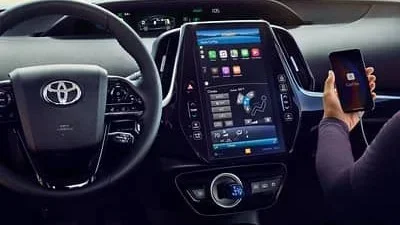
If you prefer to set things up directly in your car, the touchscreen infotainment system lets you activate Toyota Connect. Here is what to do:
- Start your vehicle and make sure the engine is running.
- Navigate to the Settings menu on the touchscreen.
- Look for “Connectivity” or “Toyota Connect.”
- Select “Activate” or “Set Up.”
- Follow the prompts to connect to Wi-Fi or the built-in cellular network.
- Sign in with your Toyota account or create a new one.
- Confirm activation when the screen shows a success message.
This method works well if you do not have your phone nearby or prefer to set everything up in the car. The touchscreen interface is intuitive and easy to navigate.
Method 3: Visit a Toyota Dealer
If you are not comfortable with technology or run into issues, visiting a Toyota dealer is a great option. A service advisor can activate Toyota Connect for you in minutes. They will also walk you through the features and answer any questions. This is especially helpful for first-time Toyota Connect users.
Call your local dealer ahead of time to schedule an appointment. Most dealers offer this service for free, especially if your vehicle is still under warranty.
Setting Up the Toyota App After Activation
Once Toyota Connect is active, the next step is setting up the Toyota app on your phone. Proper app setup ensures you get the most out of your connected services.
Creating Your Toyota Account
If you have not already created an account, open the Toyota app and tap “Sign Up.” Enter your name, email address, and a strong password. You will receive a verification email. Click the link in the email to confirm your account. This step is essential because it links your identity to your vehicle.
Pairing Your Vehicle with the App
After signing in, tap “Add Vehicle.” Enter your VIN carefully. The app will search for your vehicle in the Toyota system. Once found, follow the prompts to pair your phone with the car. You may need to confirm a pairing code on both the app and the vehicle’s touchscreen.
Customizing Your Notifications
Toyota Connect sends you alerts about your vehicle. You can customize these in the app settings. Choose which notifications you want to receive:
- Fuel level alerts
- Maintenance reminders
- Vehicle location updates
- Security alerts
- Wi-Fi hotspot status
Customizing notifications helps you stay informed without being overwhelmed with alerts you do not need.
Exploring Toyota Connect Features After Activation
Now that Toyota Connect is active and your app is set up, let us explore what you can actually do. These features are what make Toyota Connect so valuable.
Remote Start and Climate Control
One of the most popular features is remote start. On a cold morning, you can start your car and turn on the heater from your couch. On a hot day, you can cool down the interior before you even get in. The Toyota app lets you control the climate remotely. Just open the app, tap “Remote Start,” and set your preferred temperature.
Vehicle Tracking and Security
Toyota Connect includes GPS tracking. If you ever forget where you parked, the app shows your exact location on a map. More importantly, if your vehicle is stolen, Toyota’s security team can help track it down. This feature provides peace of mind, especially in crowded parking lots or high-theft areas.
Emergency Assistance
In the event of a collision, Toyota Connect can automatically contact emergency services. The system uses built-in sensors to detect a serious impact and sends your location to first responders. You can also manually request help by pressing the emergency button in the app or on the vehicle’s console.
Wi-Fi Hotspot
Many Toyota Connect-equipped vehicles include a Wi-Fi hotspot. This is a game-changer for families on road trips. Passengers can connect their devices and stay entertained or productive during long drives. The hotspot uses the vehicle’s built-in cellular connection, so you do not need to rely on your phone’s data.
Navigation and Live Traffic
The built-in navigation system provides turn-by-turn directions with live traffic updates. You can search for restaurants, gas stations, and points of interest directly from the touchscreen. The system reroutes you automatically when it detects traffic delays. This feature is especially helpful in unfamiliar cities or during rush hour.
Troubleshooting Common Toyota Connect Activation Issues
Even with a simple process, you might run into some hiccups. Here are the most common issues and how to fix them.
Activation Fails or Times Out
If the activation process fails or times out, the first thing to check is your internet connection. Make sure your phone has a strong Wi-Fi or cellular signal. Also, verify that your vehicle’s built-in modem is connected to the cellular network. Restarting both your phone and your vehicle can often resolve this issue.
App Cannot Find Your Vehicle
If the app does not recognize your VIN, double-check that you entered it correctly. The VIN is a 17-character code found on your dashboard or door jamb. If the code is correct and the app still cannot find your vehicle, contact Toyota support. There may be a delay in the system updating your vehicle status.
Connected Features Not Working
If Toyota Connect is active but features like remote start or navigation are not working, try these steps:
- Force close the Toyota app and reopen it.
- Check for app updates in the App Store or Google Play Store.
- Restart your vehicle’s infotainment system.
- Verify that your data subscription is active.
- Sign out of your Toyota account and sign back in.
Wi-Fi Hotspot Not Connecting
If the Wi-Fi hotspot is not working, make sure the feature is enabled in your Toyota Connect settings. Check that your vehicle’s data plan is active. If everything looks correct but the hotspot still does not work, a system reset through the infotainment menu usually fixes the problem.
Toyota Connect Subscription Plans and Costs
Toyota Connect offers different subscription tiers. Some features come with a free trial period, typically lasting one to three years depending on your vehicle purchase date. After the trial ends, you will need an active subscription to continue using connected services.
Here is a quick comparison of the available plans:
| Plan | Duration | Key Features | Approximate Cost |
|---|---|---|---|
| Basic Connect | 1 year | Emergency assistance, vehicle alerts | Free trial, then $50/year |
| Standard Connect | 3 years | Remote access, navigation, Wi-Fi hotspot | Free trial, then $100/year |
| Premium Connect | 5 years | All features including stolen vehicle tracking | Free trial, then $200/year |
Prices may vary by region and dealer. Check with your Toyota dealer for the most accurate and current pricing. Many new Toyota vehicles come with a complimentary trial period, so you can test all the features before committing to a paid plan.
Quick Tips for a Smooth Toyota Connect Experience
Follow these quick tips to get the most out of your Toyota Connect system:
- Keep the app updated. Regular updates fix bugs and add new features.
- Use Wi-Fi when possible. This saves your phone’s mobile data and ensures a stable connection.
- Restart your vehicle monthly. A simple restart keeps the system running smoothly.
- Set up two-factor authentication. This adds an extra layer of security to your Toyota account.
- Review your subscription. Make sure your plan is active and renewed before the trial period ends.
- Explore all features. Take time to go through every option in the app. You might discover useful features you did not know about.
Common Mistakes to Avoid When Activating Toyota Connect
Here are some mistakes that trip up many users during the activation process:
- Skipping the VIN verification. Entering the wrong VIN is the most common reason activation fails. Always double-check before submitting.
- Ignoring the data subscription. Without an active data plan, many Toyota Connect features will not work. Check your subscription status early.
- Not updating the app. Using an outdated version of the Toyota app can cause connection issues and missing features.
- Forgetting to verify your email. If you skip email verification, your account will remain inactive and you cannot access any features.
- Trying to activate in a dead zone. If you are in an area with poor cellular coverage, the activation process may fail. Move to a location with a strong signal first.
Avoiding these simple mistakes will save you time and frustration. Most activation issues are easily preventable with a little preparation.
Expert Insights: Getting the Most from Toyota Connect
According to Toyota’s connected services team, the key to a great Toyota Connect experience is regular engagement. “Users who check their app at least once a week tend to get more value from the service,” says a Toyota product specialist. “They stay on top of maintenance alerts, use navigation more effectively, and take advantage of remote features daily.”
Another expert tip is to set up your home and work locations in the navigation system. This allows the system to provide smarter route suggestions and more accurate arrival time estimates. It is a small step that makes a big difference in your daily driving experience.
Also, take advantage of the over-the-air update feature. Toyota periodically pushes software updates to connected vehicles. These updates can improve performance, add new features, and fix known issues. Keeping your vehicle’s software up to date ensures you always have the best experience.
How Toyota Connect Compares to Other Connected Car Services
Toyota Connect is not the only connected car service on the market. Here is how it stacks up against some popular alternatives:
| Feature | Toyota Connect | FordPass | Chevrolet MyLink |
|---|---|---|---|
| Remote Start | Yes | Yes | Yes |
| Emergency Assistance | Yes | Yes | Yes |
| Wi-Fi Hotspot | Yes | Yes | Yes |
| Stolen Vehicle Tracking | Yes | Yes | No |
| Free Trial Period | 1-3 years | 1 year | 3 years |
| App Availability | iOS and Android | iOS and Android | iOS and Android |
Toyota Connect holds its own against competitors. The combination of a generous free trial, comprehensive features, and strong reliability makes it a solid choice for Toyota owners. The stolen vehicle tracking feature is a standout that not all competitors offer.
Frequently Asked Questions About Toyota Connect Activation
How long does Toyota Connect activation take?
The activation process typically takes about 5 to 10 minutes. If you are using the Toyota app, it is even faster. If you visit a dealer, the process takes just a few minutes as well. The main time factor is waiting for the system to verify your vehicle and account.
Is Toyota Connect available on all Toyota models?
No, Toyota Connect is available on most models from 2018 onwards. Some older models may support a limited version of the service or use the older Entune system. Check your specific model year on the Toyota website or consult your dealer to confirm compatibility.
Do I need a data plan for Toyota Connect to work?
Yes, most Toyota Connect features require an active cellular data connection. Many new vehicles come with a free trial period. After the trial, you will need to purchase a subscription. Without an active data plan, features like remote access, navigation, and the Wi-Fi hotspot will not work.
Can I activate Toyota Connect myself, or do I need a dealer?
You can absolutely activate Toyota Connect yourself using the Toyota app or the vehicle’s touchscreen. The process is designed to be user-friendly. However, if you prefer hands-on help or run into issues, a Toyota dealer can activate it for you at no charge.
What should I do if I forget my Toyota account password?
If you forget your password, tap “Forgot Password” on the Toyota app or the Toyota website login page. Enter your email address, and you will receive a password reset link. Follow the instructions to create a new password. Make sure to choose a password you can remember but that is also secure.
Are there any hidden costs with Toyota Connect?
Toyota Connect is transparent about its costs. The features available during the free trial period are clearly listed. After the trial, you choose a subscription plan that fits your needs. There are no hidden fees or surprise charges. You can cancel your subscription at any time through the app or by contacting Toyota support.
Conclusion
Activating Toyota Connect is one of the best things you can do for your Toyota vehicle. It transforms your driving experience by adding convenience, safety, and connectivity. Whether you use the Toyota app, the vehicle touchscreen, or visit a dealer, the process is simple and well worth the effort.
Now that you know how do I activate Toyota Connect, you are ready to get started. Follow the steps in this guide, set up your app, and explore all the amazing features at your fingertips. From remote start to emergency assistance, Toyota Connect brings real value to every drive. Take a few minutes today to activate your system and enjoy the full benefits of your connected Toyota.