How Do I Reset My Subaru Battery After Replacing It
Resetting your Subaru battery after replacement is a simple process that restores your vehicle’s computer settings and clears error codes. Whether you are dealing with a dead battery or a routine swap, knowing the correct reset steps saves time and prevents frustrating issues. This guide walks you through every method, from a basic battery terminal disconnect to using an OBD2 scanner. You will also learn how to handle common problems like clock resets, radio codes, and dashboard warnings. By the end, you will feel confident tackling your Subaru battery reset like a pro.
Replacing a car battery is one of those maintenance tasks that feels satisfying once it is done. But for Subaru owners, the job does not always end at the checkout counter. A new battery means your vehicle’s computer systems lose their stored settings. You may notice a blank radio screen, a flashing check engine light, or a clock that shows the wrong time. These are all normal signs that your Subaru needs a reset.
So, how do I reset my Subaru battery after replacing it? The answer depends on your Subaru model and the tools you have on hand. Some owners prefer a simple battery terminal disconnect, while others reach for an OBD2 scanner for a cleaner reset. This guide covers every method in detail. You will find step-by-step instructions, practical tips, and answers to the most common questions Subaru owners ask after a battery swap.
Whether you drive a Subaru Outback, a Subaru Forester, a Subaru Crosstrek, or any other model, the reset process is very similar. The key is to follow the right sequence and avoid common mistakes. Let us walk through everything you need to know. By the time you finish reading, you will have a clear plan to reset your Subaru battery and get back on the road with confidence.
Key Takeaways
- Easy DIY Process: Resetting your Subaru battery after replacement can be done at home with basic tools and a few simple steps.
- Multiple Methods Available: You can reset using a battery terminal disconnect, an OBD2 scanner, or the infotainment system menu.
- Common Issues Are Fixable: Problems like clock resets, radio codes, and dashboard lights are normal after a battery change and easy to resolve.
- Prevention Matters: Using a battery tender and proper maintenance extends your new Subaru battery life significantly.
- Know When to Call a Pro: Some Subaru models and complex issues benefit from professional diagnostic tools and expertise.
- ECU Adaptation Takes Time: Your Subaru engine computer needs a driving period to relearn settings after a battery reset.
- Safety First: Always follow proper disconnect and reconnect procedures to avoid electrical damage.
📑 Table of Contents
- Why You Need to Reset Your Subaru Battery After Replacement
- Step-by-Step Guide to Resetting Your Subaru Battery
- Common Issues After a Subaru Battery Change
- Quick Tips for a Smooth Battery Reset
- When to Seek Professional Help for Subaru Battery Reset
- Maintaining Your New Subaru Battery for Long Life
- Comparison: Battery Reset Methods for Subaru
- Common Mistakes to Avoid When Resetting Your Subaru Battery
- Key Takeaways
Why You Need to Reset Your Subaru Battery After Replacement
When you install a new battery in your Subaru, the vehicle’s computer systems lose all stored data. This data includes idle speed adjustments, fuel trim values, and adaptive learning settings. Your Subaru uses this information to run smoothly and efficiently. Without it, the engine computer starts from scratch, which can cause temporary issues.
What Happens When You Lose Stored Data
Your Subaru’s engine control unit, or ECU, constantly adjusts engine performance based on driving habits. When the battery disconnects, the ECU forgets these learned values. You might notice a rough idle for the first few miles of driving. The transmission may shift differently until it relearns your driving style. These changes are temporary but can be annoying if you do not know what to expect.
The infotainment system is another area affected by a battery change. Your radio presets, Bluetooth pairings, and navigation home address may all disappear. Some Subaru models require a radio code after a power loss. The clock will also reset to a default time. These small inconveniences add up, which is why a proper reset is so important.
Common Symptoms After a Battery Change
Here are the most common symptoms Subaru owners experience after replacing their battery:
- Check engine light stays on or flashes after the new battery is installed.
- Dashboard warning lights appear even though nothing is wrong with the vehicle.
- Radio displays a code request or has lost all saved stations.
- Power windows need to be recalibrated before they work properly again.
- Cruise control settings are erased and need to be reprogrammed.
- Climate control defaults to a generic setting instead of your preferred temperature.
- Fuel economy drops temporarily as the ECU relearns your driving patterns.
All of these symptoms are normal and fixable. A proper reset clears most of them quickly. The key is to follow the right reset procedure for your specific Subaru model.
Step-by-Step Guide to Resetting Your Subaru Battery
There are several ways to reset a Subaru battery after replacement. Each method works well, and some owners prefer one over the others based on their comfort level and available tools. Below, we cover the three most popular methods in detail.
Method 1: Battery Terminal Disconnect Reset
This is the simplest and most common method. It requires no special tools and takes about 15 minutes. Here is how to do it:
- Turn off your Subaru engine and remove the key from the ignition.
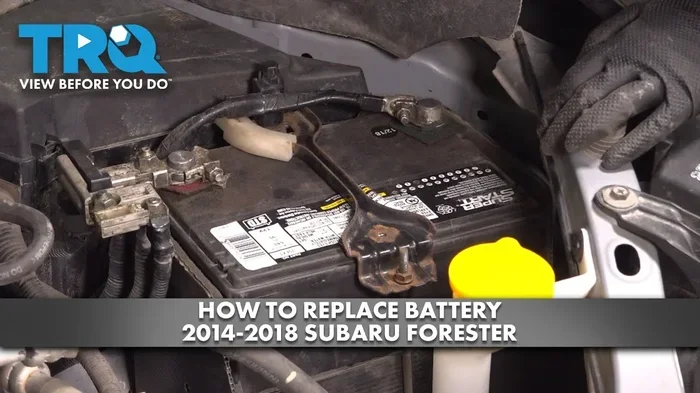
- Open the hood and locate the battery. In most Subaru models, the battery is on the left side of the engine bay.
- Use a wrench to loosen the negative terminal bolt first. Always disconnect the negative cable first to prevent short circuits.
- Remove the negative cable from the battery post and tuck it away from the terminal.
- Wait at least 15 minutes. This allows the ECU to fully clear its stored memory.
- Reconnect the negative cable first, then the positive cable.
- Tighten both terminal bolts securely.
- Start your Subaru and let it idle for a few minutes.
After this process, your Subaru should start normally. The check engine light may stay on for a short while. Drive the vehicle for about 20 to 30 minutes to allow the ECU to begin relearning. Most warning lights should turn off during this drive cycle.
Method 2: OBD2 Scanner Reset
An OBD2 scanner is a small device that connects to your Subaru’s diagnostic port. This method is more precise and clears error codes without losing all stored data. Many auto parts stores lend OBD2 scanners for free, so you do not need to buy one.
Here is how to use an OBD2 scanner to reset your Subaru battery:
- Locate the OBD2 port in your Subaru. It is usually under the dashboard on the driver’s side.
- Plug the scanner into the port.
- Turn the ignition to the “On” position without starting the engine.
- Follow the scanner’s on-screen instructions to read and clear error codes.
- Select the option to reset the ECU or clear all stored codes.
- Disconnect the scanner and start your Subaru.
This method is especially helpful if your check engine light stays on after a battery change. The scanner can tell you whether the light is caused by a real issue or just the battery disconnect. If the codes return after a few driving cycles, there may be an underlying problem that needs attention.
Method 3: Infotainment System Reset
Some Subaru models allow you to reset the infotainment system through the screen menu. This method is great for fixing radio codes and restoring lost settings. Here is how it works:
- Start your Subaru and press the “Setup” or “Settings” button on the infotainment screen.
- Navigate to the “System” or “Privacy” menu.
- Look for an option labeled “Initialize” or “Reset to Factory Settings.”
- Confirm the reset when prompted.
- The screen may go dark for a moment as the system restarts.
After the infotainment reset, you will need to reconnect your Bluetooth devices and reprogram your radio presets. This method does not affect engine settings or ECU data. It only resets the audio and display systems.
Common Issues After a Subaru Battery Change
Even after a proper reset, some issues can pop up. Knowing what to expect helps you stay calm and avoid unnecessary trips to the mechanic. Here are the most common problems Subaru owners face after a battery replacement.
Check Engine Light After Battery Replacement
A check engine light after a battery change is very common. The light usually appears because the ECU lost its adaptive fuel and ignition data. In most cases, the light turns off after a few drive cycles. A drive cycle means driving the vehicle at varying speeds for about 10 to 20 minutes.
If the check engine light stays on for more than a few days, use an OBD2 scanner to check the codes. A battery-related code like P0562 (System Voltage Low) or P0620 (Generator Control Circuit) is normal after a battery change. These codes usually clear on their own after a few trips.
Radio Code Request
Some Subaru models require a radio security code after a power loss. The code is unique to your vehicle and can be found in your owner’s manual or by contacting your Subaru dealer. You will need your vehicle identification number, or VIN, and the radio serial number to retrieve the code.
To enter the radio code, turn on the radio while the engine is off. The display will ask for a four- or five-digit code. Use the preset buttons to enter the code, then press the “Enter” or “Seek/Enter” button. Once the code is accepted, your radio will work normally again.
Power Window Recalibration
Power windows may stop working properly after a battery disconnect. This happens because the window control module loses its calibration. To recalibrate your power windows, follow these steps:
- Start the engine and roll the window all the way down using the driver’s switch.
- Pull the switch up to roll the window all the way closed.
- Keep the switch pulled up for an additional 3 to 5 seconds after the window is fully closed.
- Repeat this process for each window on the vehicle.
Once recalibrated, the windows should operate normally again. This simple procedure takes just a few minutes and does not require any special tools.
Quick Tips for a Smooth Battery Reset
A little preparation goes a long way when resetting your Subaru battery. Use these quick tips to make the process smoother and avoid common pitfalls.
- Keep your radio code handy. Write it down and store it in your glove box before you remove the old battery.
- Use a memory saver device. This small gadget plugs into your cigarette lighter and keeps power flowing to your ECU during the battery swap. It prevents data loss entirely.
- Clean the battery terminals before installing the new battery. Use a wire brush to remove any corrosion or white buildup on the terminals.
- Apply dielectric grease after reconnecting. This protects the terminals from future corrosion and keeps the connection secure.
- Drive gently for the first 20 miles. Avoid hard acceleration and sudden braking. This gives your ECU time to relearn and adapt to the new battery.
- Check your tire pressure. Some Subaru models reset the tire pressure monitoring system after a battery change. You may need to manually reset it through the settings menu.
Expert Insight: The Memory Saver Advantage
Many experienced Subaru technicians recommend using a memory saver device during any battery replacement. This small investment can save you from resetting your radio, clock, and power windows. It also prevents the ECU from losing adaptive data, which means smoother driving right from the start. Memory saver devices are inexpensive and widely available at auto parts stores or online.
When to Seek Professional Help for Subaru Battery Reset
Most Subaru battery resets are straightforward and do not require professional assistance. However, there are situations where it is wise to seek help from a qualified mechanic or Subaru dealership.
Signs You Need Professional Assistance
- The check engine light stays on after multiple drive cycles and a reset attempt.
- Your Subaru will not start even after a full battery reset procedure.
- You see multiple warning lights on the dashboard that do not turn off.
- The battery drains again within a few days of replacement.
- You are uncomfortable working with your vehicle’s electrical system.
- Your Subaru model requires a battery registration process at a dealership.
Some newer Subaru models, especially those from 2015 and later, have a battery registration feature. This means the ECU needs to be programmed to recognize the new battery’s capacity. A dealer or qualified mechanic can perform this registration quickly using a Subaru-specific diagnostic tool called SSM or Subaru Select Monitor.
What to Expect at the Dealership
A dealership visit for a battery reset typically costs between $50 and $150, depending on your location and the services performed. The technician will connect a Subaru-specific diagnostic scanner, clear any remaining codes, and register the new battery if needed. The process usually takes 30 minutes or less. Many dealerships also offer free battery testing and installation if you purchase the battery from them.
Maintaining Your New Subaru Battery for Long Life
Resetting your battery is just one part of the process. Proper maintenance helps your new Subaru battery last as long as possible. The average car battery lasts between three and five years, but with good care, you can stretch that lifespan even further.
Battery Maintenance Checklist
- Inspect terminals monthly. Look for corrosion, greenish buildup, or loose connections.
- Keep the battery clean. Wipe down the top of the battery case with a damp cloth to prevent dirt buildup.
- Use a battery tender for seasonal vehicles. If you do not drive your Subaru often, a trickle charger keeps the battery topped off.
- Avoid short trips when possible. Short drives do not give the alternator enough time to fully recharge the battery.
- Turn off all accessories before shutting off the engine. This reduces strain on the battery during startup.
- Have the alternator tested regularly. A failing alternator is one of the most common causes of premature battery failure.
How to Test Your Subaru Battery
Testing your battery is easy and does not require expensive equipment. You can use a basic multimeter to check the voltage. A fully charged Subaru battery should read 12.6 volts or higher with the engine off. When the engine is running, the voltage should be between 13.7 and 14.7 volts. If the voltage is lower than these numbers, your alternator or battery may need attention.
Many auto parts stores offer free battery testing. They use professional-grade load testers that give you a clear picture of your battery’s health. It is a good idea to test your new battery a few weeks after installation to make sure everything is working correctly.
Comparison: Battery Reset Methods for Subaru
| Method | Difficulty | Time Required | Tools Needed | Best For |
|---|---|---|---|---|
| Battery Terminal Disconnect | Easy | 15-20 minutes | Wrench | Quick home reset, all Subaru models |
| OBD2 Scanner | Medium | 10-15 minutes | OBD2 scanner | Clearing error codes, precise reset |
| Infotainment Reset | Easy | 5-10 minutes | None | Radio code, display issues |
| Memory Saver Device | Easy | Installed during swap | Memory saver | Preventing data loss entirely |
| Dealership Visit | Easy (for you) | 30-60 minutes | Professional tools | Battery registration, complex issues |
Common Mistakes to Avoid When Resetting Your Subaru Battery
Even simple tasks can go wrong if you are not careful. Here are the most common mistakes Subaru owners make when resetting their batteries after replacement.
- Disconnecting the positive terminal first. This can cause a short circuit and damage your vehicle’s electrical components. Always disconnect the negative terminal first.
- Not waiting long enough. Some owners reconnect the battery after only 5 minutes. Waiting at least 15 minutes ensures the ECU fully clears its memory.
- Forgetting to reset the clock and radio. These settings do not reset automatically after a terminal disconnect. You need to set them manually.
- Ignoring the check engine light. While a check engine light after a battery change is often normal, it can also signal a real problem. Do not ignore it if it persists.
- Using the wrong battery. Not all Subaru batteries are the same. Make sure your new battery matches the specifications in your owner’s manual.
- Skipping the drive cycle. The ECU needs time and driving to relearn settings. Skipping the drive cycle can leave your engine running less efficiently.
Expert Insight: Why the Drive Cycle Matters
Your Subaru’s ECU uses a process called adaptive learning to fine-tune engine performance. After a battery reset, the ECU enters a learning mode where it observes your driving habits and adjusts fuel delivery, ignition timing, and idle speed accordingly. This process takes several drive cycles to complete. A drive cycle typically involves driving at both low and highway speeds over the course of 20 to 30 minutes. During this time, you may notice slight changes in how the engine feels. This is completely normal and a sign that your Subaru is relearning and adapting to the new battery.
Key Takeaways
- Reset your Subaru battery after every replacement to clear error codes and restore computer settings.
- The battery terminal disconnect method is the simplest and works for all Subaru models.
- An OBD2 scanner provides a more precise reset and is ideal for clearing specific diagnostic codes.
- Common issues like radio codes, clock resets, and power window recalibration are normal and easy to fix.
- Use a memory saver device to prevent data loss during future battery replacements.
- Drive gently for the first 20 miles to allow your ECU to complete its adaptive learning process.
- Seek professional help if warning lights persist or if your Subaru model requires battery registration.
Frequently Asked Questions
How long does it take to reset a Subaru battery after replacing it?
The actual reset process takes about 15 to 20 minutes using the battery terminal disconnect method. However, your Subaru’s ECU may need several drive cycles over the next few days to fully relearn all settings. Most warning lights and error codes clear within 20 to 30 minutes of normal driving after the reset.
Will resetting my Subaru battery erase my radio presets and Bluetooth connections?
Yes, a battery disconnect will erase your radio presets, Bluetooth pairings, and navigation home address on most Subaru models. The infotainment system reset method can also clear these settings. To avoid losing this data, consider using a memory saver device during the battery replacement.
Do I need to register my new Subaru battery at a dealership?
Some newer Subaru models, particularly those from 2015 and later, require battery registration at a dealership. This process tells the ECU about the new battery’s capacity and helps optimize charging performance. Check your owner’s manual or contact your local Subaru dealer to find out if your model requires registration.
Why does my check engine light stay on after resetting the battery?
A check engine light after a battery change is often caused by the ECU losing its adaptive fuel and ignition data. In most cases, the light turns off after a few drive cycles. If it stays on for more than a few days, use an OBD2 scanner to check for codes. Persistent codes may indicate a separate issue that needs professional diagnosis.
Can I use any OBD2 scanner to reset my Subaru battery?
Most basic OBD2 scanners can clear generic error codes after a battery change. However, Subaru-specific diagnostic tools like the Subaru Select Monitor or a professional-grade scanner provide more thorough resets. For most owners, a standard OBD2 scanner is sufficient for clearing battery-related codes.
How do I know if my new Subaru battery is working properly?
A healthy Subaru battery should read 12.6 volts or higher with the engine off. When the engine is running, the voltage should be between 13.7 and 14.7 volts. If your voltage readings are lower than these numbers, have the battery and alternator tested at an auto parts store or mechanic. A new battery should last three to five years with proper maintenance.
=== CONCLUSION ===
Resetting your Subaru battery after replacing it is a straightforward process that every Subaru owner should know. Whether you choose the simple battery terminal disconnect, an OBD2 scanner for a precise reset, or the infotainment menu for radio and display issues, the steps are easy to follow. The key is to be patient, follow the correct sequence, and give your Subaru’s computer systems time to relearn and adapt.
Remember that some issues after a battery change are completely normal. A check engine light, a blank radio screen, or a clock that needs resetting do not mean something is wrong with your vehicle. These are just signs that your Subaru needs a moment to recalibrate after losing power.
By following the tips and steps in this guide, you can handle your Subaru battery reset with confidence. Keep your radio code handy, use a memory saver for future battery swaps, and always drive gently for the first few miles after a reset. Your Subaru will thank you with smooth, reliable performance for miles to come. Now that you know how to reset your Subaru battery after replacing it, you are fully prepared to tackle the job whenever it comes time.